
Managing a private knowledge base (KB) for enterprise customers involves securing sensitive data, maintaining strict access controls, and ensuring reliable AI-driven support. Private KBs store critical information like contracts, billing details, and proprietary solutions, making security a top priority. Here’s what you need to know:
- Access Control: Use Role-Based Access Control (RBAC) to limit permissions by role and task. Implement dynamic permissions that adjust based on customer status.
- Data Security: Encrypt data both at rest (AES-256-GCM) and in transit (TLS 1.3). Segment data by customer to reduce risks, and use immutable storage to protect against ransomware.
- AI Integration: AI tools can streamline KB management, but they must include safeguards like scoped retrieval and anomaly detection to prevent leaks.
- Governance: Establish clear policies for KB content creation, updates, and retirement. Track metadata like ownership, verification dates, and staleness scores.
- Automation: Automate key rotations, access audits, and content reviews to reduce errors and ensure compliance.
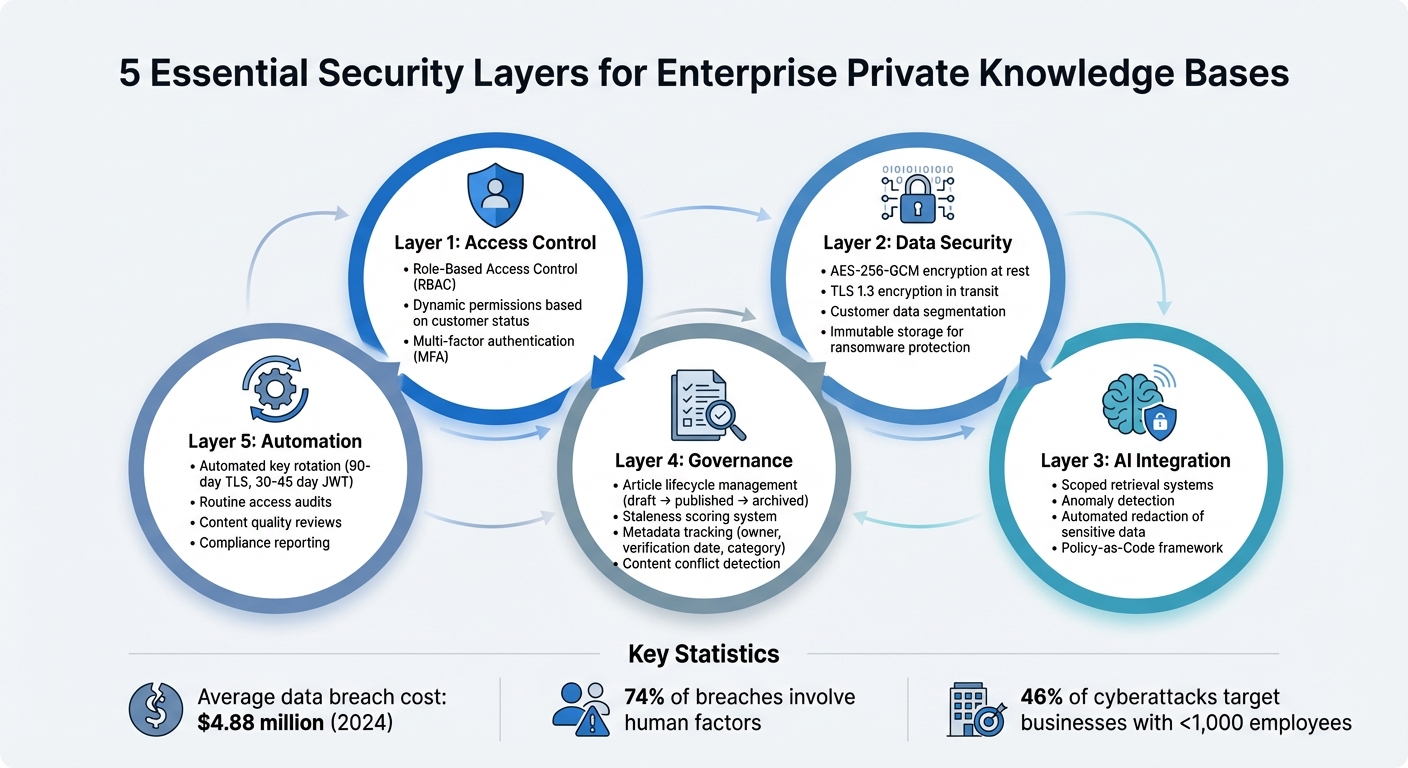
5 Essential Security Layers for Enterprise Private Knowledge Bases
AI Knowledge Base for Companies: Secure Enterprise Chatbot for Internal Knowledge
Setting Up Policies and Tracking for Private KBs
Establishing clear guidelines for your knowledge base (KB) is essential. A well-defined governance framework ensures that knowledge creation, classification, maintenance, and retirement are handled systematically. Without these policies, even the best security tools won’t be enough to safeguard your private KB.
Creating a Knowledge Base Governance Policy
A governance policy acts as the backbone of your private KB. Start by defining an article lifecycle with distinct stages: draft, published, and archived. Articles in the draft stage stay hidden from AI retrieval and customer-facing systems until they’re approved by a reviewer for publication.
Your policy should also enforce a consistent structure for content. Use clear headings and keep paragraphs concise – around 2–4 lines. Tailor instructions to specific environments, such as separate guidelines for Mac and Windows users.
Stick to a "one topic, one article" rule to reduce redundancy. For example, instead of having separate entries like "Return Policy" and "How to Return", merge them into a single, comprehensive article. Limit your KB to 5–10 broad categories to avoid overlapping topics and make maintenance easier.
To keep content relevant, implement maintenance and retirement schedules. Calculate a staleness score for each article based on three factors:
- Age (50%)
- Embedding drift (30%)
- Verification recency (20%)
Articles with scores between 0.8–1.0 are considered "Very Stale" and need immediate updates, while scores between 0.0–0.3 indicate fresh content that requires no action. These practices not only keep your KB accurate but also lay the groundwork for better metadata tracking and accountability.
Tracking Article Metadata and Usage
Once your governance policies are in place, tracking metadata becomes crucial for maintaining compliance and accuracy. Each article in your KB should include standardized metadata fields, such as:
- Owner/Author: Establishes accountability.
- Staleness Score: Triggers automated review alerts.
- Verification Date: Tracks the last expert review.
- Category: Helps with filtering and AI routing.
Include a "Mark as verified" feature that allows team members to update an article’s verification date without editing its content. This is especially useful during audits when confirming the accuracy of multiple articles quickly. The verification date then serves as a key compliance metric.
Automate conflict scans to detect duplicate or contradictory articles by analyzing similarity percentages. Regularly review analytics to identify questions that your AI struggled to answer confidently. Use these insights to create new articles that address those gaps.
Assigning Roles and Responsibilities
Clear roles are vital for effective KB management. Start by designating KB administrators to handle system-wide tasks like configuring settings, managing access controls, and organizing category structures. Assign content owners to oversee specific knowledge areas, ensuring that subject matter experts maintain the accuracy of articles in their domain.
Introduce an Auditor/Verifier role for team members responsible for reviewing articles without editing or publishing permissions. These individuals focus on identifying stale content, verifying accuracy, and marking articles as up-to-date without risking unauthorized changes. A draft-to-published workflow ensures that new content remains hidden from AI and customers until approved by a manager.
Finally, assign team members to conduct regular conflict scans and monitor analytics for knowledge gaps. By distributing these responsibilities, you avoid overloading a single individual while ensuring that every article remains accurate, secure, and AI-ready. This structured approach is essential for maintaining the integrity of your private KB.
Setting Up Role-Based Access Control (RBAC)
Controlling access is a must when dealing with sensitive knowledge base (KB) content. Role-based access control (RBAC) ensures that only authorized users can view or edit this information, based on their job roles. Without it, you risk exposing confidential customer data to the wrong individuals.
And the stakes? They’re massive. The average cost of a data breach hit $4.88 million per incident in 2024, with 74% of security breaches involving human factors like social engineering or credential misuse [3]. RBAC helps prevent these costly errors by clearly defining who can access – and modify – what within your private KB.
Configuring Granular Access Permissions
The first step is creating specific permission sets tailored to different actions. Instead of granting broad access, break permissions into focused tasks like "Edit Knowledge Base", "View Performance Data", or "Deploy Workflows" [5]. This makes scaling access much easier as your team grows.
Once you’ve defined these permissions, assign them to roles that align with actual job responsibilities. For instance:
- An AI Admin might have full access to all features, settings, and publishing tools.
- A QA Analyst could be limited to viewing performance data and testing content without editing rights.
- A Support Agent might only have view-only access to internal articles, with limited editing capabilities for specific categories.
"RBAC provides a structured way to manage access so the right people can do their part, and nothing more." – Ian Heinig, Agentic AI Marketer, Sendbird [5]
Platforms like Supportbench make it easy to configure these permissions at a detailed level. This ensures that front-line support staff can access the resources they need without accidentally altering critical content. For global operations, you can also apply regional restrictions, granting access based on location or specific use cases [5].
After setting up permissions, the next step is ensuring they’re enforced with strong security measures.
Enforcing Security Measures
Granular permissions are only effective if properly enforced. Start with the principle of least privilege, meaning employees should only access the data and tools necessary for their role [3][4]. This limits potential damage if credentials are compromised.
Strengthen this approach with multi-factor authentication (MFA) for all accounts and enforce strong password policies – think at least 12 characters, mixing letters, numbers, and symbols, and requiring updates every 90 days [3][4]. These steps protect your tailored permissions from being bypassed.
Regular audits are another must. Review access quarterly to ensure that employees who’ve changed roles or left the company no longer have access to sensitive information [3]. Advanced platforms can help by offering detailed audit logs and session tracking, making it easier to spot unauthorized changes or unusual activity.
Finally, use environment segregation to separate development and production KBs. Only trusted team leads should move changes from development to the live, customer-facing KB [5]. This prevents unapproved or untested content from accidentally reaching your audience.
Dynamic Permissions Based on Customer Status
Static permissions can fall short when dealing with enterprise customers whose needs and relationships evolve. That’s where dynamic permissions come in – they adjust automatically based on factors like customer tier, renewal status, or other business metrics.
By integrating your KB platform with your CRM, you can trigger permission updates when customer statuses change. For example:
- If a high-tier customer’s renewal is approaching, their support team might gain temporary access to premium articles or escalation workflows.
- If a customer downgrades or churns, their access to private KB content can be revoked immediately.
Supportbench’s role-based security ensures that agents and customers only see what they’re authorized to access. Dynamic permissions add another layer of flexibility, allowing you to safeguard premium content during critical periods like renewals.
This strategy keeps your private KB secure while adapting to the complexities of enterprise relationships. With clear boundaries in place, your team can scale confidently without sacrificing security [5].
Securing Data Storage and Encryption
Even with strict access controls, your private knowledge base (KB) can still be at risk if the data isn’t encrypted properly. A single breach could expose sensitive customer details. Encryption serves as a critical layer of defense, safeguarding data both when it’s stored (at rest) and when it’s being transferred between systems (in transit). These encryption measures work hand-in-hand with the access controls discussed earlier.
Encryption Best Practices for Private KBs
To ensure strong encryption, follow these guidelines:
- Use AES-256-GCM for encrypting data at rest. This standard provides both confidentiality and integrity through authenticated encryption [8][9].
- For securing data in transit, such as during API calls or content transfers, rely on TLS 1.3. This protocol offers forward secrecy and reduced latency compared to older versions [8][9].
For additional control, consider customer-managed keys (CMK) stored in Hardware Security Modules (HSMs). These keys give you full control and allow for immediate revocation in case of a breach [6][7]. For instance, AWS KMS HSMs boast an impressive durability rate of 99.999999999% for cryptographic key storage [8].
| Encryption Standard | Use Case | 2026 Recommendation |
|---|---|---|
| AES-256-GCM | Data at Rest | Primary standard for KB indexes and synonym lists [8] |
| TLS 1.3 | Data in Transit | Mandatory for all API and frontend-backend traffic [8] |
| RSA 2048/4096 | Key Exchange | Used for asymmetric encryption and digital signatures [6][8] |
Enable purge protection on your key vaults to prevent permanent key deletion during ransomware attacks. While soft-delete is often enabled by default, purge protection adds an extra layer of security [6]. Additionally, use managed identities to authenticate your search services to key vaults, eliminating the need to store credentials in your code [6]. Finally, verify your TLS setup with tools like openssl s_client to confirm secure ciphers such as TLS_AES_256_GCM_SHA384 are in use [8].
Data Segmentation by Customer
Encryption is only part of the equation. To further reduce risks, adopt data segmentation. Encrypting all data with a single key creates a significant vulnerability – if that key is compromised, all customer data could be exposed. By assigning unique encryption keys to individual customers or departments, data segmentation limits this risk [6][9].
This approach also prevents cross-tenant data leaks by enforcing application-level metadata controls. Not only does this ensure zero leakage, but it can also boost retrieval performance by up to 38% [10].
For maximum security, pair segmentation with retrieval-native access control. This method filters search results based on user identity and document-level policies before the AI model processes the data. Even if someone gains unauthorized access, they can only decrypt and retrieve data they are explicitly authorized to access.
"Retrieval-native access control has emerged as the preferred security model in 2026… ensuring each search result is filtered by user identity, attributes, and document-level policies before augmentation occurs." – Tim Freestone, Chief Strategy Officer, Kiteworks [9]
Using Immutable Storage for Ransomware Protection
To guard against ransomware, implement immutable storage to ensure data cannot be modified or deleted once it’s written. WORM (Write Once Read Many) storage is a highly effective option for this purpose [8][9].
Decentralized systems that use content-addressable storage add another layer of protection. In these systems, any change to a file generates a new address, which prevents ransomware from overwriting existing KB articles without leaving the original data intact [8]. Recent benchmarks in 2026 showed these systems achieving a 98% data availability rate across 10,000 nodes [8].
For added resilience, combine immutable storage with multi-region key replication. This setup ensures disaster recovery capabilities if your primary environment is compromised [8]. Use commands like ipfs pin add to guarantee that critical KB data remains accessible even if some infrastructure goes offline [8].
sbb-itb-e60d259
Using AI for Secure KB Management
AI enhances security while simplifying private knowledge base (KB) management. Using Policy-as-Code offers a structured, testable framework to manage access requests, replacing basic instructions like "do not share credentials" with a more reliable system [11].
AI-Driven Access Monitoring and Anomaly Detection
AI-powered monitoring systems excel at identifying threats that might slip past manual oversight. These systems can detect prompt injection attempts – such as commands instructing the AI to "ignore previous instructions" in order to expose sensitive information – and spot anomalies like unusual confidence levels, incomplete data, or fabricated outputs. When such irregularities occur, the system can trigger human intervention before any information is shared [2][5].
To ensure accountability, assign each AI agent a unique identity with scoped credentials. This way, every access attempt can be tied to a specific process [11]. AI systems can also be configured to require human approval for exceptions to policies, high-value transactions, or access to sensitive customer tiers [11]. Additionally, these systems should generate execution lineage samples, documenting why an agent accessed particular data, what was affected, and which policy governed the action [11].
"Meaningful review requires reconstructing why the agent was allowed to act, what it touched, and who had authority over the step." – Antonella Serine, Founder, KLA [11]
This approach complies with Article 12 and Article 14 of the EU AI Act, which emphasize the importance of human oversight and traceability in high-risk AI systems. By implementing AI-driven audit trails, businesses not only meet regulatory requirements but also enhance their overall security measures. These monitoring capabilities work seamlessly alongside role-based access control (RBAC) and encryption practices.
Automating KB Article Creation and Redaction
Beyond secure access and monitoring, AI can also streamline the creation of KB content while reducing the risk of human error. For instance, AI can draft knowledge base articles while automatically excluding sensitive information. This is achieved through scoped retrieval, which limits the AI’s access to specific fields or records during the drafting process, ensuring sensitive data is never exposed [11]. Separating retrieval and action phases further enhances security by using distinct permission paths for data retrieval, drafting, and final publishing [11].
Implementing AI-specific RBAC with detailed permission sets adds another layer of protection. By defining roles such as AI Admin, AI QA Analyst, and Support Team Lead, organizations can prevent unauthorized changes to knowledge sources [5]. High-risk actions should always require human approval, with flagged AI outputs reviewed for compliance and accuracy before being integrated into the KB [11][5].
"Without AI role-based access control (AI RBAC), anyone can edit your AI agent’s knowledge base… potentially leading to inconsistent behavior, off-brand experiences, or compliance violations." – Ian Heinig, Agentic AI Marketer, Delight.ai [5]
AI Tools for Internal Knowledge Retrieval
Integrating AI tools with existing KB security frameworks ensures that internal knowledge retrieval is both efficient and secure. For example, Supportbench offers tools like Agent-Copilot and a Knowledge Base AI Bot designed to facilitate safe and accurate information access [12].
Agent-Copilot reviews past cases and searches both internal and external knowledge bases to provide relevant answers, helping agents resolve issues faster. Meanwhile, the Knowledge Base AI Bot uses verified internal knowledge to generate responses, ensuring sensitive data remains protected.
These tools utilize Retrieval-Augmented Generation (RAG), which grounds AI responses in verified business knowledge rather than fabricated information [13]. This method aligns with the least-privilege access principle, granting agents only the data and tools they need for their specific tasks [11]. The outcome? Faster problem resolution without sacrificing security.
"When everyone works efficiently within clearly defined guardrails, you never have to choose between speed and safety as you scale AI operations." – Ian Heinig, Agentic AI Marketer, Sendbird [5]
Automating Maintenance, Audits, and Key Management
Expanding on the strategies of RBAC and encryption, automating tasks like maintenance, audits, and key management reduces human error and strengthens the security of your knowledge base (KB). Manual processes often lead to delays or oversights, creating vulnerabilities. By automating these critical functions, you ensure your private KB remains secure and compliant 24/7.
Automated Key Rotation for Better Security
Static keys are a weak link in any security system. Automated key rotation helps by limiting the time attackers have to exploit keys. A layered approach works best: frequently rotate envelope keys at the application edge, rotate master keys within Hardware Security Modules (HSMs) less often, and rotate metadata keys according to retention policies [16].
To avoid disruptions, configure dual-usage windows where new keys encrypt data while old keys are still used for decryption [17]. Applications should use stable aliases (e.g., "kb/customer-key") for encryption, while storing specific version IDs with ciphertext for decryption [17].
"Strong cryptography built on weak key management is security theater. Strong key management supporting strong cryptography delivers actual security." – Axelspire [19]
Cloud services like Google Cloud KMS simplify this process. For instance, you can set a rotationPeriod (e.g., 30d) and a nextRotationTime using CLI or API [20]. TLS server certificates should follow a 90-day rotation cycle, and JWT signing keys should rotate every 30–45 days [17]. Azure Key Vault also supports scheduled rotation, though it may increase monthly costs [21].
To ensure integrity, use automated runbooks with pre-checks, staged rotation, and post-rotation audits [16]. All cryptographic operations – generation, usage, rotation, and deletion – should be logged in a tamper-proof, append-only format to support automated verification pipelines [16].
Once secure key rotation is in place, the next focus should be on continuous access and content audits.
Running Routine Access and Content Audits
Routine audits are essential for keeping permissions and content up to date. Over time, access rights can drift – employees change roles, contractors leave, and permissions accumulate. Automated audits help identify and resolve these issues before they lead to breaches. Security auditing tools monitor user permissions across platforms like Active Directory, SharePoint, and file servers, flagging suspicious activity or privilege misuse in real time [15].
These tools also provide compliance-ready reports aligned with standards like HIPAA, GDPR, SOC 2, and PCI DSS, which can be delivered directly to auditors on a set schedule [15]. This is especially important considering that 46% of cyberattacks target businesses with fewer than 1,000 employees [14], and 55% of U.S. consumers are likely to switch companies after a security breach [14].
Content audits are just as critical. AI-powered tools can identify duplicate or outdated information across thousands of articles, correcting the source document at platforms like SharePoint before deployment [1]. These tools also use large language models to generate Q&As, scoring KB accuracy, completeness, and relevance on a scale from 0–100%. They can process up to 100 articles per run and handle 1,000 test cases daily [1].
| Audit Component | Automation Benefit | Target Compliance Standards |
|---|---|---|
| Access Rights | Detects privilege abuse and suspicious activity [15] | HIPAA, SOX, GDPR, PCI DSS [15] |
| Key Management | Reduces manual errors and enforces timely key expiry [17] | NIST SP 800-57, FIPS 140-2/3 [17] |
| Content Quality | Scores accuracy and identifies outdated data [1] | Internal Governance Policies [1] |
| Audit Logs | Creates tamper-proof logs for forensic analysis [16] | ISO 27001, SOC 2 [16][18] |
When adding new connectors to your KB, enable permission-fetching toggles to maintain data privacy during automated syncs [1]. Use User Acceptance Testing (UAT) environments to test incremental data changes across up to five instances before moving content to production [1].
Building Feedback Loops for Updates
Automation works best when paired with feedback loops. While AI systems monitor access and draft content, automated feedback ensures continuous improvement in KB security and integrity. Integrating audit streams into verification pipelines can produce human-readable summaries for compliance teams, turning raw data into actionable insights without exposing sensitive information [16].
Canary releases are another useful tool. These allow you to roll out updates to a small group of users first, with automated rollbacks triggered if performance issues arise [16]. Layered caching strategies for secure vaults have shown to reduce Time to First Byte (TTFB) by 40% in production environments [16]. Key metrics to track include rotation success rates, audit latency, and blocked unauthorized access attempts [16].
"The audit process serves as an educational tool, bringing the importance of cybersecurity to the forefront of your team’s awareness." – BD Emerson [18]
Ethical dashboards can further enhance visibility by highlighting trust signals, key health, and access trends. These dashboards use privacy filters and differential reporting to maintain security while providing operational insights. By 2026, customers will expect vaults that prove they cannot access secrets, and regulators will demand detailed, tamper-resistant audit trails [16].
Supportbench offers a practical example of this approach. Its AI-driven system can automatically generate KB articles from case histories, filling in details like subject, summary, and keywords. This creates a feedback loop where every support interaction directly improves KB quality without requiring manual updates.
Conclusion
Protecting a private knowledge base (KB) for enterprise customers is a critical step in building trust within B2B relationships. The strategies outlined here create a comprehensive security framework: governance policies that establish clear ownership and track metadata, granular role-based access control (RBAC) that adapts permissions based on customer status, multi-layered encryption with customer segmentation and immutable storage, and AI-powered monitoring that identifies anomalies and automatically redacts sensitive data. These aren’t standalone measures – they work together to safeguard proprietary information while supporting self-service success.
These strategies not only strengthen your KB but also align seamlessly with broader support operations. Automation bridges the gaps left by manual processes like key rotations, access reviews, and content audits. By automating these tasks, you minimize human error and maintain round-the-clock security without needing to expand your team. The key lies in selecting tools that integrate security, AI monitoring, and support workflows into a unified system, rather than relying on a patchwork of platforms.
Start by focusing on three immediate actions: enforce HTTPS with CA-signed certificates and disable anonymous access, implement dynamic permissions that adjust with contract changes, and deploy AI-driven content redaction to prevent sensitive data exposure [23]. These steps ensure your KB remains secure while supporting efficient, AI-driven B2B operations.
Supportbench simplifies this process by leveraging AI to generate KB articles directly from case histories, creating a feedback loop that improves quality and security through role-based access controls and automation.
The best knowledge bases are effortless for authorized users but impenetrable to threats [22]. When security measures operate seamlessly in the background, your system not only meets enterprise needs but also scales effortlessly. By combining governance, adaptive RBAC, encryption, and AI-driven automation, your private KB becomes a secure and scalable asset that supports your enterprise customers’ growth.
FAQs
How do I prevent cross-customer data leaks in a private KB?
To protect sensitive information and keep customer data secure, it’s essential to enforce strict access controls and ensure tenant isolation. Here’s how you can achieve this:
- Use per-tenant indices: This creates a clear separation of data at the storage level, minimizing the risk of accidental overlap.
- Implement cryptographic boundaries: Encrypt data in a way that ensures each tenant’s information remains isolated and secure.
- Avoid relying solely on query-time filters: Instead, establish explicit visibility policies to control access more effectively and reduce the risk of errors.
- Maintain audit logs: Keep detailed records of data usage to track activity and ensure accountability.
These practices work together to safeguard customer information and prevent accidental exposure between tenants.
What’s the simplest way to set up dynamic RBAC tied to contract status?
To configure dynamic RBAC tied to contract status, start by defining roles based on specific contract attributes, such as "active" or "expired." Assign permissions to these roles that reflect the necessary access for each status. Implement a system capable of supporting dynamic, attribute-based access controls to automate role updates as contract statuses change. This approach keeps permissions aligned with real-time conditions, ensuring secure and efficient access management.
How can I prove to auditors that AI access to the KB is traceable and compliant?
To maintain traceable and compliant AI access to your knowledge base (KB), it’s crucial to establish strong access controls, monitoring, and auditing measures. Start by implementing role-based permissions to restrict AI access strictly to the data it needs. This minimizes exposure and ensures only authorized data is accessible.
Additionally, keep detailed logs of AI interactions. These logs should record when and how the AI accesses the KB, providing a clear trail for accountability. Pair this with secure data handling practices, such as encrypting sensitive information, to protect it during storage and transmission.
Finally, document clear policies that explicitly prohibit unauthorized access or use. These policies should outline safeguards and provide transparent records to satisfy compliance requirements during audits. Together, these measures bolster both transparency and regulatory adherence.
Related Blog Posts
- How do you set up a customer portal that supports role-based access and multiple customer teams?
- How do you manage knowledge governance (ownership, review cycles, and “KB debt”)?
- Knowledge Governance: Keeping Your KB from Becoming a Dumpster Fire
- How to prevent KB rot: signals that your articles are out of date