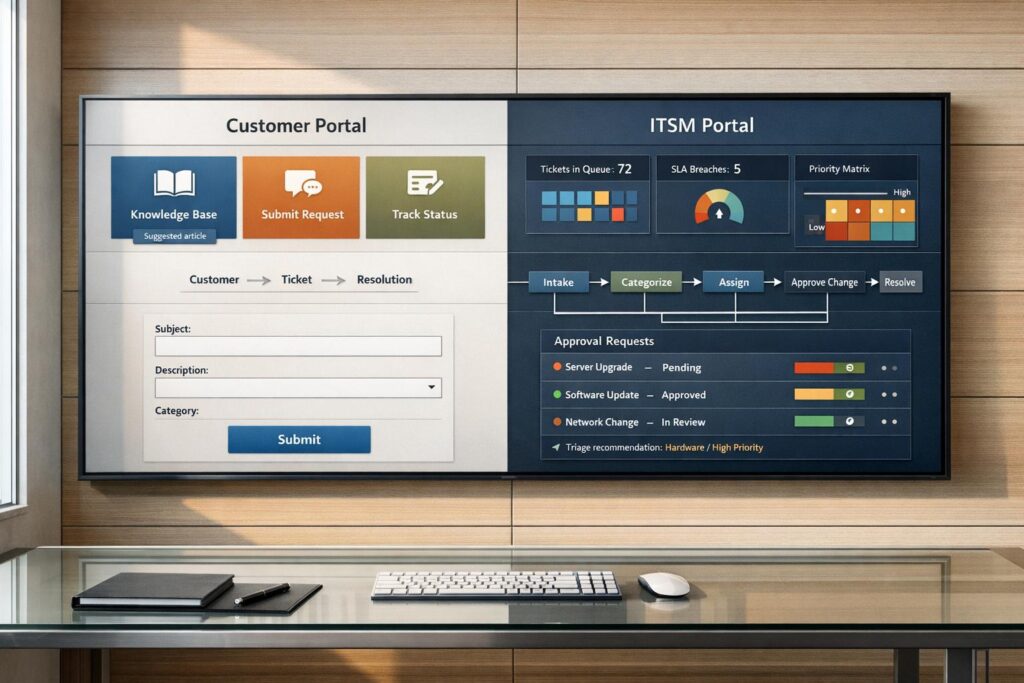
When it comes to support systems, customer portals and ITSM portals serve completely different audiences and purposes:
- Customer portals are built for external users like B2B clients or end consumers. They provide tools for managing accounts, tracking orders, submitting tickets, and accessing self-service resources. They prioritize simplicity, transparency, and customer satisfaction.
- ITSM portals are for internal employees and IT teams. These focus on IT-related issues like incident reporting, hardware requests, and internal workflows. They are optimized for productivity and operational efficiency.
The key differences lie in their user base, features, and goals. Customer portals aim to improve external customer experiences, while ITSM portals streamline internal IT processes. Using the wrong portal for the wrong audience can lead to confusion, inefficiency, and frustration.
Quick Comparison
| Feature | Customer Portal | ITSM Portal |
|---|---|---|
| Primary User | External customers (B2B/B2C) | Internal employees and IT staff |
| Core Purpose | Customer satisfaction and retention | Internal service delivery and efficiency |
| Key Tasks | Order tracking, ticket submission | Incident reporting, IT requests |
| Key Integrations | CRM, billing systems | CMDB, IT asset management |
| AI Features | Predictive search, sentiment analysis | Ticket triaging and prioritization, predictive analytics |
If your audience includes external customers, a customer portal is the right choice. For internal IT support, go with an ITSM portal. In some cases, businesses may benefit from using both systems to address diverse needs effectively.
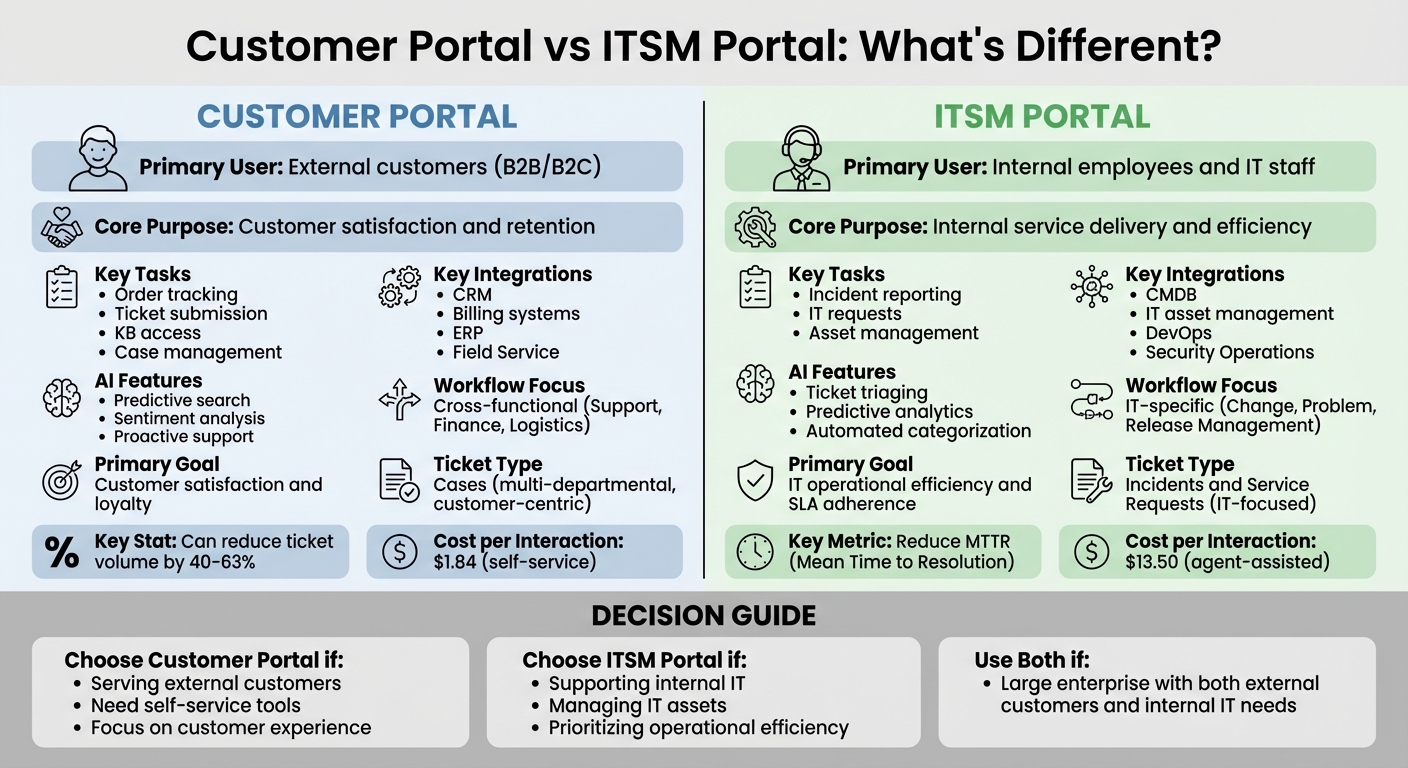
Customer Portal vs ITSM Portal: Key Differences Comparison Chart
Purpose and User Base: How Each Portal Type Differs
What is a Customer Portal?
A customer portal is a secure online platform where users can manage their accounts, track support requests, and access self-service tools like knowledge base articles. It’s all about making life easier for customers – helping them check order statuses, submit tickets, and review account details without needing to contact support directly [3][4]. The goal? To remove obstacles and build trust, improving the overall customer experience.
Depending on the industry, customer portals might go by other names. For example, client portals are common in professional services, support portals in help desk environments, and partner portals in B2B contexts [4]. No matter the name, the purpose stays the same: giving external users greater transparency and control over their interactions with your business. Customers can log in anytime to check the status of their requests.
"Customer portals solve a problem that email and phone support create: dependency." – SupportBee [4]
What is an ITSM Portal?
An ITSM (IT Service Management) portal, on the other hand, is built for internal use. It’s designed to streamline IT support by allowing employees to report incidents, request hardware, and manage service requests. The focus here is on improving operational workflows and boosting productivity within the organization.
Unlike customer portals, ITSM portals are all about internal processes. They’re tailored for service request management, technical troubleshooting, and ensuring compliance with internal SLAs. They also pull data from different sources – ITSM portals rely on IT asset management systems and internal databases, while customer portals integrate with CRM tools and customer relationship data.
User Base Differences Between Portal Types
The biggest difference between these two portal types? The people who use them. Customer portals are for external stakeholders – think B2C customers buying products, B2B clients managing accounts, or partners working with your company [3][4]. These users value simplicity, transparency, and the ability to solve problems quickly without calling customer support.
ITSM portals, however, serve internal employees and IT teams. Their purpose is to resolve technical issues and manage IT infrastructure efficiently. Since the users are internal staff, ITSM portals can afford to be more complex, as employees can be trained to navigate them. Meanwhile, customer portals prioritize user-friendly design and branding to keep customers happy – because unhappy customers can easily take their business elsewhere.
| Feature | Customer Portal | ITSM Portal |
|---|---|---|
| Primary User | External Customers (B2B/B2C) | Internal Employees & IT Staff |
| Core Goal | Customer Retention & Transparency | Internal Service Delivery & Efficiency |
| Key Tasks | Order tracking, KB access, Case management | Incident reporting, IT requests, Asset management |
These differences in user bases and goals explain why each portal is carefully tailored to meet the needs of its audience. A one-size-fits-all approach just wouldn’t work.
sbb-itb-e60d259
How External Customers Use Each Portal Type
External Customer Features in Customer Portals
External customers rely on customer portals for self-service and efficient support. These portals are built specifically for external users, offering tools like support ticket submission and tracking, a complete interaction history, billing management, and access to self-help resources such as knowledge bases and community forums [3][5]. The goal? To give customers control without needing to make a call.
Key features in customer portals are tailored to meet these needs. For instance, predictive search helps customers find answers quickly by suggesting relevant articles as they type, often resolving issues before a ticket is even created [2]. Private access links provide secure, password-free access to ticket information via email [3]. For B2B users, customer groups allow multiple employees from the same organization to share access to tickets and account data, ensuring everyone stays informed [3].
Another critical feature is mobile responsiveness. Since many customers seek support from their phones, portals need to have tappable buttons and easily readable text without requiring zooming [2][3]. Personalization goes a step further by tailoring content, case views, and entitlements based on the customer’s products or service tier [5]. These features aren’t just perks – they’re essential. Studies show that 88% of customers expect brands to offer a self-service portal, and 67% would rather use self-service than speak with an agent [2][3].
"The portal is the single source of truth that connects everything… giving the customer one persistent view of their end-to-end customer experience." – Drake Q., Chatty [5]
The benefits of customer portals extend to businesses too. By enabling customers to resolve issues independently, portals can cut routine support ticket volumes by 40% to 63%. Plus, a self-service interaction costs just $1.84, compared to $13.50 for agent-assisted help [2][5]. The result? Increased satisfaction, with scores rising by 45% when customers can solve problems instantly [5]. These advantages highlight why ITSM portals fall short for external users.
Why ITSM Portals Don’t Support External Customers
While customer portals are designed for external users, ITSM portals cater exclusively to internal workflows. These portals focus on IT operations and employee support, adhering to ITIL (Information Technology Infrastructure Library) frameworks that prioritize incident, problem, and change management [1].
ITSM portals include features like IT asset tracking, hardware request management, and ticket routing for internal IT teams. However, they lack the tools external customers need, such as order tracking or billing access. Their design prioritizes internal goals like reducing Mean Time to Resolution (MTTR), meeting internal service-level agreements (SLAs), and controlling IT costs [1].
In contrast, customer portals focus on reducing churn, boosting CSAT, CES, and NPS metrics [1]. Trying to use an ITSM portal for external customers often leads to issues like misrouted requests and wasted time. These portals lack the ability to handle cross-departmental tasks – such as routing requests to logistics or finance – that are crucial for customer support [1].
Ultimately, ITSM portals serve a completely different audience with entirely different needs. Forcing external customers into an ITSM framework only creates unnecessary friction, making it harder to resolve their problems efficiently.
Ticket and Issue Management: Key Differences
Managing tickets effectively is essential for meeting the specific support needs of external customers.
Case Management in Customer Portals
Customer portals rely on case management to address external customer issues from start to finish. Unlike simpler ticket systems, cases are tailored to handle complex, multi-departmental challenges – like billing disputes, shipping delays, product defects, or service delivery problems. These systems coordinate workflows across multiple teams. For instance, if a shipment is delayed, tasks are automatically routed to logistics, finance, and support teams, ensuring everyone involved has full visibility. On top of that, these portals monitor service entitlements, ensuring support is provided according to the customer’s contract terms [1].
External users gain access to a personalized dashboard that consolidates their interaction history, including past conversations, resolutions, and invoices. For B2B customers, shared case features allow multiple employees within the same company to view and manage cases collectively. This setup minimizes duplicate requests and ensures consistent communication [3]. Additionally, customer portals often integrate with IoT and monitoring tools, enabling proactive issue detection and resolution – sometimes even before the customer notices a problem [1].
By comparison, ITSM portals are built to prioritize the rapid restoration of internal IT services.
Incident Management in ITSM Portals
ITSM portals are designed for incident management, focusing on resolving internal IT issues as quickly as possible while adhering to ITIL-aligned processes. These portals operate within a single department, addressing incidents like software crashes or hardware malfunctions. The IT service desk oversees incidents from triage to resolution, often using a Configuration Management Database (CMDB) to track IT assets and their interdependencies. The primary objective here is to minimize Mean Time to Resolution (MTTR) and meet internal service-level agreements, rather than handling customer-facing, multi-departmental issues [1].
Because of this IT-centered structure, ITSM portals are generally unsuitable for external customer support. They lack the tools needed for coordinating tasks across departments like finance or logistics and do not offer the transparency required for tracking orders or service contracts [1].
Side-by-Side Comparison of Ticket Management
The table below outlines the key differences between customer portals and ITSM portals in ticket management:
| Feature | Customer Portal (Case Management) | ITSM Portal (Incident Management) |
|---|---|---|
| Target Audience | External customers (B2B/B2C) | Internal employees and staff |
| Ticket Type | Cases (multi-departmental, customer-centric) | Incidents and Service Requests (IT-focused) |
| Workflow Focus | Cross-functional (Support, Finance, Logistics) | IT-specific (Change, Problem, Release Management) |
| Ownership | Customer service agents and back-office teams | IT service desk and IT technicians |
| Key Integration | CRM, ERP, Field Service | CMDB, DevOps, Security Operations |
| Primary Goal | Customer satisfaction and loyalty | IT operational efficiency and SLA adherence |
| Visibility | Full transparency (order status, contracts, history) | Limited to IT ticket status and asset configurations |
In short, customer portals are built to manage the entire customer journey across multiple departments, while ITSM portals are specifically designed to support internal IT operations. Using an ITSM framework for external customers can introduce unnecessary complexity and disrupt the seamless support experience they expect.
AI Features and Self-Service Capabilities
Customer portals use AI to provide around-the-clock support for external users, delivering quick resolutions, while ITSM portals focus on streamlining internal IT operations.
AI Features in Customer Portals
AI in customer portals is all about improving the experience for external customers. One standout feature is predictive search, which guesses what users are looking for as they type, offering relevant knowledge base articles before they even finish their query. Advanced AI agents can handle up to 80% of customer interactions independently, even managing complex issues from start to finish without human help [7].
Another game-changer is sentiment analysis, which identifies frustrated or at-risk customers and routes them to specialized agents who can address their concerns. AI also powers proactive support, monitoring IoT-connected products and resolving issues before customers even notice a problem [1]. For instance, Unity introduced an AI agent in 2024 that deflected 8,000 tickets, saving the company $1.3 million [7]. Similarly, a European logistics company saw a 52% drop in ticket volume for order status inquiries within six months of launching an AI-powered portal offering real-time tracking and delay alerts [2].
AI in customer portals doesn’t stop at support – it also drives revenue. By analyzing purchase history, it suggests relevant upsells and cross-sells during customer interactions [7]. This highlights the dual role of AI in both enhancing support and boosting business outcomes.
AI Features in ITSM Portals
For ITSM portals, AI is tailored to internal IT needs. It automates ticket triaging, categorizes issues using technical criteria, and recommends relevant knowledge base articles to IT staff. Virtual agents handle repetitive tasks like password resets and hardware requests. Meanwhile, predictive analytics identify potential hardware failures or infrastructure outages, enabling proactive maintenance [6][1].
These features are designed to improve operational efficiency and reduce Mean Time to Resolution (MTTR). Unlike customer portals, the focus here is strictly on boosting internal productivity rather than enhancing external customer experiences [1].
How AI Improves External Customer Experience
AI transforms customer portals by delivering fast, accurate answers anytime. With 67% of customers preferring self-service over speaking to a human agent [2], companies that invest in strong self-service tools see real benefits. For example, businesses report a 20% increase in customer satisfaction metrics like NPS [2], reflecting higher customer satisfaction and loyalty.
The financial benefits are just as compelling. A portal that deflects 200 tickets per month at an average cost of $5 per ticket can save a company $12,000 annually [2]. Rentman, an event rental software provider, leveraged AI to analyze all customer interactions, achieving a 93% CSAT score while keeping response times between 60 and 70 minutes [7].
In short, customer portal AI focuses on delivering a personalized, proactive experience that builds satisfaction and loyalty. On the other hand, ITSM portal AI is all about optimizing internal workflows to keep IT operations running smoothly.
How to Choose the Right Portal for Your Needs
Selecting between a customer portal and an ITSM portal comes down to understanding your users and their specific needs. As mentioned earlier, offering self-service options is now a standard expectation in modern support systems.
When to Use a Customer Portal
A customer portal is ideal for external customers who need tools to manage their accounts, track support tickets, or independently find solutions. For example, if customers need to update payment details, download invoices, or manage subscriptions, a customer portal provides these capabilities – features that ITSM portals typically lack [4].
For B2B companies, features like Customer Groups are especially important. They allow multiple team members to collaborate on tickets, which is crucial for businesses where teams need to stay informed about ongoing support cases [4][3].
Take a close look at your ticket categories. If most requests are straightforward, like password resets or order status updates, the self-service functionality of a customer portal can be a game-changer. For instance, a logistics company in Europe introduced an AI-powered customer portal in 2025. It featured real-time tracking and proactive delay notifications, enabling customers to reschedule deliveries on their own. Within six months, they reduced their support ticket volume by 52% and saw an increase in customer satisfaction scores [2].
These self-service tools also translate into cost savings. Features like Private Access Links simplify the user experience by allowing customers to view tickets without requiring an account – something ITSM systems, with stricter login requirements, don’t typically offer [4][3].
However, if your focus is on internal support, an ITSM portal might be the better fit.
When to Use an ITSM Portal
ITSM portals are purpose-built for internal IT support and service delivery. Unlike customer portals, they are designed with operational efficiency in mind, not customer experience. Choose an ITSM portal when your goal is to streamline internal IT processes, implement ITIL frameworks, or manage internal assets using tools like a Configuration Management Database (CMDB) [1].
"CSM is engineered to elevate external customer experiences through proactive, personalized service, while ITSM focuses on internal service excellence and IT operational efficiency." – Bhumica Agarwal, inMorphis [1]
The main focus here is on improving efficiency – reducing Mean Time to Resolution (MTTR), managing IT costs, and ensuring SLA compliance for internal users. If your team handles tasks like incident management, change requests, or hardware provisioning, an ITSM portal is the right choice [1].
Using Both Portal Types Together
For organizations with diverse needs, deploying both portal types is often the best approach. Larger enterprises frequently use this strategy to serve different user groups while maintaining a unified platform [1]. For example, IT teams can resolve infrastructure issues identified through ITSM before they disrupt external customers using the customer portal. This approach, known as proactive management, helps prevent problems before they escalate [1].
The secret lies in cross-departmental routing. With this setup, issues reported by customers that require internal IT intervention – like fixing a technical bug – can flow seamlessly between the two systems [1]. This integration ensures that external customer satisfaction and internal IT efficiency work hand-in-hand [8].
For organizations that serve both external customers and internal employees, using both portals on a single platform offers a cost-effective, AI-driven solution that delivers top-tier support across all user groups [1].
Conclusion
Select your portal type based on the audience you serve. Customer portals cater to external customers who need tools for account management, self-service support, and proactive communication. On the other hand, ITSM portals are tailored for internal IT teams, emphasizing incident resolution, asset management, and operational efficiency. Choosing the wrong portal can lead to misrouted requests and frustrated users.
For B2B support operations, the stakes are particularly high. External customers often demand advanced features like shared ticket visibility through Customer Groups and AI-powered self-service tools, which can handle up to 63% of routine requests independently [2]. Additionally, modern customer portals are increasingly adopting proactive support capabilities, addressing potential issues before customers even notice them.
The financial benefits of these tools are hard to ignore. As mentioned earlier, AI-enabled portals can resolve roughly 50% of issues without human involvement. Companies leveraging advanced self-service tools have reported a 20% boost in Net Promoter Scores, paired with significant cost savings [2].
To craft an effective portal strategy, align your choice with your user base. If your focus is on external customers, prioritize a customer portal with built-in AI features. For internal IT services, an ITSM portal will better suit your needs. Organizations serving both audiences can benefit from implementing both portals within a unified platform, delivering AI-driven support tailored to each group.
Ultimately, the key takeaway is simple: match your portal solution to your users’ requirements. Doing so will not only cut costs but also enhance satisfaction across the board.
FAQs
Can one portal serve both customers and employees?
Yes, a single portal can effectively serve both customers and employees if it’s designed with dual functionality in mind. While customer portals typically handle external interactions, like account management or support, ITSM portals are geared toward internal needs, such as IT service requests. By incorporating role-based access controls, a unified platform can securely deliver personalized experiences for both groups. This setup allows customers to manage their accounts while enabling employees to access IT services – all within the same streamlined system.
What integrations does a customer portal usually need?
Customer portals work hand-in-hand with systems like CRM, ERP, document management tools, and payment gateways to simplify processes and enhance user experiences. These integrations let customers perform tasks such as accessing data, submitting support tickets, or completing transactions – all from within the portal itself. Many modern portals rely on APIs or middleware to establish secure and scalable connections, ensuring real-time updates and providing a seamless, efficient experience for users.
Which AI features matter most for B2B customer self-service?
AI has transformed how businesses handle customer self-service, offering tools that make support faster, smarter, and more efficient. Some standout features include:
- 24/7 Availability: AI-powered systems ensure customers can access support anytime, eliminating delays caused by traditional business hours.
- Personalized Assistance: These systems analyze customer data to offer tailored recommendations and solutions, making interactions feel more relevant and helpful.
- Quick Issue Resolution: AI chatbots can handle open-ended questions, guide users through complex problems, and even complete tasks like updating account details seamlessly.
Advanced capabilities, such as sentiment analysis and real-time interaction monitoring, take things a step further. They help prioritize urgent issues by detecting customer frustration or urgency in conversations. Meanwhile, intelligent ticket routing ensures that more complex problems are directed to the right human agent, while routine tasks are automated. Together, these features boost customer satisfaction while streamlining operations.