


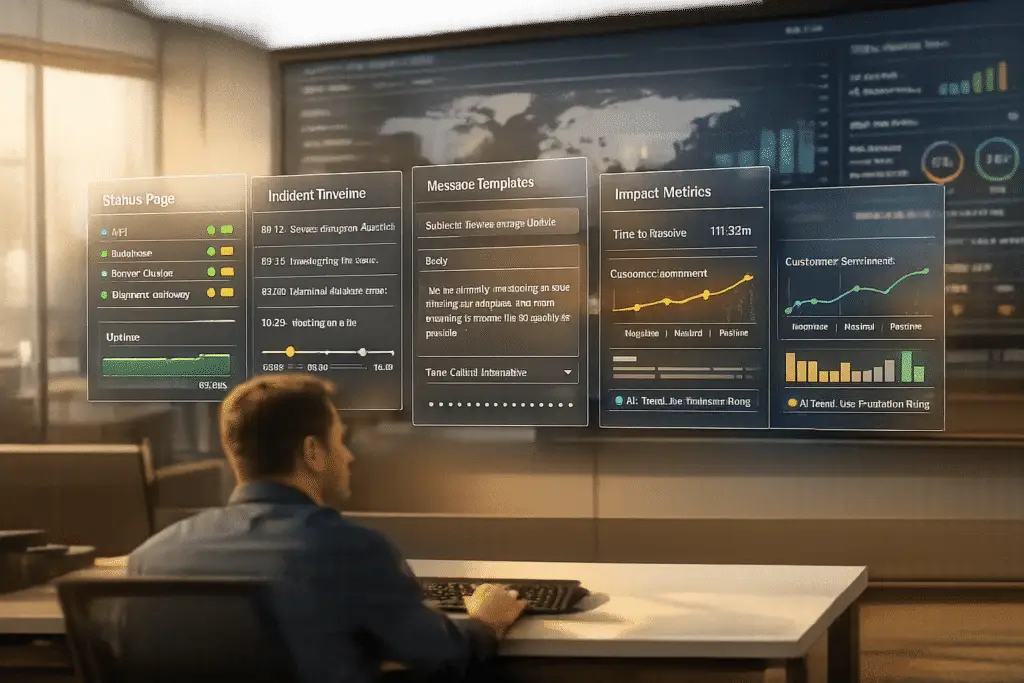
When outages happen, clear communication is your best defense against customer frustration. A status page and an incident communication playbook help you keep users informed, reduce support tickets, and maintain trust during service interruptions. Here’s how you can create both:
- Status Page Basics: Show real-time updates on key services (e.g., Login, API, Checkout) in simple, user-friendly terms. Use color codes (green for operational, red for outages) and allow users to subscribe to updates.
- Incident Playbook: Prepare message templates for each phase of an incident (Investigating, Identified, Monitoring, Resolved). Assign clear roles like Incident Manager and Communications Lead to streamline updates.
- Automation: Link monitoring tools to your status page for instant updates. Use pre-written templates to save time and ensure consistency.
- Testing: Run mock drills to refine your process and update the playbook after every incident. Track metrics like support ticket volume and update accuracy to improve over time.
Quick Tip: Publish updates within 10–15 minutes of identifying an issue, and continue every 30–60 minutes during major outages. Transparency builds trust, even in tough situations.
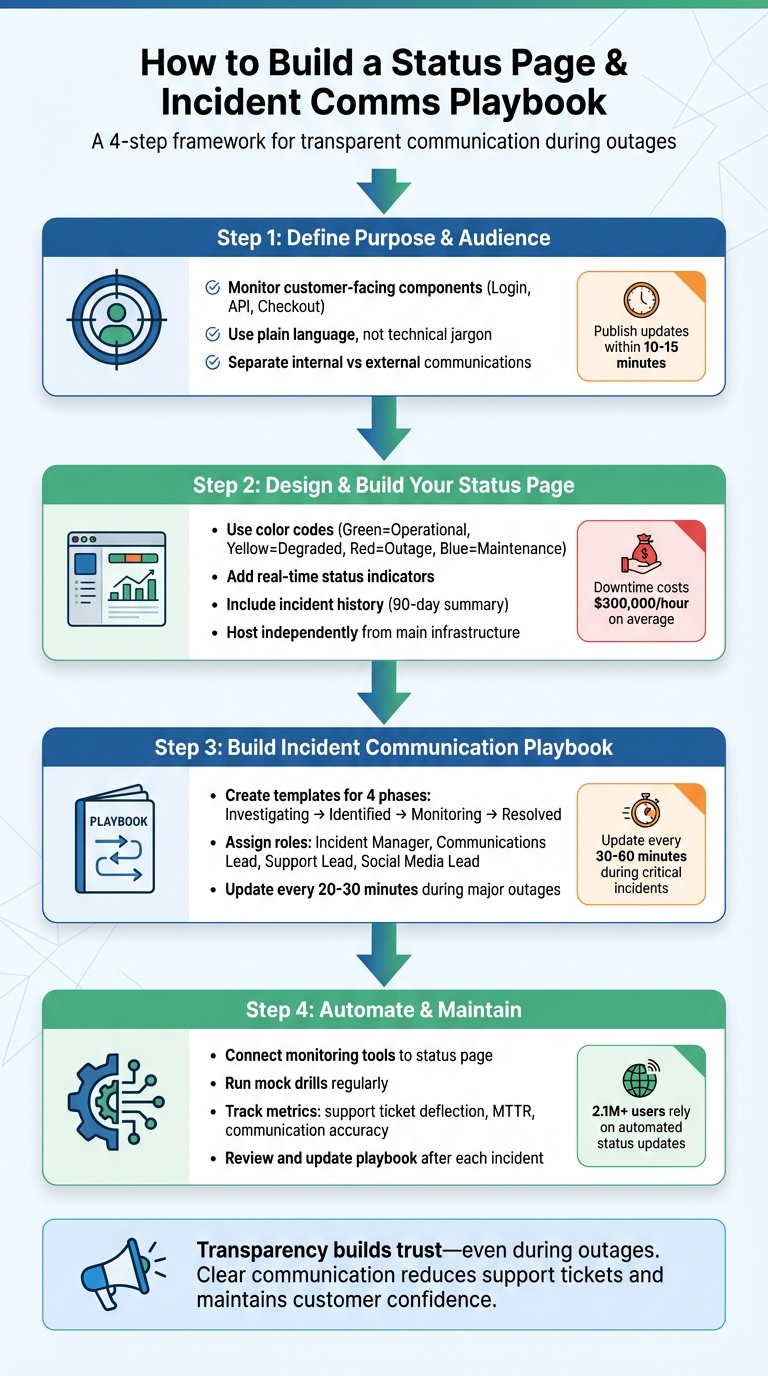
4-Step Process to Build a Customer-Facing Status Page and Incident Communication Playbook
Status Pages Explained: Incident Management & Clear Outage Communication
Step 1: Define Your Status Page’s Purpose and Audience
A status page isn’t just a technical rundown – it’s a bridge between your system’s health and your customers’ peace of mind. To make it effective, you need to decide what to display and understand who you’re addressing. Think of it as a tool to communicate how your product is performing in terms that resonate with your customers.
Choose Which Components to Monitor
Focus on what your customers interact with directly. They care about features like "Checkout", "Login", or "Account Access", not the inner workings of your infrastructure, such as database clusters or load balancers.
"A status page is not just a webpage. It is your organization’s commitment to transparency, your frontline defense against support overload during incidents." – UpStat
Key components to monitor might include APIs, dashboards, webhooks, and integrations. If your services span different regions, break down the status by geography – like US-East, Europe, or Asia-Pacific – so users can see how their area is affected. Also, don’t forget secondary services like your Help Center or Knowledge Hub, which are critical for providing support during disruptions.
For systems with many moving parts, group related components into categories. For instance, a "Core API" could include sub-components like "Authentication" and "Billing." Make sure each component has a clearly defined operational status, such as Operational, Degraded Performance, Partial Outage, or Major Outage. Defining these statuses in advance ensures consistency.
Match Your Audience’s Expectations
Your customers don’t need to know every technical detail – they just want to know if they can use your service. Replace internal jargon with plain, user-friendly language. Instead of saying, "PostgreSQL connection pool exhaustion", opt for something like, "Login functionality temporarily unavailable."
Take Slack, for example. Its status page is organized into user-centric categories like "Messaging", "Connectivity", and "Files." DigitalOcean, on the other hand, uses a dashboard-style layout with a status legend that clearly explains different impact levels. Both approaches make it easy for users to understand what’s going on. Additionally, give users the option to subscribe to updates only for the components they care about. For instance, if someone only uses your mobile API, they shouldn’t be bombarded with notifications about web dashboard maintenance.
Setting up customer-friendly communication also lays the groundwork for a clear incident response plan, ensuring transparency and effective updates during service interruptions.
Keep Internal and External Communications Separate
Your engineering team and your customers have very different needs during an incident. Engineers need detailed logs, diagnostic data, and technical discussions to resolve the issue. Customers, however, just want straightforward updates on what’s broken, whether their data is safe, and when things will be back to normal. Blurring these lines can lead to confusion.
| Feature | Internal Communication | External Communication |
|---|---|---|
| Primary Goal | Rapid resolution | Preserve trust, reduce tickets |
| Content | Logs and technical details | Impact scope, data safety, ETAs |
| Tone | Informal, technical | Professional, empathetic |
| Frequency | Real-time | Every 30–60 minutes |
| Audience | Engineers, SREs, DevOps | Customers, partners, public |
To streamline this, assign a Communication Lead who can translate technical updates into customer-friendly language. This allows engineers to focus on fixing the problem while ensuring customers stay informed. Use private tools or internal status pages for detailed metrics, and keep the public page focused on the big picture.
"This person [Communication Lead] is the public face of the incident response task force. Their duties most definitely include issuing periodic updates to the incident response team and stakeholders." – Google, Site Reliability Engineering
For customer-facing issues, aim to publish updates within 10 to 15 minutes of identifying a problem, and continue updating regularly. During major incidents, never let more than an hour pass without providing an update. This consistent communication reassures customers and reduces the flood of support inquiries asking, "What’s going on?"
Step 2: Design and Build Your Status Page
When building a transparent AI-native support operation, designing a clear and reliable status page is critical. A poorly designed page can create unnecessary confusion, especially during outages, and lead to a surge in support tickets.
Make Your Design Clear and Scannable
Visual clarity is key. Use intuitive color codes: green for operational, yellow for degraded performance, orange or red for outages, and blue for scheduled maintenance. Keep the language simple and user-focused. For instance, instead of technical jargon like "PostgreSQL connection pool exhaustion", opt for something like "Login functionality temporarily unavailable". Customers care about how the issue affects them, not the backend details.
"Database connection pool exhaustion means nothing to customers. Login functionality temporarily unavailable communicates the same information in terms customers understand."
– UpStat
Take inspiration from GitHub’s status page, which features a clean dashboard for APIs, Git operations, and Packages, along with a chronological incident timeline. This lets users quickly assess both current and historical system performance.
For complex systems, group related services under broader categories like "Core Platform" with sub-components such as Authentication or Billing. This approach balances detailed visibility with a streamlined design. Also, ensure the page complies with WCAG 2.1 accessibility standards and works seamlessly across devices. A well-designed layout is the foundation for building trust with your users.
Add These Core Features
Start by integrating real-time status indicators. Break your product into logical parts – such as APIs, dashboards, or regions – so users can instantly identify which components are affected. For example, DigitalOcean’s status page uses a global and regional health dashboard with clear color-coded badges and a status legend to explain terms like "Degraded Performance" or "Partial Outage."
Include an incident history that logs past issues with details like dates, impact, duration, and resolution notes. A 90-day summary can showcase long-term reliability while reinforcing user confidence.
Uptime metrics are another essential feature. Use simple sparkline graphs to display data like API response times or historical uptime percentages without overwhelming the page. For scheduled maintenance, post notices well in advance to manage expectations and reduce unnecessary tickets. Additionally, publishing postmortems after major incidents helps explain what went wrong and what steps are being taken to prevent similar issues in the future.
"A well-handled incident is an opportunity to build trust and strengthen the relationship between you and your customers."
– Chris Evans, Co-Founder & CPO, incident.io
To further assist users, include a "Having Trouble?" section at the top of the page. This can link to troubleshooting resources or provide support contact information, helping customers address localized issues that might not yet appear on the status page.
Host Your Status Page Reliably
Your status page must operate independently of your primary service infrastructure. Hosting both on the same system risks taking the status page offline during a major outage.
Use a custom subdomain like status.yourcompany.com and configure a CNAME record to point to a dedicated status provider. These providers typically offer globally redundant infrastructure to ensure reliability.
"Status pages must reflect current reality, not cached states or manual updates delayed by human coordination overhead."
– UpStat
Integrate your monitoring tools directly with the status page using APIs or webhooks. This ensures real-time updates, eliminating delays during critical incidents. For teams without dedicated Site Reliability Engineering (SRE) resources, hosted SaaS solutions can handle infrastructure, security, and updates more effectively.
Consider the financial stakes: downtime costs businesses an average of $300,000 per hour, and even a 99.99% uptime guarantee allows for about 52.6 minutes of downtime annually. A reliable hosting solution ensures your status page remains accessible even during high-traffic incidents.
sbb-itb-e60d259
Step 3: Build Your Incident Communication Playbook
When things go sideways, having a solid incident communication playbook can make all the difference. It ensures your team stays organized and keeps everyone – both internally and externally – on the same page during high-pressure moments.
Create Incident Message Templates
Message templates are lifesavers during chaotic situations. By preparing them in advance, you eliminate guesswork and ensure your communication is clear and timely. Focus on the four standard incident phases: Investigating (acknowledging the issue), Identified (pinpointing the cause), Monitoring (tracking the fix), and Resolved (confirming the issue is fixed).
Each template should include placeholders like GENERAL_IMPACT or NEXT_UPDATE_TIME for easy customization. For example:
- Investigating Template: "We are investigating issues with [Product]. Our team is actively working on this and will provide an update by [Time]."
- Identified Template: "We’ve identified an issue affecting [Component], which is preventing users from [Specific Action]. Our engineers are working on a fix and will update you within 30 minutes."
Group templates by categories like "General Service Outages", "Scheduled Maintenance", or "Upstream Provider Issues." This makes it faster for your team to find the right one. Keep external messages focused on customer impact and empathy, while internal messages can dive into technical details.
Here’s a quick breakdown of what each phase should cover:
| Incident Status | Purpose | Key Elements to Include |
|---|---|---|
| Investigating | Acknowledge that an issue exists | Team name, general impact, next update time |
| Identified | Confirm the problem and its scope | Description of the problem, specific fix being worked on |
| Monitoring | Inform users that a fix is being tested | Description of the fix, expected behavior, monitoring details |
| Resolved | Confirm that the issue is fixed | Type of issue resolved, sincere apology for the impact |
This structured approach ensures you maintain the transparency established on your status page.
Define Communication Timing and Ownership
Timely updates are crucial. Aim to publish the first status update within 10–15 minutes of declaring an internal incident, and provide updates at least every 20–30 minutes for major outages .
Assign specific roles to avoid confusion. Here’s how you can distribute responsibilities:
- Major Incident Manager: Oversees decision-making and ensures a post-incident review is conducted.
- Communications Manager: Handles both internal and external updates, working closely with product, engineering, and marketing teams.
- Customer Support Lead: Manages incoming tickets and direct customer inquiries.
- Social Media Lead: Monitors public reactions and responds to comments or concerns.
Make sure each role has one or two backups to guarantee coverage if someone isn’t available.
"This person [Communication Lead] is the public face of the incident response task force. Their duties most definitely include issuing periodic updates to the incident response team and stakeholders."
– Google, Site Reliability Engineering
By assigning clear roles and responsibilities, your team can manage incidents more efficiently while instilling confidence in your customers.
Stay Consistent and Transparent
Once you’ve set roles and schedules, the next step is delivering clear, consistent messages.
Transparency is key. Acknowledge problems quickly, clearly explain the impact on customers, and give realistic timelines for resolution. Even if you don’t have all the answers yet, a brief update is better than silence. Silence can lead to frustration and erode trust.
When communicating, ditch the jargon. For example, instead of saying "PostgreSQL connection pool exhaustion", try something like "an issue preventing users from accessing account data". Always include a genuine apology that reflects the severity of the outage. This helps rebuild customer trust and loyalty after the issue is resolved.
Step 4: Automate and Maintain Your System
Automation and regular upkeep are key to keeping your status page and playbook reliable. By pairing automation with consistent testing, you can ensure transparency and efficiency over time.
Use Automation for Status Updates
Manually updating your status page can slow down responses and introduce errors. Modern tools can connect directly to your monitoring systems, ensuring that when health checks fail, status updates are pushed to your page almost instantly.
One approach is to use a centralized service catalog. This allows you to define services and link them to monitors, triggering automatic status updates when needed. Platforms like incident.io even let you set up conditional workflows. For instance, you can configure the system to send customized alerts – like emails or SMS messages – only when an incident reaches a certain severity level, such as "Major" or "Critical".
Another useful feature is integrating slash commands into your communication tools. For example, typing /incident statuspage in your chat platform can quickly update your status page. Services like UptimeRobot, trusted by over 2.1 million users, rely on similar automation to keep status pages up-to-date.
While automation handles technical updates, human oversight is still crucial for customer-facing communication. Pre-written templates can help responders craft clear, timely messages, ensuring consistency and empathy during incidents.
Once your automation is set up, regular testing is essential to ensure everything works as expected.
Test and Update Your Playbook Regularly
Your playbook should be a living document, not something you create and forget about. Regular mock drills are a great way to test your automation and refine your communication processes. These practice runs help your team prepare for high-pressure situations and highlight any gaps in your system.
"Begin to run mock incidents to see how your plan holds up, and continue to make tweaks to perfect it before the real deal." – Shannon Winter, Atlassian
After each real incident, conduct a post-incident communication review. This goes beyond a technical post-mortem. Create a timeline of the incident and map out every communication sent. Look for significant time gaps between updates – these indicate where your process may have faltered. Consider questions like: Did the communications team have access to the necessary information? Were the templates accurate and empathetic?
Hold team meetings after multiple incidents to discuss lessons learned. Use these discussions to refine your pre-written templates, ensuring they reflect new scenarios or improved language. Also, make sure each critical role – like Major Incident Manager or Communications Manager – has trained backups to guarantee coverage.
With regular drills and playbook updates, you’ll be better prepared for future incidents. Metrics can then guide ongoing improvements.
Track Metrics and Customer Feedback
Tracking the right metrics helps you refine your system and build trust with your audience. One key metric is support ticket deflection. Your status page should act as a first line of defense during outages. If ticket volumes don’t drop during incidents, your status page may need improvement.
Another important metric is communication accuracy, which measures the delay between a monitoring alert and the corresponding status page update. Additionally, track incident duration metrics like Mean Time to Resolve (MTTR) and the total time customers experience disruptions.
Customer feedback is equally important. Add simple tools, like a "Was this helpful?" widget, to your status updates or postmortems. This lets you gauge whether your communication is meeting customer needs. Social media sentiment is another valuable source of feedback – questions or complaints on platforms like Twitter or Facebook can indicate missing details on your status page.
"Incidents data can be used as an organizational observability tool, allowing you to see how things truly work, and not just how you imagine them." – incident.io
Review these metrics monthly to spot trends and justify investments in better tools and automation. You can even calculate the financial impact of downtime using your incident data, giving your team a clearer picture of how outages affect your bottom line. By taking a data-driven approach, you ensure your status page and playbook grow alongside your organization’s needs.
Conclusion: Build Trust Through Clear Communication
A status page isn’t just a technical tool – it’s a promise to keep communication open and honest with your audience. By understanding what your audience needs, creating a page that’s easy to navigate, and maintaining clear communication, you can protect customer trust even during the toughest situations.
"Nothing erodes trust like system downtime and poor communication. Downtime can’t always be avoided, but poor communication can." – Atlassian
Being transparent doesn’t just ease the burden on your support team by reducing ticket volume – it also shows both potential and current clients that your team is capable of handling challenges effectively. Recording and sharing details of past incidents further highlights your dedication to accountability and openness.
When these practices are combined, they create a strategy that turns every incident into a chance to strengthen trust. At the heart of it all, the difference between retaining loyal customers and losing them often boils down to communication. Stay consistent across all channels, address the situation quickly, provide updates every 30 to 60 minutes during critical outages, and wrap up with a clear resolution message. This approach is key to modern support operations that balance cost efficiency with customer trust.
FAQs
What should be included on a customer-facing status page?
A great customer-facing status page should clearly display the current status of all systems, provide real-time updates on incidents, and include estimated resolution times. Using straightforward, user-friendly language ensures your message is clear and accessible, whether your page is open to the public or restricted to specific users.
For better transparency, think about adding features like historical uptime data, options for users to subscribe to automated notifications, and a clean, easy-to-navigate design. These additions can strengthen trust and make communication smoother during service interruptions.
How does automation improve communication during service outages?
Automation plays a crucial role in keeping communication clear and efficient during outages. It ensures timely, consistent, and accurate updates are delivered without the need for constant manual intervention. For example, AI-driven workflows can detect incidents as they happen and automatically post real-time updates to status pages. This means customers stay informed about disruptions almost instantly. With predefined templates and automated messages, communication remains clear and uniform, which helps build trust when it matters most.
On top of that, automation helps manage incidents more effectively by categorizing and prioritizing issues. This allows support teams to focus their energy on resolving the most urgent problems first. Automated notifications also ensure stakeholders are kept in the loop, reducing the burden on support teams while improving transparency. By simplifying these tasks, automation not only makes communication smoother but also enhances the overall customer experience during outages.
Why is it important to separate internal and external communications during an incident?
Separating how you communicate internally and externally during an incident is crucial. It ensures your customers get clear, accurate, and timely updates while preventing unnecessary confusion or stress for your team.
Internal communication should focus on coordinating efforts, solving the problem, and keeping the team aligned on next steps. External communication, meanwhile, is about maintaining transparency and trust with your customers. This means sharing updates that are relevant to them without bogging them down with technical jargon or internal setbacks.
By keeping these two communication streams separate, you can make your response process smoother, avoid misunderstandings, and keep everyone – both your team and your customers – on the same page.
Related Blog Posts
- Best SaaS helpdesk for growing support teams
- How do you run incident communications during outages so customers stay calm?
- How do you build an incident management process for B2B support (not just engineering)?
- How do you create a customer communication cadence during long investigations (update rules)?






