
When choosing support software, the way you pay matters as much as the price itself. Costs typically fall into two categories:
- CapEx (Capital Expenditures): Large upfront payments for assets like perpetual licenses or on-premise servers. These are owned and depreciated over time but require significant cash and long approval processes.
- OpEx (Operational Expenditures): Recurring subscription payments for services like cloud software. These are fully deductible in the year they occur, preserve cash flow, and offer flexibility for scaling.
Key Takeaways:
- CapEx Pros: Ownership, control, potential long-term cost savings.
- CapEx Cons: High initial cost, slower tax benefits, less flexibility.
- OpEx Pros: Predictable payments, immediate tax deductions, scalable.
- OpEx Cons: Long-term costs may exceed CapEx, less control over assets.
Quick Comparison:
| Feature | CapEx | OpEx |
|---|---|---|
| Upfront Cost | High | Low or none |
| Tax Treatment | Depreciated over years | Fully deductible in the same year |
| Scalability | Limited | Highly scalable |
| Cash Flow Impact | Significant initial cash drain | Predictable recurring payments |
Choosing the right model depends on your financial priorities, growth plans, and need for flexibility. Many businesses now favor OpEx for its adaptability to changing tech needs, but a hybrid approach can balance stability and agility. This is especially critical when implementing service solutions for cloud software that must scale with your user base.
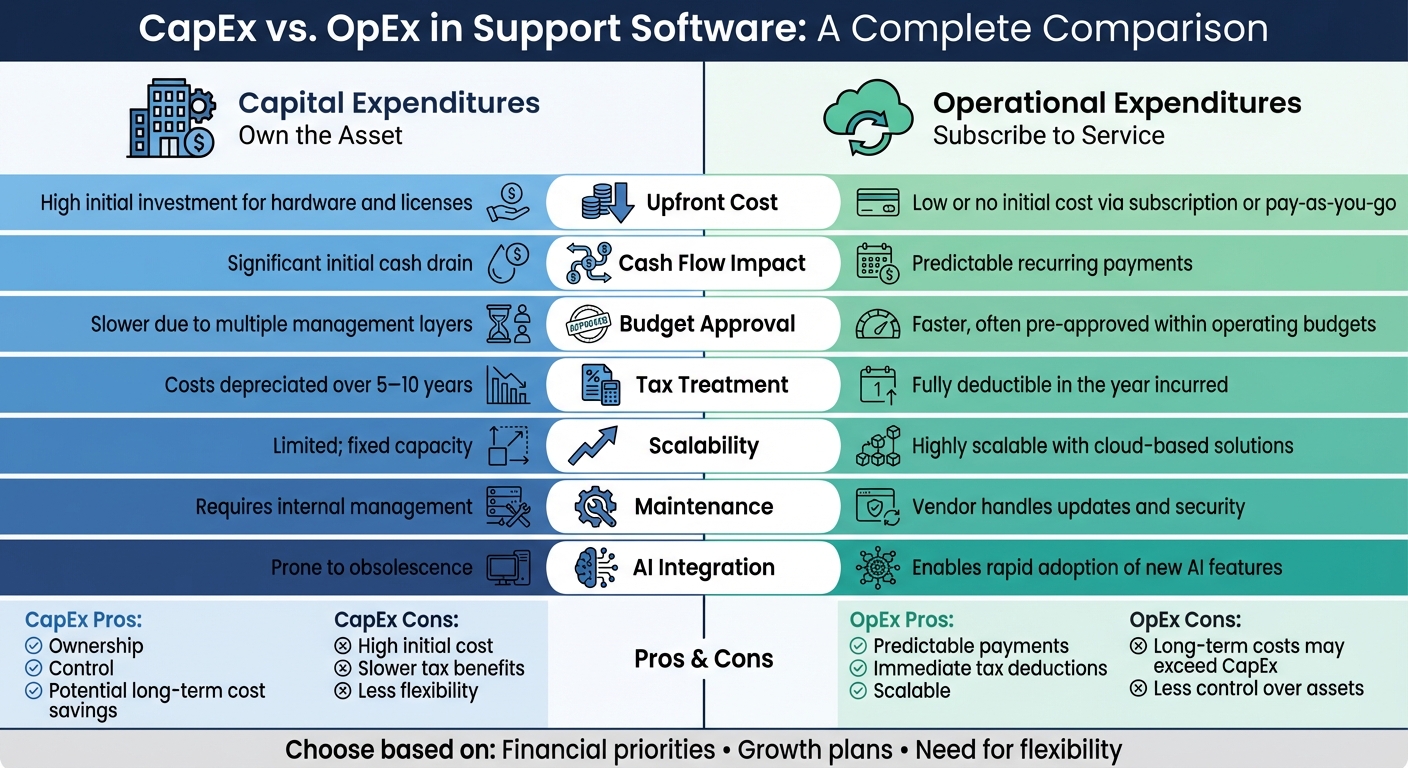
CapEx vs OpEx Comparison for Support Software
CapEx vs. OpEx: What’s the Difference and Why It Matters
sbb-itb-e60d259
1. CapEx (Capital Expenditures)
CapEx in support software involves a hefty, one-time payment to acquire assets like perpetual licenses, custom-built tools, or on-premise servers. These assets become company property once purchased [4].
Accounting Treatment
CapEx expenses are recorded as assets and depreciated over their useful life – usually 3–5 years for software and 5–10 years for IT hardware [1]. This approach spreads out the cost over time, which can make short-term financial reports look better. However, the approval process for such expenditures is often lengthy and involves multiple management levels [1].
Cash Flow Impact
CapEx significantly impacts cash flow due to the large upfront investment required. This can restrict additional IT spending. Stephen Watts from Splunk highlights this challenge:
"CapEx assets are usually types of expenses requiring significant up-front outlays that can quickly deplete IT budgets and reduce cash flow for the rest of the business." [2]
Scalability and Flexibility
CapEx provides full ownership and control over software and infrastructure, enabling modifications without relying on vendors. However, this ownership comes with downsides. The initial investment creates a financial commitment that makes it harder to scale or adapt to new technologies, such as emerging AI tools. This rigidity can lead to sunk costs as technology evolves [1][2].
Tax Implications
Tax benefits from CapEx are realized over time through depreciation, rather than being deducted immediately. This slower tax relief process contrasts with the more immediate benefits seen in OpEx models [1]. This thorough overview of CapEx sets the stage for comparing it to OpEx in the next sections.
2. OpEx (Operational Expenditures)
OpEx refers to paying for services through recurring subscriptions rather than making upfront purchases. In this model, the vendor takes care of ownership, maintenance, security, and updates, while you pay a subscription fee.
Accounting Treatment
OpEx doesn’t just change how you pay; it also has a big impact on accounting. These costs are directly recorded on your income statement in the period they occur, which immediately affects profitability [1]. Unlike CapEx, which is capitalized and depreciated over time, OpEx expenses are accounted for as they happen. This simplifies bookkeeping and often requires fewer budgetary approvals [3].
Cash Flow Impact
One of the biggest advantages of OpEx is how it spreads costs over time with smaller, recurring payments. This approach preserves cash flow and keeps liquidity intact [1]. The pay-as-you-go structure ensures funds are available for other priorities. Stephen Watts from Splunk highlights this benefit:
"Subscription IT models enable you to reconfigure an architecture or service easily and quickly if it isn’t working for you." [2]
For operations with fluctuating demands, this flexibility is a game-changer. You can scale up resources during busy periods and cut back during quieter times, avoiding the risk of over-investing in capacity.
Scalability and Flexibility
OpEx models let you scale resources up or down instantly based on real-time needs, eliminating the need to commit to fixed hardware capacity [2]. Deployment timelines shrink dramatically – from months to just days or even hours – making it easier to implement new tools, such as AI-driven solutions, at speed. If a vendor falls short on service level agreements or better technology becomes available, switching providers is also more manageable financially. This flexibility is crucial in a fast-evolving tech landscape, where outdated assets can quickly lose their value [5].
Tax Implications
OpEx brings immediate tax advantages, as these expenses are fully deductible in the same year they occur [8]. By contrast, CapEx deductions are spread out over the useful life of an asset, which can range from 2 to 10 years for IT equipment [8]. This immediate deductibility provides a timely tax benefit, helping to offset high-revenue periods and stabilize recurring costs. Combined with its liquidity and scalability perks, OpEx creates a compelling case for businesses to weigh its advantages against CapEx.
Comparing the Advantages and Disadvantages
Choosing between CapEx and OpEx models is all about weighing their trade-offs, as each impacts support operations differently. With CapEx, you’re looking at a hefty upfront investment – this could mean a significant hit to cash reserves for hardware, perpetual licenses, and infrastructure. However, if your needs are carefully projected, the total cost of ownership over time could end up being lower. On the other hand, OpEx spreads costs into manageable monthly or annual payments, preserving cash flow. That said, the long-term expenses of OpEx might eventually surpass the one-time cost of a CapEx solution.
Approval processes also differ significantly. CapEx purchases often require navigating multiple management layers due to their large financial commitment, which can slow down deployment. In contrast, OpEx expenses tend to fall under standard operating budgets, making them easier and faster to approve – ideal for quickly rolling out new tools.
Flexibility is another key factor. CapEx locks you into fixed capacities, which can lead to obsolescence if your needs evolve. With OpEx, scalability is built-in, allowing you to adjust resources in real time and adopt new AI technologies more seamlessly. For B2B support operations that handle fluctuating ticket volumes, this adaptability can help avoid over-provisioning while ensuring your tools stay up to date.
Here’s a quick comparison of the two models:
| Feature | CapEx | OpEx |
|---|---|---|
| Upfront Cost | High initial investment for hardware and licenses | Low or no initial cost via subscription or pay-as-you-go |
| Cash Flow Impact | Significant initial cash drain | Predictable recurring payments |
| Budget Approval | Slower due to multiple management layers | Faster, often pre-approved within operating budgets |
| Tax Treatment | Costs depreciated over 5–10 years | Fully deductible in the year incurred |
| Scalability | Limited; fixed capacity | Highly scalable with cloud-based solutions |
| Maintenance | Requires internal management | Vendor handles updates and security |
| AI Integration | Prone to obsolescence | Enables rapid adoption of new AI features |
Tax treatment is another factor worth considering. OpEx models allow immediate tax deductions in the year the expense occurs, which can help offset costs during periods of high revenue. In contrast, CapEx investments spread tax benefits over the asset’s lifecycle – typically 5 to 10 years. While this approach might improve EBITDA metrics, it delays the full financial benefit. For AI-driven support operations, OpEx often aligns better with rapidly evolving technology and fluctuating growth needs.
These insights provide a foundation for structuring contracts that balance cost efficiency with the flexibility needed to stay competitive.
How to Structure Contracts for Flexibility and Cost Control
To make your contracts more adaptable and cost-efficient, it’s essential to remove barriers that limit flexibility. For OpEx agreements, one key step is negotiating out auto-renewal clauses. These clauses can lock you into services you may no longer need, reducing your leverage in future negotiations [1]. Instead, consider requesting step-down pricing schedules. With this approach, your per-unit costs – whether for resolved tickets or API calls – automatically decrease as your usage surpasses specific thresholds [10]. This ensures you benefit from efficiency gains as your operations grow without needing to renegotiate every year.
For CapEx agreements, the focus shifts. Here, it’s critical to secure perpetual license rights and long-term maintenance terms [7][4]. The initial quote often hides the true cost, so standardizing vendor proposals over a 3-to-5-year horizon can help. Make sure to account for hidden expenses like data migration, internal staff time for system management, and exit fees [6]. Richard Frykberg, CEO at IQX Business Solutions, emphasizes this point:
"The appropriate cost to consider is both the up-front implementation services cost and the net present value of subscription fees over the planning horizon" [7].
Additionally, setting aside a 20% contingency for unpredictable integration costs is a smart move [6].
As businesses increasingly adopt AI-driven strategies, pricing models should prioritize operational efficiency. For example, AI workforce models are often better than traditional seat-based pricing. Seat-based contracts charge for every new human agent, which can penalize growth. Instead, opt for agreements that price based on automated workflows or "digital workers", allowing unlimited human seats to foster collaboration without extra costs [9]. You can also negotiate BYO-LLM terms (Bring Your Own Large Language Model) to use your own AI endpoints, such as those from OpenAI or Anthropic. This can significantly reduce costs, letting you pay "cents on the dollar" at scale compared to bundled, opaque vendor pricing models [9].
To safeguard your interests, include Most-Favored-Customer (MFC) provisions. These clauses ensure that no peer customer of a similar size gets better terms than you [10]. Pair this with price-benchmark clauses, which tie critical unit costs to external analyst benchmarks. If market rates drop, your vendor must lower prices and credit any overpayments [10]. These measures prevent you from subsidizing discounted deals offered to other customers and keep your costs aligned with market trends.
Lastly, explore outcome-based pricing. This approach ties vendor earnings to measurable business outcomes, such as ticket deflection rates, first-contact resolution, or mean-time-to-detect [10]. The Umbrex Strategic Cost Cutting Playbook explains:
"Outcome-based contracts… link supplier earnings to the business results executives already track on their scorecards" [10].
Conclusion
Deciding between CapEx and OpEx depends heavily on your financial situation, growth objectives, and operational needs. CapEx is ideal for businesses with steady cash flow, seeking to build equity and maintain full control over their infrastructure. It’s particularly suited for companies with predictable, long-term technology requirements [2]. Meanwhile, OpEx is better for organizations focused on conserving cash, scaling quickly, and staying aligned with evolving technologies – especially as the trend moves toward cloud-based, subscription-driven models [2][1].
The size of your company plays a major role in this decision. Larger enterprises often have the financial stability to handle CapEx investments and benefit from depreciation advantages. In contrast, startups and smaller companies tend to lean toward OpEx to stay agile and avoid the burden of managing physical assets [5]. Stephen Watts from Splunk highlights this shift perfectly:
"OpEx procurement will become the norm, while traditional IT ownership (CapEx) will become more strategic" [2].
This observation underscores how company scale shapes procurement strategies.
For many modern support operations, a hybrid approach often strikes the right balance. CapEx works well for stable, long-lasting infrastructure, while OpEx is ideal for flexible tools that can adapt to shifting customer needs [2]. This combination allows for financial stability in core areas while maintaining agility where it matters most.
When negotiating contracts, it’s essential to perform a detailed Total Cost of Ownership analysis over a five-year period. This should include acquisition, implementation, maintenance, internal labor, and potential exit costs [6]. Prioritize long-term costs over just the initial price tag. Valentina Gomez from Capicua emphasizes this point:
"The choice between Capital Expenditures (CapEx) and Operating Expenditures (OpEx) directly affects both cash flows and financial health" [4].
Such an analysis is key to developing a cost-effective strategy.
Ultimately, aligning your spending model with your operational goals is crucial for long-term success. OpEx provides the scalability needed for fast-growing operations [2]. On the other hand, if you’re building proprietary systems with extended lifespans and require full control, CapEx may be the better fit [5]. Evaluate your budget, technology lifecycle, and need for control, and tailor your contracts accordingly.
FAQs
How do I decide whether support software should be CapEx or OpEx?
Deciding whether to classify support software as CapEx or OpEx comes down to your company’s financial strategy and the type of software you’re dealing with. CapEx typically covers long-term investments like purchasing licenses or infrastructure outright, while OpEx is better suited for subscription-based models, cloud services, or other recurring expenses. To make the right choice, think about factors like cash flow, tax benefits, and how much flexibility you need to meet your financial and operational goals.
What hidden costs should I include in a 3–5 year total cost of ownership?
When evaluating the 3–5 year total cost of ownership (TCO) for support software, it’s crucial to account for hidden costs that might not be immediately obvious. These include expenses for implementation, training, maintenance, and ongoing support.
You’ll also want to consider costs tied to integrations, premium features (like AI tools), license management, upgrades, and unexpected growth spikes. Customization, change management efforts, and even hardware requirements can add up quickly.
Overlooking these factors can lead to budget miscalculations and unexpected cost overruns, throwing off your financial planning.
Which contract terms protect flexibility in an AI-native support setup?
In an AI-driven support framework, certain contract terms are designed to maintain flexibility while aligning with changing needs and technologies. Key elements often include service definitions, outcome-based SLAs (Service Level Agreements), governance, and audit rights.
- Outcome-based SLAs prioritize achieving specific results over strictly adhering to fixed processes. This allows for adjustments as requirements or technologies evolve.
- Governance and audit rights establish oversight systems, ensuring operations stay aligned with organizational goals while remaining open to future advancements.
These provisions create a structure that supports both accountability and the ability to adapt as circumstances shift.