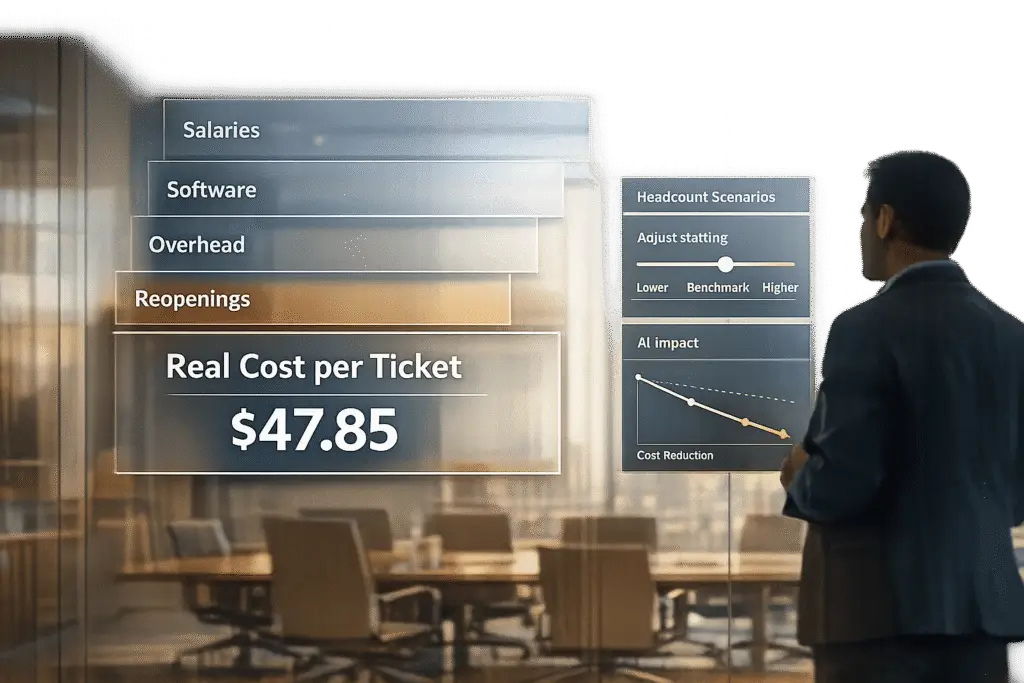
Every support ticket has a hidden cost. From salaries to software, office utilities to lost productivity, calculating your Cost Per Ticket (CPT) gives you a clear picture of your support operation’s expenses. This number helps you make smarter decisions about hiring, automation, and resource allocation.
Key Takeaways:
- CPT Formula: Total support costs ÷ resolved tickets = Cost Per Ticket.
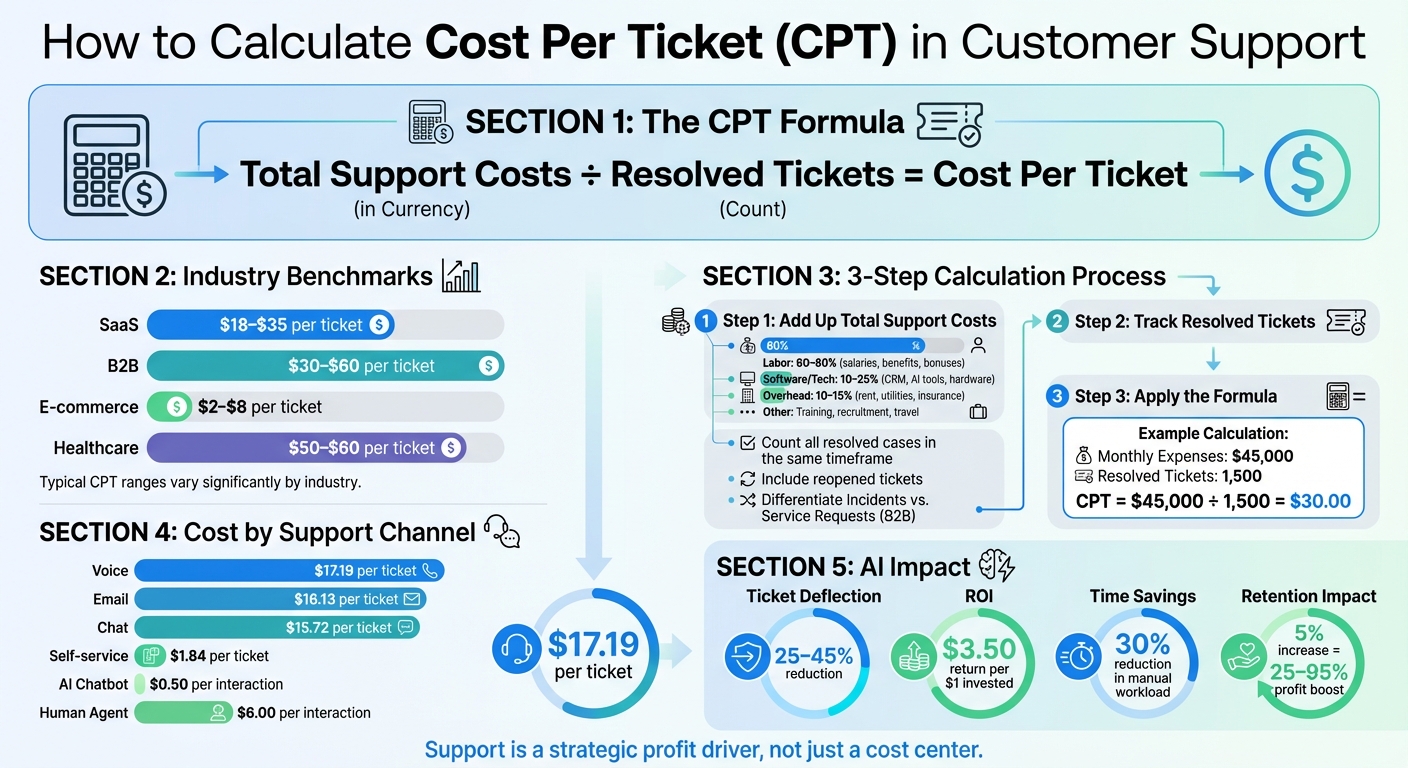
- Typical CPT Ranges:
- SaaS: $18–$35 per ticket.
- B2B: $30–$60 per ticket (higher complexity).
- How CPT Helps:
- Identifies if your team is overworked or underutilized.
- Justifies hiring, outsourcing, or investing in AI.
- Highlights inefficiencies impacting productivity.
Steps to Calculate CPT:
- Add Up Total Support Costs: Include salaries (60–80%), software (10–25%), overhead (10–15%), training, and recruitment.
- Track Resolved Tickets: Count all resolved cases, including reopened ones.
- Use the Formula: Divide total costs by resolved tickets.
Example:
If monthly expenses are $45,000 and 1,500 tickets are resolved, CPT = $30.
Why It Matters:
- AI and Automation: Deflect 25–45% of tickets, reducing costs.
- Benchmark Comparison: Compare your CPT to industry averages to spot inefficiencies.
- Staffing Decisions: Determine if hiring or automation offers better ROI.
Understanding your CPT transforms customer support into a measurable, data-driven function. It’s not just about cutting costs – it’s about improving efficiency and protecting revenue.
How to Calculate Cost Per Ticket: Complete Formula and Industry Benchmarks
How to Calculate Real Cost Per Ticket: Step-by-Step
Identify Your Total Support Costs
Start by gathering all your support-related expenses. Labor typically makes up the bulk of your budget – around 60–80%. This includes base salaries, benefits, payroll taxes, bonuses, overtime, and prorated costs for team leads, QA staff, and managers.
Technology and infrastructure account for roughly 10–25% of your spending. This covers expenses like helpdesk or CRM licenses, AI tools, telephony systems, and hardware such as laptops and headsets. Don’t forget overhead and facilities costs (10–15%), which include office rent, utilities, insurance, and shared administrative resources like HR and IT support.
"Most companies misjudge their total cost per ticket by 30–40% because they forget to include indirect and software-related expenses." – Türkü Şimşek, Content Marketing Specialist, LiveChatAI
Other costs to consider include training, onboarding, and upskilling expenses. For B2B operations, you’ll also need to account for specialized technical knowledge, higher-tier escalations to L2/L3 experts, and longer resolution times. Don’t overlook recruitment fees, travel for on-site customer visits, and the potential costs of customer churn.
Once you’ve outlined your total costs, the next step is accurately tracking resolved tickets.
Track Resolved Tickets
Focus on counting only resolved tickets within the same time frame you’re measuring costs. Use work logs to track the time agents spend per ticket, and include reopened tickets in your total. Reopened cases reflect the true workload and highlight the cost of not resolving issues on the first attempt.
In B2B settings, it’s important to differentiate between "Incidents" (unexpected disruptions like system outages) and "Service Requests" (planned tasks like software provisioning). These categories vary significantly in complexity and cost. AI-based platforms and integrated ITSM tools can streamline tracking by automating the classification and routing of tickets across communication channels like email, chat, and phone. This ensures every interaction is logged – whether it’s a routine password reset or a complex issue requiring multiple teams.
Apply the Formula with Examples
Once you’ve calculated total costs and tracked resolved tickets, use the following formula to find your Cost Per Ticket (CPT):
Total Support Costs ÷ Resolved Tickets = Cost Per Ticket.
Here’s an example for a mid-size B2B support team:
| Cost Component | Monthly Amount |
|---|---|
| Labor (4 B2B Support Engineers) | $32,000 |
| Management (Support Manager & QA, prorated) | $6,000 |
| Software/Tech (CRM, ITSM, AI tools, communication platforms) | $4,500 |
| Overhead (Office space, utilities, training) | $2,500 |
| Total Expenses | $45,000 |
| Resolved Tickets | 1,500 |
| Cost Per Ticket | $30.00 |
For instance, if your team resolves 1,500 tickets in a month while incurring $45,000 in total expenses, your cost per ticket comes out to $30.00. This number serves as a benchmark to assess whether you should hire additional staff, invest in automation, or maintain your current setup.
What Drives Cost Per Ticket in B2B Support
Case Complexity in B2B Support
B2B support tickets are rarely straightforward. Unlike simpler tasks like password resets, these tickets often demand advanced technical troubleshooting. As LiveChatAI explains:
"In software, every customer issue can feel like a small engineering sprint. Integrations, API errors, and configuration debugging all raise complexity – and cost."
Escalations add another layer of expense. When Tier 1 agents can’t resolve an issue, it gets passed to L2 or L3 specialists. These specialists command higher salaries, and their involvement often extends resolution times, driving costs up further [4,12]. Compared to e-commerce, where ticket costs typically range from $2 to $8, B2B support operates on a much higher cost scale. For SaaS companies, support operations consume roughly 8% of their Annual Recurring Revenue (ARR), with labor accounting for 60–80% of that expense. This inherent complexity not only increases baseline costs but also affects how costs vary across different support channels.
Cost Differences Across Support Channels
Support costs can vary significantly depending on the channel. In 2021, North American support teams reported average costs of $17.19 per voice ticket, $16.13 per email ticket, and $15.72 per chat ticket. However, costs can range widely – from as low as $0.74 for automated self-service to over $100 for complex, manually resolved issues.
Self-service options tend to be the most cost-effective, with median costs at $1.84 per interaction compared to $13.50 for assisted channels. Chat and messaging channels are also relatively efficient, as agents can handle multiple conversations simultaneously. This efficiency contrasts with phone support, which requires one-on-one interaction. In specialized industries like healthcare, where compliance and expertise are critical, ticket costs can soar to $50–$60.
How AI and Automation Reduce Costs
AI is reshaping the economics of support by streamlining operations and reducing reliance on human agents. Companies leveraging AI-driven self-service and automation report ticket deflection rates of 25–45%, significantly lowering the need for human intervention [6,9].
Modern AI systems can triage, route, and summarize tickets, cutting the manual workload by up to 30%. This shift allows businesses to achieve an ROI of 2x to 5x within the first year of implementing AI solutions [9,10]. By automating high-volume, low-complexity tasks – like password resets, order status updates, and basic troubleshooting – human agents can focus on addressing the more intricate challenges unique to B2B support [4,9].
Using Cost Per Ticket Data to Justify Headcount Changes
Compare Your Costs to Industry Benchmarks
Start by calculating your fully loaded Cost Per Ticket (CPT) and compare it to industry averages. For 2025–2026, SaaS companies generally range between $18 and $35 per ticket, while B2B support costs are higher – typically $30 to $60 per ticket due to greater technical complexity. If your CPT exceeds these ranges, it could indicate inefficiencies. This gap becomes the foundation for your argument – whether it’s about adding more agents to reduce burnout and improve resolution times or investing in automation to cut costs without increasing headcount.
Also, keep an eye on your volume-to-cost ratio. A drop in ticket volume with unchanged fixed costs will cause your CPT to rise. This is a red flag that adjustments are needed, either by reallocating resources or optimizing processes. Identifying this gap early helps you forecast staffing needs more effectively.
Forecast Staffing Needs Based on Ticket Volume
Staffing models have traditionally followed a linear path, but AI can significantly alter this equation. With AI deflecting 25% to 45% of routine tickets, you may not need to grow your team proportionally to ticket volume increases. Run forecasts with conservative, moderate, and aggressive AI deflection scenarios. For example, if AI deflects a significant portion of routine tickets, your current team could handle spikes in demand, reducing the need for new hires.
AI-driven interactions are also far more cost-effective: a chatbot interaction costs around $0.50, compared to $6.00 for a human agent. These savings shift the dynamics of staffing needs dramatically.
Another factor to consider is escalation optimization. Moving resolutions to Tier 1 agents or self-service (Tier 0) reduces reliance on expensive Tier 2 and Tier 3 specialists. Equipping Tier 1 agents with better tools and training can help them absorb additional workload, minimizing the need to hire costly senior staff.
Build ROI Models for Headcount Decisions
Once you’ve aligned costs with benchmarks and forecasted staffing needs, it’s time to quantify the return on investment (ROI) for headcount changes. Fully loaded costs for new hires typically fall between $60,000 and $80,000, with an additional $15,000 for recruiting and onboarding. Management overhead can further increase your CPT by 15% to 25%.
Compare this to automation: an AI platform capable of replacing 3 to 5 agents often costs less than hiring one fully loaded employee. Use this formula to calculate productivity savings:
(Average Time Saved per Interaction in Minutes) × (Total Interactions) ÷ 60 × (Average Fully Loaded Agent Hourly Cost).
Don’t stop there – tie your ROI model to employee retention and revenue protection. Even a 5% increase in retention can boost profits by as much as 95%. Demonstrate how improved support, whether from additional staff or AI-driven efficiency, reduces churn and protects revenue. For instance, calculate churn reduction value by multiplying the number of customers by the estimated reduction in churn rate and the average customer lifetime value. This approach reframes your support function as a strategic retention tool rather than just a cost center.
| Support Model | Cost Per Resolution | Resolution Time |
|---|---|---|
| Human Agent | ~$6.00 | 5–10 minutes |
| AI Chatbot Interaction | ~$0.50 | <30 seconds |
| Hybrid (70% AI / 30% Human) | ~$1.80 | Immediate/Variable |
| Outsourced (Pay-per-resolution) | $3.00–$9.00 | 12–24 hours |
(Source:)
Top-performing companies using AI report a $3.50 return for every $1 invested in support technology. Use this benchmark to strengthen your case, showing how the right balance of human resources and automation delivers measurable ROI – not just in cost savings but in overall business impact.
sbb-itb-e60d259
Automate Cost Analysis with AI-Native Platforms
Real-Time Cost Tracking with Automated Workflows
Relying on manual tracking often leads to delays and incomplete data, especially when spreadsheets and logs can’t keep up. AI-native platforms solve this by automating data collection for the cost-per-ticket formula: (Total support spend) ÷ (Total tickets handled).
These platforms use work logs to capture exact agent times, enabling precise labor cost calculations based on fully loaded salaries. Automated workflows – such as intelligent triage, auto-categorization, and auto-tagging – ensure accurate, real-time data. Additionally, AI capabilities help reduce resolution times, with productivity improvements tracked instantly. Predictive analytics, like predictive CSAT and CES scores, flag at-risk customers before they churn, allowing you to quantify retention value as part of your cost models. AI-powered dashboards provide a clear view of resource allocation, operational performance, and emerging trends, helping you make informed decisions about staffing and resources.
"For organizations where support quality and accuracy are paramount, simply automating agents away isn’t the goal. The true ROI encompasses empowerment and intelligence." – Nooshin Alibhai, Founder and CEO, Supportbench
With this level of precision and real-time insight, businesses can create transparent cost models that support scalable pricing strategies.
Cost Efficiency Through Scaled Pricing and Built-In AI
Beyond real-time tracking, AI-native platforms introduce scalable pricing models that simplify cost management. A common pitfall in support operations is underestimating AI integration costs, which are often miscalculated by as much as 40% to 60% due to overlooked ecosystem requirements.
Platforms like Supportbench take a different approach by embedding AI from the start. This ensures that expenses align with team scalability. For example, with transparent pricing starting at $32 per agent per month, teams gain access to AI-driven tools like triage, predictive analytics, automated workflows, and real-time dashboards – all without hidden fees. This pricing structure grows with your team, ensuring that operational efficiency improves as your support operation expands.
AI agents can deliver an ROI of 30% to 200% within 18–24 months by cutting operational costs and reducing the need for additional headcount. However, achieving these results requires integrating AI into your core platform rather than adding costly layers to outdated systems. AI-native platforms offer quicker value realization, lower total ownership costs, and scalable support without proportional increases in software or staffing expenses.
Conclusion
Key Takeaways for Support Leaders
Understanding your true cost per ticket (CPT) is essential for making smarter staffing and technology decisions. For B2B support teams, CPT typically falls between $30 and $60 per ticket. However, hidden costs – like management overhead and lost productivity – often push the actual figure higher. To get an accurate CPT, you need to factor in everything: salaries, benefits, software, training, and infrastructure.
But here’s the thing: cutting costs shouldn’t be the only goal. As Türkü Şimşek, Content Marketing Specialist at LiveChatAI, puts it:
"The real ROI of customer support isn’t in lowering expenses – it’s in increasing loyalty."
Balancing CPT with Customer Satisfaction (CSAT) is critical. You can’t afford to sacrifice service quality for efficiency. Why? Because even a modest 5% increase in customer retention can drive profits up by 25% to 95%. This makes customer support not just a cost center but a strategic profit driver.
AI and automation play a huge role in scaling support without ballooning costs. Tools like AI copilots, intelligent triage, and predictive analytics help agents resolve issues faster while reclaiming around 40% of the time lost to repetitive tasks. This highlights AI’s potential to deliver substantial cost savings without compromising service quality.
These insights lay the groundwork for meaningful operational improvements.
Next Steps for Optimizing Your Support Operations
To put these ideas into action, start by conducting a cost audit of your support operations. Compare your CPT against industry benchmarks: $18–$35 for SaaS and $30–$60 for B2B support. If your costs exceed these ranges, it’s time to identify inefficiencies.
Next, review your technology stack. Are there outdated or redundant tools? Consider adopting AI-native platforms like Supportbench, which combine automation, real-time cost tracking, and predictive analytics. With AI solutions delivering an average ROI of $3.50 for every $1 spent – and top performers seeing up to 8x ROI – choosing the right tools can transform your bottom line. Plus, these platforms make it easier to align staffing needs with an AI-driven approach.
FAQs
How can I calculate the real cost per ticket (CPT) and use it to justify team size?
To figure out your Cost Per Ticket (CPT), start by tracking how many tickets your support team resolves over a specific time frame, like a month. Use dependable help desk software or a ticketing system to ensure your tracking is accurate and consistent. Make sure you’re only counting tickets that are fully resolved – leave out any that are still open or waiting on additional action. It’s also important to define what "resolved" means for your team to keep things consistent.
After you’ve tallied up the number of resolved tickets, calculate your CPT by dividing your total operating costs – this includes salaries, tools, infrastructure, and overhead – by the number of resolved tickets. The result shows how efficiently your support team is operating. With this information, you can pinpoint areas where processes could improve or even decide if adjustments to your team size are necessary based on workload and costs.
What are the most common mistakes companies make when calculating the cost per ticket (CPT)?
One mistake many companies make is zeroing in on direct costs – like agent salaries and software fees – without factoring in indirect costs such as overhead, infrastructure, training, and quality assurance. These hidden expenses can quietly drive up the actual cost per ticket, leading to miscalculations.
Another common misstep is relying on simple averages that fail to account for variables like ticket complexity, different support channels, or regional cost differences. This approach often paints an incomplete picture of operational expenses. On top of that, not updating cost analyses to incorporate the effects of modern tools like AI or automation can leave businesses with an outdated and inaccurate understanding of their cost structure.
The solution? Use a comprehensive, data-driven strategy that includes all cost elements and keeps pace with advancements in technology and changes in operations.
How does AI influence the cost per ticket and staffing decisions?
AI has become a game-changer in cutting support ticket costs and streamlining staffing decisions, thanks to its ability to boost efficiency and trim operational expenses. Tools like chatbots and automated workflows can handle a large chunk of routine support tasks for a fraction of the cost of human intervention. For example, an AI-powered interaction might cost just a few cents per ticket, compared to the $6 to $40 range typical for traditional support. This means companies can cut down on labor expenses without compromising – and sometimes even enhancing – service quality.
AI also enables smarter staffing by accurately forecasting ticket volumes and resource needs. By automating repetitive tasks and speeding up responses, it lightens the overall workload, allowing teams to focus on more critical, high-value activities. With real-time data and predictive analytics, businesses can fine-tune staffing levels to maintain both cost efficiency and customer satisfaction, avoiding the pitfalls of being overstaffed or understaffed.