When L1 agents struggle to find accurate, quick answers, escalations to L2 increase, leading to slower resolutions and higher workloads. The solution? A structured, accessible knowledge base that empowers L1 teams to resolve more issues independently. Here’s how to make it happen:
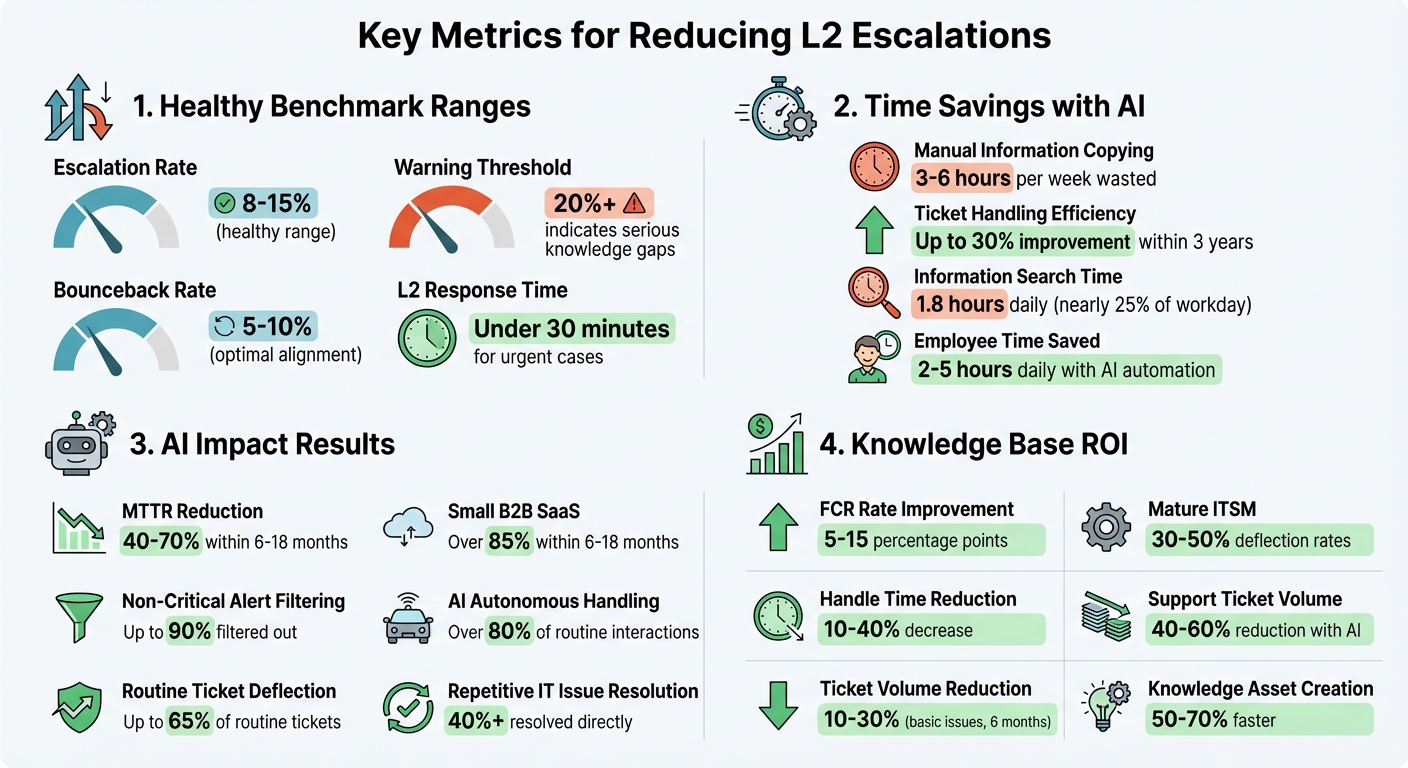
- Analyze Escalation Data: Track metrics like escalation rates (healthy range: 8-15%) and bounceback rates (5-10%) to identify patterns and gaps.
- Leverage Feedback: Collect insights from L1 agents about their challenges and what resources they need most.
- Build a Knowledge Base: Create well-organized, searchable content with clear formats (e.g., step-by-step guides) and intuitive navigation.
- Use AI Tools: Automate updates, identify knowledge gaps, and streamline article creation from resolved cases.
- Train L1 Agents: Provide hands-on training to ensure agents can effectively use and contribute to the knowledge base.
- Measure Success: Track metrics like L2 interruption rates, first-contact resolution, and zero-result searches to refine the process.
Key Metrics for L1 Knowledge Base Success and Escalation Management
Identify L1 Escalation Patterns and Knowledge Gaps
Before creating a knowledge base, take a close look at your support data to understand why L1 agents escalate tickets. A good starting point is calculating your escalation rate:
(Escalated Tickets / Total Tickets) × 100.
For B2B SaaS, a healthy range is 8% to 15%[3]. If your rate exceeds 20%, it’s a sign that your team faces serious knowledge gaps.
"Your escalation problems are structural, not performance-based. You need metrics that expose breakpoints." – Richie Aharonian, Head of Customer Experience & Revenue Operations, Unito[2]
The real value lies in breaking down escalations. Segment your data by category (technical, billing, feature requests), priority, agent, and even time of day. For instance, if escalations spike during night shifts, your team might need better after-hours documentation to compensate for fewer senior staff[2].
Keep an eye on the bounceback rate – tickets L2 sends back for clarification. A range of 5% to 10% suggests alignment[2]. Also, track instances where L2 has to re-ask customers for details already provided to L1. These “context loss” cases often highlight documentation issues or tool integration failures[2].
Review Historical Ticket Data
You don’t need to dig through years of data to spot trends. Focus on the last three months for insights into current challenges[4].
Go beyond counting escalations. Look at metrics like “Time to Escalate” (how long L1 spends before escalating) and “Handoff Delay” (how quickly L2 picks up high-priority tickets). Ideally, L2 should respond in under 30 minutes for urgent cases[2].
Pay attention to the resolution codes L2 uses. If simple fixes or standard procedures resolve many escalations, those are clear opportunities to shift those tasks to L1 through better documentation[4].
Also, ensure L1 agents categorize tickets accurately. Mislabeling can obscure the real patterns you need to address[4].
Collect Feedback from L1 Agents
Your L1 agents are on the front lines, so they know exactly where the gaps are. Regular surveys or feedback sessions can uncover their pain points and what information they wish they had.
Ask specific questions:
- What types of issues do they feel confident solving?
- Which escalations frustrate them because they were close to finding the answer?
- What information do they spend the most time searching for?
In some teams, agents spend 3 to 6 hours per week manually copying information between tools[2]. That’s time they could use solving tickets if the knowledge was centralized.
Set up a continuous feedback loop where agents can flag cases where better documentation could’ve prevented an escalation. Use this input to fine-tune your knowledge base to address their real challenges.
List Common L2-Resolved Issues
Build a list of frequent issues L2 resolves that L1 could handle with the right resources. This list becomes your guide for knowledge base development.
Start with the easiest wins – issues L2 resolves quickly using standardized procedures. These are perfect for documentation since they’re repeatable and don’t require advanced expertise. Track how often these issues occur and prioritize based on their frequency and impact on your business.
When shifting tasks to L1, make sure quality isn’t compromised. Focus on issues that don’t require deep expertise but can be handled effectively with proper guidance[3][4].
Organizations that integrate AI and automation into their workflows can improve ticket-handling efficiency by up to 30% within three years[2]. The challenge is identifying which tasks can be standardized and documented, and which ones truly require L2 or higher-tier expertise.
sbb-itb-e60d259
Build a Knowledge Base for L1 Teams
Once you’ve mapped out your escalation patterns, the next step is to follow best practices to build a knowledge base that provides that provides instant solutions during live support interactions.
Bring all your support resources together in a single, actionable platform. This ensures every support tier has access to consistent troubleshooting guides and historical data from past incidents[5].
Organize Articles for Easy L1 Access
How you structure your knowledge base matters more than how much content it contains. Use logical categories like product modules, common error types, or agent workflows to make navigation intuitive. A hierarchical setup works well for this.
Stick to a standard format for articles: Issue Summary, Prerequisites, Resolution Steps, and Related Links. This structure allows L1 agents to quickly scan for key information without wading through unnecessary details. Place the most critical solutions at the start of each article to speed up resolution times.
When writing article titles, focus on action-oriented phrases that match how agents search under pressure. For example, "How to Reset User Permissions" is more helpful than a vague title like "User Permissions Policy." Decision trees and automated workflows within the knowledge base can further assist L1 agents in gauging issue complexity and deciding whether escalation is required[5].
To make content easier to understand, include annotated screenshots or short videos. Also, separate internal and external views. Articles meant for L1 agents can include internal-only notes, such as known workarounds or specific triggers for escalating to L2, which shouldn’t be visible to customers.
Add Search-Friendly Keywords
Even the best articles are useless if agents can’t find them. Once your content is organized, make it easy to locate.
Optimize metadata by adding a "Keywords" or "Tags" section at the bottom of each article. Include synonyms (e.g., "reboot", "restart", "power cycle"), common misspellings, and specific error codes (e.g., "Error 500"). This ensures articles show up in searches, even if terms vary.
Use bold text to highlight UI elements like buttons, menu options, and field names. This helps agents guide users through software interfaces faster. If a solution depends on another article, hyperlink directly to it, so agents don’t waste time searching for related steps.
Modern platforms equipped with semantic search can understand the intent and context behind an agent’s query, even when the exact keywords aren’t used. This reduces the frustration of rephrasing searches when the initial attempt doesn’t yield results.
A well-optimized search system and tagging strategy also pave the way for AI-driven content updates.
Use AI to Maintain the Knowledge Base
Manual updates to documentation can quickly fall behind. AI tools can help by automatically updating articles using data from resolved tickets and standardizing content formats[7]. Generative AI, for example, can cut the time needed to create standard operating procedures (SOPs) from hours to minutes[7].
AI can also identify "knowledge gaps" by scanning resolved L2 tickets for recurring issues that don’t have a corresponding L1 article. Based on the resolution notes from closed tickets, AI can draft preliminary articles, which a knowledge manager can then review and publish.
Another way AI adds value is by cleaning and standardizing data. It can correct typos, decipher shorthand, and ensure consistent language in technician notes, making the information easier to retrieve and use later[6]. Before using AI maintenance tools, it’s helpful to clean up data manually – correcting typos, splitting complex fields into categories (e.g., Issue/Category/Description), and applying dropdown options to ensure uniformity[6].
Platforms like Supportbench take this a step further, using AI to create knowledge base articles directly from case histories. When a case includes a clear problem and solution, the AI compiles related interactions to generate an article. It auto-fills the subject, summary, and keywords, allowing the knowledge base to grow naturally as issues are resolved.
"The system gets more accurate every month – the opposite of manual documentation that decays from the moment it is written." – Oxmaint[7]
Automated updates improve accuracy and empower L1 agents to handle more issues independently, reducing escalations to L2.
To ensure accuracy, implement verification protocols using tools with built-in review systems. These systems can prompt subject matter experts to keep content up to date[8]. Adding features like a "Was this helpful?" button or a comment section also allows L1 agents to flag outdated information or suggest changes. This creates a feedback loop that keeps the knowledge base aligned with real-world needs.
Train L1 Teams to Use the Knowledge Base
A solid knowledge base is only as effective as the team using it. For L1 agents, knowing how to navigate, update, and rely on this resource during live interactions is critical. Without proper training, escalations will remain high, no matter how well-crafted the content is.
A McKinsey report highlights that employees spend an average of 1.8 hours daily searching for information[12]. That’s nearly a quarter of the workday lost to inefficiencies. For L1 agents managing back-to-back tickets, this wasted time adds up quickly. The solution? Not just better content, but better training on how to locate and apply it under pressure.
Provide Training on Knowledge Base Navigation
Skip passive tutorials and focus on hands-on training during onboarding. Practical exercises are far more effective than simply asking agents to watch videos[13]. One community member shared their approach:
"For new hires, we set their first week assignment is to finish this training… it is hard to follow up and track if [a video] has been watched. So we changed to set this assignment with some hand on practice and then follow up to review the percentage of completion." – SoboYiW, Brainy Member, Aspire Community[13]
Develop role-specific training guides that focus on the agent’s day-to-day tasks. For example, an L1 agent handling password resets doesn’t need to wade through sections meant for troubleshooting API issues[13]. Create a "must-read" onboarding section that highlights the most common troubleshooting steps they’ll need[10].
Teach agents to make full use of search bars with autofill suggestions and keyword-based recommendations for faster information retrieval during live calls[10]. Show them how to navigate features like breadcrumbs, sidebars, and "most read" widgets to stay oriented, even in high-pressure situations[10]. Ensure mastery by tracking progress through completion milestones instead of just video views[13].
To keep skills sharp, schedule weekly interactive sessions that reinforce knowledge base usage beyond the initial onboarding period[11].
With practical training in place, L1 agents won’t just rely on the knowledge base – they’ll actively improve it.
Enable Agent Contributions to the Knowledge Base
L1 agents are on the front lines, making them the best source for identifying gaps in the knowledge base. Empower them to contribute directly.
Set up a system where agents can suggest new articles based on recurring cases. Encourage them to transform frequently used "saved replies" into formal, searchable knowledge base content[12]. This approach turns informal knowledge into accessible solutions.
To maintain accuracy, define user access levels: L1 agents can have "Contributor" or "Draft" rights, while senior staff or L2 agents retain "Publisher" rights to approve changes[12]. This ensures critical documentation remains intact while still allowing agents to share their insights.
Use analytics to pinpoint knowledge gaps, helping prioritize the creation of new content[12].
Create Verification and Feedback Protocols
Agent contributions are invaluable, but they need oversight to ensure the knowledge base remains accurate and organized.
Implement a draft-and-review workflow, where senior staff or subject matter experts review and approve new content before it’s published[14]. Require agents to reference approved articles for every response, ensuring consistency and accuracy[14].
Introduce confidence thresholds: if the system’s confidence in a retrieved article is low, agents should escalate the issue rather than guessing[14]. This safeguards both customers and agents from misinformation.
Establish a weekly review process. Spend 30–45 minutes with support teams, knowledge owners, and product operations to refine the knowledge base based on real-world performance[14]. Review 10–20 interactions weekly and score them against a rubric to ensure agents are applying knowledge base content effectively[14].
"Trust is the KPI behind every KPI." – Ameya Deshmukh, Director of Customer Support[14]
Keep an eye on frequently cited articles that haven’t been reviewed recently. As products evolve, even the most popular content can become outdated[14]. Analyze the top reasons for ticket escalations to identify unclear or missing articles[14].
With thorough training and well-defined review protocols, your L1 team will be ready to maximize the potential of AI tools and improve first-contact resolution rates.
Use AI to Reduce Interrupts and Improve First-Contact Resolution
Even the best-trained L1 teams can struggle under pressure, especially when faced with unique cases or scattered information. This is where AI steps in, delivering precise answers instantly, without the need for agents to search manually. By integrating AI into your existing workflows, you can significantly boost efficiency while complementing your team’s training and knowledge base.
Companies using AI for incident management report impressive results, with a 40–70% reduction in Mean Time to Resolution (MTTR) within 6–18 months[15]. AI can also filter out up to 90% of non-critical alerts, freeing agents to focus on high-priority issues instead of wading through duplicates[15]. The outcome? Faster resolutions, fewer escalations, and agents able to tackle more complex challenges.
Deploy AI Agent Copilots
AI copilots take support to the next level by analyzing live customer interactions and instantly presenting relevant replies, troubleshooting steps, or knowledge base (KB) articles. Instead of searching through multiple platforms like Confluence, SharePoint, or Slack, agents receive a synthesized, context-rich answer tailored to the problem at hand.
For example, in January 2025, Younited, a European credit platform, implemented an "Action Language Model" (ALM) framework to handle L1 support. This system transformed natural language into structured, validated outputs, taking over 100% of tasks previously managed by their external L1 team and cutting operational costs by more than 90%[9].
"The best AI solutions aren’t always the most sophisticated – they’re the ones that reliably solve real problems while maintaining security and compliance." – Antoine Habert, Tech Operations Manager, Younited[9]
Another success story involves a global enterprise using the Enjo platform. By unifying knowledge from Confluence, SharePoint, and internal wikis, their AI resolved over 40% of repetitive IT issues directly within Slack and Teams – without requiring any updates to existing articles[16]. Similarly, Supportbench’s AI Agent-Copilot analyzes past cases and internal knowledge to help agents find fast, accurate solutions.
Enable AI-Driven Auto-Responses
AI can draft responses using data from past cases and KB articles, drastically reducing response times. For routine issues like password resets, shipping updates, or basic troubleshooting, AI often handles the interaction entirely. In fact, it can deflect up to 65% of routine tickets and manage over 80% of such interactions independently[15].
To maintain quality, set a confidence threshold of 85–90% before allowing AI to resolve tickets without human intervention. Anything below this threshold gets routed to an L1 agent, complete with a pre-drafted response for quick review[18]. This "human-in-the-loop" approach balances efficiency with accuracy and compliance while lightening agent workloads.
It’s crucial to disclose AI usage to customers (e.g., "I’m an AI assistant. Want to speak to a person?") and implement safeguards like the "3-turn rule", which ensures the AI offers a human escalation option after three exchanges[18]. Avoid trapping customers in automated loops by always providing a clear path to a human agent. Tools like Supportbench’s AI auto-responses streamline this process, creating draft replies based on case history and KB content, so agents can quickly review and send accurate responses.
Apply Predictive Analytics for Escalation Prevention
AI doesn’t just react to issues – it helps prevent them. Predictive analytics identify patterns in unresolved queries, ineffective search terms, and content that frequently leads to escalations. This foresight allows teams to address knowledge gaps before they become problems[16].
For example, tracking escalation rates per article can highlight content that isn’t resolving issues effectively. Monitoring AI confidence scores helps predict when an AI or L1 agent might fail due to unclear information. Additionally, analyzing unresolved query patterns can reveal emerging technical trends[16].
"A single unclear article can trigger dozens of unnecessary human handoffs." – Enjo.ai[16]
AI can even draft new KB articles based on unresolved queries, staying ahead of common issues that might otherwise escalate[16]. Supportbench’s AI KB Article Creation from Case History feature automates this process, turning resolved cases into searchable KB entries complete with summaries and keywords. This automation can save employees 2–5 hours daily, freeing up L1 agents to focus on more complex, high-value work instead of escalating to L2[17].
Measure and Improve the Knowledge Process
Creating a knowledge process isn’t something you do once and forget about – it’s an ongoing effort. To truly reduce L2 escalations, you need to measure the right metrics consistently. These metrics help ensure that L1 teams can handle more issues on their own, cutting down on unnecessary escalations. The first step? Establish a clear starting point before making any changes. Then, keep a close eye on specific indicators that reveal whether L1 agents are becoming more self-sufficient.
Track Key Metrics
Start by focusing on L2 interruption rates, which tell you how many tickets are being escalated from L1 to L2. Another critical metric is first-contact resolution (FCR) rates, which often improve by 5–15 percentage points after implementing a solid knowledge base. Additionally, track average handle time – this can drop by 10–40% when agents have quick access to accurate information.
Don’t overlook "zero-result" searches, as they highlight content gaps in your knowledge base. Pair these quantitative metrics with qualitative feedback, such as article ratings and agent input, to get a well-rounded understanding of your system’s performance [19].
Once you’ve established these metrics, compare them to the baseline data to evaluate the impact of your efforts.
Compare Before and After Results
Before making any changes, document key data points like ticket volume, cost per ticket, and resolution times. Focus on the 20% of issues that account for 60–80% of your ticket volume – tackling these can deliver the biggest return on investment.
Run a pilot program over 4–6 weeks with clear success criteria. For example, you might aim to improve search accuracy or reduce agent handle time. Pilots often reveal significant results: basic issue ticket volumes can decrease by 10–30% within six months. Small B2B SaaS companies typically see a 10–25% reduction in ticket volume within just three months, while mature IT service management systems can achieve deflection rates of 30–50% [19].
These before-and-after comparisons provide the foundation for ongoing improvements.
Refine Based on Data
Use the metrics you’ve gathered to fine-tune your knowledge process. For example, flag articles that haven’t been updated in 12 months or those with ratings below 3.5 after 50+ views [19]. AI tools can make this process even more efficient.
Take Supportbench’s AI KB Article Creation from Case History feature. It automatically converts resolved cases into searchable knowledge base entries, keeping your content up-to-date with minimal effort. One enterprise IT team leveraged AI to extract steps from screen recordings of onboarding sessions and create process diagrams, cutting new-agent training time from 12 days to just 6 [19].
Regular audits, combined with AI-driven automation, ensure your knowledge base stays relevant and effective.
Conclusion
Creating an effective knowledge process for L1 teams goes beyond just having documentation – it’s about reshaping how support operations function. When L1 agents have quick access to the right information, interruptions to L2 teams decrease, resolution times improve, and customer satisfaction rises. In fact, research highlights that AI-driven knowledge bases can cut support ticket volume by 40–60% and speed up the creation of knowledge assets by 50–70% [20].
Switching from traditional knowledge bases to AI-powered systems can bring major cost savings and efficiency improvements. Unlike traditional search, which depends on exact keywords, AI search focuses on intent, delivering relevant solutions even if the phrasing doesn’t match perfectly [20]. This intent-driven approach equips L1 teams to handle issues effectively, even when customers describe problems in unfamiliar terms.
AI-native solutions are worth the investment because they evolve over time. Modern platforms can be deployed within 2–3 days and enhance search relevance automatically by learning which responses successfully resolve issues [20]. This adaptability paves the way for smarter content organization.
To get the most out of these systems, structure content around common customer issues and implement automated alerts for AI satisfaction scores that fall below 80% [20]. Without these measures, less experienced teams might struggle with complex problems, potentially causing disruptions in the support workflow [1].
FAQs
Which escalations should L1 handle vs send to L2?
L1 support is responsible for managing routine issues that are well-documented and have standardized solutions. These typically include common problems with clear causes and fixes, often resolved by referencing a centralized knowledge base.
On the other hand, L2 support should step in when the situation involves more complex or unique challenges. This includes handling system outages, intricate technical bugs, or issues that require advanced troubleshooting beyond the scope of standard procedures.
How do we structure L1 KB articles for fast use?
To create L1 knowledge base (KB) articles that are easy to use, focus on making them clear and accessible. Choose short, straightforward titles and headings that address common issues, allowing users to find what they need quickly. Break down solutions into step-by-step instructions using simple language, and include visual aids like screenshots to make the process easier to follow. Concentrate on resolving frequently reported problems, and take advantage of AI tools to recommend related articles. This can save users time and help reduce the need to escalate issues to L2 support.
How do we prove the KB reduced L2 interrupts?
To show that the knowledge base (KB) has successfully reduced L2 interruptions, it’s essential to monitor key metrics both before and after its implementation. Pay close attention to metrics like the number of L2 escalations, how often L2 interruptions occur, and any shifts in customer satisfaction (CSAT) and deflection rates. Leverage AI-powered analytics to spot recurring problems and directly link the drop in escalations to the KB. This approach ensures that any improvements are measurable and backed by solid data over time.