
Single Sign-On (SSO) simplifies access to multiple apps with one login, improving security and reducing IT workload. It’s now essential for support portals, with 92% of enterprises requiring SSO for vendor selection. Companies using SSO report a 76% drop in credential breaches and save time with fewer password reset tickets. However, implementing SSO can be complex, especially in environments with legacy systems or multiple stakeholders.
Key Takeaways:
- Benefits of SSO: Better security, faster access, and reduced IT support tickets.
- Challenges: Legacy apps, single points of failure, and stakeholder coordination.
- Steps for Success:
- Audit all applications for SSO compatibility.
- Define clear metrics like adoption rates and login times.
- Use a phased rollout: Pilot testing → Departmental expansion → Full deployment.
- Set up fallback plans for potential failures (e.g., "break-glass" accounts).
- Train users and provide clear communication to ease the transition.
SSO isn’t a one-time setup – it requires ongoing monitoring, security updates, and user support to maintain efficiency and safety. Done right, it boosts productivity and strengthens enterprise security.
Single Sign-On (SSO) Explained in 10 Minutes | SAML, OIDC & SCIM
sbb-itb-e60d259
Pre-Rollout Planning Checklist
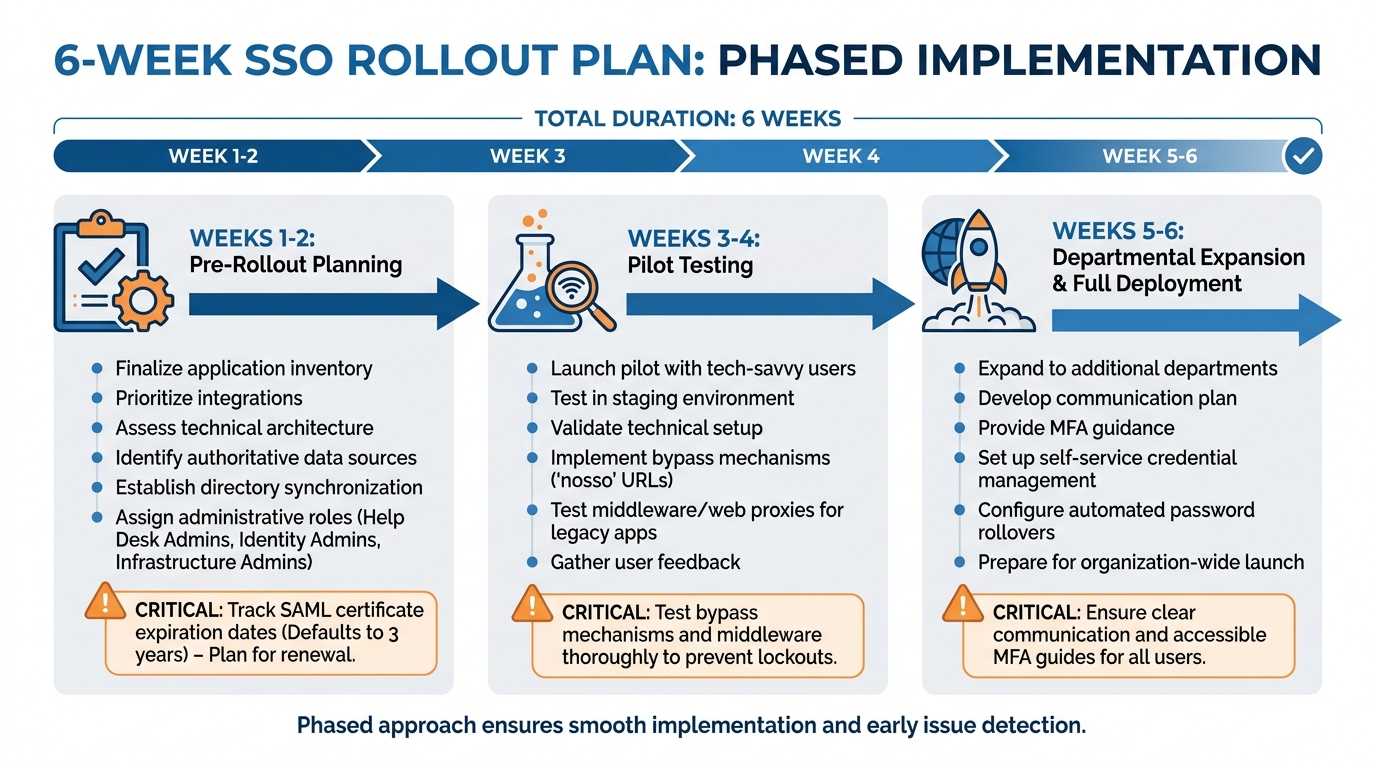
SSO Rollout Timeline: 6-Week Implementation Plan with Key Milestones
Audit Applications for SSO Compatibility
Start by compiling a comprehensive list of all the applications your organization uses. This includes tools like CRMs, ticketing systems, knowledge bases, email platforms, project management tools, HR portals, and even any unofficial or shadow IT/AI tools. Once you have this list, dig into each application to confirm whether it supports modern authentication protocols such as SAML 2.0, OpenID Connect (OIDC), or OAuth 2.0. You can usually find this information in the vendor’s documentation or API details.
For older systems that don’t support these protocols, you may need to consider upgrades, replacements, or even using web proxies to make them compatible with SSO. As Daniel Wright, a Technical Writer & IAM Specialist, puts it:
90% of SAML problems are due to metadata issues.
To troubleshoot these kinds of issues, use SAML tracing browser extensions to see how each application processes authentication requests.
While auditing, document critical details about each application. Note the number of users, how often the app is used, and whether it handles sensitive data (like information covered by HIPAA or GDPR). This will help you prioritize which applications to integrate first – focusing on those that are most frequently used, store sensitive data, or generate the most password-related support tickets. Additionally, map out the user attributes (like email addresses, usernames, or group affiliations) each application needs from your Identity Provider. These details will be crucial for setting up integrations and defining success metrics.
Define Success Metrics for Your Rollout
Before you start, establish benchmarks to measure the efficiency improvements SSO can bring. For instance, track metrics like the number of password reset requests, average login times, and security incident rates. Many organizations report a 63% reduction in password-related tickets and a jump in first-pass audit approval rates from 62% to 98% after implementing SSO[1].
If your organization operates in an AI-driven B2B environment, consider tracking the Mean Time to Secure Access (MTTSA), with a goal of keeping it under 30 seconds. Another key target is achieving over 90% SSO adoption among enterprise users within the first 90 days. This is especially important since 92% of enterprises now consider SSO a critical factor when selecting vendors[1]. With these metrics in place, you can outline a phased timeline to guide your rollout efforts.
Build a Realistic Rollout Timeline
A phased approach is essential for navigating potential challenges and ensuring a smooth SSO implementation. A typical rollout can be completed in 4–6 weeks if you stick to clear milestones.
- Weeks 1–2: During this initial phase, finalize your application inventory, prioritize integrations, and assess your technical architecture. Identify your authoritative data sources, establish directory synchronization methods, and determine integration points with your security tools. Assign administrative roles, such as Help Desk Admins for Tier 1 support, Identity Admins for configuration, and Infrastructure Admins for certificate management. Also, take note of SAML application certificate expiration dates – these often default to three years, and tracking them now can save you from unexpected outages later.
- Weeks 3–4: Begin a pilot program with a small group of tech-savvy users. Test your configurations in a staging environment that closely mirrors your production setup. Use this phase to validate your technical setup and gather feedback. Be sure to implement bypass mechanisms, like "nosso" URLs, to prevent admin lockouts during testing. If certain applications don’t support modern protocols, this phase will also reveal whether middleware or web proxies are necessary.
- Weeks 5–6: Expand the rollout to additional departments and prepare for full deployment. Develop a clear communication plan to inform users about the upcoming changes. Provide guidance on the new authentication methods, including Multi-Factor Authentication (MFA), and explain how to access support if needed. To reduce the burden on your IT helpdesk, set up self-service credential management options. For teams using shared accounts (like those for social media platforms), allocate extra time to configure automated password rollovers and manage credential resets.
Stakeholder Checklist: Roles and Responsibilities
Key Stakeholders and Their Roles
Rolling out a successful SSO system requires well-defined roles across multiple teams. IT administrators handle the technical groundwork – choosing the Identity Provider (IdP), setting up SAML or OIDC protocols, and syncing directory services like Active Directory or LDAP. Security teams step in to establish authentication policies, such as multi-factor authentication (MFA) and session timeout rules, and conduct penetration testing to identify vulnerabilities before they escalate. Meanwhile, support operations leads focus on easing the transition for end-users, troubleshooting login issues, and monitoring ticket trends.
Department heads from teams like sales, finance, and marketing identify which apps their teams rely on – Salesforce for sales or Workday for finance, for example – and define role-based permissions. HR plays a pivotal role in automating user provisioning by linking HR systems with the IdP, ensuring that access is promptly revoked when employees leave the organization. Executive leadership oversees the big picture by setting business objectives, allocating budgets, and ensuring the necessary resources are available. As Devraj Patel, Founder & Identity Architect at SSOJet, aptly puts it:
Think of SSO as a master key for your digital workplace – one login that opens the door to every application your employees need.
When roles are clearly defined, it reduces risks and ensures smoother implementation. With this foundation in place, the next step is thorough preparation before the pilot launch.
Pre-Rollout Preparation Steps
Once stakeholder roles are established, it’s time to ensure all prep work is complete. Start by assigning a Project Manager who will create a concise project charter. This document should outline goals, tasks, deliverables, and key decisions, acting as your guiding framework throughout the rollout. It’s crucial to secure stakeholder approval on this charter upfront – ambiguity at this stage can lead to misalignment later.
Conduct a shadow IT audit by surveying employees to identify unofficial tools they may be using. These often-overlooked apps can contain sensitive data and, if not addressed, could complicate your rollout. To support the pilot phase, recruit "User Champions" who are tech-savvy and can provide early feedback. Their insights can help fine-tune the system and streamline support processes.
Set up a clear escalation process for login issues and customize your support portal URL to direct users to your internal help desk. Define success metrics early – such as reducing password reset requests or achieving login times under 30 seconds – so you can measure your return on investment (ROI) from day one.
Stakeholder Responsibility Table
| Stakeholder Role | Responsibilities | Preparation |
|---|---|---|
| IT Admin | Technical configuration and IdP management | Sync directory services (AD/LDAP) and map user attributes |
| Security Team | Policy enforcement and risk mitigation | Define MFA requirements and session timeout policies |
| Department Heads | Access requirement definition | Audit department-specific apps and assign user roles (Admin/Viewer) |
| HR Department | Lifecycle management | Ensure HR database accuracy for automated provisioning |
| Help Desk | User support and troubleshooting | Create troubleshooting runbooks for common SSO login errors |
| End-Users | Adoption and feedback | Participate in training and report UI/UX friction during pilot |
Phased SSO Rollout Plan
Implementing Single Sign-On (SSO) effectively requires a structured, three-phase approach. This method minimizes disruption, allows for early adjustments, and ensures a steady, scalable deployment. Here’s how to roll it out step by step.
Phase 1: Pilot Testing
Start with a small, controlled group of experienced IT and support staff. These users are equipped to identify and troubleshoot potential issues while offering detailed feedback. Focus on applications that already support SAML or OIDC protocols during this phase. The goal is to validate your technical setup, ensure smooth session management across devices, and confirm that Multi-Factor Authentication (MFA) works as intended.
Keep a close eye on metrics like login times, authentication success rates, and error patterns. For example, a multinational CRM provider with 12,000 enterprise clients began its pilot with financial services teams that required SOC 2 compliance. This helped them identify and resolve session timeout problems before extending the rollout to other departments [1]. Use the feedback from this phase to replace overly technical language with user-friendly instructions, making the process more accessible.
Phase 2: Departmental Expansion
After a successful pilot, expand the rollout to specific departments, such as Sales or Finance. This phase focuses on scaling operations and refining processes. It’s the perfect time to test role-based access controls and establish formal procedures for troubleshooting, including creating runbooks for common issues. Implement SCIM (System for Cross-domain Identity Management) to automate user provisioning and deprovisioning.
One healthcare analytics startup used this phase to deploy a no-code SCIM integration, cutting its Mean Time to Secure Access from 8.7 minutes to just 23 seconds [1]. For legacy applications that don’t support modern protocols, test proxies to bridge compatibility gaps. Daily monitoring of authentication logs is critical here to catch and address emerging patterns early. Organizations taking this step-by-step approach often see a 94.2% user adoption rate within 90 days [1].
Phase 3: Full Rollout and Ongoing Maintenance
With lessons learned from the pilot and departmental phases, it’s time to roll out SSO across the entire organization. Focus on clear communication and change management to ensure smooth adoption. Create resources like video tutorials, quick-reference guides, and FAQs tailored to the issues identified earlier.
To prevent SSO from becoming a single point of failure, ensure your system includes redundancy and failover capabilities. Maintain "break-glass" accounts – local admin logins – for emergency access in case your Identity Provider goes down. Regularly monitor authentication metrics, rotate certificates, and conduct security audits. Automating user deprovisioning is also essential to immediately revoke access when employees leave, reducing the risk of "ghost accounts."
As Devraj Patel puts it:
SSO isn’t a ‘set it and forget it’ technology – it requires ongoing attention to maintain security, improve user experience, and adapt to changing organizational needs [6].
| Phase | Primary Focus | Key Activities |
|---|---|---|
| Phase 1: Pilot | Technical Validation | Test SAML/OIDC, gather user feedback, troubleshoot MFA |
| Phase 2: Expansion | Operational Scaling | Departmental rollout, SCIM setup, legacy app proxies |
| Phase 3: Full Rollout | Adoption & Maintenance | User training, monitoring, disaster recovery planning |
Common SSO Rollout Pitfalls and How to Avoid Them
Even with thorough planning and preparation, rolling out Single Sign-On (SSO) often comes with challenges that can slow progress and frustrate users. Below are some common pitfalls and strategies to sidestep them, ensuring a smoother implementation process.
Incomplete Application Inventory
One of the most common mistakes is overlooking certain applications. A complete inventory of all apps is essential to avoid access issues after rollout. Pay special attention to "Shadow IT/AI" – those unauthorized tools employees rely on daily that might house sensitive data. Missing these can lead to sudden and unexpected access gaps [6][5].
Lack of Clear Ownership
Having undefined roles can stall the rollout process. SSO implementation requires specialized knowledge, and relying on just a couple of experts creates vulnerabilities. As Devraj Patel, Founder & Identity Architect at SSOJet, warns:
you don’t want your organization to be dependent on one or two people who understand how everything works [6].
To avoid this, assign clear accountability to multiple stakeholders and document all configurations and troubleshooting procedures.
Skipping Pilot Testing
Skipping pilot testing is a risky shortcut. Without it, you might miss critical issues like Single Logout (SLO) failures or protocol mismatches that could disrupt user provisioning. A pilot group can identify these edge cases before they become larger problems during the full rollout [7][8].
Poor Communication with Users
Failing to communicate effectively with users can lead to confusion and a surge in support tickets. Make sure to explain the benefits of SSO in simple terms and provide resources like tutorials, FAQs, and proactive updates. Replace technical jargon in error messages with language users can easily understand. As Devraj Patel points out:
Even the most well-designed SSO system can fail if users don’t understand how to use it effectively [7].
Neglecting Compliance Requirements
Cutting corners on security can leave your system vulnerable. Combine SSO with Multi-Factor Authentication (MFA) to block the majority of automated attacks [7]. Prepare for potential disasters by using multi-region Identity Provider (IdP) setups and creating "break-glass" admin accounts. Regularly rotate certificates and conduct security audits to ensure ongoing functionality [5][8].
Common Oversights and Proactive Strategies
| Oversight | Proactive Strategy |
|---|---|
| Shadow IT/AI | Use employee surveys and SSO audits to identify all applications [6][5] |
| IdP Outage | Set up multi-region IdPs and maintain "break-glass" admin accounts [5] |
| Orphaned Sessions | Ensure Single Logout (SLO) functionality across all connected apps [7] |
| Expired Certificates | Automate certificate rotation and schedule regular maintenance [8] |
| User Confusion | Offer video tutorials, FAQs, and clear notifications [6] |
Addressing these challenges with a proactive approach will help you maintain momentum and minimize disruptions during your SSO rollout. By focusing on preparation, communication, and security, you’ll be better equipped to handle any obstacles that arise.
Key Takeaways for a Successful SSO Rollout
Recap of the Rollout Process
Rolling out SSO successfully for support portals hinges on three main pillars: having a full inventory of applications (including shadow IT), defining clear ownership across IT, security, HR, and support teams, and following a phased deployment plan. Start with pilot tests involving tech-savvy users, then gradually expand to other departments, addressing unique situations along the way. Finally, roll it out across the organization, supported by strong change management practices [6][2]. This step-by-step approach minimizes authentication roadblocks and allows teams to focus on higher-value customer interactions.
For enterprise web apps and financial services, SAML 2.0 is the recommended protocol. Meanwhile, OIDC works best for cloud-native SaaS platforms and mobile applications [6][4]. Aligning with these standards ensures smooth operations. Additionally, automating lifecycle management with SCIM can reduce support tickets by 63% [1][6].
Security is a top priority. Implementing MFA is critical – it can stop 99.9% of automated attacks [7]. Other must-haves include "break-glass" admin accounts for emergencies, Single Logout (SLO) to close inactive sessions, and thorough documentation to avoid reliance on just a few experts [6][5][7]. These steps not only ensure security but also lay the groundwork for long-term operational benefits.
Long-Term Benefits of SSO
Beyond immediate technical wins, SSO drives meaningful business outcomes. For instance, it can significantly reduce help desk tickets, which account for over 30% of IT requests [3]. Automated provisioning through SSO has been shown to cut onboarding delays by 28%, while also boosting customer retention by 17% as teams can refocus on AI-powered support initiatives [1].
SSO also plays a critical role in revenue generation. With 92% of enterprises requiring SSO for vendor partnerships and 45% treating it as a mandatory security feature, it has shifted from being a cost to a competitive advantage [1]. By automating access, organizations reduce the Mean Time to Secure Access from 8.7 minutes to just 23 seconds, enhancing both employee efficiency and customer satisfaction in B2B support settings [1].
FAQs
What should we integrate first for SSO?
Start by making sure your Identity Provider (IdP) is set up properly and has been thoroughly tested. Pay close attention to login functionality and security measures before expanding its use. This initial step helps streamline the integration process and reduces the chances of encountering problems during deployment.
How do we prevent lockouts if the IdP goes down?
To prevent lockouts during an Identity Provider (IdP) outage, it’s crucial to have fallback measures ready. This could include backup authentication methods or manual login options to ensure access remains possible. Regularly monitoring integration logs can help you catch and address issues quickly, minimizing potential downtime. Also, consider building IdP redundancy into your system’s design and establish clear emergency access procedures to mitigate risks during unexpected outages.
SAML or OIDC – how do we choose?
Choosing between SAML and OIDC comes down to the specific needs of your support portal.
- SAML works best for enterprise environments, particularly when browser-based single sign-on (SSO) is required. It integrates seamlessly with more traditional identity providers, making it a solid choice for organizations already using established systems.
- OIDC, on the other hand, is designed for modern use cases. It excels in API-driven workflows and offers better compatibility with mobile applications.
When deciding, think about your current technical setup, security needs, and plans for future growth. Aligning your choice with your infrastructure and user experience goals will help ensure a smooth implementation.