



When helpdesk teams lack visibility into customer assets, they lose time and money. On average, technicians waste 65 minutes daily, costing a 5-person team $10,833 annually. Add to that $300–$500 per repair for missing warranty data, and unnecessary costs can reach $21,600 per year.
The solution? Integrating asset management into helpdesk workflows. This approach links devices to support tickets, providing instant access to asset specs, history, and warranty details. The result: faster diagnostics, fewer escalations, and reduced downtime.
Here’s how you can streamline operations:
- Build an asset inventory: Track hardware, software, cloud resources, and configurations.
- Use discovery tools: Agents, probes, and cloud APIs ensure accurate data collection.
- Organize assets: Structure as Configuration Items (CIs) with clear relationships and ownership.
- Automate monitoring: Real-time updates and alerts prevent issues before they escalate.
- Leverage AI: Link tickets to assets, predict failures, and surface relevant solutions.
Smart asset management cuts costs, improves efficiency, and ensures better customer support. Companies have seen a 30–40% drop in incident volumes and a 25% boost in customer satisfaction by adopting these practices.
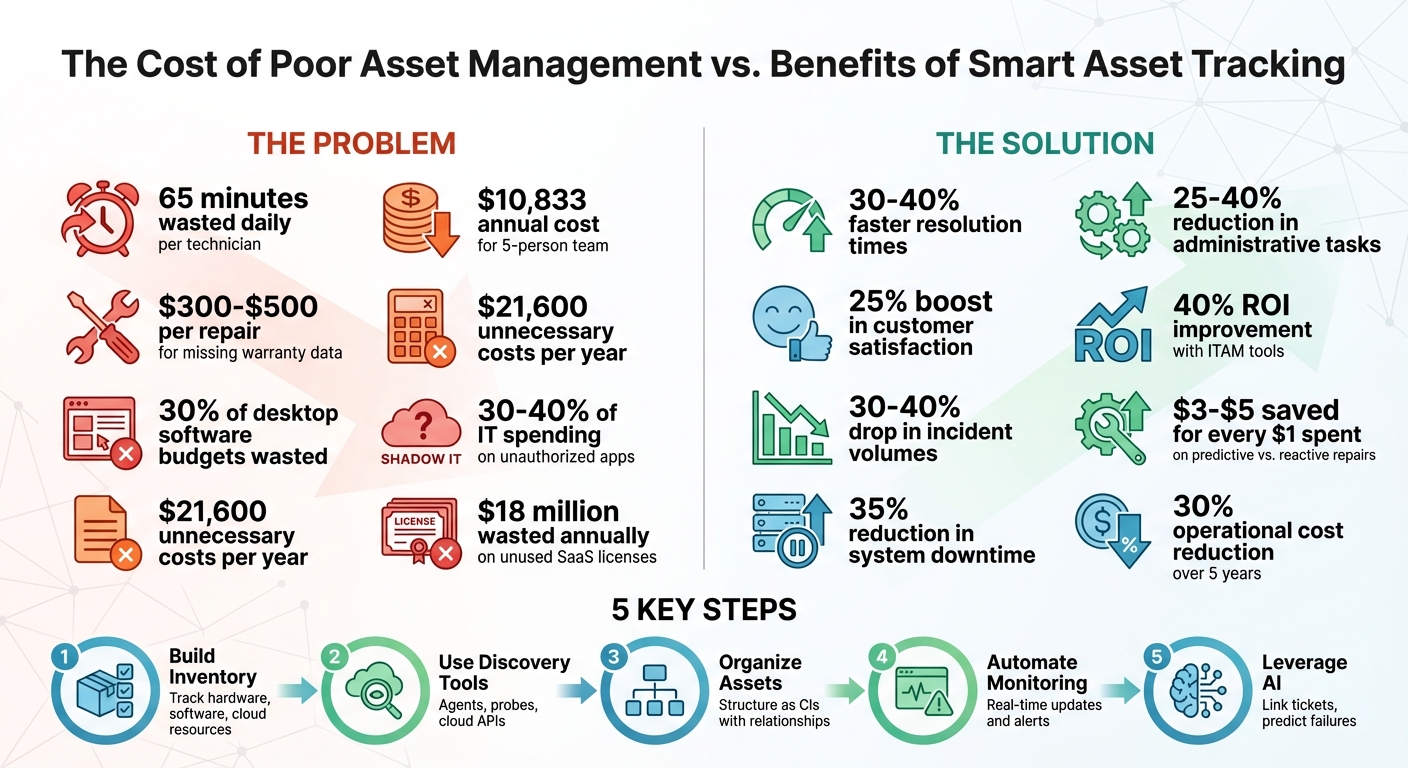
Asset Management ROI: Cost Savings and Efficiency Gains for Helpdesk Teams
Building Your Asset Inventory
Creating a thorough asset inventory involves deciding what to track, how to discover it, and how to organize it. Without this groundwork, support teams may find themselves guessing which laptop a customer is using or scrambling to find warranty details during a support call.
What Assets to Track
Focus on tracking anything that could impact support outcomes. This includes:
- Hardware: Laptops, desktops, servers, printers, firewalls, and mobile devices.
- Software: Installed applications, license keys, and version numbers.
- Cloud Resources: AWS instances, Azure storage buckets, and Kubernetes pods that can be dynamically created or removed.
- Account Configurations: User permissions, API keys, and integration settings, as misconfigurations here often lead to support issues.
For example, in January 2026, Neptune Equipment began tracking hundreds of laptops, printers, and firewalls. By tying these assets to support tickets, they spotted recurring hardware problems and replaced faulty equipment before it caused major disruptions [1]. Similarly, Newport News Public Schools managed over 20,000 laptops using automated auditing tools, which helped avoid unnecessary spending on replacements [1].
Identifying these asset categories will help you choose the right tools for discovery and organization.
Selecting Discovery and Inventory Tools
Choosing the right tools depends on the types of assets and how they are used. Here’s how different tools can address specific needs:
- Discovery Agents: Ideal for mobile devices like laptops that frequently leave the office network. These agents update asset records over the internet, even for remote workers.
- Discovery Probes: Best for fixed infrastructure, such as printers, servers, and network switches. These probes scan IP ranges using protocols like WMI (Windows), SSH (Linux/Mac), and SNMP.
- Cloud APIs: Perfect for cloud resources. APIs from providers like AWS, Azure, and GCP allow real-time cataloging of resources. As Cloudaware puts it, "Multi-cloud isn’t three inventories. It’s one inventory with three dialects" [4]. Standardizing these formats into a unified model – covering resource type, environment, owner, and cost center – makes management more straightforward.
Here’s a quick comparison of discovery methods:
| Method | Best For | Network Dependency |
|---|---|---|
| Discovery Agent | Laptops and remote/mobile devices | Updates via the internet |
| Discovery Probe | Servers, printers, network switches | Requires devices on the network |
| Cloud APIs | AWS, Azure, and GCP resources | Real-time via provider APIs |
Once assets are discovered, the next step is to organize the data into a manageable structure.
Organizing Asset Data
An effective inventory relies on organizing assets as Configuration Items (CIs) connected by logical relationships (e.g., Business Services → Application Groups → Specific CIs). This structure makes it easier to trace how a single failure – like a server going down – might affect customer-facing applications.
Assigning assets to teams ensures continuity, even during personnel changes. As Cloudaware notes, "Ownership = Jane works until Jane leaves. Owner = Payments Platform team survives reorgs and on-call rotations" [4]. Tagging assets with details like environment (production vs. development), cost center, and security compliance status adds another layer of clarity.
Every asset record should include a "last seen" timestamp. The refresh frequency should match the asset’s nature: hourly for dynamic cloud resources and daily for static office devices. As Cloudaware points out, "If an asset has no last-seen time, it’s not inventory. It’s trivia" [4].
For short-lived cloud resources, keep a historical record for 30–90 days to assist with incident investigations. And if your discovery tools miss an asset, check billing exports – untracked spending often reveals undocumented resources.
A well-structured inventory doesn’t just track assets; it provides a foundation for mapping critical dependencies within your configuration management database. This ensures smooth operations and better problem resolution.
sbb-itb-e60d259
Mapping Asset Relationships and Dependencies
Once you’ve built your asset inventory, the next step is mapping how these assets are interconnected. This process helps you uncover potential failure points. For instance, a server isn’t just a standalone piece of hardware – it might host several applications, rely on a specific database cluster, and support customer-facing operations. Without this mapping, even a minor configuration change could lead to unexpected outages and wasted time troubleshooting. By identifying these connections, you can create workflows that integrate support processes more effectively.
Using a Configuration Management Database (CMDB)
A Configuration Management Database (CMDB) takes your asset inventory to the next level by showing how assets are linked and interdependent. It turns a static list into a dynamic model of your infrastructure. These relationships can be:
- Physical: A disk drive installed in a server.
- Logical: Software running on a virtual machine.
- Conceptual: Service instances tied to specific business functions [6][7].
Labeling these relationships accurately – using terms like "Runs on" or "Depends on" – is crucial for diagnosing issues effectively [6][8].
"Understanding the dependencies and other relationships among your assets and CIs can tell you how upgrading Processor A can improve Laptop B’s performance, or which services are affected if Router C failed." [6]
This visibility is a game-changer during incidents. For example, if a database cluster fails, your CMDB can immediately show which applications and customers are impacted. This allows your team to focus on the most critical areas first, saving time and minimizing downtime.
Once you’ve mapped these relationships, it’s important to document the critical dependencies to ensure you’re prepared for quick action during incidents.
Documenting Critical Dependencies
Start by thinking from the user’s perspective. Identify key access points like URLs, Virtual IPs, or service queues, and then trace the dependencies downstream to the infrastructure supporting them [9]. Focus on mapping the top 10–20 services that either generate the most incidents or have the highest revenue impact [9][8].
Use source-destination arrows to clearly show the flow of dependency. For instance, if Application A relies on Database B, a failure in Database B will directly affect Application A [6]. To keep this data reliable, use automated tools to capture relationships and avoid outdated or incorrect information [9][10]. Test these maps against your last three major outages to confirm they accurately reflect real-world impacts [9].
"A CMDB only helps during an incident or a risky change if people trust it and it reflects how systems actually run today." [9]
To maintain trust in your CMDB, assign service owners to keep maps up-to-date and schedule monthly reviews to prevent data from becoming obsolete [9]. When conflicts arise, establish clear rules for resolving discrepancies – like prioritizing cloud console data for virtual assets or relying on directory services for personnel information [9].
Automating Asset Monitoring and Updates
Keeping track of assets manually can quickly lead to outdated records. Servers get decommissioned, laptops receive upgrades, and software licenses expire – making it tough to keep everything accurate. Automation steps in to solve this problem by continuously scanning your systems and updating asset data. This ensures your records stay accurate and provides real-time visibility into your assets, building on the foundation of your CMDB.
Shifting from reactive troubleshooting to proactive support becomes possible when asset updates are automated.
Setting Up Real-Time Asset Monitoring
Real-time monitoring employs agent-based scanning for detailed data on workstations and servers. It also uses network probes to identify headless devices like printers, switches, and IoT equipment [11].
Cloud environments, however, need a different approach. Here, API integrations pull live data from platforms like Microsoft Intune or Jamf, giving your helpdesk up-to-date information about device ownership and specs [11].
To handle data from various sources, automated reconciliation steps in. It normalizes the data, removes duplicates, and resolves conflicts automatically [11]. For field technicians, some systems offer offline sync capabilities – allowing updates via barcode or QR code scanning even without an internet connection. Once connectivity is restored, the changes sync seamlessly [11].
Configuring Alerts for Common Risks
Proactive alerts help stop small issues from escalating into bigger problems. A good starting point is setting warranty and license expiration notifications for at least 30 to 90 days before they expire. This gives your team time to plan renewals and avoid service interruptions [11][12].
"We take our top 50 customers and go through the servers that are end of life next year… Just those big ticket items… you want to identify for them and say as a courtesy, ‘just want to let you know next year you’re going to have to buy a new server.’" – Justin Kelm, CEO of JK Technology Solutions [12]
Alerts can also be configured to detect rogue devices as soon as they connect to your network [13]. To avoid overwhelming your team, prioritize alerts based on the asset’s importance. High-priority alerts should focus on servers, firewalls, and other critical infrastructure, while lower-priority ones can cover peripheral devices [12][14]. This prevents alert fatigue and ensures attention is directed where it’s needed most.
For even greater efficiency, link these alerts to your helpdesk workflows. This way, tickets or change requests are automatically generated with all the relevant asset details included [11]. These integrations streamline the response process, reducing downtime and ensuring prompt action.
Using AI to Connect Asset Data with Tickets
Once real-time updates are in place, AI can take things a step further by turning static data into actionable insights. Natural Language Processing (NLP) analyzes incoming tickets – whether through email, chat, or web forms – and identifies the device or software involved. It then links the ticket to the correct configuration item in your database [15][16].
AI doesn’t stop there. It correlates logs, metrics, and historical ticket data to pinpoint the root cause of asset failures [16]. Companies using AI for customer operations report a 14% increase in issue resolution per hour and a 9% reduction in handling time [16]. AI-powered systems can cut manual ticket handling by 30% and improve Mean Time to Resolution (MTTR) by 25% [16].
Predictive failure identification is another game-changer. By analyzing ticket frequency, asset age, and maintenance history, AI flags devices that are likely to fail soon. This allows you to replace or repair them before they cause downtime. Organizations using these predictive capabilities have seen a 40% drop in incident volumes and a 35% reduction in system downtime [16].
Platforms such as Supportbench bring even more to the table. They use AI to surface past cases, relevant knowledge base articles, and resolution patterns tied to the asset in question. This means agents don’t have to dig through multiple systems for information, speeding up issue resolution and ensuring consistent outcomes.
Integrating Asset Management into Helpdesk Workflows
Bringing asset data into your helpdesk system creates a single view of device specs, warranty details, and repair history. This integration speeds up ticket resolution and cuts down on mistakes, like assigning tickets to the wrong team or missing crucial context about a customer’s setup. With all this information at their fingertips, agents spend less time searching and more time solving problems. Customers also benefit, as their hardware history, software versions, and past issues are instantly available when a ticket is created. By automating asset updates and linking them directly to tickets, issue resolution becomes quicker and more efficient.
Linking Assets to Tickets and Case Histories
When a ticket is submitted, your system should automatically match it to the correct asset. AI can scan ticket descriptions for identifiers like serial numbers, IP addresses, or device names, linking the ticket to the appropriate equipment without manual effort [18]. Even vague descriptions like "my computer is slow" can be resolved – AI cross-references the user’s name with their assigned hardware to make the connection [18].
This creates a detailed record of every incident, maintenance task, and configuration change tied to that specific asset [17][1]. Agents can see the full history of a device before they even begin troubleshooting.
"Asset-to-ticket linking is the critical capability that integrates your support requests (tickets) with your inventory records (assets). For regulated industries, this creates a single source of truth for assets by automatically generating a verifiable asset-to-ticket audit trail." – Issuetrak [1]
For industries like healthcare and manufacturing, this connection isn’t just helpful – it’s required. It ensures compliance by maintaining detailed records for critical equipment, such as medical devices or factory machinery [1]. Weekly automated audits, powered by remote scripts, keep asset data accurate, tracking software versions, disk space, and installed applications without requiring manual updates [1].
Supporting Problem and Change Management
Having visibility into assets is key when addressing recurring problems or planning infrastructure updates across multiple sites. For example, if the same server model fails repeatedly in different locations, linking those assets to a Problem record allows you to investigate root causes and plan upgrades [17][1].
Helpdesk systems should allow agents to pull up any asset and view its full ticket history and current owner instantly. This feature is invaluable during customer calls, providing immediate context [3]. Additionally, tracking purchase prices, depreciation, and warranty expiration dates in the same system enables smarter decisions about equipment refresh cycles [3].
You can also set automation rules to escalate tickets for high-value or critical assets to specialized teams [3]. This ensures that major issues, like a failing core switch or firewall, get prioritized over less critical devices. Asset-level reporting can identify problematic hardware – devices with frequent issues that may be cheaper to replace than repair [1][3].
"You may not always think of software subscriptions as an asset – but a recurring program is the perfect candidate for an asset auditing software… Through it, you can run a report for renewals, estimate your costs, run the audit regularly." – Noel Lucas, Director of Technology, Issuetrak [1]
By integrating service schedules with your helpdesk, maintenance events can automatically generate tickets for the IT team. This coordination ensures proper documentation and reduces surprises [19]. AI further enhances these workflows by delivering real-time asset context to agents.
Using AI to Surface Asset Context Automatically
AI simplifies the process by delivering key asset details as soon as a ticket opens. It identifies user intent, urgency, and retrieves associated data like user profiles, device health, licenses, and recent ticket history [20]. Using Retrieval Augmented Generation (RAG), AI fetches relevant policies, standard operating procedures, and knowledge base articles tailored to the asset and its operating system [20].
Platforms like Supportbench use AI to surface past cases, knowledge articles, and resolution patterns linked to the asset. This information appears directly in the agent’s workspace, eliminating the need for manual searches.
AI can even detect performance issues in devices and open tickets automatically, suggesting fixes before users notice the problem [20]. Companies using AI in their helpdesks have seen noticeable improvements: faster First Contact Resolution (FCR), higher Customer Satisfaction (CSAT, CES, and NPS), and a 25% drop in Average Handle Time (AHT) [20]. AI also achieves a 40% deflection rate for the top 10 most common support requests [20].
To maximize efficiency, configure priority rules so AI focuses on critical hardware first. For tickets involving multiple assets, the system should prioritize a user’s primary device over peripherals [18]. Role-based visibility ensures that technicians see technical specs and diagnostics, while procurement teams access warranty and cost data – avoiding unnecessary clutter [18].
Start with AI in a "suggest only" mode to build agent confidence before moving to "auto-resolve with guardrails" for straightforward tasks like password resets or software access [20]. Keep your knowledge base centralized and up-to-date, as AI’s accuracy depends on the quality of the data it accesses [20].
"AI Agents for IT Helpdesk act like tireless tier 0 or tier 1 analysts that work 24 by 7, scale instantly during spikes, and escalate smartly when humans are needed." – Digiqt [20]
Improving Asset Utilization and Reducing Costs
Asset management goes beyond simply keeping tabs on equipment – it’s about minimizing waste and getting the most value from your resources. Surprisingly, even the most advanced IT teams lose around 25% to 30% of their budgets due to overspending on desktop and SaaS licenses [21]. Shadow IT – those unauthorized devices and apps flying under the radar – can make up 30% to 40% of an organization’s IT spending [11]. On average, companies waste $18 million annually on unused SaaS licenses [11]. By implementing effective asset management practices, businesses can cut operational costs by up to 30% over five years [5]. Here’s how you can identify inefficiencies and reclaim value from your assets.
Finding Underutilized and Aging Assets
Helpdesk records are a goldmine for spotting underutilized or outdated equipment. Look for hardware that either breaks down repeatedly or never generates support tickets – it could be redundant [1][3]. For example, a server that hasn’t triggered a single ticket in six months might be running unnecessary services or could be retired altogether.
Shadow IT is another area to address. Use enterprise tools to track network traffic and identify these hidden drains on your budget [11]. Setting automated alerts for warranty expirations and contract renewals helps avoid surprise costs or automatic renewals for services you no longer need [1][11]. Keep in mind, under-licensing software can lead to legal and financial penalties exceeding $100,000 [11].
"Through [asset auditing software], you can run a report for renewals, estimate your costs, run the audit regularly (monthly, quarterly, etc.), and more." – Noel Lucas, Director of Technology, Issuetrak [1]
Implementing Cost Reduction Strategies
One of the quickest ways to save money is through license reclamation. Reclaim unused licenses and consolidate hardware to delay new purchases while still meeting operational requirements. Regular audits – done quarterly – can help reconcile physical inventory with digital records to address any mismatches.
Before purchasing new equipment, check your existing inventory. Often, assets can be repurposed across departments or roles, saving you from unnecessary expenditures. Hardware consolidation is another smart move – it can postpone capital investments while still meeting business needs. Additionally, standardizing offboarding processes ensures you don’t lose expensive hardware or leave software access unrevoked.
Usage reports are invaluable when it comes to negotiating vendor contracts. Base these negotiations on actual consumption rather than inflated estimates. Predictive maintenance, supported by AI analytics, can extend the life of your assets by flagging issues before they turn into costly failures. ITAM calculators can also help track avoided penalties and demonstrate ROI improvements of up to 40% [11].
Once these strategies are in place, focus on calculating ROI and fine-tuning asset refresh cycles to maintain long-term value.
Calculating ROI and Asset Refresh Cycles
Linking support tickets to specific assets lays the groundwork for a data-driven refresh strategy. Compare the repair costs of a device to the price of a new one to decide whether a replacement is justified [3]. For assets with a high number of incidents, prioritize them for the next refresh cycle instead of opting for another temporary fix [3].
Automated alerts for warranty and lease dates can help you avoid costly out-of-contract repairs and ensure timely replacements [1][3]. Companies with robust asset management processes often see a 25% boost in customer satisfaction thanks to faster issue resolution [5]. The secret lies in combining financial data – like purchase prices, depreciation, and warranty expiration – with operational metrics such as ticket volume and failure rates. This approach gives a clear picture of whether it’s worth keeping aging equipment in service or investing in replacements.
Conclusion
Smart asset management can turn helpdesks into proactive and efficient operations. By maintaining a detailed inventory, understanding dependencies, automating monitoring, and embedding asset data into ticket workflows, support teams gain the insights they need to resolve issues faster and more accurately. Companies that adopt strong asset management practices report 30–40% faster resolution times [22] and a 25% boost in customer satisfaction scores [5].
With a solid foundation of asset data, AI takes efficiency to the next level. Predictive maintenance prevents failures before they occur, saving $3–$5 for every $1 spent on reactive repairs [23]. Automated tools for license reclamation and usage monitoring help cut unnecessary expenses – most businesses are unaware they waste 30% of their desktop software budgets [24]. Additionally, AI-driven solutions reduce administrative tasks by 25–40% [2][25], freeing up agents to focus on more critical responsibilities.
This approach doesn’t just streamline operations; it also drives smarter decisions. For example, linking asset data to ticket histories helps avoid oversights like $48,000 in annual warranty errors and eliminates duplicate repair costs ranging from $10,800 to $21,600 [2].
By weaving asset data into every stage of support workflows, organizations unlock these advantages. Today’s B2B support isn’t just about tracking tickets – it’s about having a complete view of the customer’s infrastructure. Platforms like Supportbench offer this visibility, combining AI-powered insights, automated workflows, and advanced case management. Starting at $32 per agent per month, Supportbench provides enterprise-level features that scale with your team, including instant access to asset histories, warranty details, and repair information directly within ticket workflows.
AI-driven asset management doesn’t just cut costs – it redefines IT’s role within the business. By predicting and preventing problems, IT becomes a strategic partner, delivering lasting value for both your team and your customers.
FAQs
What should we track first in a customer asset inventory?
To effectively manage support operations, begin by gathering and recording the key details of your assets. Pay close attention to three main fields: asset type, location, and status. These details are crucial for accurate tracking and management.
By documenting this core information, teams can easily access asset histories, link assets to support tickets, and simplify the resolution process. Focusing on these fields helps create more efficient workflows, leading to quicker issue handling and better overall support.
How do we keep asset data accurate without manual updates?
To keep asset data accurate without constant manual updates, consider leveraging AI-powered automation. These tools work in real time to track and update asset information, ensuring your inventory remains up-to-date. They can also analyze performance, forecast maintenance requirements, and produce compliance reports that are ready for audits. By automating these tasks, you can cut down on manual work, simplify processes, and boost the overall reliability of your data.
How can we link tickets to the correct asset when users provide vague details?
Integrating asset management with your helpdesk can help match tickets to the right assets, even when users provide incomplete or unclear details. By maintaining thorough asset records – covering hardware, software, and configurations – and leveraging tools like lookup fields or automation, you can connect partial data points (like serial numbers or tags) to the correct asset. This setup allows agents to efficiently search and link assets, minimizing dependence on user input and boosting both resolution speed and accuracy.






