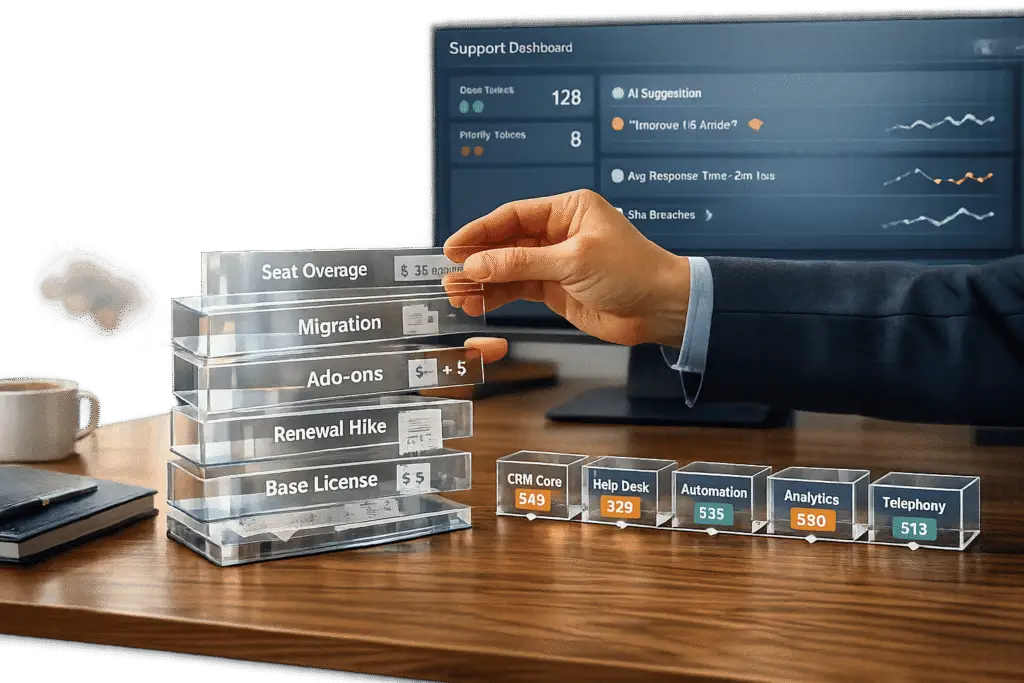
All-in-one CRM platforms seem like a simple solution, but they often cost more than expected. Here’s why:
- Hidden Costs: Annual renewal rates average a 12% increase, and add-ons can make up over 75% of expenses. Implementation fees alone often hit $250,000.
- Paying for Unused Features: Most teams use less than 60% of features, wasting significant budgets on tools they don’t need.
- Vendor Lock-In: Migrating away is expensive, with data transfer costs reaching up to $15,000, plus challenges like proprietary formats and contract clauses.
- Premium Tiers: Essential features like advanced reporting or AI are locked behind costly upgrades, driving up total costs.
The Alternative: Modular CRM tools let you choose and pay for only what you need. They reduce waste, avoid hidden fees, and offer better scalability. By transitioning gradually, businesses can save up to 25% and boost productivity by 40%.
If your CRM feels bloated or overpriced, it’s time to rethink your strategy.
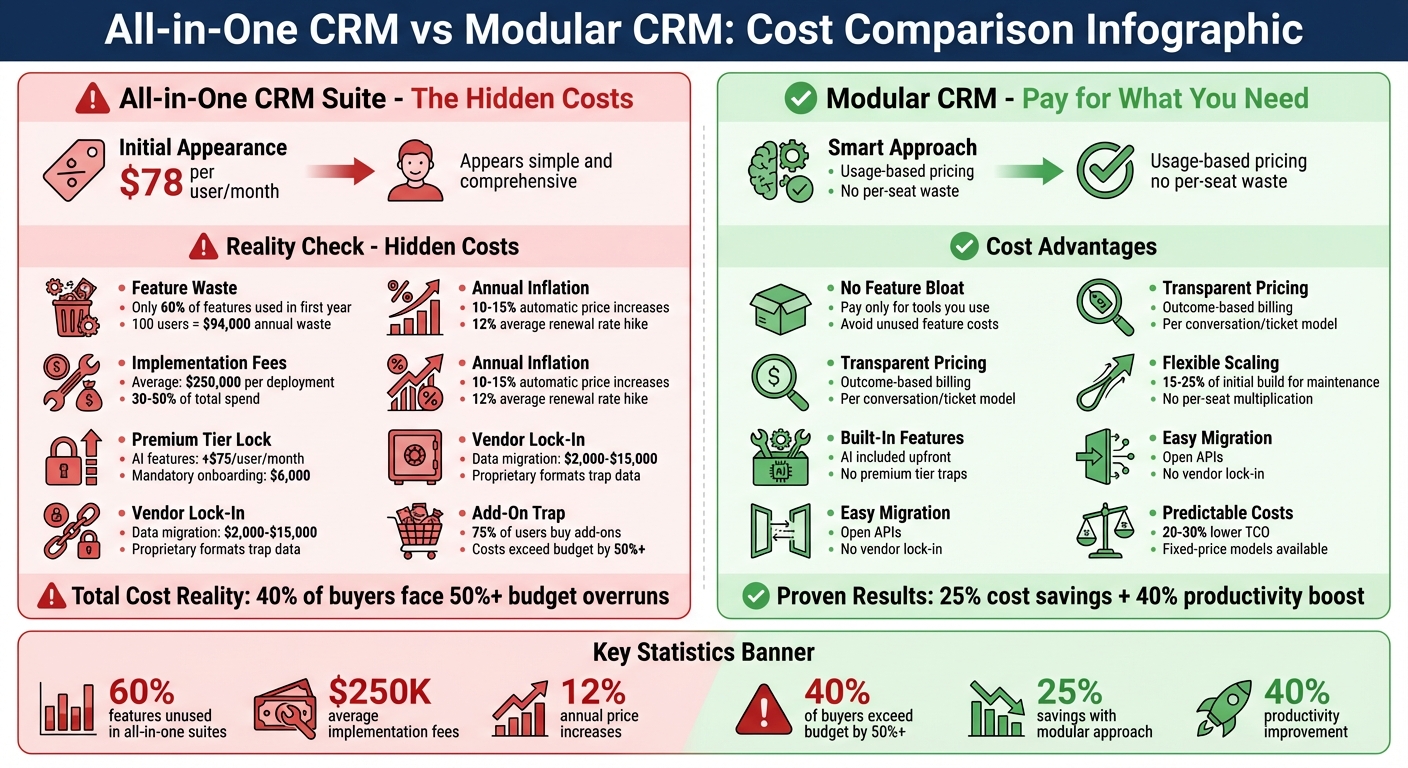
All-in-One CRM vs Modular CRM: Cost Comparison and Hidden Fees
The Real Cost of All-in-One CRM Suites
Paying for Features You Don’t Use
When you invest in an all-in-one CRM, you’re paying for the entire package – even if you only use a small portion of it. Here’s the reality: most teams use less than 60% of the features in their first year [6]. So, while you might need basic tools like contact management or email tracking, you’re also paying for advanced features like AI-powered lead scoring or marketing automation that may never see the light of day.
This isn’t just a hypothetical issue. A 2023 study revealed that 40% of CRM buyers faced unexpected total cost of ownership (TCO) surprises, exceeding their original budget by over 50% [3]. Many organizations upgrade to higher-priced enterprise plans just to unlock one or two critical features – like custom reporting or API access – while leaving the rest of the suite untouched. Considering the average CRM costs $78 per user per month, multiplying that by 100 users for features you don’t use could mean an annual waste of nearly $94,000 [9].
These unused features not only drain budgets but also pave the way for bigger financial pitfalls, like vendor lock-in.
Vendor Lock-In and Migration Costs
Once you’re locked into a CRM, switching to another platform can be both time-consuming and expensive. Many vendors design their ecosystems to make leaving difficult. For example, migrating data alone can cost anywhere from $2,000 to $15,000, depending on the complexity of your records [6]. But that’s just the tip of the iceberg.
Take the case of a Fortune 500 retailer. They faced a 45% price hike at renewal when their CRM vendor cited "market changes." After factoring in mandatory analytics modules and unexpected support fees, their total spend ballooned to $3.5 million – 75% higher than anticipated. Switching platforms would have cost even more, so they stayed put [3].
This isn’t an isolated incident. Vendors often include "evergreen" clauses in contracts, which automatically increase prices by 10-15% annually [3]. Combine that with heavy customizations that break during updates, and businesses find themselves stuck in a cycle where leaving costs more than staying – even if the CRM no longer meets their needs. This is why many companies are now turning to unbundled solutions for a more transparent and manageable alternative.
And if migration challenges weren’t enough, escalating upgrade costs often force businesses to pay premium prices for basic functionality.
Premium Tiers for Basic Features
One of the most frustrating aspects of all-in-one CRM pricing is how essential features are locked behind the highest-priced tiers. Need AI-powered automation? That’s an upgrade. Want advanced reporting? Another tier jump. Custom workflows? Only available in the enterprise plan.
For example, a major CRM vendor charges $75 per user per month for AI features, but enterprise customers must also pay a mandatory $6,000 onboarding fee [8][9]. A tool that initially seemed affordable at $50 per user per month can quickly escalate to $150 or more once you factor in the features your team actually needs.
"The cheapest option isn’t always the most cost-effective. Simplicity in pricing reduces management overhead and improves ROI." – Prasad Thammineni, CEO of Agentman.ai [8]
On top of that, implementation costs can eat up 30-50% of your total spend, with hidden fees averaging $250,000 per deployment [3]. By the time you’ve paid for setup, training, premium tiers, and renewals, your "all-in-one" solution can become a massive drain on your budget.
sbb-itb-e60d259
Why Unbundling CRM Tools Reduces Costs
Pay Only for What You Need
A major perk of unbundling CRM tools is avoiding payment for features you’ll never use. All-in-one CRM providers bundle everything into a single package, charging for the entire suite even if you only use a fraction of it [10]. For example, while you might rely heavily on contact management and email tracking, you could still end up footing the bill for unused features like marketing automation, social media integrations, or advanced lead scoring.
Unbundled tools flip this model. Instead of paying $165 per user per month for a comprehensive suite [5], you can opt for specialized tools that base their pricing on usage – such as the number of conversations or tickets handled. This shift from "access-based" to "outcome-based" pricing can lead to noticeable savings, especially for larger teams.
Another cost-saving advantage is avoiding the "add-on trap." Big CRM platforms often push users toward add-ons, with attach rates exceeding 75% [3]. These extras, like premium analytics or AI modules, frequently come with steep markups. On the other hand, specialized tools often include these features upfront, sparing you from negotiating multiple tiers or paying onboarding fees that can reach $6,000 just for basic automation [9]. This streamlined approach leaves room for more advanced AI capabilities without breaking the bank.
Better AI for B2B Support
The cost benefits of unbundling extend further when you consider AI capabilities. All-in-one suites often deliver AI features designed to cater to a wide range of industries, sacrificing the depth needed for complex B2B workflows. In contrast, unbundled tools tailored for B2B operations collect precise, domain-specific data, enabling better predictions and smarter automation [1].
For instance, AI-native support tools can accurately detect first contact resolution (FCR) by analyzing the complete context of customer interactions – something generalized systems often struggle with. They can also create dynamic service level agreements (SLAs) that adjust in real time based on factors like upcoming renewals or customer health scores, ensuring high-priority accounts get the attention they deserve. These features come built-in, avoiding the extra costs associated with add-ons.
"When a platform tries to be everything to everyone, its core features can become diluted. Specialization is where true innovation happens." – TheSaaSPeople [1]
Unbundled tools, powered by AI models trained on focused, high-quality data, can uncover patterns in customer behavior, predict satisfaction scores, and recommend solutions based on past cases. This level of precision often outperforms the generalized AI found in all-in-one systems.
Scale and Customize Without Limits
Unbundled solutions also shine when it comes to scalability and customization. All-in-one suites often use a per-seat pricing model, meaning costs rise directly with headcount – even if some users only need limited features. For example, a 50-person team paying $165 per user per month racks up $99,000 annually, excluding any additional fees [5]. Adding more team members only compounds these costs, regardless of how much they actually use the system.
Unbundled tools, however, typically scale based on usage or data volume rather than per-seat licenses. These modular systems charge 15%–25% of the initial build cost for maintenance, eliminating the need for per-seat fees [5]. This approach allows your support team to grow without ballooning costs, making it easier to manage budgets.
Customization is another area where unbundling excels. All-in-one platforms often force businesses to adapt their processes to predefined, rigid structures. If you need to track unique data, such as customer training records or compliance certifications, you might face awkward workarounds or incur professional services fees that could add 30%–50% to your total costs [3]. Modular tools, with open APIs and flexible architectures, let you design a system that fits your specific needs. You can integrate specialized tools for ticketing, knowledge management, or customer health tracking without encountering API limits or paying for middleware.
The end result? A support stack that grows with your business, offering scalable performance, tailored customization, and predictable costs – all while avoiding the constraints of monolithic platforms.
How to Evaluate Modular CRM Tools
What to Look for When Choosing Tools
When evaluating modular CRM tools, pay close attention to API maturity. Look for vendors that offer REST or GraphQL APIs, OpenAPI specifications, and dependable webhook streams [11]. These technical elements are crucial for ensuring seamless communication between tools, sparing you from constant maintenance headaches.
Another key factor is the integration ecosystem. Tools with native connectors and compatibility with platforms like Workato, Make, or Zapier can save you from "integration debt" [11][4]. Even the most feature-rich tool can become a burden if it doesn’t integrate smoothly with your existing stack, potentially leading to expensive custom development work.
Total Cost of Ownership (TCO) goes beyond the monthly subscription fee. To get a clear picture, factor in implementation costs, integration expenses, and usage-based fees like API calls [3][11]. Ask vendors for fixed-price models or transparent billing structures, which can reduce TCO by 20%–30% [3].
Scalability is another must. Look for tools with high API throughput, generous record limits, and low webhook latency to ensure they can handle growing support volumes [11]. Setting automated alerts at 70% and 90% of API or automation quotas can help you avoid unexpected overage charges [11]. Also, prioritize tools with observability features like logs, dashboards, and run histories to monitor automation performance and quickly spot issues [11].
"The cheapest option isn’t always the most cost-effective. Simplicity in pricing reduces management overhead and improves ROI." – Prasad Thammineni, CEO, Agentman.ai [8]
By focusing on these criteria, you’ll be better equipped to choose tools that fit your needs without creating unnecessary complexity or costs.
Mistakes to Avoid
One of the most common mistakes is underestimating integration challenges. Modular connections can fail, and maintaining custom API code can eat up as much as 40% of an IT budget [2]. Before adding a new tool, ensure your team has the resources to handle the integration workload.
Be cautious of hidden per-seat pricing traps. Traditional per-user pricing models don’t account for AI agents that perform tasks autonomously, leading to inefficiencies like paying for "idle seats." Instead, opt for outcome-based pricing models that charge per conversation or ticket handled [8][5]. Similarly, avoid tools with strict API rate limits, as these can lead to costly overage fees when your operations scale [5].
Watch out for tools that restrict essential features behind expensive "Enterprise" tiers. Features like AI capabilities often come with minimum seat requirements [3][8]. Scrutinize contracts for clauses like "auto-renewal" or "CPI plus X%" price increases, which can inflate costs by up to 20% annually [3]. Negotiate predictable renewal rates and bundled pricing for automation runs to maintain control over your budget [11][8].
Another pitfall is over-optimizing for future growth. Choosing enterprise-grade tools too early often means paying for features you don’t yet need [4]. Always test tools in a sandbox environment to validate performance and integration latency before committing [11]. And don’t overlook data quality – migrating "dirty data" into a new system only shifts the problem rather than solving it [5].
How to Transition from All-in-One to Unbundled CRM
Review Your Current CRM Costs
Start by conducting a thorough audit of your current CRM setup. Use tools like IT procurement records, SSO logs, expense reports, and browser extension audits to uncover hidden apps and their associated costs [12]. Many organizations find they’re using 30–50% more applications than their IT teams realize [12].
Create a detailed inventory that lists each application’s name, vendor, purpose, cost, license count, active users, and integrations [12]. Pay close attention to usage data – applications with less than 50% active licenses often account for 20–30% of SaaS spending and are ideal candidates for removal [12].
Next, identify where your all-in-one system is falling short. Are there clunky features, like email tools that slow you down? Or maybe analytics that don’t give you the insights you need? These pain points, along with hidden costs like integration maintenance and context switching, can add up to as much as your visible license costs [12]. Document your workflows – how leads are qualified, approvals are handled, and where data breaks – to ensure your new modular tools align with your actual processes [14].
With this comprehensive understanding of your current setup, you’re ready to start testing modular tools.
Test Modular Tools First
Once you’ve established a clear baseline of costs and needs, begin piloting modular tools. Focus on testing high-impact features alongside your current system [2]. Start small – try one module, like sales engagement or customer support, to confirm its value before expanding to other areas [13]. Building and testing a minimal viable product (MVP) for your CRM typically takes 3–5 months, while a full transition with deep integrations might require 6–12 months or more [14].
Opt for tools with open architectures and strong APIs to ensure they integrate smoothly into a unified system [1]. Before adding new tools, set up a central "System of Truth" (such as a cloud data warehouse) to maintain clean, unified data [13]. To avoid creating new data silos, define data contracts early on, mapping event and customer data properly to CRM fields [16].
"The right stack for $0 MRR is not the same as the right stack for $500K MRR. And that’s fine. Your infrastructure should match your stage. Not your aspirations." – SoftwareVouch [4]
After successful pilots, you can start phasing out parts of your old CRM suite.
Phase Out Your Old Suite
Transitioning away from your legacy CRM should be a gradual process, typically over 3–6 months. Start with an MVP that handles your core workflows, then slowly add automations and analytics [14][2]. Use an orchestration layer to connect customer-facing systems with your old backend, ensuring a smooth transition [15].
Keep in mind that 25% of small businesses cite setup and data migration as the toughest part of implementing a new CRM [7]. Throughout the process, maintain a unified "Customer 360" view to prevent conflicting information from derailing your sales and service teams [2]. Treat your CRM stack as a dynamic ecosystem that requires ongoing management rather than a one-time project [15]. Companies that improve CRM adoption often see productivity gains and faster sales cycles, leading to average savings of $8.7 million [14].
This phased approach minimizes disruptions while aligning your operations with scalable, AI-ready solutions that reduce costs in the long run.
"The goal is no longer to find a single platform to last a lifetime, but to build a resilient, intelligent ecosystem that allows you to adapt, innovate, and win." – Matthew Iovanni, CEO, FullFunnel [13]
The Next Breakthrough: Switching Cost Flattening
Conclusion
Feature bloat often leaves you footing the bill for tools you never use, while renewal inflation – averaging about 12% each year – quietly eats away at your budget [3]. Add vendor lock-in, which traps your data in proprietary formats, and hidden setup fees that can account for 30–50% of your total spend [3], and the financial strain only grows.
Switching to a modular CRM can flip the script. With this approach, you only pay for the features you actually need, swap out modules as your business evolves, and avoid the typical 10–15% annual price hikes many enterprise contracts impose [3]. Modular tools are more focused, delivering better performance and adaptability for specific needs. For B2B support teams, this translates to improved AI capabilities, cleaner data, and workflows designed for managing long-term, complex customer relationships.
The numbers back it up: 40% of CRM buyers report unexpected costs exceeding initial quotes by over 50% within three years [3]. Meanwhile, businesses that adopt modular CRM solutions experience 25% cost savings and a 40% boost in productivity [17]. By auditing your expenses, testing modular tools with one team, and phasing out unnecessary features, you can unlock these savings and efficiency gains.
Ultimately, a modular CRM strategy offers a more flexible and cost-effective way to support your business. Your CRM should work for you, not limit you. Start by reviewing your current setup, experiment with modular tools in a controlled way, and eliminate the excess. A CRM tailored to your needs today can fuel your growth far better than an all-in-one suite that tries to do it all.
FAQs
How do I calculate my CRM’s true total cost of ownership?
To figure out your CRM’s true total cost of ownership (TCO), you need to look beyond just the licensing or subscription fees. Hidden costs can add up quickly – think about administrative overhead, customization, integration, training, and data migration. On top of that, don’t forget ongoing expenses like maintenance, updates, and even potential vendor lock-in fees. By analyzing both direct and indirect costs in detail, you’ll get a clearer picture of your CRM’s long-term financial impact.
What’s the safest way to avoid vendor lock-in before I sign a contract?
To steer clear of vendor lock-in, focus on tools that align with open standards and allow for data portability. This makes it simpler to switch providers if the need arises. When negotiating contracts, ensure they include clear terms about data ownership, exit strategies, and migration procedures. Look for vendors that offer transparent pricing and steer away from agreements requiring long-term commitments. It’s also wise to prioritize modular, best-of-breed solutions rather than relying on all-in-one platforms, as this approach helps maintain flexibility and minimizes reliance on a single provider.
How do I unbundle without breaking my Customer 360 data?
To separate your CRM without losing the benefits of your Customer 360 data, it’s crucial to keep your data centralized and easy to access during the shift. Rely on native integrations or APIs to maintain smooth data exchange across systems. Taking a phased migration approach can minimize the risk of creating data silos, while using flexible setups like middleware ensures your data stays consistent. Throughout the process, regular testing and validation are key to protecting data accuracy and keeping customer insights flowing without interruption.