


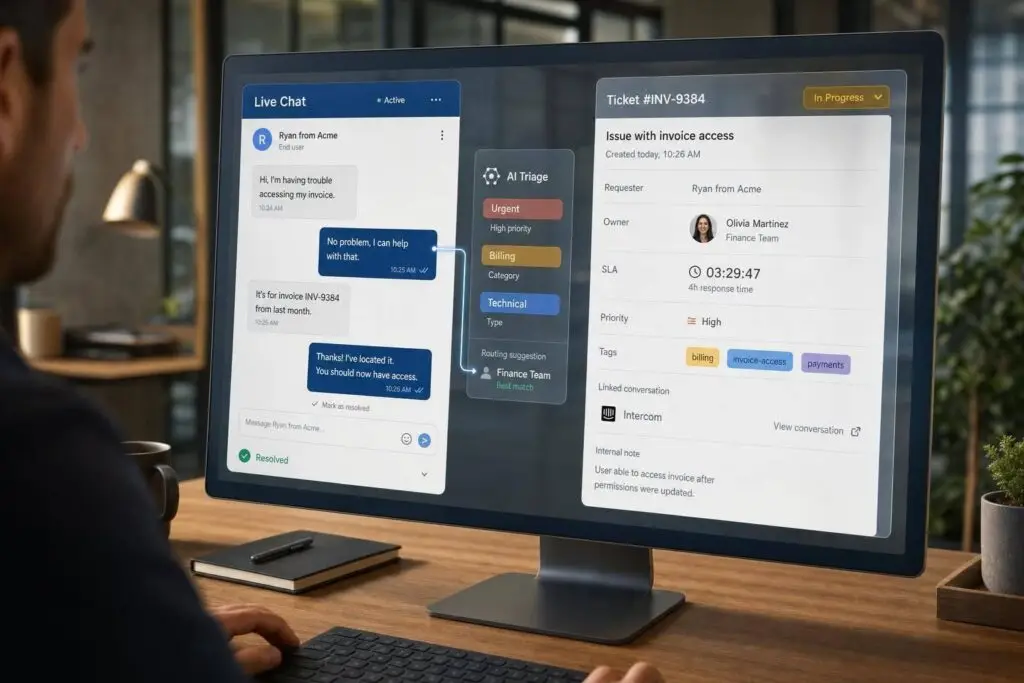
If a case needs tracking, an owner, an SLA, or work across teams, I would not keep it in Intercom alone. I’d use Intercom for live chat and move the case into a ticket system for the work that follows.
Here’s the short version:
- Keep Intercom for chat: onboarding help, billing questions, and one-session troubleshooting
- Open a ticket for casework: bugs, outages, VIP issues, legal or finance reviews, and anything that lasts more than one shift
- Use one priority model: for example, P1 to P4 in both systems
- Sync status both ways: so the chat agent can see ticket progress without digging
- Run SLA clocks and escalations in the ticket system: not in chat
- Use AI for triage and summaries: one cited benchmark in the article says mature AI triage can reach about 89% accuracy, versus 40% to 50% for rule-based routing
I read this as a simple two-layer setup: Intercom handles the conversation, and the ticket system handles the case. That split helps stop lost context, repeat questions, missed deadlines, and messy queue management.
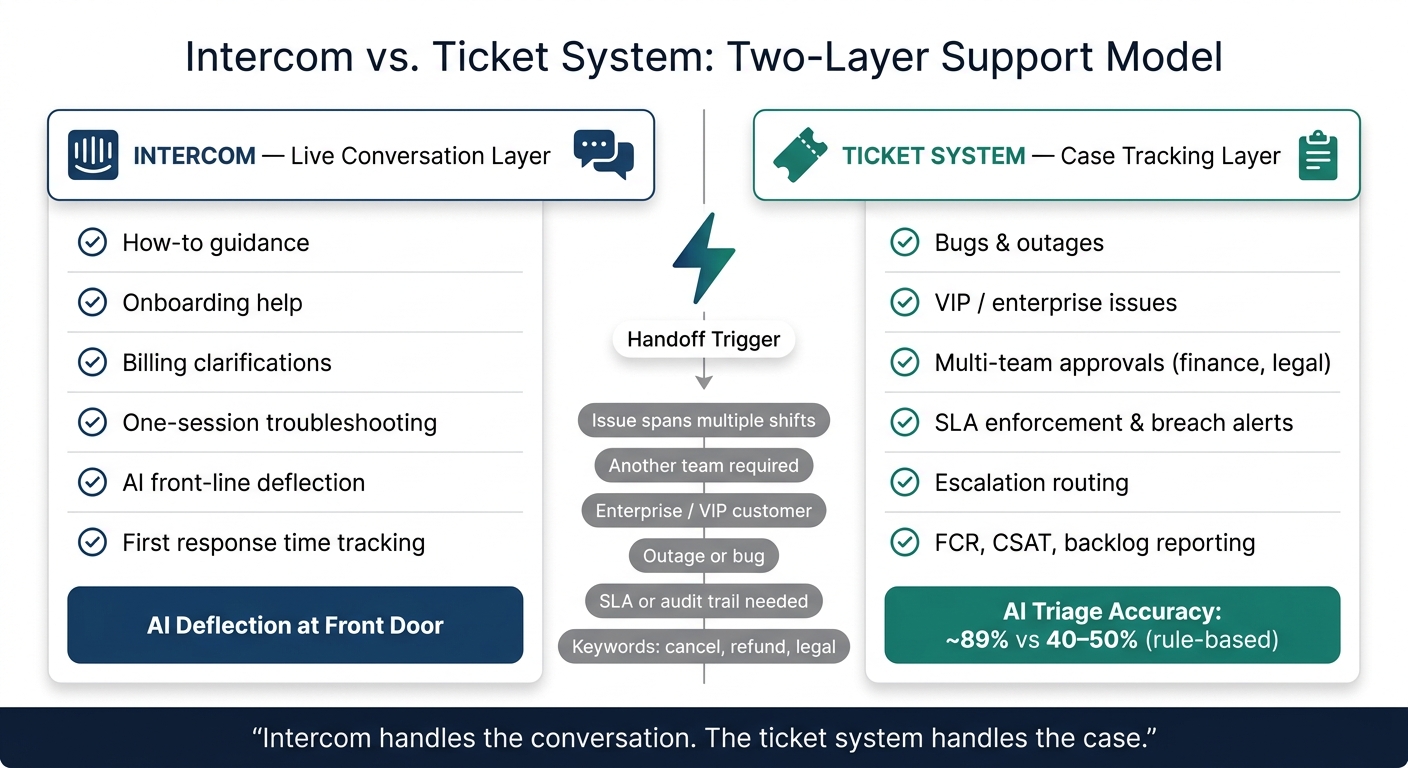
Intercom vs. Ticket System: Two-Layer Support Model Explained
Quick comparison
| Area | Intercom | Ticket system |
|---|---|---|
| Main job | Live customer conversation | Case tracking and resolution |
| Best for | Fast answers in one session | Multi-step work across days or teams |
| Ownership | Can get unclear across shifts | Clear owner on each case |
| SLA handling | Basic response timers | SLA rules, alerts, and escalations |
| Reporting | Response time and CSAT | Backlog, aging, FCR, escalation rate, cost per case |
| AI use | Front-line deflection | Triage, summaries, routing, KB drafts |
My takeaway: if you try to run backlog, escalations, and audit trails inside chat, work gets buried. If you let chat stay chat, and let tickets stay tickets, support is easier to run and easier to measure.
sbb-itb-e60d259
Why a chat-first setup breaks when it becomes your only helpdesk
Intercom is built for live conversation, not multi-step casework. That setup works fine when a question can be solved on the spot. But things start to wobble when an issue needs engineering input, manager approval, or a few days of follow-up across teams.
Once that happens, chat stops feeling like a neat conversation and starts acting like a loose queue. Messages stack up. Context gets buried. Ownership gets fuzzy. That line matters, because the next section turns it into routing rules.
Where Intercom works well
Intercom does a good job with single-session issues. Think of it as the front door, not the place where every case should live from start to finish.
It fits best for:
- how-to guidance
- onboarding help
- billing clarifications
- live troubleshooting
What breaks under backlog, handoffs, and SLA pressure
The trouble starts when a thread moves across shifts or teams. The next agent often has to piece the story back together, and the customer ends up repeating the same details. That’s a workflow problem, not a staffing problem. Agents manually relay context across tools.[1][2]
And that mismatch gets worse when there are no ticket fields or controls like status, owner, priority, and an SLA clock. Without those, there isn’t a dependable way to see where a case stands or who owns it. Escalations become ad hoc, and chat metrics don’t show backlog, account risk, or workload across cases that stay open for days.[1][4]
Chat layer vs. ticketing layer: what each system should own
The distinction is simple:
| Dimension | Chat Layer (Intercom) | Ticketing Layer (Supportbench) |
|---|---|---|
| Primary unit of work | Customer-facing conversation | Resolution-oriented ticket |
| Optimization goal | Speed and responsiveness | Workflow, ownership, and outcomes |
| Backlog handling | Conversations pile up; hard to prioritize | Structured queues with status and priority |
| Ownership | Often shared or ambiguous across shifts | Explicit owner assigned to every case |
| SLA management | Basic response timers | Multi-tier enforcement and breach alerts |
| Escalations | Manual, ad hoc, often via Slack | Structured paths with internal notes and routing |
| Reporting | Engagement metrics like CSAT and response time | Operational analytics like trends, productivity, and account health |
That split decides which requests stay in chat and which ones should become tickets.
Design the two-system model: what stays in Intercom and what becomes a ticket
Make the split a clear policy: Intercom handles live intake. Supportbench handles any case that needs tracking, ownership, or follow-up. From there, the job is simple. Decide which requests stay in chat and which ones should become tickets.
Rules for keeping work in chat versus opening a ticket
A clean way to draw the line is to ask one question: can this be resolved in one session without another team? If yes, keep it in chat. If not, open a ticket.
Keep work in Intercom for things like a how-to question, a routine account update, or a simple billing clarification. Create a ticket in Supportbench when any of these apply:
- The issue spans more than one shift or needs follow-up over several days
- Another team, such as finance or legal, needs to approve or resolve the issue
- The customer is on an enterprise or VIP tier, or a renewal is at risk
- There’s an outage or a bug affecting more than one customer
- The case needs an SLA or audit trail
It also helps to set keyword-based escalation triggers inside Intercom. Terms like "cancel", "refund", or "legal" should auto-flag a conversation for ticket creation. Sentiment signals matter too. If AI detects high frustration, escalate before the thread stalls. [6]
Every ticket created from Intercom should include a handoff summary: what the customer asked, the customer’s tier, any diagnostic data already collected, and why it was escalated. That way, the back-office agent doesn’t have to start from scratch. [2][6]
Define ownership, priority, and severity across both systems
Assign ownership twice: one owner for the conversation, another for the ticket. On a small team, that may be the same person. Still, the roles should be named plainly in your policy.
Use one shared priority model across both systems, such as P1 through P4. If agents rejudge urgency when they switch tools, a case can quietly slip down the queue. When a ticket is updated in Supportbench, those updates should sync back to the Intercom thread so the front-office agent stays in the loop without chasing the ticket by hand. [2][5]
That split only works when statuses and notifications stay in sync across both systems.
How to choose the right ticketing backbone for complex B2B support
Not every ticketing tool fits B2B casework. A platform built for high-volume support may do a good job with fast intake, then struggle with the kind of case handling B2B teams deal with every day. What matters most here is pretty specific: SLA enforcement with breach alerts, automated escalation workflows, account-level context, and built-in AI support. Those points decide whether the handoff stays clean or turns into duplicate work.
Supportbench fits that setup. It includes SLAs that tighten near renewal, multi-level escalation tracking, account-level context, and AI features like case summaries, auto-triage, sentiment scoring, and KB article creation.
Once the ticketing backbone is chosen, the next move is a clean handoff: statuses, queues, and customer updates.
Build the handoff: routing, statuses, queues, and customer communication
Once routing rules are in place, the next step is simple in theory but easy to mess up in practice: move the right case, with the right context, into the right queue.
A handoff only works when the ticket shows up with the transcript, account context, and the next action already spelled out. If that context is missing, the case often starts over in the wrong queue, and the team loses time fast.
Manual, rules-based, and AI-assisted ticket creation
There are three practical ways to move work from Intercom into Supportbench.
Manual ticket creation turns an active chat into a ticket. Rules can create tickets on their own from triggers like VIP status, renewal risk, or refund intent. AI triage classifies intent, flags frustration, and routes the case to the right queue.
When summaries and metadata are attached, AI routing helps teams classify cases faster and cut handle time.
Map statuses and queues so work stays visible
Map ticket states directly so SLA clocks and escalation rules fire the way they should: New, In Progress, Waiting on Customer, Escalated, and Resolved.
Queues help keep urgent B2B work from getting buried in the backlog:
| Queue | Trigger | Owner |
|---|---|---|
| SLA Breach | SLA threshold reached or system outage | On-call Lead |
| VIP / High-Tier | Enterprise or Pro plan + high urgency | Account Manager |
| Technical / Bugs | Intent: "bug", "error", "API" | Engineering Support |
| Account Risk | Renewal <60 days + frustration signal | Customer Success |
| Billing / Legal | Finance, billing, or legal requests | Specialized Dept |
Sync status changes back to Intercom so the chat owner can see ticket progress without opening the ticket itself.
Well-designed handoff vs. duplicate-work handoff: a side-by-side look
The gap between a clean handoff and a messy one usually comes down to one thing: where the source of truth lives.
If agents are working the same issue in both systems at the same time, context gets split and work doubles. Supportbench should be the operational record. Intercom should stay the customer-facing layer.
| Well-Designed Handoff | Duplicate-Work Handoff | |
|---|---|---|
| Transcript capture | Automatically attached to the Supportbench case | Manual copy-paste or lost in chat history |
| Ownership | Clear ticket owner in Supportbench | Fuzzy ownership across the chat inbox |
| Status sync | Bi-directional between Intercom and Supportbench | Manual updates required in both systems |
| SLA visibility | Hard clocks with breach alerts | Best-effort response times, no enforcement |
| Customer updates | Automated via ticket status change | Agent sends manual "checking in" messages |
| Escalation clarity | Dedicated queues (Bugs, Billing / Legal, Account Risk) | Single "Escalations" tag or folder |
| Agent workload | Context delivered via AI summary and metadata | Agent reads the full chat history from scratch |
With the handoff set up this way, SLAs and escalations can run from the ticketing layer instead of the chat thread.
Run SLAs, escalations, reporting, and AI from the ticketing layer
When tickets are moving cleanly, the inbox stops being the main story. The operating layer matters more. Once the handoff is working, run SLA, reporting, and AI from the ticketing layer.
Use Supportbench for SLA clocks, escalation paths, and case reporting
The SLA clock should start the moment a conversation turns into a ticket, or when it hits a complexity trigger like a refund request or a bug mention. Supportbench supports dynamic SLAs, so the clock can tighten on its own based on account conditions. For example, that can happen when a renewal is 45 days out or when a customer is marked high risk [2].
Breach alerts can fire at 75% of the SLA window as a warning, at 90% as an escalation to the team lead, and at 100% with auto-reassignment to a manager [7]. Every step stays visible in Supportbench.
Reporting should move there too. Use Intercom for first response time. Use Supportbench for case outcomes like first-contact resolution (FCR), CSAT, CES, NPS, backlog aging, escalation rate, and customer health scores. Split those views across both systems without a clear role for each, and visibility starts to fall apart.
AI use cases that cut handling time and improve consistency
Rule-based routing systems average about 40% to 50% accuracy, while mature AI triage can reach about 89% accuracy [3]. That gap matters. It means fewer cases sent to the wrong team, less reassignment churn, and less time wasted getting each ticket to the right owner.
Use AI to handle work that slows teams down:
- Summarize the Intercom transcript at handoff
- Surface relevant knowledge base articles during the case
- Draft a KB article after resolution so solved cases feed the knowledge base
- Flag likely CSAT or CES risk before a bad survey comes in
- Detect FCR without making agents guess whether the case was solved on first contact
Predictive CSAT and CES give agents and managers a chance to step in before a negative survey is submitted. AI-driven FCR detection also removes the manual guesswork around whether a case was resolved on first contact.
Intercom only vs. Intercom plus Supportbench: a direct comparison
That’s the practical difference between a chat tool and a support system of record.
| Capability | Intercom only | Intercom + Supportbench |
|---|---|---|
| SLA flexibility | Conversation-level SLA handling | Dynamic, account-based, multi-tier SLA enforcement |
| Escalation control | Basic conversational routing | Multi-tier escalation with breach alerts and auto-reassignment |
| Reporting depth | Responsiveness and volume metrics | FCR, CSAT, CES, NPS, backlog aging, escalation rate, and cost per case |
| AI workflow coverage | Front-line deflection | Triage, summarization, escalation prediction, and KB drafting |
Intercom handles the conversation. Supportbench handles the work that needs ownership, deadlines, and reporting.
Conclusion: Use Intercom for conversations and Supportbench for accountable support work
Intercom works well for live conversations, proactive messaging, and AI-assisted deflection at the front door. But structured queues, multi-tier escalations, and SLA commitments are not what it was built to handle. When teams push Intercom into that role, the same problems keep showing up: lost context and missed deadlines.
The fix is simple: use Intercom for live conversations and Supportbench for tracked, accountable casework.
When escalation triggers are set upfront and handoffs are automated, the full Intercom transcript moves with the ticket. That means agents don’t have to rebuild context by hand every time a case moves from one team to another.
Slow, fragmented handoffs lead to rework, repeat contact, and avoidable churn. That’s where the payoff shows up. Supportbench adds AI for triage, summarization, escalation prediction, and knowledge reuse, so teams spend less time piecing cases back together and more time resolving them – while each system stays focused on the job it was built to do.
FAQs
When should a chat become a ticket?
A chat should turn into a ticket when a simple, live question becomes a more complex issue with multiple steps and a need for follow-up.
Move it to a ticket when it needs clear ownership, status updates, cross-team collaboration, SLA management, stretches across multiple days, or when volume creates a backlog that chat just doesn’t handle well.
How do I prevent duplicate work across both systems?
Stop manual copy-paste between systems. Set up automated, API-based ticket creation so the full chat transcript and key customer details go straight into your ticketing platform. Keep history in sync too, so agents can see past interactions without making customers repeat themselves.
You should also show account details and open ticket status inside the chat. That gives both customers and agents a clearer view of what’s going on in the moment.
A few pieces matter here:
- AI-driven escalation routing should pass context along with the handoff, so nothing gets lost when a case moves to another team.
- Fallback ticket forms should kick in if an API call fails, so the customer can still submit the issue without hitting a dead end.
What should sync between chat and tickets?
Sync the full conversation transcript and key customer details so every team has the same context and doesn’t waste time doing the same work twice.
Include details like:
- Customer identifiers: email, account ID, subscription tier
- Context signals: sentiment, intent, priority
- History: open tickets, past escalations
Use API-based connectors to send tickets over already filled in with the right details. Then sync ticket status changes back to chat, so everyone can see what’s happening without switching tools.
Related Blog Posts
- Intercom (10) – framed correctly as “chat-first → real helpdesk”
- How do you convert Intercom conversations into tickets and keep ownership + SLAs?
- How do you design a workflow where Intercom stays for chat but tickets live elsewhere?
- Moving Beyond “Chat”: Why Asynchronous Ticketing Wins for Complex B2B Issues
Evaluating help desks for a B2B team?
Supportbench is all-inclusive from $32 per agent per month, with migration and onboarding included. See pricing or book a 20-minute demo.






