



Support teams waste too much time searching for customer data. On average, agents spend 23 minutes per ticket just gathering details across multiple tools. This inefficiency frustrates customers – 53% have to repeat their issues to different agents – and costs businesses millions annually. A single source of truth (SSOT) solves this by centralizing accurate, up-to-date customer information in one place.
Here’s what you need to know:
- Why it matters: Disconnected systems lead to slower resolutions, higher churn, and lost productivity. Companies with unified data retain 89% of customers compared to 33% for those without.
- What to include: Key customer data like account details, billing status, ticket history, product usage, and internal knowledge base.
- How to start: Define your data model, clean up duplicates, connect tools via APIs or automation, and set clear ownership rules.
- Results: Faster resolutions, higher CSAT scores, and better customer retention. For example, Cynet increased their CSAT by 14 points and cut resolution time by 2–3 days after adopting an SSOT.
This guide walks you through the steps to build an SSOT, from mapping data sources to integrating systems, ensuring your support team has everything they need to deliver consistent, efficient service.
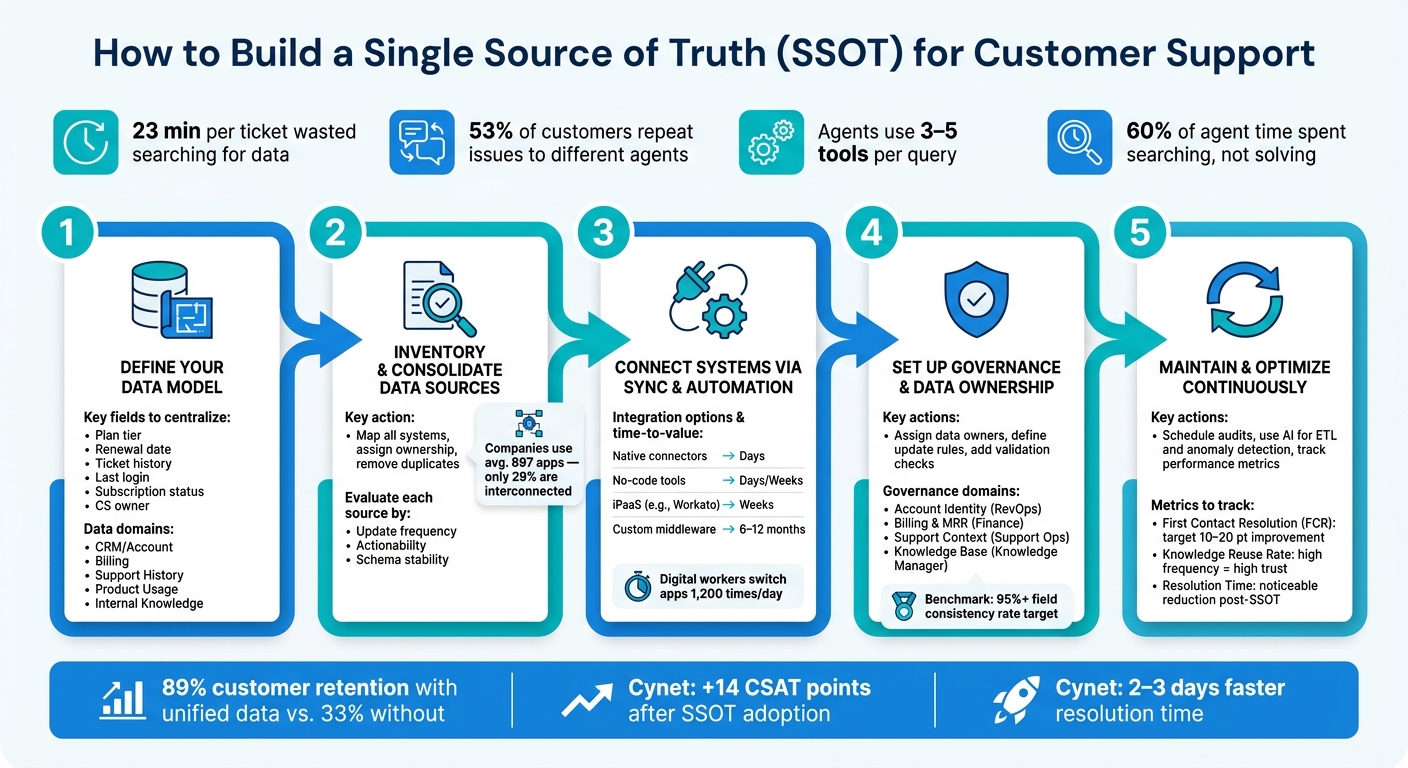
How to Build a Single Source of Truth for Customer Support
Define Your Customer Context Model
Before diving into system integrations, it’s crucial to figure out what should go into your single source of truth (SSOT). Without clear guidelines, you might end up centralizing too much, creating a cluttered and inefficient data model. The focus should be on identifying the specific information that helps agents resolve tickets faster and more effectively.
"Unified customer data means creating a single source of truth with complete interaction history, account intelligence, usage patterns, and health indicators – not just another dashboard or data warehouse." – Tina Grubisa [1]
What Data Should Be Centralized?
Customer context can be broken down into five key areas: account intelligence, interaction history, billing and financial data, product usage, and internal knowledge. Each area answers critical questions agents might need to address when handling a ticket.
| Data Domain | Essential Fields |
|---|---|
| CRM / Account | Plan tier, renewal date, contract value, key stakeholders, CS owner |
| Billing | Subscription status, MRR, invoice history, payment failures, active refunds |
| Support History | Past ticket content, resolution patterns, escalation count, CSAT scores and sentiment |
| Product Usage | Last login, feature adoption rates, usage spikes or drops over time |
| Internal Knowledge | Relevant runbooks, similar past resolutions, SME notes |
It’s important to differentiate between metadata (e.g., the number of tickets filed) and actual content (e.g., what those tickets were about). Metadata alone doesn’t provide the depth agents need. Full interaction history, with insights into ticket topics and resolutions, equips agents with the context required for effective support.
Minimum Data Fields for Effective Support
Not every piece of data from your CRM or billing system needs to be part of the SSOT. The guiding principle is simple: if an agent needs it to answer common questions without switching tabs, it belongs in the SSOT. Fields used for quarterly reports or executive dashboards can remain in their respective systems.
At a minimum, your SSOT should include the following for each customer record:
- Current plan tier
- Renewal date
- Recent ticket history with resolution notes
- Last login date
- Subscription status
- Assigned CS owner or account manager
Why is this so important? On average, agents interact with 3 to 5 different tools before responding to a single customer query [4]. Even more striking, they spend about 60% of their time searching for information instead of actually solving problems [4]. By narrowing the data model to only the essentials, you can significantly reduce these inefficiencies.
Here’s a practical rule: if answering a routine question requires opening more than two or three tabs, the relevant data points should be centralized in the SSOT. Keeping the focus on operationally critical data ensures agents have what they need to act quickly.
Once you’ve established a clear data model, the next step is to inventory and consolidate your existing data sources.
sbb-itb-e60d259
Inventory and Consolidate Your Data Sources
Once you’ve established your customer data model, it’s time to figure out where your customer data lives and how scattered it is. Here’s a startling fact: companies use an average of 897 applications, but only 29% of them are interconnected [2]. This lack of connection is where context gets lost, making this step essential for setting up the integrations we’ll cover later.
Identify Data Sources and Assign Ownership
Start by creating a map of every system involved in customer interactions. This includes your CRM, billing platform, support ticketing tool, product analytics, and internal knowledge bases. For each system, document the data it contains, who owns it, and how often it’s updated. That last point – update frequency – is often overlooked but critical. Outdated data leads to "truth conflicts", where different systems report inconsistent numbers for the same customer.
"When every team has a different number, nobody trusts any number. Decisions get delayed. Meetings turn into debates about methodology instead of strategy." – Andrey Avtomonov, CTO, Kaelio [3]
Assigning ownership to each data source ensures someone is accountable for its accuracy. Without clear ownership, data often falls through the cracks.
Remove Duplicates and Merge Overlapping Data
Before connecting systems, conduct a drift audit to find duplicates, conflicting IDs, and domain collisions. A frequent issue is multiple organization records sharing a single external ID or the same email domain being linked to multiple accounts [5]. These errors often go unnoticed until they disrupt your single source of truth (SSOT).
To avoid this, use a stable identifier – like a CRM account ID – as the anchor across all systems. Exclude generic domains (e.g., gmail.com, outlook.com) to prevent accidental links between unrelated accounts. If there’s any ambiguity in matching, stick to syncing company-level data to avoid overwriting the wrong information [5]. This approach reduces conflicts and ensures faster, more accurate responses from your team.
"The integration may look fine on day one while duplicate external_ids, domain collisions, and wrong default orgs silently pile up." – FoundryOps [5]
Compare Data Sources for Usability
Not all data sources are equally valuable for your SSOT. Evaluate each one based on four factors: data type, update frequency, actionability for support, and schema stability. A real-time data source that directly answers support questions is far more useful than one that only offers weekly exports of metrics no one uses.
| Data Source | Update Frequency | Actionable for Support | System of Record |
|---|---|---|---|
| CRM (account data) | Real-time / daily | High – plan tier, renewal dates, stakeholders | Primary |
| Billing platform | Real-time | High – subscription status, payment failures | Primary |
| Support ticketing | Real-time | High – ticket history, CSAT, escalations | Primary |
| Product analytics | Daily / hourly | Medium – usage trends, feature adoption | Secondary |
| Internal knowledge base | Manual / ad hoc | Medium – runbooks, SME notes | Secondary |
Keep an eye on schema drift – changes like field renames or data type adjustments can silently disrupt downstream processes [6]. Make schema checks part of your audit process, not something you deal with after the sync is live. These steps are crucial for ensuring your support systems work seamlessly together through sync and automation.
Connect Support Systems Through Sync and Automation
After mapping and cleaning up your data sources, the next hurdle is integrating them effectively. Did you know the average digital worker switches between apps 1,200 times a day? That’s a lot of wasted time spent on context switching [2]. The objective here is to make your tools work together seamlessly, reducing manual effort and leveraging the data you’ve already consolidated.
Use APIs and Workflow Automation
The integration method you choose depends on your team’s capacity and the complexity of your workflows. Here’s a quick breakdown of options:
- Native point-to-point connectors: Great for straightforward tasks like syncing a ticket ID with a CRM record. These are quick to set up, often going live in just a few days.
- iPaaS tools: If your workflows involve conditional logic (e.g., routing escalations based on subscription tier and ticket history), iPaaS platforms like Workato offer more flexibility. However, they require more maintenance.
- No-code tools: Perfect for teams without engineering resources. They cover most standard automation needs and are cost-effective.
- Custom middleware: Best for deep customization, but it’s a long-term investment requiring in-house engineering support.
| Integration Approach | Time to Value | Maintenance | Best Fit |
|---|---|---|---|
| Native Point-to-Point | Days | Low | Simple field mirroring |
| iPaaS (e.g., Workato) | Weeks | Medium–High | Linear workflows, moderate volume |
| Custom Middleware | 6–12 months | High | Deep customization, in-house engineering |
| AI Agent Unification | 2–4 weeks | Low | Cross-platform SOPs requiring judgment |
When setting up these integrations, don’t forget about retry logic. Use techniques like exponential backoff and intelligent queuing to handle API rate limits from providers like HubSpot or Salesforce. A silent sync failure is worse than one that loudly alerts you – it’s better to know when something goes wrong.
Standardize How Data Gets Updated Across Systems
Connecting systems is only part of the equation. The bigger challenge? Deciding who updates what, and when. Without clear rules, you risk bidirectional conflicts – where two systems update the same field, and the last timestamp wins by default. This chaos can lead to unpredictable outcomes.
"Don’t automate disagreement. Standardize the field definition first, then connect the systems." – DocsBot AI [8]
To avoid this, designate one system – often your CRM – as the authoritative source for key data like customer identity and lifecycle stage. For shared fields, define explicit ownership: decide which system can write to the field and which can only read. After the initial data load, switch to delta syncs, which only pull records updated since the last sync. This reduces API load and keeps processes efficient.
For sensitive updates, such as pricing changes or account escalations, add a human-in-the-loop gate. This means automation drafts the update, but a person reviews and approves it before execution. This extra step ensures accuracy and accountability.
Set Up Role-Based Access Controls
To protect your data, limit access to only those who need it. Role-Based Access Control (RBAC) is the go-to standard for support teams, offering a balance of simplicity and security. It’s far easier to manage than more complex models.
Follow the least privilege principle: grant each role only the permissions they need. Focus on behaviors rather than job titles. For example, determine who needs to export data, who can edit account fields, and who should only have view access. Building a permission matrix before configuring any software forces teams to address data ownership – a step many skip.
Don’t overlook AI agent access. Treat AI agents like scoped users, not admins. Assign them specific, auditable permissions (e.g., contacts.read or Create support ticket) instead of broad API access. This minimizes risk if something goes wrong and ensures a clear audit trail. Conduct an access review 30 days after launch to revoke any temporary rights [9].
Set Up Governance and Data Ownership
Creating clear data governance practices is essential for keeping your integrated systems reliable. Without defined ownership, accountability tends to disappear. As Alexander Stasiak, CEO of Startup House, wisely says:
"Every page needs a clear owner. ‘Collective ownership’ means no ownership in practice." [11]
This concept applies to everything from single data fields to entire records and larger data domains.
Assign Data Owners and Define Update Rules
A good first step is setting up a record ownership agreement – a document that specifies which system is the authority for each type of data. For instance, your CRM might manage account identity and lifecycle stages, while your support platform oversees ticket history and escalation details. This prevents confusion when multiple systems attempt to update the same field, ensuring a clear source of truth [5].
To maintain control, assign system, domain, and data stewards. For sensitive fields like subscription status, account tier, or escalation flags, introduce an approval step. Automation can suggest changes, but a person should verify them before they go live.
Add Validation Checks to Catch Data Problems
Automating validation is a powerful way to stop bad data at the source. Use required field rules, picklist restrictions, and real-time duplicate detection to prevent errors from spreading to downstream systems [12].
For ongoing monitoring, set up daily automated alerts to flag issues like tickets linked to the wrong organization, missing required fields, or integration sync failures. Additionally, conduct periodic 50-record audits: manually check records across your CRM, billing system, and support platform to measure how well fields match across tools. A 95%+ consistency rate is a solid benchmark [13][14]. Falling below this threshold signals a governance problem that needs attention.
To streamline issue resolution, categorize problems with specific codes (e.g., org_duplicate_external_id, user_domain_ambiguous) so teams can prioritize fixes quickly [5].
Governance Table for Data Domains
A governance table can help clarify roles and validation processes for each data domain. Here’s an example:
| Data Domain | Accountable Team | Primary Validation Checks | Update Schedule |
|---|---|---|---|
| Account Identity | RevOps / Sales | Duplicate external_id, domain collisions | Weekly audit |
| Billing & MRR | Finance / RevOps | Subscription status vs. CRM stage | Real-time sync |
| Support Context | Support Ops | Ticket-to-org mismatch, missing memberships | Daily review |
| Knowledge Base | Knowledge Manager | Stale content flags, knowledge gap analysis | Monthly audit |
One key note: exclude personal email domains like gmail.com or outlook.com from automated user-to-organization mappings. These domains can introduce messy data that’s difficult to clean later [5].
Keep Your Source of Truth Current and Useful
Maintaining a single source of truth (SSOT) is not a one-and-done task – it’s an ongoing process. Without regular updates, the quality of your data can decline rapidly, leaving support teams to make decisions based on outdated information. Over time, this can snowball into bigger issues that affect both efficiency and customer satisfaction.
Schedule Regular Data Reviews and Audits
High-performing teams treat data quality as part of their daily operations, not just as an occasional project. One way to stay ahead is by setting expiration thresholds for key records and knowledge articles. When a record reaches its age limit, it triggers a mandatory review, ensuring it remains accurate and relevant. Use an approval workflow to verify updates before they go live. For general content, automated checks can handle most of the work.
Another important step is auditing agent workarounds. These audits can highlight areas where data updates are most urgently needed. As the Consortium for Service Innovation aptly puts it:
"Knowledge creation should happen in the flow of work, not separate from it." [10]
These regular reviews create a solid foundation for leveraging AI tools, which can further improve the accuracy and usefulness of your SSOT.
Use AI to Keep Data Actionable
AI’s real strength lies in its ability to ensure consistency. AI-powered platforms can automate processes like ETL (Extract, Transform, Load) to clean up your data. This includes removing duplicates, fixing formatting issues, flagging missing fields, and spotting anomalies – like a drop in product usage combined with an increase in support tickets – before a human ever notices. [1][2]
AI can also analyze resolved ticket transcripts and draft updated knowledge articles directly from them. This means your SSOT evolves alongside your product without requiring constant manual updates. As Andrey Avtomonov, CTO of Kaelio, explains:
"AI is only as good as the data it can access, and siloed data means siloed intelligence." [2]
Track How the Single Source of Truth Affects Support Performance
To understand the effectiveness of your SSOT, you need to measure its impact. Focus on a few key metrics that reflect both data quality and accessibility:
| Metric | What It Tells You | Target |
|---|---|---|
| First Contact Resolution (FCR) | Indicates if agents have enough accurate context to resolve issues immediately | 10–20 percentage point improvement [15] |
| Knowledge Reuse Rate | Measures how often agents rely on centralized records instead of searching elsewhere | High frequency = high trust in the system [15] |
| Time to Publish | Tracks the speed of updating the SSOT after identifying a data gap | Days, not weeks [15] |
| Resolution Time | Shows if unified data reduces the time agents spend searching for information | Noticeable reduction post-SSOT implementation [1] |
Don’t just stop at numbers – consider agent experience as well. Teams using a unified system often report higher job satisfaction compared to those juggling multiple tools. [7] If resolution times are improving but agents still feel frustrated, it might mean the system is functional but not user-friendly. Keeping your SSOT accurate and easy to use not only streamlines operations but also lays the groundwork for AI-driven support, boosting overall service quality and team morale.
Conclusion: Steps to Unified Customer Context
After diving into strategies for unifying data and refining operations, it’s time to turn those insights into practical steps. Creating a single source of truth isn’t just about technology – it’s about building a disciplined operational framework. Start by auditing every system that interacts with customer data. Define a unified data model with clear naming conventions, connect tools using APIs and automation, assign clear governance roles, and keep the system up-to-date with regular reviews and AI-driven enhancements. This structured approach can lead to real improvements in customer retention and support efficiency.
The results speak for themselves. Businesses with unified data often see higher retention rates and faster issue resolution. Top-performing support teams using integrated platforms achieve first contact resolution rates that far exceed industry averages. These aren’t just operational wins – they directly safeguard revenue.
Successful teams usually begin with a single high-impact use case, like churn prediction, pipeline quality assessment, or AI-generated summaries of customer interactions. Validating ROI through one focused initiative before scaling up allows for steady progress. This step-by-step strategy consistently delivers results, with teams reporting better CSAT scores and higher ticket deflection rates by executing incrementally rather than attempting an all-at-once overhaul.
The ultimate aim is a system where agents can open a ticket and instantly access everything they need – account history, usage patterns, previous interactions, and health metrics – without hunting for information. Reaching this level of efficiency shifts support from being reactive to becoming a driver of revenue growth.
FAQs
What’s the fastest way to launch an SSOT without a big rebuild?
The fastest way to create a ‘single source of truth’ (SSOT) without completely revamping your systems is by leveraging AI-native platforms that work effortlessly with tools you already use, like CRMs and support systems. Here’s how to make it happen:
- Audit your data sources: Identify where your data lives and ensure it’s accurate and up-to-date.
- Choose a platform with automation features: Look for tools that streamline processes and reduce manual work.
- Focus on a high-impact use case: Start with an area where centralized data can make an immediate difference.
This method keeps the process straightforward while delivering quick and noticeable results.
How do we prevent sync conflicts between systems in an SSOT?
To maintain consistency and avoid sync conflicts in your SSOT, it’s crucial to establish clear guidelines and processes. Start by designating a definitive "source of truth" for each type of data. This ensures there’s no ambiguity about where the most accurate and up-to-date information resides.
Here are some practical steps to follow:
- Map only critical fields for synchronization: Avoid syncing unnecessary data to reduce complexity and potential errors.
- Control sync triggers: Decide whether updates happen in real-time or on a set schedule, depending on your needs.
- Enforce strict conflict resolution rules: For example, you can implement automatic rules like "the source of truth always wins" to handle discrepancies.
- Regular monitoring and audits: Continuously review and audit your data to catch and fix inconsistencies early.
By sticking to these practices, you can ensure your systems remain aligned and your data stays reliable across platforms.
Which customer fields should we include first for support context?
When it comes to delivering efficient and personalized support, certain customer data fields are especially important. Here’s what to prioritize:
- Interaction History: Knowing past interactions helps agents understand the customer’s journey and address ongoing concerns effectively.
- Account Details: Information like contract terms, renewal dates, and key stakeholders provides crucial context about the relationship.
- Product Usage Patterns: Tracking how customers use your product can reveal opportunities for engagement or areas where they might need assistance.
- Health Indicators: Signals like risk factors or overall account health can alert agents to potential issues before they escalate.
- Billing History: A clear view of payment records ensures smoother conversations about finances or overdue balances.
- CRM Profile Data and Account Metadata: Details like industry, account health, and strategic importance help agents tailor their approach and prioritize efforts.
By combining these fields, agents gain a well-rounded understanding of the customer’s status, laying the groundwork for support that feels both proactive and personalized.






