


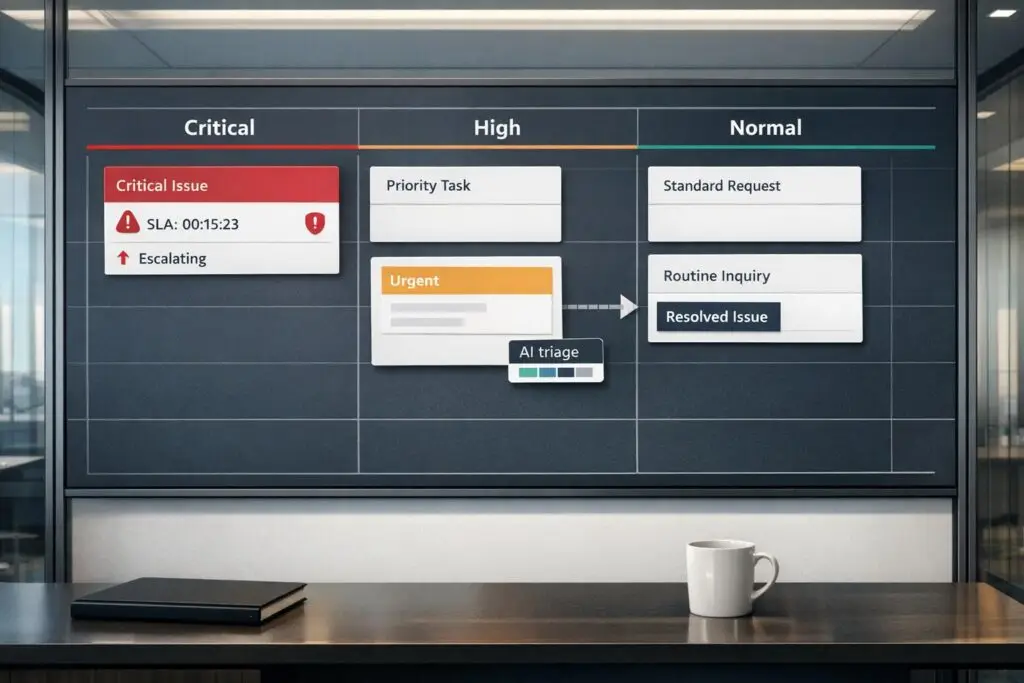
When customers mark minor issues as "URGENT", it disrupts support workflows and delays responses to real problems. The solution? Build systems that prioritize genuine emergencies, not just loud voices. Here’s how you can fix it:
- Define Urgency Clearly: Use a framework based on impact, sentiment, and business importance to classify tickets.
- Leverage AI Tools: Automate ticket prioritization with sentiment and intent analysis to spot real emergencies.
- Train Agents: Equip them with stress management techniques and clear communication skills to handle exaggerated claims calmly.
- Set Expectations: Provide clear timelines and service level agreements (SLAs) to reduce urgency mislabeling.
- Create Workflows for Critical Cases: Set up dedicated queues and resource buffers for urgent issues.
04 | How To Prioritize & Triage Incident Ticket | Learning IT Help Desk
sbb-itb-e60d259
Step 1: Define What Actually Counts as Urgent
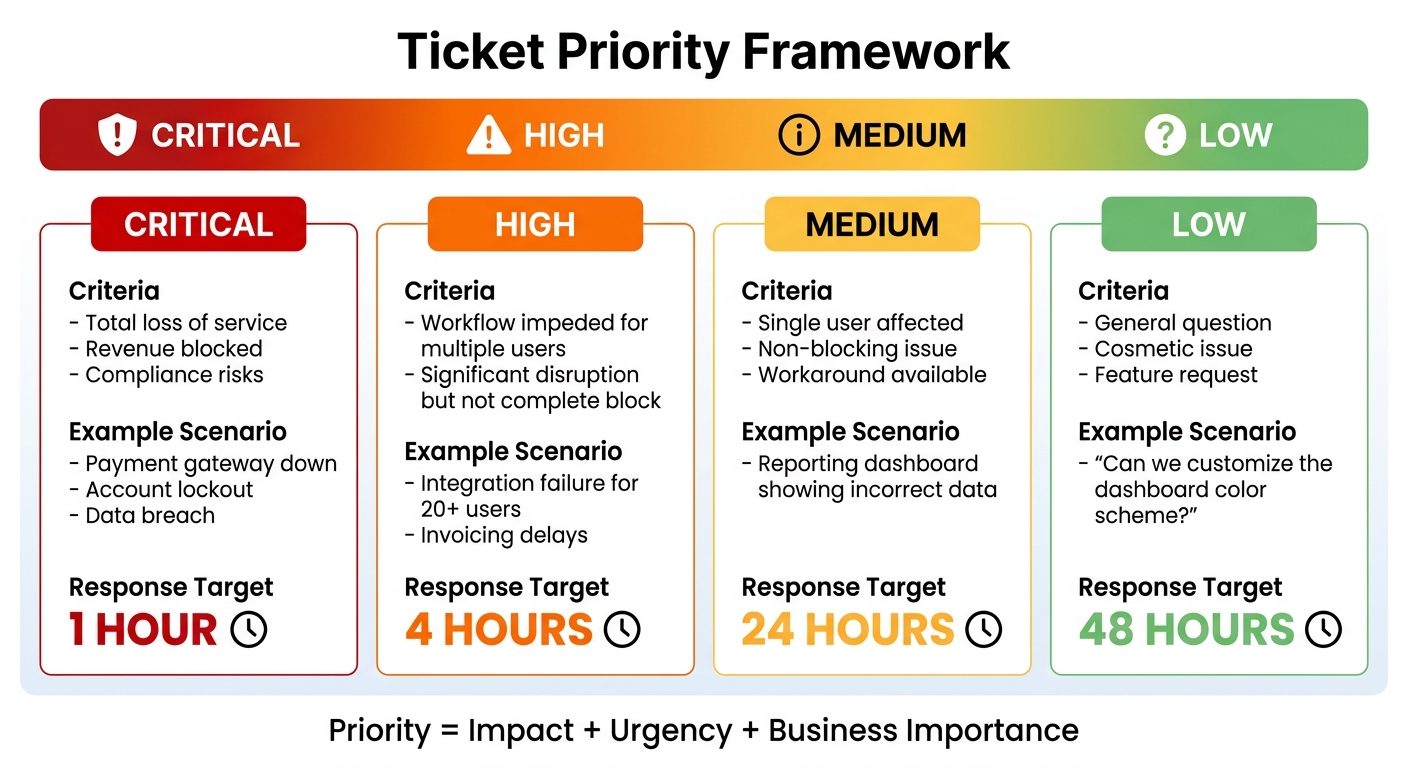
Customer Support Ticket Priority Framework: Impact Levels and Response Times
To tackle misclassified tickets, you need a clear definition of "urgent." Many teams rely on gut feelings or let customers decide, which often leads to trivial issues – like password resets – being treated with the same urgency as major outages.
A better approach? Use a three-axis framework that evaluates tickets based on Urgency (time sensitivity), Sentiment (emotional tone), and Business Importance (account value or monthly recurring revenue). This system eliminates guesswork, ensures consistent ticket prioritization and routing, and lays the groundwork for streamlined processes and AI-powered tools.
Set Clear Urgency Standards
Urgency should be based on functional impact, not how upset a customer sounds. A ticket is truly urgent if it results in a total loss of product use. For example, being locked out of an account or facing a complete system outage qualifies as Critical and demands a 1-hour response time.
Here’s how to categorize issues:
- Critical: Total service loss, revenue impact, or compliance risks. Examples include a payment gateway failure or a data breach.
- High Priority: Significant disruption to workflows but not a complete block. For instance, an integration issue delaying invoicing.
- Medium Priority: Non-blocking issues with workarounds available, such as incorrect data on a reporting dashboard.
- Low Priority: Feature requests or cosmetic concerns, like asking for a custom dashboard color.
| Impact Level | Criteria | Example Scenario | Response Target |
|---|---|---|---|
| Critical | Total loss of service; revenue blocked | Payment gateway down; account lockout | 1 hour |
| High | Workflow impeded for multiple users | Integration failure for 20+ users | 4 hours |
| Medium | Single user; non-blocking issue; workaround | Reporting dashboard showing incorrect data | 24 hours |
| Low | General question or cosmetic issue | "Can we customize the dashboard color scheme?" | 48 hours |
As Hemant Panda, Senior IT Delivery Leader, explains:
Impact decides how big the problem is. Urgency decides how fast it must be fixed. Priority decides what we fix first[4].
Apply AI Sentiment and Intent Detection
AI tools can help spot urgency signals that might not be obvious. Sentiment analysis evaluates the emotional tone of a message (positive, neutral, or negative), while intent detection identifies the customer’s goal. The real game-changer is emotion detection, which distinguishes between mild annoyance and outright frustration.
For example, Tekeir used multilingual sentiment analysis to manage support backlogs across Ireland, Croatia, and the US. By automatically prioritizing flagged tickets, they cut weekend backlog clearance from three days to just a few hours – a 60% efficiency boost[1].
The secret? AI models that understand context, not just keywords. These tools can detect sarcasm, intensity, and urgency more accurately than traditional systems. To maximize impact, set up automation rules that flag phrases like "can’t log in", "account suspended", or "ASAP" as Urgent. Then, layer AI sentiment analysis on top to identify frustrated customers who don’t use those exact words. Companies implementing this approach often see improvements of 20% to 32% in revenue growth, cost efficiency, and customer satisfaction[1].
Ask Direct Triage Questions
Agents can further refine urgency by asking targeted questions like:
- "Is this issue blocking your daily operations?"
- "Is there a workaround you can use right now?"
If the answer to the first question is no, or the second is yes, the ticket likely isn’t Critical. A frustrated customer might feel their issue is urgent, but unless it completely halts their ability to work, it’s not.
Another key question: "How many users are affected?" A minor bug affecting one user is a Medium priority issue, but if 50 users can’t access a core feature, that’s High or Critical. These direct questions help prevent wasted effort on tickets that don’t require immediate attention.
As the AI Shortcut Lab Editorial Team puts it:
Sentiment escalates urgency; it doesn’t replace it[3].
Step 2: Train Agents to Stay Calm and Professional
When customers blow minor issues out of proportion, agents need strategies to stay composed. The challenge isn’t just the customer’s tone – it’s the physical reaction it triggers. Constantly dealing with high-stress situations can lead to burnout. In fact, call centers face an average turnover rate of 30% to 45%, with the cost to replace a single agent ranging from $5,000 to $7,500 [5]. On top of that, 63% of employees have thought about quitting due to workplace stress [6].
So, what’s the fix? Equip agents with stress management techniques that help them reset emotionally between interactions. These aren’t just feel-good practices – they’re proven methods to lower blood pressure, slow heart rates, and reduce stress hormones [5][6].
Practice Stress Management Techniques
Quick stress-relief methods like the 4×4 breathing technique can make a big difference. This method involves inhaling, holding, exhaling, and pausing for four seconds each. Psychologist Judith Tutin explains:
Deep breathing works by slowing the heart rate and lowering blood pressure [5].
For immediate stress relief, agents can also use cold water on their wrists or face. This triggers the "mammalian dive reflex", activating the body’s natural calming mechanisms [5]. Another effective tool is sensory grounding – focusing on specific sounds, smells, or textures (like the feel of a desk) to break the stress cycle and stay present [5][6].
Short breaks between calls, or "micro-escapes", can also help. Just 10 minutes to stretch, walk, or get fresh air can recharge an agent’s energy for the next task [6]. Even simple desk exercises like shoulder shrugs or head rolls improve circulation and ease muscle tension without leaving the workstation [5].
Once agents regain their calm, they’ll be better prepared to address issues with professionalism and clarity.
Use Calm, Clear Language
After resetting, agents should focus on using clear, objective language to address the problem. The goal is to separate emotional reactions from the actual impact of the issue. This means prioritizing based on the real effect on business (e.g., revenue or operations) rather than reacting to an angry tone [8].
For instance, instead of saying, "I’ll escalate this right away", an agent could respond:
"I understand this is frustrating. Based on the information you’ve provided, this is a Medium priority issue with a 24-hour response window. I’ll request the missing details we need and aim to resolve it within 2–3 business days."
RC Victorino from Slab sums it up well:
Focusing on urgent tasks puts you in a reactive mindset, which can make you feel defensive, rushed, and narrowly focused. Focusing on important tasks puts you in a responsive mindset, which can make you feel calm, rational, and open to new ideas [7].
Using objective triage criteria also helps agents communicate priorities clearly. Statements like "This affects one user, so it’s a Medium priority" or "There’s a workaround available, so it’s not blocking your operations" reassure customers without dismissing their concerns [8].
Step 3: Set Clear Expectations with Customers
After agents regain their composure and use calm, measured language, the next step is to reduce the likelihood of future “urgent” escalations. How? By setting clear, realistic timelines right from the start. Using AI to prioritize tasks can also help establish these expectations. Often, customers exaggerate the urgency of their issues because they don’t know when to expect a response. By telling them exactly when they’ll hear back and when their issue is likely to be resolved, you can ease the uncertainty that fuels their anxiety. As Radu Dumitrescu, Head of Presale & Digital Transformation at BlueTweak, explains:
The most common mistake I see in help desk operations isn’t a bad tool or an undertrained team but the absence of a shared definition of urgency. When ‘critical’ means something different to every agent, priority becomes whoever shouts loudest, and the queue reflects politics rather than risk. [9]
This brings us to a two-part strategy: sharing dynamic SLA information and offering specific resolution timeframes.
Share Dynamic SLA Information
Not all issues are created equal, and customers appreciate knowing why some problems are prioritized differently. Context-aware SLAs (Service Level Agreements) adapt timelines based on factors such as the type of case, customer tier, and current service capacity. For instance, a P3 (Medium) issue affecting one user with a workaround might have a 24-hour first-response target and a 2–3 business day resolution window. On the other hand, a P1 (Critical) issue that disrupts revenue would demand immediate attention.
To reduce follow-up inquiries, display the “next-update time” directly in the customer portal or messaging interface. This gives customers clear visibility into when they can expect an update [9]. Additionally, implement dynamic SLA escalation, where lower-priority tickets are automatically bumped up if no action is taken within a set timeframe, such as 72 hours.
Once SLAs are communicated effectively, the next step is to provide specific resolution timeframes for added clarity.
Provide Specific Resolution Timeframes
Vague promises like “we’ll get back to you soon” often cause more stress than reassurance. Instead, tie response and resolution timeframes to the issue’s priority level. For example, a Medium priority issue might receive a first response within 24 hours and be resolved within 2–3 business days.
This approach has two major benefits. First, it prevents customers from feeling ignored – a key factor in retention issues. Research shows that boosting customer retention by just 5% can increase profits by 25% to 95% [10]. Second, it positions your team as professionals who understand the effort needed to deliver quality solutions. By committing to realistic timelines instead of over-promising, you build trust and respect.
If a customer questions the timeline, be transparent about the reasoning: “This timeframe allows our team to thoroughly analyze your logs, test a fix, and ensure the solution doesn’t introduce new problems. Rushing could lead to rework, which would ultimately delay resolution.” Framing timelines around quality assurance reassures customers that their issue is being handled with care.
Step 4: Use AI to Prioritize Cases Automatically
Once you’ve set clear customer expectations, the next move is to let AI take over case prioritization. Sorting cases manually not only eats up valuable time but also leads to inconsistencies – what one agent sees as urgent might be routine to another. AI, on the other hand, can analyze incoming cases in seconds, applying consistent logic based on factors like sentiment, intent, and business context. This frees up your team to focus on solving problems rather than spending time on triage.
The impact is measurable. Companies that integrate AI into their customer service operations report improvements ranging from 20% to 32% in areas like revenue growth, cost reduction, CSAT (Customer Satisfaction), and employee efficiency. In fact, 90% of CX leaders report seeing a positive return on investment [1]. The trick is to use AI that doesn’t just label tickets but actively reorganizes queues and triggers escalations based on true urgency.
Automate Case Sorting and Assignment
Today’s AI systems go beyond simple keyword matching by analyzing sentiment, intent, and even emotion to understand the full context of customer messages. For example, a message like "Great, another delayed shipment" might seem positive at first glance, but advanced NLP (Natural Language Processing) models can detect sarcasm and flag it as negative [1].
This kind of nuanced analysis helps reduce false positives by assigning intensity scores, distinguishing minor frustration from critical issues like chargeback threats or predict customer churn [1]. By integrating data such as order history, shipping status, and customer value, AI ensures that high-priority cases – like a frustrated customer with a large order – are addressed before routine inquiries.
A great example of this in action comes from 2026, when Tekeir implemented multilingual sentiment analysis and intelligent prioritization. Their AI system cut weekend email backlogs from days to hours, improved team efficiency by 60%, and achieved a 98% seller feedback rating [1]. The system didn’t just sort cases – it re-prioritized queues and routed them to the right teams based on urgency, not just arrival time.
To start, configure your AI to trigger actions rather than just applying labels [1]. Use an "assist mode" initially, where the AI suggests intent and priority for human review. These human corrections help refine the system’s accuracy over time [11]. Keep your initial taxonomy simple with 8–15 high-level intents. Overloading the system with too many categories early on can hurt accuracy and drive up manual labeling costs [11].
But sorting is just the beginning. AI can also predict service outcomes, helping you allocate resources more effectively.
Track Predictive Service Metrics
AI doesn’t stop at sorting – it can also forecast outcomes, giving you the tools to allocate resources where they’re needed most. Metrics like Predictive CSAT, CES (Customer Effort Score), and FCR (First Contact Resolution) allow teams to identify cases requiring immediate attention versus those that can follow standard workflows. By analyzing the tone of communication in real time, AI can flag rising frustration and prompt timely human intervention [12].
For example, AI can analyze case history to determine whether an issue was truly resolved on the first contact – something that’s traditionally been tough to measure [12]. It can also predict when customer satisfaction might dip, even if the technical service delivery was flawless. Tracking metrics like the Escalation Accuracy Rate – the percentage of cases escalated to human experts that genuinely needed advanced intervention – helps teams refine routing logic. By categorizing escalations into groups like "Required expertise", "Needed better documentation", or "Shouldn’t have escalated", you can avoid unnecessary escalations and ensure senior agents focus on complex cases [13].
The results speak for themselves. Companies using sentiment analysis have reported a 27% boost in CSAT scores [1], and well-configured AI systems typically achieve a First Contact Resolution rate of 70% to 90% for autonomous interactions [12]. The secret lies in continuously monitoring these metrics and fine-tuning your AI’s decision-making based on real-world outcomes.
Step 5: Create Workflows for Real Urgent Cases
Once AI has helped prioritize your cases, the next step is to create workflows specifically designed for genuine emergencies. These workflows ensure that critical issues get immediate attention without disrupting your team’s ability to handle routine tasks. The idea is straightforward: focus on urgent cases while keeping everything else on track. Without these systems, urgent matters risk being overlooked or causing constant interruptions that drain productivity.
It’s all about distinguishing between “this customer is upset” and “this issue could cost the company money if not resolved within the hour.” With clear processes in place, your team knows exactly how to respond, resources are allocated where they’re needed most, and nothing critical slips through the cracks.
Set Up Separate Urgent Case Queues
Creating dedicated queues for urgent cases ensures they receive prompt attention without slowing down other operations. A helpful approach is to categorize requests into four priority tiers:
- Low (general inquiries)
- Medium (troubleshooting)
- High (issues impacting functionality)
- First Priority (critical problems, like a product being completely unusable) [2]
This structure gives your team clarity on what demands immediate action versus what can follow standard procedures.
To make this work, combine automated routing with a tagging system in your helpdesk software. Tags can sort tickets by severity, category, and age, ensuring that critical issues are addressed first [14]. For example, some ticket types, like order cancellations or address changes, require immediate action to prevent further complications. As Zsa Zsa, a Customer Service Agent at Influx, explains:
I once worked with an eCommerce client, and I learned that some types of tickets require immediate attention. Examples of such tickets include requests to change an address, cancel an order, or make changes to an ongoing order. These issues must be addressed quickly before the status of the order changes [14].
To keep low-priority tickets from falling through the cracks, set up automated escalation triggers. For instance, if a low-priority ticket isn’t addressed within 72 hours, it can be bumped to medium priority. This keeps the queue moving while ensuring urgent cases still take precedence. It’s a streamlined process that balances efficiency with responsiveness, aligning with modern AI-driven support practices.
Once urgent cases are flagged, the next step is preparing your team to handle sudden spikes in volume.
Plan Resource Buffers for Escalations
Even with effective triage, there will be times when urgent cases surge. That’s where daily capacity reserves come in. By maintaining a buffer – typically 15-20% of your team’s capacity – you can handle unexpected escalations without overwhelming your staff.
Another way to manage these spikes is by enhancing your team’s product knowledge. When agents are well-trained, they can resolve urgent issues quickly without needing to escalate every case to senior staff [14]. For instance, during ClassPass’s rapid growth, they partnered with managed support teams to handle surges, enabling them to resolve over 250,000 tickets in a single month [14].
Using label-triggered workflows can further streamline operations. For example, label urgent tasks as "Needs Reply" and pending ones as "Waiting" [15]. Automated follow-ups can then be triggered after a set number of days to ensure no case goes cold [15]. Before finalizing responses to urgent escalations, always double-check key details like deadlines, amounts, and recipients to avoid errors caused by rushing [15].
This approach delivers measurable results. Influx, for example, maintained a CSAT rating of over 95% by prioritizing support requests effectively through ticket triage [14]. With workflows that balance urgent resolutions and team capacity, you create a win-win: customers get fast, accurate responses, and your team stays productive without burning out.
Conclusion
Managing falsely urgent tickets doesn’t require adding more staff or stretching work hours – it calls for smarter systems. By leveraging AI-driven classification and streamlined workflows, businesses can eliminate the guesswork from prioritization. Instead of treating every request equally, modern B2B support tools analyze factors like sentiment, intent, and business context to differentiate real emergencies from routine issues. The result? Quicker responses, less stress for support teams, and better use of resources.
These operational enhancements also deliver major cost savings. AI-powered support can reduce overall costs by 30%-40%, cutting the cost-per-interaction from $8–$15 to just $0.50–$0.70 and driving significant profit increases [16][17][18]. For example, in 2024, Klarna‘s AI assistant handled 2.3 million conversations – the equivalent workload of 700 full-time agents – leading to a $40 million boost in annual profit and cutting average resolution times from 11 minutes to under 2 minutes [17]. Similarly, Vodafone‘s AI virtual agent resolved 70% of inquiries independently, reducing cost-per-chat by 70% while increasing their online Net Promoter Score by 14 points [17].
In addition to financial benefits, AI improves team efficiency. Automated triage can save a five-person support team handling 100 tickets daily more than 8 hours per week [19], freeing agents from repetitive tasks. As support expert JieGou explains:
Triage automation doesn’t replace support agents. It removes the sorting work so they can spend their time on what they were hired to do – help customers – JieGou [19]
When agents dedicate their energy to solving problems rather than administrative tasks, productivity and job satisfaction naturally rise.
AI also transforms prioritization by focusing on what truly matters. Traditional first-come-first-served systems fail to distinguish between a casual inquiry and a critical escalation. AI, on the other hand, ranks tickets based on emotional and commercial urgency [1]. For instance, a frustrated customer with a delayed high-value order gets priority over routine questions. Companies using sentiment analysis report a 27% improvement in CSAT scores [1], and 90% of CX leaders confirm positive ROI from AI tools in customer service [1].
Modern B2B support is about working smarter, not harder. With AI managing routine tasks and workflows handling escalations, teams can deliver faster, more precise responses without risking burnout. By adopting these AI-powered strategies, businesses achieve both cost efficiency and exceptional service. The tools are here, the ROI is undeniable, and the competitive edge is within reach.
FAQs
What’s the fastest way to define “urgent” for my support team?
AI-powered tools can help you assess and predict the urgency of support requests in no time. With pretrained classifiers, tickets can be categorized into Critical, High, Medium, Low, or Informational levels, complete with confidence scores. These AI triage systems also go a step further by sorting tickets based on urgency, sentiment, and their overall impact on your business. This consistent and scalable approach to prioritization removes the need for manual reviews, allowing your team to focus on the most pressing issues without wasting valuable time.
How can AI reduce false “urgent” tickets without missing real emergencies?
AI leverages sentiment analysis to identify emotional cues – like frustration or urgency – hidden within support tickets. This helps filter out false "urgent" requests, ensuring that true emergencies are given the attention they deserve. By automating ticket triage and routing, AI can classify issues more accurately, escalating critical ones while pushing routine matters to the back of the queue. This process not only speeds up response times but also eases the workload on support teams, allowing them to maintain excellent service levels without missing genuine emergencies.
What should agents say when a customer insists their issue is urgent?
When a customer mentions their issue is urgent, it’s crucial to acknowledge their concern while managing expectations. You could say something like: "I understand this is important to you. Let me take a closer look at your request to determine the best way to assist you quickly." This approach shows empathy and ensures the customer feels heard. At the same time, explain that urgency is evaluated based on specific operational guidelines, which helps maintain fairness in prioritizing all requests.






