


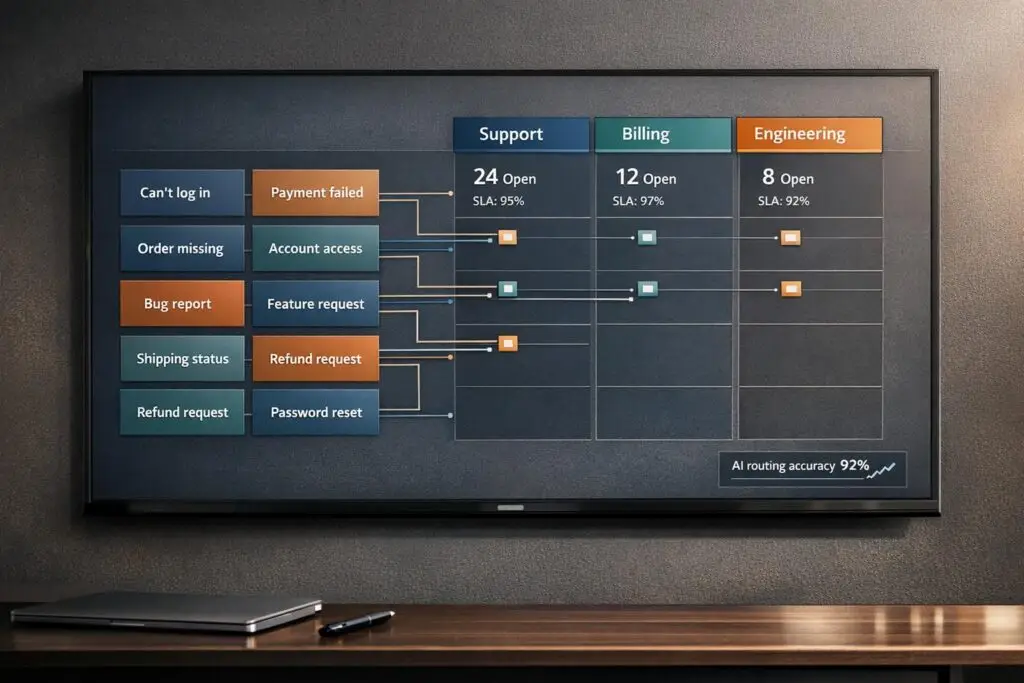
If your support team struggles to classify customer issues accurately, you’re not alone. Misaligned issue types – like calling a "login problem" an "authentication failure" – can waste time, confuse agents, and lead to unreliable data.
The solution? Build issue types that reflect how customers actually describe their problems. This approach improves ticket routing, speeds up resolution times, and ensures consistent data for analysis. Here’s how to do it:
- Collect customer language: Analyze historical tickets, emails, and chat logs to identify common phrases customers use.
- Standardize terms: Group similar terms into clear categories and subcategories, using simple, customer-friendly language.
- Use automation: Implement AI tools to auto-categorize tickets based on customer descriptions, reducing errors.
- Test and refine: Pilot your system with a small team, measure accuracy, and adjust based on feedback and data.
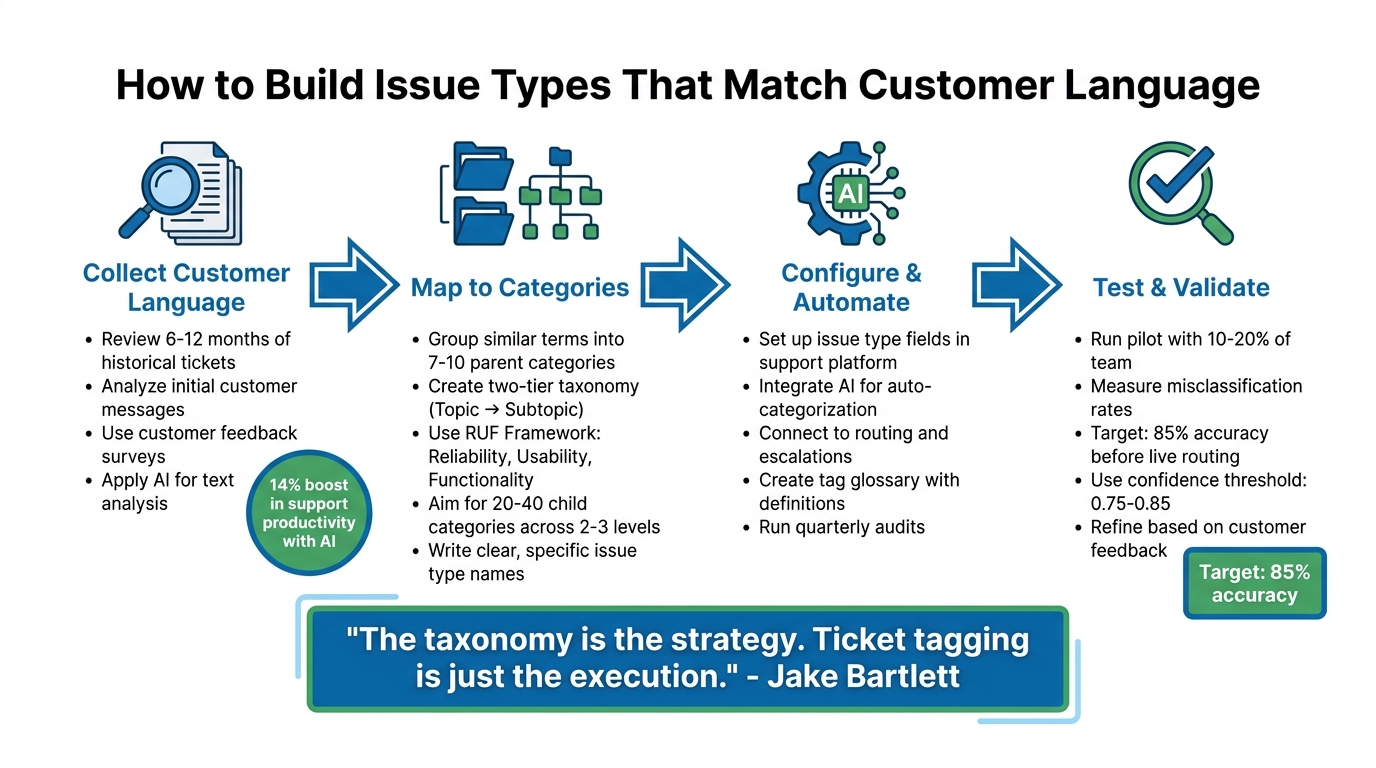
4-Step Process to Build Customer-Centric Issue Types for Support Teams
How to Automate Customer Support Ticket Categorization using AI
sbb-itb-e60d259
Step 1: Collect and Analyze How Customers Describe Problems
To truly understand how customers describe their issues, you need to gather data from every channel they use to communicate – whether it’s tickets, emails, chats, social media, or surveys. The goal is to identify patterns in how they actually talk about their problems, rather than relying on assumptions.
Review Historical Case Data
Start by mining the data you already have. Look at support tickets from the last 6–12 months and focus on the initial customer messages, before any agent interaction. Export descriptions from tickets, email subject lines, and chat transcripts into an analytics tool for review.
Organize this data using a two-tier taxonomy. The first level should include broad "Topics" like Technical Issues or Billing Questions, while the second level can include more specific "Subtopics", such as Login Problems or Invoice Not Received [2]. This structure keeps your analysis focused and manageable. Pay close attention to inconsistent terminology – for instance, customers might use "payment", "billing", and "invoice" interchangeably. Standardize these terms across your system to avoid confusion [2].
One important tip: don’t rely on catch-all categories like "Other" or "General Inquiry." These categories make it impossible to identify trends. If something doesn’t fit into your existing taxonomy, treat it as a sign to refine your categories rather than creating a miscellaneous bucket.
Once you’ve reviewed historical data, it’s time to gather insights directly from customers.
Use Customer Feedback Surveys
Open-ended survey questions are a great way to capture customer language in their own words. After resolving a ticket, try asking questions like, "What could we have done better during this interaction?" or "Why did you give this rating?" [6]. These responses often reveal details and emotions that numeric ratings can’t.
Timing is everything here. Send surveys right after a ticket is closed, a purchase is completed, or a trial period ends – when the experience is still fresh in the customer’s mind [6]. Keep surveys short and focused: one rating question and one open-ended question are usually enough. Longer surveys tend to lower response rates and result in less meaningful feedback. Once you’ve collected responses, group them into common themes, such as usability problems, performance concerns, or missing features [6]. This helps transform individual comments into actionable data.
To scale this process and uncover deeper insights, consider using AI.
Apply AI for Text Analysis
While manual review is a good starting point, AI can take your analysis further by processing large datasets quickly and efficiently. AI text analysis tools can group similar customer descriptions together and identify subtle trends you might otherwise miss [3][4]. Unlike simple keyword searches, AI understands context. For example, it can differentiate between "slow" in "slow mobile checkout" and "slow response time" while also tracking when complaints spike after a product update [4].
"A keyword tool tells you how many customers used the word ‘slow’ this month. Machine learning text analysis tells you that ‘slow’ appears almost exclusively in conversations about mobile checkout, not desktop, and that it started spiking three weeks ago after your last app update. One is a count. The other is a diagnosis." – SleekFlow [4]
AI also goes beyond basic sentiment analysis, picking up on nuances like sarcasm, mixed emotions, and intensity [4][5]. Companies using AI for text analysis have reported a 14% boost in support productivity, as well as the ability to detect emerging issues that traditional surveys might miss [5]. To stay ahead, set your AI tool to run quarterly audits of ticket language. This will help you consolidate overlapping terms and uncover new patterns as your product or service evolves [2].
Step 2: Map Customer Language to Issue Categories
Turn customer feedback into actionable issue types that meet both support and business goals. This step connects what customers say with the structured data your internal systems need.
Group Similar Terms into Categories
Start by organizing related customer phrases into broader, manageable groups. For example, take the top 30 reasons customers contact you and consolidate them into 7–10 parent categories [1][2]. This keeps things streamlined for agents while still capturing key insights.
Customers often use different words to describe the same issue, so standardizing terminology is essential. Choose one term for each concept to avoid confusion and keep your data clean and consistent [2].
A two-tier taxonomy model works well here. Tier 1 includes high-level topics like "Technical Issue", "Billing & Payments", or "Account Management." Tier 2 dives into specific subtopics using customer language, such as "Login Problem" or "Refund Request" [2]. This approach balances clear reporting at the top level with the flexibility to capture detailed customer feedback.
| Customer Inquiry | Topic (Tier 1) | Subtopic (Tier 2) |
|---|---|---|
| "I keep getting an ‘invalid credentials’ error…" | Technical Issue | Login |
| "Can you send me an invoice with our company VAT?" | Billing & Payments | Invoice |
| "Is there a way to schedule reports each week?" | Feature Request | Reporting Module |
| "I can’t reset my password; no access to email." | Account Management | Authentication |
If you’re just starting out, try the RUF Framework. Tag each ticket as either Reliability (errors/performance), Usability (how-to questions), or Functionality (feature requests) [2]. This simple system immediately highlights whether customers are dealing with bugs, need guidance, or want new features.
Once you’ve grouped terms, create clear labels for each category.
Write Clear and Specific Issue Types
Translate these groups into precise, descriptive issue types. Focus on the symptoms customers report, as the root cause is often unclear when the issue is first logged.
"Name issues for the symptom the customer reports. People tag what they can see (‘payment declined’), not the deep root cause." – Eric Lutley, Customer Science [1]
Use subject-verb-object naming for clarity [1]. For example, instead of vague terms like "Payment Issue", use specifics like "Payment Declined" or "Payment Method Expired." This helps agents quickly find the right category and makes your data more useful for analysis.
Define each category and subtopic in one concise sentence [1][2]. Clear definitions ensure consistent tagging, even as your team grows. For instance: "Login Problem: Customer cannot access their account due to authentication errors or forgotten credentials."
Aim for a taxonomy with 20–40 child categories spread across 2–3 levels [1]. Overly complex structures with more than three levels can slow agents down and lead to inconsistent data [1]. Keep it simple to avoid constant reference to documentation.
Balance Customer Language with Business Needs
Once your categories are grouped and labeled, align them with your operational goals, like routing, SLAs, and reporting. Tier 1 categories should be stable, mutually exclusive, and broadly applicable [2]. They need to work for both agents tagging tickets and executives analyzing trends.
Focus on the most common 80% of inquiries instead of trying to cover every possible edge case [2]. Overcomplicating the system makes it harder to maintain and less effective. Stick to the issues that dominate your support volume.
Avoid catch-all categories like "Miscellaneous." If agents can’t classify a ticket, use that as a signal to refine your existing categories instead of adding a vague one.
"If a tag doesn’t change how you handle a ticket or how you understand your support data, it’s adding noise instead of clarity." – Jake Bartlett, Swifteq [2]
Behind the scenes, use persistent, dot-delimited codes like issue.payment.declined.card to maintain data integrity, even if the customer-facing labels change [1]. This consistency makes it easier to automate processes like routing and escalations.
Finally, separate fields for Issue (symptom), Context (product/plan/channel), and Cause (internal driver) keep your data clear [1]. This approach ensures you can track what customers report, where it happens, and why it happens, without mixing up your data as your system evolves.
Step 3: Configure and Automate Issue Types in Your Platform
With your issue types clearly defined in Step 2, the next move is to integrate them into your support platform. This setup helps agents work more efficiently while keeping your data organized and useful.
Set Up Issue Type Fields and Categories
Start with a two-tier taxonomy model. For Tier 1, limit the categories to fewer than 10 main types (e.g., Technical Issue, Billing & Payments, Feature Request, Account Management). Tier 2, which is optional, adds more detail (e.g., Login Problem, Refund Request)[2].
To keep things consistent, create a tag glossary with concise definitions for each category and subtopic. For instance: "Login Problem: Customer cannot access their account due to authentication errors or forgotten credentials"[2]. Focus your taxonomy on the 80% of tickets you handle most frequently, and avoid vague categories like "Other" or "Miscellaneous"[2].
"The taxonomy is the strategy. Ticket tagging is just the execution." – Jake Bartlett, Writer and Customer Success Expert[2]
Use AI for Auto-Categorization
Integrate AI tools to automatically assign issue types based on customer descriptions. AI is particularly effective at understanding context and intent, reducing errors that might occur with manual tagging. For example, phrases like "I can’t get in" and "invalid credentials error" can both be categorized as Login Problem[2].
Require agents to apply at least one Tier 1 tag per ticket, with the option to add a Tier 2 tag for more precision. To keep your system relevant, run audits every quarter or six months. This process helps you remove unused tags and merge overlapping ones, ensuring your categorization evolves with customer needs and product changes[2].
Once automation is in place, use these tags to streamline ticket routing and prioritization processes.
Connect Issue Types to Routing and Escalations
A well-structured taxonomy becomes even more powerful when connected to workflows. Link each issue type to specific workflows to ensure tickets are routed to the right team and assigned the correct priority. For example, a Technical Issue tagged as Export Functionality can automatically go to the Product Support team with an appropriate priority level[2]. This automation eliminates the need for manual intervention and speeds up response times.
"Ticket tags can also trigger automated workflows, so getting them right is critical for maintaining a smooth support operation that enables agents to respond quickly." – Swifteq[2]
Develop routing logic to handle cases based on their complexity. High-complexity tickets should go directly to specialists[7]. When escalations occur, ensure SLA timers remain intact during handoffs, maintaining both urgency and customer trust[7]. In essence, your issue types act as the backbone of your support system, guiding every step from the initial response to final resolution.
Step 4: Test and Validate Issue Types with Real Cases
Before introducing your new issue types to the entire support team, it’s crucial to test them in a controlled environment. Think of this pilot phase as a dress rehearsal to catch potential issues – like unclear wording, overly technical jargon, or the inevitable "synonym chaos" where agents interpret similar categories differently[9][10].
Run a Pilot with a Small Team
Start with a small group of your support team – about 10% to 20% is ideal[8]. Even a pilot with just 2–3 agents can uncover critical issues. During this phase, conduct walkthroughs where agents classify tickets step-by-step. This hands-on approach helps pinpoint "confusion pairs" (e.g., distinguishing between "billing" and "refund requests") and allows you to maintain an override log. This log is essential for tracking corrections to AI-assigned categories, which can be used later to retrain your system[10][11].
"Choosing the right sample for pilot testing is not just a step – it’s the foundation for refining the customer experience."
– Damian Grabarczyk, Co-founder, PetLab Co.[10]
These initial observations provide valuable insights that will help you measure and improve classification accuracy in the next step.
Measure Misclassification Rates
Set a clear benchmark for success – aim for at least 85% accuracy across all categories before implementing AI-powered ticket routing[11]. Use a set of 100 labeled historical tickets per category to calculate accuracy and identify where errors occur. For AI-based classification, apply a confidence threshold of 0.75–0.85. This ensures that only tickets with high-confidence matches are auto-routed, while others are flagged for human review[11].
Pay attention to how often agents resort to "catch-all" tags like "Other" or "General." A high frequency of these tags might signal that your Tier 1 categories are either unclear or incomplete[2]. Use this data to refine your options during the pilot stage.
Once your accuracy targets are met, incorporate customer feedback to further fine-tune your categories.
Refine Based on Customer Feedback
Plan quarterly audits to review tag usage and identify any that are unused, redundant, or overlapping[2]. To maintain consistency, stick to one term per concept and provide a brief, clear definition. For example: "Login Problem: Customer cannot access their account due to authentication errors or forgotten credentials."
Go beyond agent feedback by cross-referencing issue types with behavioral data – like product usage patterns or login activity. This ensures that the assigned categories align with the customer’s actual experience[12]. By combining these insights, you reduce subjectivity and ensure your issue types accurately reflect real-world customer challenges.
Common Mistakes in Designing Issue Types and How to Avoid Them
Support teams can unintentionally sabotage their issue type systems by making predictable mistakes. These errors can frustrate agents, complicate workflows, delay resolutions, and obscure important trends. Let’s dive into what to avoid and how to address these challenges.
Creating Too Many or Overly Complex Categories
When your system balloons to hundreds of tags or more than three hierarchical levels, things start to fall apart [1]. Overcomplicated structures force agents to rely on documentation or make random selections. The result? Fragmented data that makes it nearly impossible for leadership to identify patterns or root causes.
Atlassian tackled this issue with the RUF framework, which organizes tickets into three simple categories: Reliability (errors or performance issues), Usability (how-to questions), and Functionality (feature requests). This method, developed by Sean Cramer (former Head of VoC at Atlassian), allowed the team to efficiently handle hundreds of thousands of tickets without overwhelming agents.
Here’s a practical suggestion: limit your system to 7–10 parent categories and no more than 20–40 subcategories. Use progressive disclosure, meaning subcategories only appear after a parent category is selected. This way, agents focus on the most common issues – streamlining workflows and keeping data actionable [1][2].
Using Internal Jargon Instead of Customer-Friendly Language
Your engineering team might call something an "authentication failure", but customers often describe the same issue in different, less technical terms. Using internal jargon can lead to inconsistencies, like labeling similar problems as "Billing", "Payments", or "Invoicing." This inconsistency confuses agents and muddies your data.
The fix? Standardize your terminology. Choose one term per concept and provide a clear, one-sentence definition for each issue type. For instance:
"Login Problem: Customer cannot access their account due to authentication errors or forgotten credentials."
You can also create a two-tier system: Tier 1 categories (like "Technical Issue" or "Billing & Payments") ensure internal consistency, while Tier 2 subcategories (like "Login" or "Refund Request") use customer-friendly language [1][2].
And don’t forget – your taxonomy isn’t static. Regular updates are crucial to keep it aligned with customer needs.
Letting Issue Types Become Outdated
Over time, issue type systems often suffer from "tag bloat." This happens when new categories are added without retiring old ones, leaving agents to sift through an overwhelming list of options. Meanwhile, outdated tags remain in use, and emerging issues lack proper representation.
To avoid this, set up a taxonomy board – a quick, 30-minute weekly meeting to review and approve changes. Conduct quarterly audits to consolidate tags, eliminate redundant categories, and track the rate of mis-tagging through dashboards. This helps pinpoint areas needing improvement [1][2].
"It’s harder to simplify an over-engineered tagging structure than to add detail over time." – Jake Bartlett, Swifteq
When retiring tags, use a deprecation period where old tags remain selectable but are mapped to updated ones. This ensures historical data and automation processes remain intact.
"A good taxonomy lives in systems as codeable tags, not just slides, so agents can apply it quickly and machines can act on it reliably." – Eric Lutley, Customer Science
Conclusion
To stay aligned with customer needs, issue types must evolve alongside the language customers use. Start by analyzing how customers communicate, then create a straightforward taxonomy – ideally 7–10 parent categories with 20–40 subcategories, limited to 2–3 levels. Assign concise, one-sentence definitions to each tag to ensure both agents and AI tools interpret them consistently [1]. This structure not only simplifies support operations but also sets the stage for successful AI-driven automation.
AI-powered auto-categorization helps eliminate inconsistencies by applying categories based on clear, plain-language definitions [2].
"The tool that applies your tags only matters if the tagging structure and taxonomy itself are solid." – Jake Bartlett, Swifteq [2]
To keep the system effective, regular maintenance is key. Conduct taxonomy reviews and quarterly audits to remove redundancies and improve clarity [1]. Monitor metrics like AI-driven sentiment, mis-tag rates, and coverage rates – aiming for 95% of tickets classified within 30 days – to identify areas for improvement [1]. Make sure to version and document updates so your team stays aligned [1].
"A good taxonomy lives in systems as codeable tags, not just slides, so agents can apply it quickly and machines can act on it reliably." – Eric Lutley, Customer Science [1]
FAQs
How do I decide the right number of issue types to start with?
Start with a small, focused set of core issue types – around 5 to 10 – that address the most frequent customer problems. Review your current list of issues to eliminate redundancies or overly broad categories, and introduce subcategories where necessary. Keeping things simple at the start makes it easier to validate, minimizes errors in classification, and lays the groundwork for a system that can expand alongside your support operations while remaining clear and effective.
What should we do when a ticket could fit multiple issue types?
When a ticket involves multiple issue types, it’s crucial to set up a clear, hierarchical categorization system. This approach helps manage overlaps and ensures clarity. Use a model that can scale with your needs, aligning ticket classifications with actual user behavior. This alignment not only improves organization but also supports better automation and routing.
Incorporating AI-driven workflows for auto-tagging can significantly cut down on misclassification and save time. Additionally, make it a habit to regularly review your categories. Analyze ticket data and gather user feedback to refine and adjust the system. This ensures accuracy and consistency as your operations expand.
How can we keep AI auto-tagging accurate as our product changes?
To keep AI auto-tagging accurate as your product changes, it’s essential to update tagging models regularly to align with new features and terminology. Pay attention to mislabeled data – it can be a valuable resource for retraining your models. Incorporating manual reviews of tagged samples is another critical step to spot errors and fine-tune the system.
By using updated datasets that include recent product changes and customer feedback, you enable continuous learning. This approach ensures your models stay relevant and maintain high accuracy over time.






