


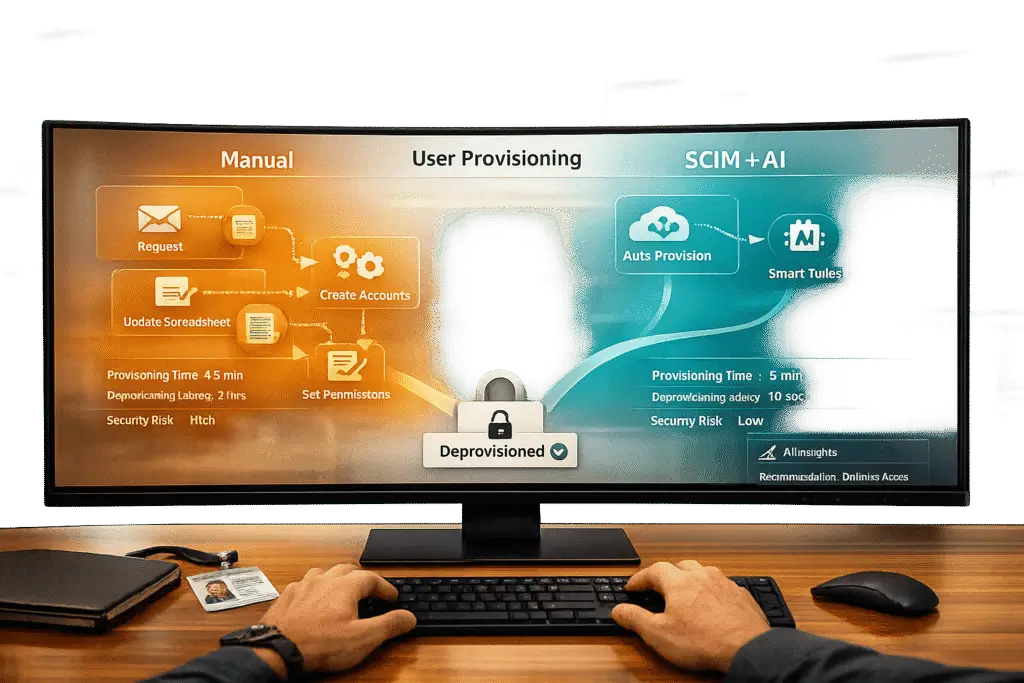
If you’re managing user accounts manually across dozens of apps, you’re wasting time, increasing costs, and exposing your company to security risks. Manual provisioning takes hours per user, costs thousands per app annually, and leaves room for errors like over-provisioning or "zombie accounts" (accounts of former employees that remain active).
SCIM (System for Cross-domain Identity Management) automates this process, reducing provisioning time by 90%, cutting costs, and minimizing errors. It syncs your Identity Provider (like Okta or Google Workspace) with SaaS apps in real-time, ensuring seamless onboarding, role updates, and deprovisioning.
Here’s the key difference:
- Manual provisioning is time-consuming, error-prone, and costly.
- SCIM saves time, eliminates errors, and improves security by automating user lifecycle management.
If you’re still relying on manual workflows, it’s time to rethink your approach. SCIM not only simplifies IT operations but also strengthens your organization’s security posture while reducing costs.
Manual User Provisioning: Process, Costs, and Risks
How Manual Provisioning Works
Manual provisioning requires IT teams to log into each application’s admin console to manage user accounts. Whether it’s creating new accounts, updating roles, or deactivating users, every action is handled individually across systems like Salesforce, Gainsight, and project management tools. IT staff manually input employee details, assign roles, and set permissions for each app – a repetitive and time-intensive process [10].
"You’re not paying for an IT team – you’re paying for a human API." – Jay Srinivasan, Co-founder and CEO, Stitchflow [10]
This tedious approach slows down operations and comes with hidden costs that many organizations overlook.
The Real Cost of Manual Provisioning
The inefficiency of manual provisioning doesn’t just waste time – it also drains budgets. For mid-sized companies, the average cost of managing user access manually is about $12,000 per app, per year, based on a workforce of 500 employees [10]. For larger organizations with 1,000 employees, this figure doubles to $24,000 per app annually [10].
Breaking it down further, IT teams spend approximately 101 hours per app each year on manual provisioning, at an average labor cost of $60 per hour. On top of that, there’s the cost of unused licenses – about 12 per app, priced at $327 each – and compliance-related efforts, which require around 4 hours per access gap [10].
Certain applications are especially demanding. Gainsight, for example, consumes 242 hours of IT labor annually due to its complex role configurations, while Freshservice requires 233 hours because of its broad access needs and intricate permissions [10]. Multiply these hours across multiple apps, and IT teams end up dedicating weeks to repetitive provisioning tasks rather than focusing on higher-value projects.
But the financial toll isn’t the only concern – manual workflows also create serious compliance and security vulnerabilities.
Compliance and Security Risks
Beyond the financial strain, manual provisioning introduces significant security risks. Despite using centralized identity providers like Okta, organizations still face an average of 422 identity and access gaps. This is largely because 98.8% of SaaS apps either don’t support SCIM (System for Cross-domain Identity Management) or restrict it to expensive enterprise plans [10].
One of the biggest threats comes from "zombie accounts" – active accounts belonging to former employees that were never deactivated. These accounts are prime targets for unauthorized access and potential data breaches [5]. Additionally, manual processes increase the likelihood of human error, such as over-provisioning, where users are granted more access than necessary. This widens the internal attack surface and exposes organizations to further risks [10].
Compliance audits also become a headache. Without centralized logging, it’s difficult to track and monitor access permissions. When audits arise, IT teams are forced to scramble, manually compiling reports – a process that’s not only time-consuming but also prone to mistakes [7].
sbb-itb-e60d259
SCIM: Automated User Provisioning at Scale
Why SCIM Works Better
SCIM (System for Cross-domain Identity Management) replaces outdated manual provisioning methods – like help desk tickets, custom scripts, and CSV imports – with a standardized REST-based API. This API connects your Identity Provider (IdP) directly to SaaS applications, ensuring real-time updates and consistency [1][3].
Here’s how it works: When a new employee joins, their accounts are created across all connected applications in seconds. If their role changes, permissions are updated automatically. If they leave, SCIM deactivates their access across an average of 211 applications almost instantly [5].
"SCIM is a powerful way to automate user lifecycles and maintain user accounts across platforms that can save companies time, money, and increase their security."
Next, let’s explore how SCIM’s standardized API endpoints handle these tasks efficiently.
How SCIM Works
When a new employee is added, the IdP sends a POST request to the /Users endpoint to create their account. For role changes, a PATCH request updates details like job title or department [4][6]. SCIM uses OAuth 2.0 Bearer tokens for secure authentication [4].
For scalability, SCIM supports Bulk Operations, processing up to 1,000 changes in a single API request [1]. It also includes filtering options, such as GET /Users?filter=meta.lastModified gt "timestamp", which allow for efficient incremental synchronizations. This reduces network traffic and keeps systems in sync without unnecessary overhead [4].
These features streamline processes, delivering clear savings in both time and cost.
Cost and Time Savings with SCIM
With IT teams now managing an average of 138 employees per team member – a 31% jump from last year – they’re more stretched than ever [13]. SCIM allows IT teams to oversee hundreds of applications for thousands of employees without needing additional staff [5].
Automated deprovisioning is a game-changer, instantly reclaiming costly SaaS licenses when employees leave. Unlike manual provisioning, which can take hours or even days and often involves ticket backlogs, SCIM executes these tasks in seconds with no human input. By removing tedious administrative work, IT teams can focus on more strategic, high-impact projects [5].
What Is SCIM Provisioning and How Does It Work?
SCIM vs Manual: Side-by-Side Comparison
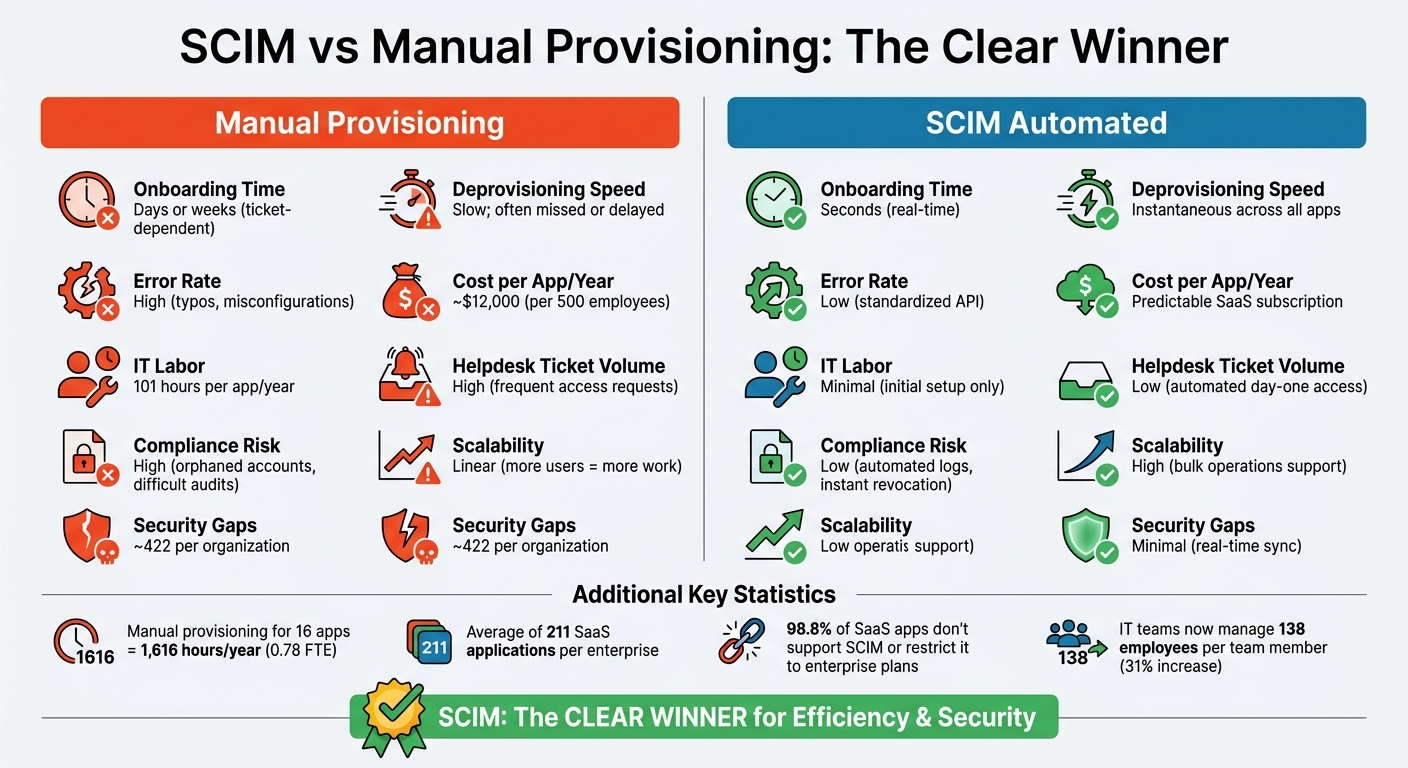
SCIM vs Manual User Provisioning: Cost, Time, and Security Comparison
When you compare the inefficiencies of manual workflows with the streamlined nature of SCIM automation, the difference becomes glaringly obvious. Manual provisioning drags down productivity, consumes valuable IT resources, and increases the likelihood of errors and security lapses.
To revisit the numbers, manual provisioning is a costly process. For companies with 500 employees, it racks up an estimated $12,000 per app annually. For mid-sized organizations managing 16 apps without automation, this equates to around 1,616 hours of IT labor each year – equivalent to nearly 0.78 full-time employees [10].
"The 101 hours of manual IT time is the most damaging cost. It doesn’t improve security posture or business velocity. It simply compensates for missing automation – turning skilled IT teams into manual bridges."
- Jay Srinivasan, Co-founder and CEO, Stitchflow [10]
The security implications are equally concerning. Manual processes often leave organizations with an average of seven access gaps per audit, each requiring about four hours to resolve. This adds up to approximately 422 identity and access gaps across an organization, even when using an Identity Provider. These gaps can result in dormant "zombie accounts" that remain unnoticed until exploited [10] [8].
Here’s a quick breakdown of how SCIM automation stacks up against manual provisioning:
Comparison Table: SCIM vs Manual
| Feature | Manual Provisioning | SCIM (Automated) |
|---|---|---|
| Onboarding Time | Days or weeks (ticket-dependent) | Seconds (real-time) |
| Deprovisioning Speed | Slow; often missed or delayed | Instantaneous across all apps |
| Error Rate | High (typos, misconfigurations) | Low (standardized API) |
| Cost per App/Year | ~$12,000 (per 500 employees) [10] | Predictable SaaS subscription |
| IT Labor | 101 hours per app/year [10] | Minimal (initial setup only) |
| Helpdesk Ticket Volume | High (frequent access requests) | Low (automated day-one access) |
| Compliance Risk | High (orphaned accounts, difficult audits) | Low (automated logs, instant revocation) |
| Scalability | Linear (more users = more work) | High (bulk operations support) |
| Security Gaps | ~422 per organization [10] | Minimal (real-time sync) |
This table paints a clear picture: SCIM automation doesn’t just save time – it reduces costs, improves security, and simplifies scaling. It’s a game-changer for organizations looking to optimize their identity and access management processes.
How to Implement SCIM: Step-by-Step Guide
Implementing SCIM can streamline user provisioning, cut down on errors, and save support costs – making it essential for scaling customer support operations. While it requires careful preparation, the payoff includes saving hundreds of hours annually and reducing security risks.
Step 1: Configure SCIM in Your Identity Provider
First, confirm that your Identity Provider (IdP) supports SCIM 2.0. Platforms like Okta, Microsoft Entra ID (formerly Azure AD), and Google Workspace typically offer this support. Ensure that SAML 2.0 or OIDC authentication is already set up, as SCIM relies on these protocols [14].
Generate a secure API credential – this is usually an OAuth 2.0 Bearer token or a long-lived Personal Access Token with the necessary scopes, such as "scim:enterprise." Store this token securely, as it will enable communication between your IdP and SCIM.
Make sure all SCIM traffic is encrypted using HTTPS/TLS to protect sensitive identity data during transmission [15]. Before provisioning users, verify your email domain – many platforms require this step to ensure that only authorized users from your organization can access the system [12]. Also, note that provisioning should be limited to 1,000 users per hour to avoid running into rate limits [14].
Once SCIM is configured, the next step is to align your user attributes and roles.
Step 2: Map User Attributes and Roles
Map SCIM attributes like userName, emails, name.givenName, and name.familyName to match your application’s user model. Use the externalId attribute to store your IdP’s internal user ID, which acts as a stable reference even if the user’s email or username changes [4].
For role-based access control, align SCIM groups with your application’s internal roles or teams. When a user is added to a group in your IdP, your SCIM server should automatically update their permissions. To avoid issues, provision users first before assigning them to groups [14]. Implement soft-deprovisioning by linking the SCIM active attribute to an internal status flag – setting active: false suspends access while preserving audit data [16].
Step 3: Set Up Governance Policies
Define clear governance rules to manage provisioning and deprovisioning processes effectively. Establish automatic provisioning criteria, default access levels, and deprovisioning policies, such as whether users should be deactivated immediately or soft-deleted.
Create a /ServiceProviderConfig endpoint to outline supported operations like PATCH and bulk updates, which can help minimize integration errors [15]. You can also extend the SCIM schema with custom attributes, such as department or employeeNumber, to enable more detailed access controls [6].
After finalizing these configurations, move on to testing and monitoring.
Step 4: Test and Monitor
Before deploying SCIM, test it thoroughly in a sandbox environment. Validate the full user lifecycle by testing operations such as Create (POST), Update (PATCH), List (GET with filters), Fetch (GET by ID), and Delete/Deactivate (DELETE) [15]. Confirm that your system handles error responses correctly, including 400 (Bad Request), 401 (Unauthorized), 409 (Duplicate User), and 429 (Rate Limit).
Once live, monitor the provisioning process closely. Key metrics to track include provisioning success rates, error rates per organization, and synchronization latency [16]. Stream audit logs to an external system for long-term compliance, as some platforms only retain logs for 180 days [14]. To maintain security, rotate SCIM bearer tokens every 90 days and use exponential backoff logic to handle rate limit errors without causing further throttling [4].
Common Mistakes in User Provisioning
Even with automation, user provisioning – whether through SCIM or manual workflows – can go wrong in ways that are both costly and frustrating. Below, we’ll break down the most common missteps and how they can derail your provisioning efforts.
SCIM Setup Mistakes
At first glance, SCIM might seem simple to implement. But small configuration errors can lead to major issues, often without clear error messages to guide you. In fact, configuration mismatches are responsible for about 60% of SCIM provisioning failures[18].
"In my experience… configuration problems cause about 60% of all provisioning failures. These aren’t dramatic failures with obvious error messages – they’re subtle mismatches that cause requests to fail in confusing ways."
- Devraj Patel, Founder & Identity Architect, SSOJet[18]
Here are a few common culprits:
- Case Sensitivity: Something as small as using
/Usersinstead of/userscan cause requests to fail, depending on the provider. - Trailing Slashes and Protocols: Using HTTP instead of HTTPS or adding a trailing slash to an endpoint can also lead to unexpected failures[18].
- Improper Token Management: Tying SCIM tokens to personal accounts instead of dedicated service accounts is risky. If the admin owning the token leaves, the whole system can break[20].
Additionally, Identity Provider (IdP) quirks can complicate things further. While SCIM is a standard, providers often interpret it differently. For instance:
- Microsoft Entra ID requires schema prefixes for custom attributes, whereas Okta treats them as top-level attributes[17].
- Deactivation workflows vary: Entra ID sends a
DELETErequest, while Okta uses aPATCHwithactive: false[17].
Another common oversight is assuming SCIM handles everything. While it can create accounts, it often won’t assign users to resources or permission sets unless additional APIs are integrated[19].
"SCIM created all the accounts perfectly. It just didn’t provide employees any actual access required to do their job."
Finally, avoid hard deletes. Instead, use soft deletes (e.g., setting active: false) to maintain audit trails while still revoking access[20].
Manual Workflow Problems
Manual provisioning, while sometimes necessary, introduces its own set of challenges. These issues can amplify both security risks and inefficiencies.
For starters, manual processes are error-prone, with an average error rate of 30% in such environments[21]. New hires often experience delays of 3 to 5 days for basic access, leading to a 40% drop in productivity during their first week[21].
Security risks are another major concern:
- Orphaned Accounts: When employees leave, IT must manually revoke access across various systems. Inevitably, some accounts are missed. Alarmingly, 20% of security breaches are linked to ex-employees retaining active access[21].
- Shadow IT: Employees adopting tools outside official channels can leave these "invisible" apps active indefinitely. Mid-market companies often underestimate their application stack by 60% to 70%[19].
Lastly, there’s permission drift. When employees are promoted, switch teams, or take on temporary roles, their permissions are often updated to grant new access. However, older permissions frequently remain in place. Over time, this unchecked accumulation can lead to compliance violations and heightened security risks[2][11].
Using AI to Scale User Provisioning
SCIM streamlines user provisioning by automating processes, but adding AI-powered tools takes it a step further. These tools reduce errors, improve compliance, and enhance automated workflows by identifying issues, routing requests intelligently, and flagging potential risks.
AI for Error Detection and Request Routing
When you’re developing or maintaining SCIM integrations, AI coding agents can save time and reduce mistakes. For instance, Scalekit offers a plugin for Claude Code that ensures the agent interacts correctly with the SCIM API. This not only minimizes errors but also accelerates the development of provisioning logic [12].
"If you’re using an AI coding agent, install the official Scalekit plugin. It gives your agent full awareness of the Scalekit API – reducing hallucinations and enabling faster, more accurate code generation."
- Scalekit [12]
AI doesn’t stop at development. AI-powered observability tools can monitor SCIM sync health in real time, identifying issues like email domain mismatches that prevent users from appearing in downstream apps. These tools can suggest fixes – or even apply them automatically [12][16]. By analyzing provisioning incidents, AI pinpoints problems such as attribute mismatches or failed synchronizations.
AI also simplifies request routing. With enterprise organizations managing an average of 211 SaaS applications [5], AI can determine which team or automated workflow should handle each provisioning request. This reduces the manual effort of ticket triaging and ensures requests are routed efficiently.
These capabilities lay the groundwork for AI-driven auditing, enabling precise monitoring of provisioning events.
AI-Driven Auditing and Compliance Monitoring
AI doesn’t just fix errors – it also enhances auditing and compliance. Through real-time auditing, AI tools continuously monitor access logs for unauthorized activity, unusual patterns, or access discrepancies [23][24]. This is especially useful for identifying orphaned accounts – active accounts belonging to former employees – which can pose major security risks.
For compliance, AI can flag provisioning failures caused by edge cases, such as mismatched email domains that don’t align with the registered organization domains [12]. It also identifies and flags zombie accounts that bypass normal deprovisioning workflows [5][16].
As businesses grow, AI is increasingly tasked with managing non-human identities like RPA bots and AI agents. These identities require their own provisioning and deprovisioning cycles. By linking them to human sponsors, AI ensures accountability for automated actions [9][24].
Another area where AI excels is time-bound access. Instead of granting permanent permissions, AI can assign access that automatically expires when a project concludes. This eliminates the need for manual access reviews and reduces the risk of lingering permissions [22].
Wrapping Up
Keeping up with over 211 enterprise apps manually is a tall order [5]. Relying on tickets and spreadsheets not only slows things down but also opens up security risks, drains IT resources, and leaves room for lingering zombie accounts.
That’s where SCIM comes in. It streamlines the entire user lifecycle – covering everything from onboarding to offboarding. This cuts down on overhead while also reducing the risk of unauthorized access [5]. For B2B SaaS providers, SCIM has become a must-have for enterprise buyers [11].
And it doesn’t stop at automation. When combined with AI, SCIM takes things to the next level. AI tools can spot provisioning errors, intelligently route requests, and flag potential issues like orphaned accounts or mismatched attributes before they snowball into major security problems.
Still handling user provisioning manually? Take a step back and review how long your current process takes and where errors are happening. This will give you a clear picture of whether your system can keep up as you grow.
Automating provisioning isn’t just about saving time – it’s about creating a secure and scalable foundation for your business. Start small by implementing SCIM with your most critical applications, track the improvements, and then expand. Automation can be the key to building a stronger, more efficient operation.
FAQs
When is SCIM worth implementing?
SCIM becomes a smart choice when you’re managing user provisioning on a large scale – think thousands of users spread across multiple systems. It shines when manual processes can’t keep up with the sheer volume and complexity of tasks. By automating critical user lifecycle tasks like onboarding, role updates, and offboarding, SCIM not only boosts efficiency but also cuts down on errors. For organizations experiencing rapid growth or dealing with intricate identity management needs, SCIM can be a game-changer.
What should I do for apps that don’t support SCIM?
For apps that don’t support SCIM, there are other ways to handle provisioning. Just-in-Time (JIT) provisioning is a great option – it creates user accounts automatically during their first login, cutting down on manual work. If JIT isn’t an option, you can rely on manual workflows or custom scripts. While these methods can get the job done, they often require ongoing maintenance to stay effective.
No matter which approach you choose, it’s crucial to document your workflows and keep them updated. This helps reduce errors and keeps the provisioning process as efficient as possible.
How do I prevent access gaps and zombie accounts?
To avoid access gaps and prevent "zombie accounts", it’s smart to use automated user provisioning and deprovisioning systems built on protocols like SCIM. This approach keeps user accounts aligned with your HR system or identity provider, ensuring they’re created, updated, or deactivated as needed.
By automating these processes, you can minimize security risks like orphaned accounts while also boosting efficiency with tools such as bulk operations. Make it a habit to audit workflows regularly to confirm that deprovisioning is working as intended and to address any lingering access problems.






