


Want more users to log in and engage with your portal? Onboarding emails are the key. Research shows that 40-60% of users open an app once and never return. But well-timed, action-focused emails can change that.
Here’s the deal:
- Users who find value in the first 7 days are 3x more likely to stick around.
- A 5% retention boost can increase profits by 25-95%.
- The right email sequence can drive logins, reduce churn, and improve retention.
What works?
- Send a welcome email immediately after signup. Include login details and a quick-start guide.
- Follow up within 2-3 days if users haven’t logged in, offering help and motivation.
- Highlight key features in emails sent 3-5 days after signup to show quick wins.
- Re-engage inactive users with personalized nudges and benefits.
- Check in at Day 7 to celebrate progress and offer support.
Tips for success:
- Use clear subject lines like "Welcome to [Product]! Let’s get started."
- Focus on one call-to-action per email (e.g., "Log in now").
- Personalize content based on user behavior.
- Use AI tools and intelligent email management to optimize timing and tone.
With these strategies, you can increase login rates, improve user engagement, and lower support costs. Dive into the full article for email templates and actionable tips.
SaaS Onboarding Emails: 5 Rules Every Team Needs to Know
sbb-itb-e60d259
Core Elements of Effective Onboarding Emails
Creating a successful onboarding email boils down to three things: a subject line that grabs attention, a call-to-action (CTA) that motivates action, and timing that ensures the email lands when it’s most effective. If any of these elements miss the mark, your email won’t deliver the results you’re aiming for.
Subject Lines and Preheaders That Get Opened
Welcome emails often have open rates between 60-80% [1], which is much higher than typical marketing emails. But even with this advantage, a dull subject line can kill your chances. The best subject lines are short, clear, and action-driven. For example, instead of saying "Getting Started", opt for something more direct like "Let’s get you started" or "Action needed: Verify your account" [1][4].
Highlighting specific outcomes works wonders. A line like "Get your first report in 5 minutes" not only sets clear expectations but also appeals to the reader’s desire for quick results [1].
Your preheader text should complement the subject line – not repeat it. If the subject is "Welcome to your portal", follow it up with a preheader like "Your account is ready – here’s what to do first" [1]. This combination gives the reader both a reason to open the email and a hint at the value inside.
Adding urgency or social proof can further boost open rates. Phrases like "Your trial ends in 3 days" create a sense of urgency, while statements such as "Join 10,000+ others" tap into the bandwagon effect [1][5]. Even subtle word choices can make a difference – A/B tests have shown that "Grateful" can outperform "Thankful" in certain contexts [4]. Plus, emails sent from a real person’s name (like a founder or account manager) instead of a generic "noreply" address can double engagement rates [1].
| Subject Line Strategy | Example | Objective |
|---|---|---|
| Welcoming | "Welcome to {{productName}}! Let’s get you started" | Build rapport [1] |
| Outcome-Focused | "Get your first {{outcome}} in 5 minutes" | Deliver immediate value [1] |
| Urgency | "Your trial ends in 3 days – here’s what to do" | Encourage timely action [1] |
| Curiosity/FOMO | "Most users miss this feature" | Highlight key features [1] |
| Social Proof | "We think you’re 1 in 10 million" | Build trust [5] |
| Time-Aware | "Your Dashboard Tour, Three Minutes to Mastery" | Simplify onboarding [4] |
Once you’ve captured attention with a strong subject line, the next step is creating a CTA that turns interest into action.
Personalized Call-to-Actions That Drive Clicks
A great subject line gets your email opened, but it’s the call-to-action (CTA) that determines whether your users take the next step. Onboarding emails often produce a 196% increase in unique click rates compared to promotional emails [7]. The key? A single, focused CTA that leaves no room for confusion. Including multiple CTAs can overwhelm users, leading to inaction [6][7][1].
Personalization makes CTAs more effective. Tailoring CTAs to the user’s behavior or stage in the onboarding process makes the email feel specific and relevant. For instance, if a user hasn’t logged in yet, the CTA should direct them to the login page. If they’ve already logged in but haven’t completed their profile, guide them to finish that step [6][1]. Avoid generic phrases like "Click Here." Instead, use action-oriented, benefit-driven text like "Access Your Dashboard", "Create Your First Project", or "Get Your First Report" [7][1].
Design matters too. Use bright, contrasting colors for your CTA buttons to make them stand out. Structuring your email in an "inverted pyramid" format – starting broad and narrowing down to the CTA – helps guide the reader’s focus [7].
Reduce unnecessary steps. Deep links that take users directly to the relevant page (like billing or a feature tour) eliminate friction. Every extra click increases the likelihood of drop-off. And since mobile email use has grown by over 30% recently, ensure your buttons are easy to tap on smaller screens [7].
| CTA Type | Purpose | Example Copy |
|---|---|---|
| Activation | Encourage first login | "Access Your Dashboard" |
| Quick Win | Help users see immediate results | "Create Your First Project" |
| Educational | Introduce features or tutorials | "Watch 2-Minute Walkthrough" |
| Conversion | Move free users to paid plans | "Unlock Full Access" |
| Re-engagement | Bring back inactive users | "Pick Up Where You Left Off" |
Using AI to Optimize Tone and Send Times
AI tools can make onboarding emails smarter and more efficient, helping you reach users at just the right moment. One of the most practical uses is tone adjustment. AI can tweak formal language into something more conversational or simplify complex messages for clarity [8]. For example, a B2B email might need a professional tone, while a lifestyle brand can use casual, friendly language [8].
"When we use AI for strategy outlining, we make sure it doesn’t start with a blank canvas. We give it context first: what our company stands for, who we speak to, and the style we use in our communication." – Aygul Mehdiyeva, VitaMail [8]
Send-time optimization (STO) is another game-changer. Instead of sending emails at a fixed time, AI tools analyze user behavior to determine when each recipient is most likely to open their inbox [9]. For example, in January 2026, Stash used real-time segmentation and behavioral triggers to customize its onboarding emails. This approach boosted click-through rates by 64% and open rates by 72% [9].
AI can also predict user behavior, like the likelihood of churn, and trigger re-engagement campaigns. If someone hasn’t logged in for five days, AI can send a targeted email with a fresh tone and a new CTA [1][3]. In January 2026, Canva used AI to pair users with relevant features, increasing email opens by 55%, clicks by 47%, and feature adoption by 8%. The team also saved around 1,000 hours by automating content creation for over 200 email variants [9].
"AI works best when it complements your creativity rather than replacing it." – Natalie Slyman, Content Marketing Manager, Benchmark Email [8]
To get the most out of AI, always add a human touch. Incorporate real-world examples, brand-specific phrases, and personal anecdotes to keep your emails authentic [8]. AI can streamline the process, but your creativity and insights are what make the message resonate.
5 Email Templates That Increase Portal Login Rates
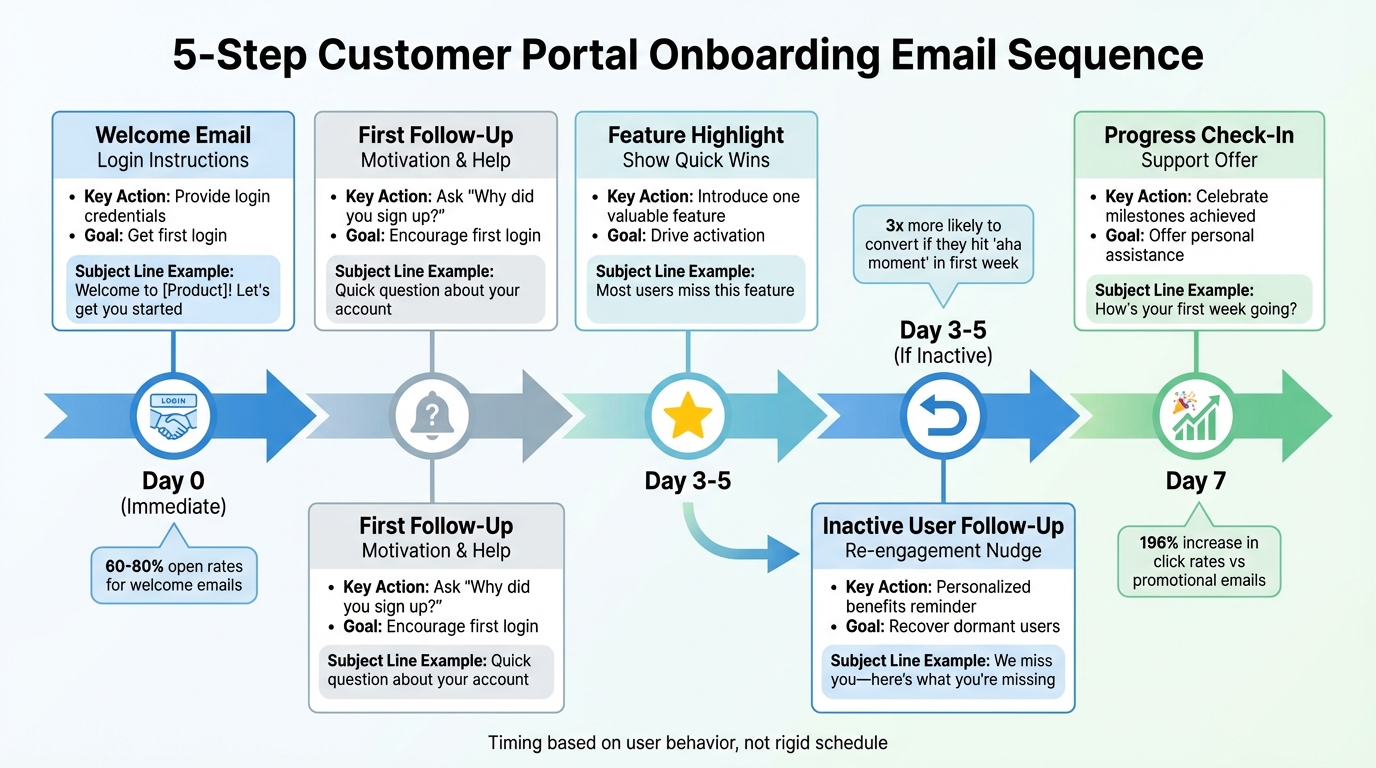
5-Step Customer Portal Onboarding Email Sequence Timeline
These email templates are designed to help B2B support teams boost portal login rates, reduce support costs, and speed up onboarding. Each template targets a specific stage of the user’s journey, making it easier to engage and guide them toward success. Customize these templates with your branding, product names, and personalization variables like {{firstName}} or {{companyName}} for maximum impact.
Template 1: Welcome Email with Login Instructions
This email should go out immediately after signup to take advantage of the user’s initial enthusiasm. The goal? Get them to log in and complete a quick, simple task.
Subject Line: "Welcome to {{productName}}! Let’s get you started"
From: [Your Name], Customer Success Manager
Body:
Hi {{firstName}},
Welcome to {{productName}}! Your account is ready to help you {{primaryOutcome}}.
Your Login Details:
- Portal URL: [Direct Link to Dashboard]
- Username: {{userEmail}}
- Temporary Password: {{tempPassword}}
Your First 5 Minutes: After logging in, you’ll find a quick setup guide that takes just 5 minutes. It’ll help you {{specificQuickWin}}.
Need assistance? Reply to this email or schedule a 15-minute kickoff call.
Looking forward to seeing what you create,
[Your Name]
Why this works: It provides all the essential login details, sets clear expectations for the first session, and offers immediate support. Emails sent from a real person, rather than a "noreply" address, typically see much higher engagement rates [1].
Template 2: First Follow-Up for Users Who Haven’t Logged In
If a user hasn’t logged in within 2-3 days of signing up, send this friendly reminder. It acknowledges that life gets busy while gently nudging them to take action.
Subject Line: "Quick question about your {{productName}} account"
From: [Your Name], Customer Success Manager
Body:
Hi {{firstName}},
We noticed you haven’t logged in yet. What inspired you to sign up? Understanding your goals will help us make sure you get the most out of the portal.
Here are three quick things you can do in under 5 minutes:
- Access your dashboard and complete your profile
- {{specificAction1}} to achieve your first {{outcome}}
- {{specificAction2}} to save time on {{commonTask}}
Have questions? Just reply to this email, and I’ll be happy to help.
Best,
[Your Name]
Why this works: Asking about their motivation provides valuable insights into their goals. Plus, users who hit their first "aha moment" within the first week are three times more likely to convert into paying customers [1].
Template 3: Feature Highlight Email Showing Quick Wins
This email, sent 3-5 days after signup, introduces a single feature that delivers immediate value. Keep the message focused and include social proof if possible.
Subject Line: "Most users miss this feature"
From: [Your Name], Customer Success Manager
Body:
Hi {{firstName}},
Here’s a feature that teams like yours love – it helps you {{specificOutcome}} in just a few clicks.
{{FeatureName}} allows you to {{whatItDoes}}. Here’s what one of our customers said:
"{{FeatureName}} cut our {{taskName}} time from 2 hours to 15 minutes. It’s a game-changer." – {{CustomerName}}, {{CustomerCompany}}
Try it now: Watch a 2-minute walkthrough or jump straight into {{FeatureName}}.
Questions? Reply to this email, and I’ll assist you quickly.
Best,
[Your Name]
Why this works: Highlighting a single feature keeps the message clear, while a customer testimonial builds trust. The subject line also taps into curiosity by suggesting they might be missing out.
Template 4: Automated Follow-Up for Inactive Users
If a user hasn’t logged in for 3-5 days, trigger this email to re-engage them. Leverage behavioral data to personalize the message and create a sense of urgency.
Subject Line: "We miss you, {{firstName}} – here’s what you’re missing"
From: [Your Name], Customer Success Manager
Body:
Hi {{firstName}},
It’s been {{daysSinceLastLogin}} days since your last login. Let’s get you back on track!
You haven’t had the chance to {{nextMilestone}} yet. Here’s what’s waiting for you:
- {{benefit1}} to save you {{timeAmount}} per week
- {{benefit2}} to help you {{specificOutcome}}
- {{benefit3}} to assist with {{solveCommonProblem}}
Pick up where you left off: Log in now
Have questions? Just hit reply, and I’ll be here to help.
Best,
[Your Name]
Why this works: Behavioral triggers allow for timely, personalized follow-ups. Even a small increase in customer retention (just 5%) can significantly boost profits [3].
Template 5: Progress Check-In and Support Offer
Around Day 7, send this email to users who haven’t fully activated. A personal check-in can often save a trial that might otherwise be lost.
Subject Line: "How’s your first week going with {{productName}}?"
From: [Your Name], Customer Success Manager
Body:
Hi {{firstName}},
You’ve been using {{productName}} for about a week now. How’s it going so far?
You’ve already completed {{milestonesCompleted}}, which puts you ahead of {{percentageOfUsers}}% of other users at this stage.
What’s next? To get even more value, I recommend {{nextStep}}. This will help you {{specificBenefit}}.
Need help? Schedule time here or reply to this email.
Looking forward to hearing from you,
[Your Name]
Why this works: Celebrating progress reinforces a sense of accomplishment, while offering help shows genuine care for their success [1].
| Template | Timing | Primary Goal | Key Element |
|---|---|---|---|
| Welcome Email | Immediate (Day 0) | Provide login credentials | Direct dashboard link, 5-minute quick start |
| First Follow-Up | Day 2-3 (if no login) | Encourage first login | Ask "why did you sign up?" |
| Feature Highlight | Day 3-5 | Drive activation with a feature | Customer testimonial, 2-minute video |
| Inactive User Follow-Up | 3-5 days of inactivity | Re-engage dormant users | Personalized benefits, behavioral trigger |
| Progress Check-In | Day 7 | Offer personal assistance | Celebrate milestones, suggest next steps |
Next, explore how to optimize email performance using advanced data-driven techniques and AI-powered follow-ups.
How to Improve Email Performance Over Time
The templates we discussed earlier are a great foundation, but there’s more to email success than just sticking to a script. To truly elevate your email campaigns, you need to focus on user behavior, timing, and automation. For instance, onboarding campaigns with tailored strategies often see open rates as high as 54.78%, compared to the average 42.35% for standard marketing emails [2]. These results come from moving beyond rigid schedules to smarter tactics like behavioral triggers, segmentation, and AI-driven follow-ups.
When and How Often to Send Onboarding Emails
Timing is everything. Your welcome email should hit the inbox within 5–10 minutes of signup – this alone can achieve open rates between 50% and 70% [11]. After that, follow up with an "Activation Nudge" about 12–18 hours later to encourage users to take their first key action. A well-rounded onboarding sequence typically includes 5–7 emails spread over 14 days [12].
Instead of relying on fixed schedules, consider milestone-based emails. These are triggered by user actions, such as completing a profile or starting a project, and they often deliver 2 to 3 times higher conversion rates than time-based sequences [11].
"A 10 percent improvement in trial-to-paid conversion has more impact on revenue than a 10 percent increase in traffic – and it costs a fraction as much to achieve" [11].
As a trial period nears its end, shift the tone of your emails to create urgency. Highlight what the user stands to lose – like "access to your 12 saved reports" – to tap into loss aversion psychology [11].
Once your timing is dialed in, focus on segmentation to ensure your emails feel relevant and impactful.
Segmentation and Personalization Methods
Segmentation is key to making your emails resonate. Group users by their activity levels – active users might appreciate advanced tips, while less engaged users may need re-engagement efforts [1][10]. You can also personalize emails based on job roles. For example, marketers might receive content showcasing marketing tools, while developers see API-related features [13].
Go beyond basic personalization like adding a first name. Reference the user’s specific goals from their signup process to make your emails feel tailored. Emails sent from real individuals also tend to perform better.
Set up triggers to help users who get stuck. For instance, if someone hasn’t moved to the next step within 48 hours, send a helpful nudge [13]. Mid-trial reports showing measurable value – like "You saved 4.5 hours this week" – can also reinforce the benefits of your product [11].
AI Automation for Follow-Up Sequences
AI can take your segmentation strategy to the next level by automating follow-ups and removing guesswork. Modern AI tools can generate personalized onboarding content quickly using natural language processing [14]. They can also identify inactive users – those who haven’t logged in for 3–5 days – and automatically send re-engagement emails to address potential drop-off points [1][13].
An optimized onboarding sequence powered by AI can boost activation rates by 20–30% [14]. These platforms also make A/B testing easier, enabling you to refine subject lines, timing, and call-to-action buttons based on real-time engagement data [14]. Considering that 40–60% of free trial users log in only once and then disappear [14][3], automated re-engagement emails can help recover many of these users. This not only reduces support costs but also helps users realize the value of your product faster.
For high-value users or those who seem stuck, consider automating an offer for a personal 15-minute onboarding call. And keep in mind that over 50% of onboarding emails are read on mobile devices, so it’s essential to ensure your templates are mobile-friendly and easy to scan [12].
Tracking Results and Making Data-Driven Improvements
Once you’ve implemented optimized email strategies and AI-driven follow-ups, the next step is to measure how well they’re working. Tracking key performance metrics and refining your approach based on data is what separates effective onboarding emails from those that fall flat.
Take PostHog as an example. Between February 2024 and February 2025, Joe Martin and his team revamped their onboarding flow seven times, tweaking everything from visuals to sender identity. By version 6.0, they hit a 52% open rate and kept their unsubscribe rate at a low 0.3% [18][19]. That level of success didn’t happen by accident – it was the result of consistent tracking, testing, and adjusting.
Metrics That Matter for Onboarding Emails
When it comes to onboarding emails, some metrics stand out as critical. Start with the basics: open rates, click-through rates (CTR), and click-to-open rates (CTOR). These will tell you if your subject lines and email content are resonating [15]. But the real indicators of success go deeper. Metrics like logins to your tool and active user count reveal whether your emails are actually driving users to engage with your product [16][17].
Another key metric is Time to First Value (TTFV) – how quickly users experience that "aha moment" after receiving your email. Research shows that users who reach this milestone within the first week are three times more likely to convert into paying customers [1].
PostHog sets clear benchmarks for their emails: an open rate above 40% (with a goal of 50%), a CTR over 4% (targeting 6%), and an unsubscribe rate below 1% [18]. They also go beyond tracking logins, focusing on meaningful activation steps like creating a dashboard or enabling billing [18].
A/B Testing to Refine Your Templates
A/B testing is your best tool for fine-tuning emails. The goal? Drive users to their "aha moment" faster. Joe Martin’s experiments at PostHog offer some actionable insights. For instance, when they tested product screenshots against illustrations, the illustrations consistently outperformed screenshots by a 1–2% margin in CTR [18][19].
Sender identity also played a big role. Emails sent from Joe’s personal address to engineers achieved a 68% open rate and a 16% CTR – much higher than emails sent from a generic company address [18][19].
"Personalization doesn’t mean calling users by their first name… It means providing the right content, at the right time, in the right way." – Joe Martin, PostHog [18]
Behavioral triggers are another area worth testing. For example, delaying the welcome email by an hour can give users time to explore your product before receiving guidance [18]. Tailoring emails to specific roles can also make a difference. Engineers might appreciate technical tips, while managers may respond better to ROI-focused messaging. The takeaway? Iteration is key. Each test informs the next, helping you refine your emails for different user groups and activation goals.
Using Customer Feedback to Improve Emails
Sometimes, the best insights come directly from your users. A simple question in your welcome email – like, "Why did you sign up?" – can help you understand what success looks like for each customer [3]. For users who seem stuck, sending a follow-up like "What’s blocking you?" can reveal friction points quickly [11][12].
Sending emails from a real person and inviting replies creates a valuable feedback loop. This qualitative data complements your quantitative metrics, offering a fuller picture of what’s working and what isn’t [1][18].
You can also interview recent users who successfully adopted your product. Ask them to pinpoint the moment they realized its value, then build your onboarding sequence around that milestone [11]. Combining direct feedback with data-driven insights ensures your emails are both effective and user-focused.
Conclusion
Boosting portal logins starts with crafting emails that are clear, timely, and focused on one action. Small tweaks – like improving subject lines, using personalized calls-to-action (CTAs), and optimizing send times – can significantly increase engagement. As Alkan Balkaya, Founder and CEO of Mailsoftly, explains:
"A well-crafted onboarding email establishes trust, reduces confusion, and drives engagement from the very first interaction" [2].
AI tools can take this further by ensuring emails land in users’ inboxes during peak engagement times, often within 5 to 10 minutes of signup. Automated follow-ups and behavioral triggers help guide inactive users toward their first "aha moment", with research showing a 60% higher likelihood of staying active after the first week [2]. These tools not only streamline the process but also set the stage for ongoing improvements through targeted testing.
Regular A/B testing of subject lines, CTAs, and send times can elevate onboarding efforts. Pairing these tests with AI-driven optimizations creates a well-rounded strategy. Even small changes – like replacing generic images with illustrations or sending emails from a real person – can improve click-through rates by 1–2%. Over time, these small wins add up, especially when tracking metrics like first-action completion rates and activation milestones.
Email marketing continues to deliver a strong return on investment, averaging $36 for every $1 spent. Automated campaigns, in particular, generate 320% more revenue than manual ones [20]. For support teams managing complex B2B accounts, a strong email strategy can lead to fewer support tickets, faster onboarding, and higher customer retention.
Take these strategies and put them into action. Use the templates provided, test what resonates with your audience, and refine your approach based on real results. A thoughtful email strategy can drive portal engagement while improving your bottom line.
FAQs
What should my portal onboarding emails link to?
Your onboarding emails should include links to the customer portal or onboarding platform, guiding users to complete essential tasks, access resources, or start the setup process. Make sure to direct them to specific pages like the login screen or a dedicated onboarding link. This could involve steps like filling out forms, signing agreements, or reviewing instructions. Providing these direct links helps streamline access to critical sections, making the onboarding process easier and increasing user engagement.
How can I personalize onboarding emails without extra work?
Using templates with dynamic personalization variables – like the recipient’s name, product name, or specific actions – can make your emails feel more tailored and engaging. For instance, variables such as {{firstName}}, {{productName}}, and {{firstStep}} automatically pull in relevant details, saving you time while keeping your messaging personal.
Pre-designed templates simplify the process of crafting customized emails. They let you deliver messages that feel personal and thoughtful, all while minimizing the effort needed on your end. This approach not only helps your audience feel acknowledged but also streamlines your workflow.
Which metrics prove onboarding emails increased logins?
Metrics that show a boost in logins from onboarding emails include open rates, click-through rates, and engagement markers such as completed onboarding tasks or initial portal access. With the right approach, open rates can hit impressive levels – up to 83%. To achieve this, prioritize clear subject lines, personalized messaging, and actionable calls-to-action. These elements work together to encourage users to engage and adopt the portal effectively.






