


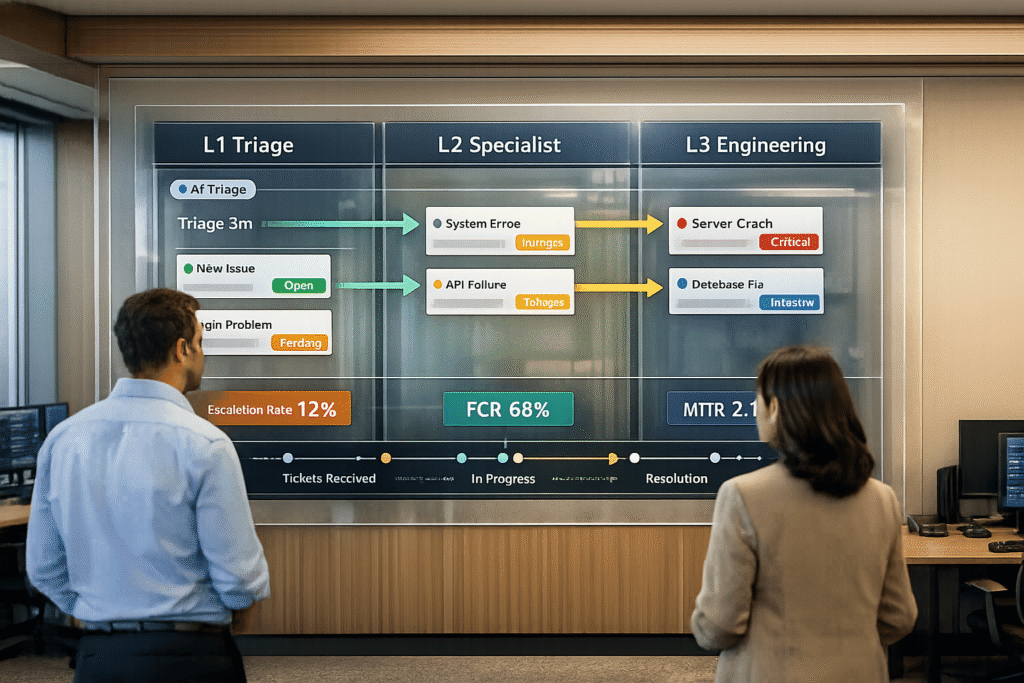
Tiered support systems divide customer service into three levels to handle issues based on complexity and required expertise. This approach ensures efficient resource use, faster resolutions, and cost control. Here’s a quick breakdown:
- L1 (Frontline Support): Handles high-volume, simple tasks like password resets and account setup. Aims for a 70-80% first contact resolution (FCR).
- L2 (Technical Specialists): Tackles more complex problems, such as troubleshooting logs and reproducing issues. Escalates unresolved cases to L3.
- L3 (Expert Engineers): Focuses on root causes, critical bugs, and code-level fixes.
Key benefits:
- Reduces delays by routing issues to the right tier.
- Saves costs by resolving basic issues at lower levels.
- Enhances team efficiency with clear workflows and AI-powered tools.
Efficient handoffs are critical. Clear documentation, standardized workflows, and AI-powered ticket routing ensure smooth transitions between tiers. AI also predicts escalations, enriches tickets with context, and improves routing accuracy, reducing manual tasks and delays.
This system balances customer satisfaction with operational efficiency, allowing businesses to scale support without unnecessary expenses.
What Does IT Support Do? Level 1, Level 2, Level 3 Escalations [Overview]
sbb-itb-e60d259
Roles and Responsibilities for Each Support Tier
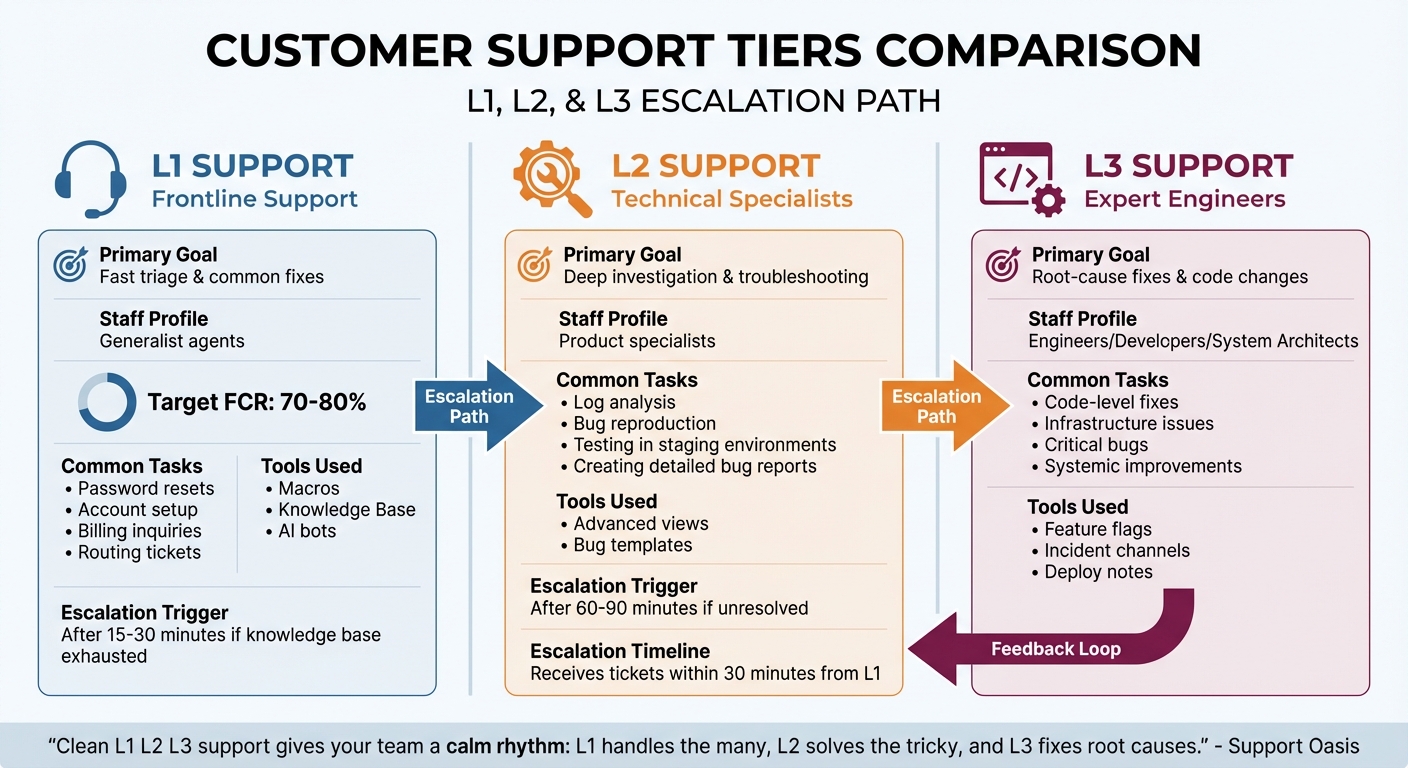
L1 L2 L3 Support Tier Comparison: Roles, Goals, and Tools
Each support tier is designed to address specific types of issues: L1 focuses on high-volume, routine problems, L2 tackles more complex cases, and L3 dives into root causes and systemic fixes. This tiered structure ensures that every issue is handled by the right level of expertise.
"Clean L1 L2 L3 support gives your team a calm rhythm: L1 handles the many, L2 solves the tricky, and L3 fixes root causes." – Support Oasis [2]
L1 Support: First-Line Problem Solving
L1 agents are the first point of contact for customers. They focus on resolving common issues quickly and efficiently while escalating more complex problems with proper context. Their role is all about speed and accuracy.
Some of their typical tasks include:
- Password resets
- Account setup
- Billing inquiries
- Routing tickets to the right team
To handle these efficiently, L1 agents rely on tools like knowledge bases, macros, and AI bots. AI-powered platforms further streamline their work by automating intent tagging and suggesting pre-written responses. A strong L1 team aims for a First Contact Resolution (FCR) rate of 70-80% [5], ensuring most issues are resolved without escalation.
When escalation is needed, L1 agents must provide clear documentation, including:
- A concise problem statement
- Steps already attempted
- Relevant screenshots or IDs
- Customer impact
For example, instead of saying, "It’s broken", an effective escalation might note, "Suspected database timeout based on error code." This level of detail sets up the L2 team for success.
L2 Support: Handling Complex Technical Issues
L2 agents are the go-to specialists for cases requiring deeper analysis and technical expertise. They dig into the details, troubleshoot thoroughly, and often collaborate with engineering teams to pinpoint issues.
Their responsibilities include:
- Reproducing reported issues
- Analyzing logs and configurations
- Testing scenarios in staging environments
- Creating detailed bug reports
L2 agents also play a key role in improving the overall support process. For instance, they update documentation to help L1 handle similar issues in the future [1]. When they resolve escalated problems, they share the solutions back with L1, closing the loop and boosting the frontline team’s knowledge [2].
Industry standards suggest escalating unresolved L1 issues to L2 within 30 minutes [1]. If an L2 agent cannot resolve a problem within 60–90 minutes, it typically moves to L3 [7].
L3 Support: Expert-Level Problem Resolution
L3 teams consist of highly skilled engineers, developers, or system architects. They handle the most challenging problems, including:
- Code-level fixes
- Infrastructure issues
- Critical bugs
- Systemic improvements to prevent recurring issues
"The highest level of technical support is Tier 3, staffed by developers, engineers, or system experts. Issues requiring code-level intervention, infrastructure problems, and critical bugs fall under the responsibility of the Tier 3 team." – ChampsCX [6]
L3 teams leverage advanced tools like feature flags, incident channels, and deploy notes to implement fixes and monitor their impact [2]. In AI-powered operations, they also use predictive analytics to identify potential issues before customers even notice them [3].
To avoid bottlenecks, some organizations introduce "office hours" – dedicated time where L3 engineers assist L2 agents with challenging cases without being bogged down by individual tickets [2]. Smaller teams can simulate this tiered structure by rotating responsibilities, with one person focusing on deep investigations while others handle frontline tasks [2].
| Feature | L1 Support | L2 Support | L3 Support |
|---|---|---|---|
| Primary Goal | Fast triage & common fixes | Deep investigation & troubleshooting | Root-cause fixes & code changes |
| Staff Profile | Generalist agents | Product specialists | Engineers/Developers |
| Common Tasks | Password resets, basic billing, routing | Log analysis, bug reproduction | Code fixes, infrastructure issues |
| Tools Used | Macros, Knowledge Base, AI bots | Advanced views, bug templates | Incident channels, deploy notes |
Building Effective Handoff Workflows Between Tiers
Handoffs often fail when crucial context is missing, leading to customers repeating themselves and wasting agents’ time. To avoid this, it’s essential to standardize handoffs by clearly defining the steps required before escalating a ticket.
"Poor handoffs create loops and frustration. Therefore, standardize these three elements: definition of done, escalate with a hypothesis, and return path." – Support Oasis [2]
Each tier should have a clear "Definition of Done" before escalating a ticket. This ensures that all necessary context is included, saving time for the next agent and reducing frustration for the customer.
A well-executed handoff includes a clear hypothesis. For instance, rather than saying "it’s broken", an L1 agent might write, "Suspected database timeout based on error code" [2]. This gives L2 agents a clear starting point. Additionally, when L2 or L3 agents identify a quick fix, they should send it back to L1 with coaching notes [2]. This return path not only prevents repeated escalations but also strengthens the knowledge of frontline agents.
Below are specific guidelines for L1-to-L2 and L2-to-L3 handoffs.
L1 to L2 Handoffs
L1 agents should escalate a ticket after 15–30 minutes of troubleshooting if they’ve exhausted their knowledge base and available macros [7]. It’s important to include detailed context from prior troubleshooting efforts and provide a starting hypothesis for L2. AI-powered tools can further streamline this process by auto-assigning tickets based on factors like intent tags, sentiment analysis, or SLA deadlines [4][8], ensuring the right specialist gets the case quickly.
Dynamic SLAs can further prioritize escalations. For example, tickets from customers with double the average MRR or those nearing renewal within 30 days can be flagged for faster routing [4][8]. These systems help ensure high-value cases are handled with urgency. In October 2025, Uber’s generative AI tool, "Genie", managed 70,000 internal support interactions, saving around 13,000 engineering hours by aggregating context and automating handoff summaries [11].
| Handoff Element | L1 to L2 Requirements | L2 to L3 Requirements |
|---|---|---|
| Primary Goal | Triage and common fixes | Root-cause fix or code change |
| Mandatory Info | Steps attempted, screenshots, impact | Confirmed bug, repro steps, logs |
| Trigger | Exhausted knowledge base/macros | Confirmed defect or system outage |
| Feedback Loop | Return for coaching if fix is simple | Post-incident report for prevention |
L2 to L3 Handoffs
L2 agents should escalate to L3 after 60–90 minutes of investigation [7]. By this point, they should confirm the issue is related to a code-level bug, infrastructure problem, or systemic failure. The "Definition of Ready" for L3 includes detailed reproduction steps, system logs, environment specifics, and timestamps [9].
Some teams use "office hours" – a daily 30-minute session where L3 experts assist L2 agents without requiring formal escalations [2]. This approach prevents bottlenecks and allows L3 agents to focus on more complex tasks. For instance, in 2025, Liberty London integrated AI into their escalation workflows, cutting ticket resolution times by 11% and boosting customer satisfaction by 9%. This was achieved by giving agents instant access to historical data and summaries during handoffs [11].
While manual handoff processes are crucial, they also set the stage for AI-driven solutions that can predict and streamline triage, routing, and escalation.
Using AI for Triage, Routing, and Escalation Prediction
AI is reshaping how support teams manage incoming tickets by replacing rigid keyword-based systems with intelligent decision-making. Instead of making customers pick categories, AI interprets their intent and sentiment to route tickets accurately [12][13]. For example, a customer saying, "I can’t access my account", will be routed differently than one reporting, "Your login page keeps timing out", even though both involve access issues. The AI identifies whether it’s a simple password reset (L1) or a more complex infrastructure issue (L2).
Modern AI triage evaluates multiple factors at once, such as agent expertise (e.g., "API Specialist"), language skills, current workloads, time zones, and customer value tiers [12][13]. This ensures tickets are assigned to the most suitable agent right away, avoiding the dreaded "ticket tennis" that frustrates everyone. AI also enriches tickets by extracting key details like order numbers or error codes and summarizing the issue in a neat paragraph. This reduces the time agents spend reading through entire conversation threads [13][11].
"AI triage changes that operating model. Instead of treating triage as a human sorting job, you treat it like a decision system – one that runs 24/7, applies your standards consistently, and hands your agents cleaner, better-prepared work." – Ameya Deshmukh, Everworker [13]
Sentiment-driven prioritization takes things a step further. AI can sense frustration or urgency even when customers don’t explicitly say "urgent" or "emergency" [12][13]. For instance, messages written in ALL CAPS or laced with sarcasm can trigger higher priority, especially for key accounts. This ensures that angry enterprise customers don’t sit in a standard queue just because they didn’t mark their issue as urgent.
AI-Powered Triage and Auto-Assignment
AI-powered triage categorizes and assigns cases almost instantly, handling language variations effortlessly [12]. When a ticket arrives, the system analyzes its content, applies relevant tags, determines the correct tier, and routes it to the right agent – all without human involvement.
For example, in October 2025, Liberty London implemented AI in their customer service operations. This led to an 11% reduction in ticket resolution time and a 9% improvement in customer satisfaction scores [11]. By automating the initial triage, their support team avoided manual categorization and case transfers, allowing agents to focus on solving problems.
Another major advantage of AI is automated ticket enrichment. Before an L2 agent even opens a ticket escalated from L1, the AI has already gathered vital details – like error codes, account histories, and prior interactions – and created a concise summary [13][11]. This eliminates the need for agents to sift through lengthy conversations or ask customers to repeat themselves.
To ensure accuracy, teams can implement confidence thresholds. For example, tickets with low-confidence classifications (below 70%) can be flagged for human review before the final assignment [13]. Monitoring reassignment rates is also crucial; frequent manual reassignments indicate that the AI’s training data or routing logic needs refinement [13][2].
| Feature | Rule-Based Triage | AI-Powered Triage |
|---|---|---|
| Logic | Rigid IF-THEN rules [12] | NLP and Machine Learning [12] |
| Context | Surface-level keywords only [12] | Understands sentiment and intent [13] |
| Maintenance | High; rules require manual updates [12] | Low; models adapt to data patterns [13] |
| Accuracy | Limited; struggles with typos or nuances [12] | High; handles language variations [12] |
| Handoffs | Manual context gathering [11] | Automated summaries and logs [11] |
With efficient ticket routing in place, predictive AI takes it further by identifying potential escalations before they occur.
Predicting Escalations Before They Happen
Building on AI-driven routing, predictive models take support to the next level by spotting potential escalations before they spiral into major issues. These models analyze historical data – such as ticket types, customer sentiment, response times, and interaction frequency – to predict cases that might need Tier-3 intervention [11]. This allows teams to prepare diagnostic data or assign cases to senior agents right away, avoiding delays caused by multiple handoffs.
Sentiment and behavioral detection is particularly critical for escalation prediction. AI picks up on signs of frustration – like sarcasm, ALL CAPS, repetitive complaints, or phrases such as "this is ridiculous" – and escalates the case before the customer explicitly asks for a manager [14][11]. For example, if a complex technical issue is paired with negative sentiment, the system can route the ticket directly to a senior specialist instead of letting it linger in an L2 queue.
In 2025, TGH Urgent Care implemented AI-powered triage and communication systems to manage patient inquiries. This reduced incoming call volumes by 40% and increased call answer rates by 80% [11]. By predicting which inquiries required human intervention and which could be resolved automatically, their team handled more cases with fewer resources.
AI also uses value-based segmentation to prioritize escalations. In B2B support, the system taps into CRM data to identify high-value accounts, which are routed to "fast lanes" for immediate human attention. Meanwhile, lower-tier users follow AI-first resolution paths [14][10]. High-value customers who receive prompt, expert help are 25% more likely to renew [14], making smart routing not just an operational win but a revenue-protection strategy.
To further improve escalation handling, teams should set confidence thresholds that trigger automatic escalation when the AI’s confidence score dips below a certain level (e.g., 70%) [14][10]. Additionally, a "3-strike rule" can be applied: after three failed attempts to resolve an issue, the case is automatically handed off to a human [14][10]. This prevents customers from getting stuck in frustrating "bot traps" that can harm brand loyalty. Industry data shows that 52% of customers will abandon a brand after just one bad experience with AI support [14].
"AI is revolutionizing the operational backbone of support by bringing intelligence and context-awareness to ticket routing and prioritization. This isn’t just about incremental improvement; it’s about fundamentally optimizing how support work gets done." – Nooshin Alibhai, Founder and CEO, Supportbench [12]
Common Handoff Problems and How to Fix Them
Even with AI-powered triage systems, handoffs can stumble when key information gets lost during transitions. A major issue arises at "compression points" – moments where critical details, like the business impact or user-specific data, vanish because the receiving system doesn’t have matching fields to store them [15]. For instance, a detailed "Customer Impact" field in a support platform might turn into a vague note when transferred to an engineering tool. This kind of data loss can lead to overlooked details and unresolved issues, highlighting the importance of clear documentation and synchronized systems.
"Every handoff is a compression point. Information gets compressed into whatever the receiving system can accept. Everything else… simply disappears."
– Richie Aharonian, Head of Customer Experience & Revenue Operations, Unito [15]
Another common issue is the "ping-pong" effect, where tickets bounce between tiers because of unclear ownership [2]. This often happens when L1 agents escalate cases without a clear "definition of done", or when L2 receives tickets lacking a troubleshooting history. In such cases, higher-tier agents end up repeating steps already taken by L1, delaying resolutions. In October 2025, Liberty London tackled this by using AI to embed critical context into escalations, cutting ticket resolution times by 11% and boosting customer satisfaction by 9% [11].
State desynchronization adds another layer of complexity. A ticket might show as "In Progress" in one system while its linked engineering task is marked "Blocked" in another. This misalignment leaves both agents and customers in the dark about the ticket’s actual status. Without systems that sync bidirectionally, updates become unreliable, and customers feel neglected.
Setting Documentation Standards
To address these challenges, consistent documentation is essential for a seamless management system. Vague case notes like "customer says it’s broken" only create headaches for L2 agents, who must start from scratch [2]. Instead, establish clear escalation standards. These should include:
- Screenshots
- Error codes
- Troubleshooting steps already taken
- A concise hypothesis about the issue
For example, instead of writing "it’s broken", an agent might document: "Customer can’t log in; password reset failed; suspect account lockout after three failed attempts."
It’s also crucial to audit how fields map across systems. If your support platform tracks important details like "Business Impact", but your engineering tool doesn’t, consider creating custom fields or automating processes to ensure this data travels with the ticket.
Formatted context blocks offer another solution. These automated summaries attach structured data – such as customer tier, account history, and troubleshooting logs – to tickets. This ensures vital information is preserved, even if system fields don’t align [15].
"The vulnerability isn’t the boundary itself. It’s what happens to information that doesn’t fit the receiving system’s data model."
– Richie Aharonian, Head of Customer Experience & Revenue Operations, Unito [15]
Breaking Down Team Silos
Beyond documentation, promoting collaboration between teams can reduce silos and miscommunication. Silos form when L1, L2, and L3 teams operate independently, with little understanding of each other’s workflows. One solution is to implement a "return path" for resolved tickets [2]. When L2 or L3 resolves an issue, they should send the solution back to L1, along with an explanation of what went wrong and how it was fixed. This not only closes the loop but also helps train L1 agents to handle similar issues in the future.
Cross-tier rotations can also build empathy and understanding. By encouraging agents to shadow colleagues from higher tiers or participate in calibration meetings, teams can align on priorities and gain insights into each other’s challenges [2]. For instance, L1 agents can better understand L2’s needs, while L3 agents gain perspective on the pressures faced by front-line teams.
For organizations that use separate systems for support and engineering, bidirectional state synchronization is a must [15]. Integration platforms can ensure that status updates and comments flow seamlessly between tools, creating a shared, real-time view of a ticket’s progress.
In 2025, TGH Urgent Care introduced an AI-driven support structure to improve cross-tier collaboration. By ensuring that only complex issues reached human agents – with full diagnostic data attached – they reduced incoming call volume by 40% and increased call answer rates by 80% [11].
| Breakdown Type | Root Cause | Practical Fix |
|---|---|---|
| Priority Disputes | Misalignment between the sending system’s "Urgent" classification and the receiving system’s priority logic | Create explicit translation rules and directly map key fields like "Business Impact" |
| Redundant Work | Troubleshooting history confined to internal notes, invisible to L2 | Build formatted context blocks that append structured history to the ticket description |
| Ownership Ambiguity | Previous owner assumes the issue is resolved while the new owner remains unaware | Implement automated notification triggers to alert all parties during state transitions |
Measuring Handoff Performance
Measuring how well handoffs are managed requires focusing on the key moments where things can go wrong – like when information gets lost or tickets stall between tiers [16]. These metrics are essential for tackling issues like context loss and the back-and-forth problems mentioned earlier.
In a well-functioning service desk, about 15–20% of tickets typically escalate to higher tiers [16]. One key metric to watch is handoff delay time – the gap between when Level 1 (L1) escalates a ticket and when Level 2 (L2) starts working on it. This "limbo period" can highlight problems with routing or notification systems. For high-priority tickets, aim to keep these delays under 30 minutes [16].
Another crucial metric is the escalation bounceback rate, which tracks how often tickets are sent back to a lower tier for clarification. If more than 20% of escalations bounce back, it’s a sign of a broken handoff process. A good target is between 5–10% [16]. Similarly, context loss incidents – when engineers have to re-ask for information already gathered by L1 – should affect fewer than 10% of escalated tickets [16].
Customer follow-ups asking, "What’s happening with my case?" indicate a failure in proactive communication during the handoff. Monitoring these re-contact rates can help identify gaps. Keep an eye on the SLA breach rate for escalated tickets to see if handoffs are causing delays that miss deadlines [16]. Also, track handoff churn, or the number of group changes per ticket, as frequent "ping-ponging" suggests unclear ownership [9].
Key Metrics for Tracking Handoffs
The most meaningful metrics fall into three categories:
- Volume: Escalation rates.
- Speed: Handoff delays and resolution times along escalation paths.
- Quality: Bounceback rates and context loss incidents [16].
One area that deserves special focus is AI deflection rates. For B2B SaaS, a healthy AI-to-human escalation rate is between 5% and 10% [17][14]. A 0% escalation rate isn’t a sign of flawless AI – it might mean customers are stuck in chatbot loops without a way to reach a human [14]. In fact, 80% of customers say they’ll only use a chatbot if they know they can escalate to a human [17].
Companies using integrated service management tools have seen up to a 30% boost in ticket-handling efficiency by their third year, largely by cutting out manual handoff tasks [16]. To maximize efficiency, ensure integrated systems sync within 10 seconds. If engineers are manually transferring notes between tools, that’s wasted time that should be addressed [16].
Using Scorecards to Track Progress
Scorecards turn raw data into actionable insights by highlighting trends. For example, breaking down escalation rates by issue type, product area, or agent can reveal whether certain categories are falling short of standards or if specific agents need more training [9].
It’s important to focus scorecards on capability gaps, not just performance gaps. If L1 agents can’t run diagnostics because they lack the right tools, that’s a structural problem, not an agent error [9]. One useful metric is how often L2 sends tickets back to L1 for missing information – this shows whether the "definition of ready" is clear and effective [9]. Regular calibration meetings can help teams review top escalation reasons and spot recurring "handoff loops", where tickets keep bouncing between the same groups [9].
To improve compliance, set up mandatory fields that must be completed before tickets can change status. Required details like reproduction steps, logs, or environment information ensure tickets are ready for the next tier. Monitoring whether these fields are consistently filled helps identify process gaps.
AI-based platforms simplify this process by automatically tracking handoff performance. They can measure context loss, predict escalations, and flag tickets likely to bounce back. Scorecards integrate with these tools to provide real-time insights into handoff health, allowing teams to fix issues as they arise instead of waiting for post-mortem reviews. This kind of constant monitoring helps maintain efficient operations and supports scalable, AI-driven support systems.
Conclusion: Building Better Tiered Support with AI
Creating an efficient tiered support system boils down to three key elements: clearly defined roles, smooth handoff processes, and AI-driven intelligence that ties it all together. When these pieces align, support operations shift from being reactive to proactive. For example, when L1 agents know their tasks inside out, L2 specialists receive all the context they need, and L3 experts can focus on tackling root problems, the entire workflow becomes streamlined and more cost-effective. The evolution toward agentic AI is a game-changer here – it allows support systems to scale without ballooning costs. By 2029, agentic AI is expected to autonomously handle 80% of standard customer service issues, leading to a 30% cut in operational expenses [10]. But this efficiency only happens when roles are well-defined, handoffs are rich with context, and AI systems have access to backend data for smart routing.
AI doesn’t just make escalations smoother – it turns them into a controlled, efficient process. Instead of replacing human agents, AI enhances every tier by delivering the right context at the right time, speeding up resolutions, and cutting costs.
"Escalation is not a limitation of AI agents – it’s one of their most valuable capabilities when designed well." – Ameya Deshmukh, Everworker [10]
Modern B2B support systems thrive when AI is embedded into every step of the process. This includes predictive escalation, automated summaries, sentiment analysis, and feedback loops that guide L1 agents. For instance, when handoff templates auto-fill, tickets likely to bounce back are flagged, and complex cases are routed directly to the right specialists, teams can focus on solving real problems instead of managing tickets. By weaving these practices into every stage, B2B support teams achieve efficiency and cost savings like never before.
FAQs
When should a ticket move from L1 to L2?
When a ticket can’t be resolved at the front-line level (L1), it should be escalated to L2 for further handling. This step is crucial for addressing more intricate issues, such as system errors or connectivity challenges, that require specialized technical knowledge or deeper investigation.
To keep things running smoothly, it’s essential to have clear escalation rules in place. These rules ensure that tickets are only escalated when absolutely necessary. This approach not only boosts efficiency but also ensures that complex problems are handled by agents with the right expertise.
What information should be included in an escalation handoff?
When performing an escalation handoff, it’s important to include key details to ensure the process is smooth and efficient:
- Summary of the issue: Provide context, outline the steps already taken, and explain the current status.
- Ticket history and notes: Share relevant troubleshooting details to maintain continuity.
- Reason for escalation: Clearly state why the issue is being escalated, whether due to complexity, urgency, or other factors.
- Next steps or instructions: Outline specific actions for the receiving team to take.
- SLA or priority information: Highlight any deadlines or priority levels to ensure the issue is addressed promptly.
This approach helps the receiving team pick up where you left off without delays or confusion.
How do you prevent ticket “ping-pong” between tiers?
To avoid the frustrating back-and-forth of ticket "ping-pong" between support tiers, it’s crucial to set up clear handoff processes. Define escalation criteria, along with the specific roles and responsibilities for each tier. Automation can play a big role here – use it to handle routing and triage efficiently.
Make sure detailed ticket notes are consistently documented. This ensures everyone involved has the full picture, reducing confusion. Establish clear rules for escalation based on factors like ticket complexity or its overall impact. This cuts down on ambiguity and speeds up resolution.
Finally, keep an eye on key metrics and refine your workflows regularly. This helps pinpoint recurring issues and smooth out the entire resolution process.






