


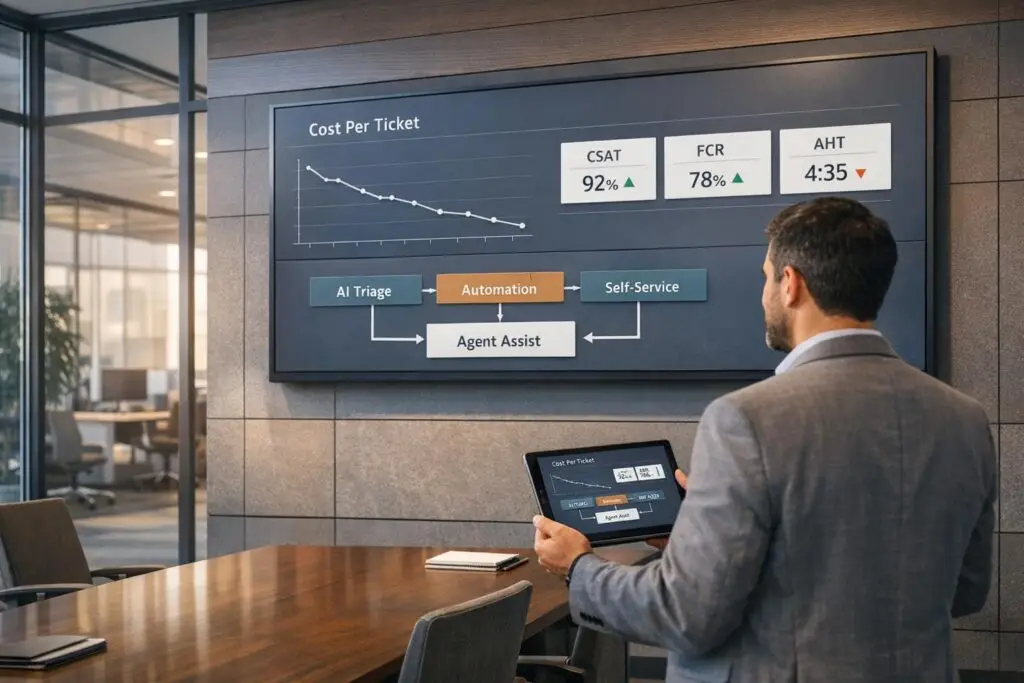
Lowering your Cost Per Ticket (CPT) doesn’t mean reducing staff or sacrificing quality. Instead, it’s about improving efficiency through smarter processes, automation, and better use of resources. Here’s what you need to know:
- What is CPT? It’s the total cost of resolving a single customer support ticket, including salaries, benefits, tools, and infrastructure.
- Why reduce CPT? High CPT impacts scalability. By lowering it, you can reinvest in tools, training, and strategies that improve customer experience.
- How to reduce CPT without layoffs? Focus on:
- AI-powered triage and automation: Route tickets faster and handle repetitive tasks for under $1 per interaction.
- Self-service options: A strong knowledge base can deflect 30%-60% of tickets.
- Agent productivity: Use tools like AI copilots to cut admin time and improve resolution speed.
- Track metrics: Monitor CPT alongside key support metrics like CSAT, FCR, and AHT to ensure cost-saving measures don’t hurt service quality.
Businesses like Grammarly and Unity Technologies have successfully reduced costs by automating processes and empowering their teams to handle more complex tasks. The key is balancing automation with human expertise while tracking progress to avoid common pitfalls like over-automation or poor escalation paths.
How to Calculate and Measure Your Current CPT
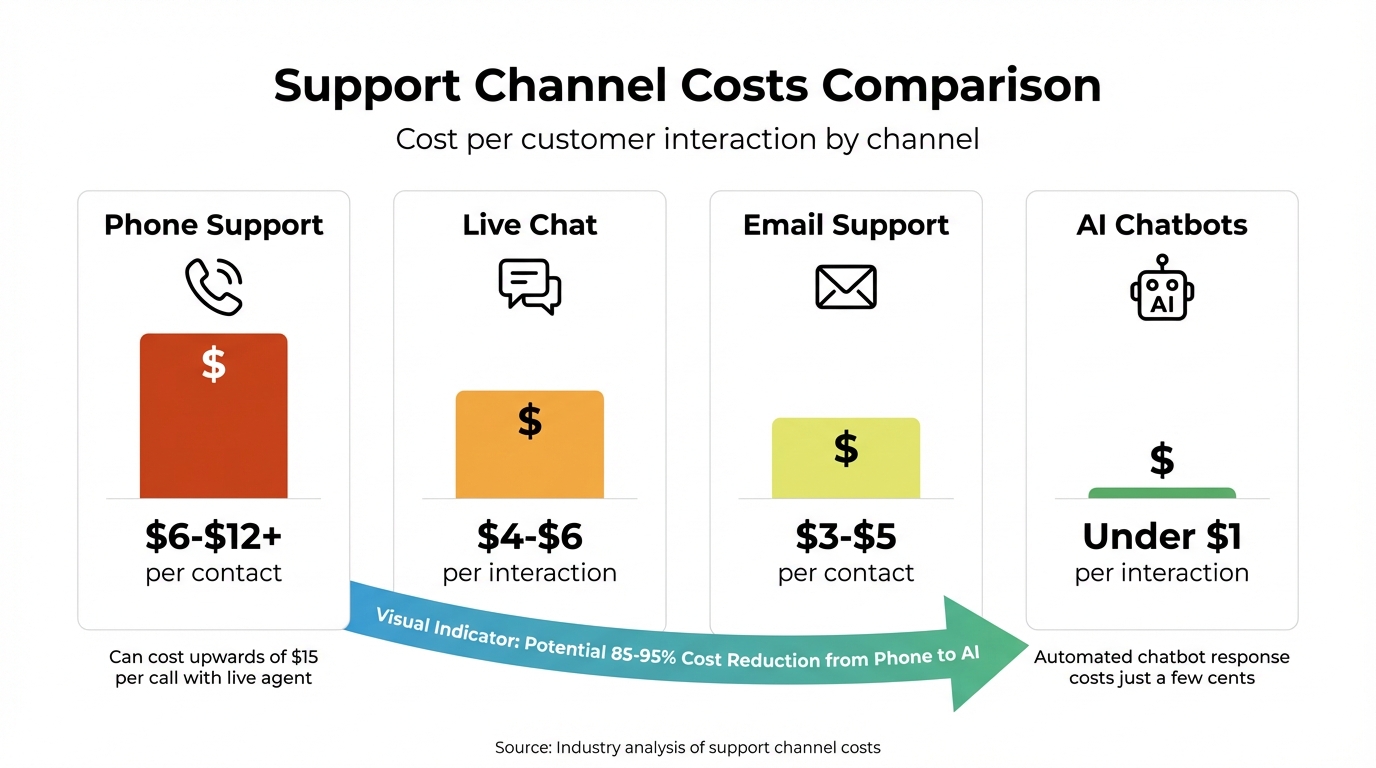
Support Channel Costs: Phone vs Chat vs Email vs AI Chatbots
The CPT Calculation Formula
To calculate Cost Per Ticket (CPT), use this formula: Total Support Operating Costs ÷ Total Number of Resolved Tickets [1].
Here’s an example: If your team spent $50,000 in January and resolved 1,500 tickets, the CPT comes out to $33.33. However, many teams make the mistake of only factoring in agent salaries, which can result in a serious underestimation of actual support costs. A fully-loaded CPT should include additional expenses like benefits (which typically add 20%–30% to salaries), management overhead (5%–10%), office space and infrastructure (10%–15%), and software tools. Ignoring these can lead to underestimating support costs by as much as 30%–40% [6].
"The true fully-loaded cost per ticket is significantly higher than salary-only calculations suggest. Misunderstanding this leads to chronic under-budgeting." – Bloomitize [6]
For instance, let’s break it down: An agent earning $60,000 annually also incurs $15,000 in benefits, $4,000 in management costs, $3,000 for office space, and $3,000 for software licenses. That brings the total to $85,000. If this agent resolves 2,000 tickets in a year, the true CPT is $42.50 – not just the base salary divided by ticket volume.
Identifying What Drives Your Support Costs
Understanding what influences your support costs is crucial for managing them effectively. Labor costs typically make up 60%–80% of total support expenses [1]. But it doesn’t stop at salaries and benefits – recruitment, training, help desk platforms, CRM systems, phone systems, office rent, and equipment all add to the tab. Emerging technologies like AI also play a growing role. For example, by 2025, large language model (LLM) usage fees could account for up to 20% of software spending [1].
Another factor to consider is "shrinkage" – the time agents are paid but unavailable due to meetings, training, or breaks. Shrinkage directly impacts your overall costs [4].
Costs also vary significantly depending on the support channel. For example:
- Phone support costs range from $6 to $12 (or more) per contact.
- Live chat typically costs $4 to $6 per interaction.
- Email support costs between $3 and $5.
- AI chatbots, on the other hand, operate for under $1 per interaction [3].
A phone call with a live agent can cost upwards of $15, while an automated chatbot response might cost just a few cents. By analyzing work logs from your ticketing system, you can pinpoint costs by channel [5]. Gaining this visibility is key to interpreting trends and making informed decisions about your CPT.
Tracking CPT Trends Over Time
Once you calculate your baseline CPT, track it regularly – weekly or monthly – to spot trends [3]. Pay close attention to the ratio of ticket volume to costs. For example, if ticket volume drops but your fixed costs remain steady, your CPT will increase [1].
Dashboards can help you monitor CPT alongside related metrics like Average Handle Time (AHT), First Contact Resolution (FCR), and Customer Satisfaction (CSAT). This combination of metrics can alert you to potential issues before they grow. Reliable CPT tracking enables smarter decisions about improving resolution times and overall efficiency.
Take Unity Technologies as an example. Between 2019 and 2020, they faced a 56% surge in ticket volume. Instead of adding headcount, Senior Manager of Services Support David Schroeder and his team introduced self-service and automation workflows. These initiatives deflected 8,000 tickets and saved $1.3 million [1]. This case demonstrates how consistent monitoring, paired with targeted operational changes, can lead to significant cost savings.
sbb-itb-e60d259
How to Reduce CPT Without Reducing Staff
Lowering your cost per ticket (CPT) doesn’t have to come at the expense of your team. Instead, focus on helping your team work more efficiently. By improving resolution speed, leveraging automation, and enabling ticket deflection, you can cut costs while maintaining high service standards.
Reducing Ticket Resolution Time
The faster your team resolves tickets, the lower your CPT. Quick resolutions mean agents can handle more tickets in the same timeframe. The trick is ensuring tickets go to the right person immediately, avoiding unnecessary back-and-forth between teams.
AI-powered triage is a game-changer here. It turns customer messages into structured data, identifying intent and urgency to route tickets directly to the most qualified agent. Plus, it learns from past resolutions to improve over time [9]. This eliminates the problem of "misrouting", where agents waste time reassigning tickets. By ensuring the right person handles the ticket from the start, First Contact Resolution (FCR) improves, reducing the need for follow-ups [9][3].
AI doesn’t stop at routing – it also enriches tickets by summarizing key details, like order IDs or error codes, and pre-filling fields. This means agents spend less time gathering context and more time resolving issues [9].
The impact of AI triage is significant. It can reduce response times by up to 73% [10]. To get started, focus on 5–10 high-volume ticket categories, such as password resets or billing inquiries, to fine-tune the system before expanding [9]. Before deploying AI, test it on historical ticket data to ensure accuracy and effectiveness [11].
Once resolution times are optimized, automation can take efficiency to the next level.
Using AI to Automate Repetitive Work
Automation doesn’t replace your agents – it frees them from repetitive tasks so they can focus on more complex issues. Tools like AI Copilots draft responses based on historical data, helping agents reply faster and reducing Average Handle Time (AHT) by up to 25% [3][11].
The cost savings are notable. AI-driven tools, such as chatbots and automated triage, can handle interactions for less than $1 each [3].
To ensure accuracy, set confidence thresholds for AI. For instance, only allow the AI to route or respond automatically when it meets a specific confidence score. If the AI isn’t confident, it should escalate the ticket to a human agent with all relevant context included [9][3]. You can also configure AI to automatically extract details like order IDs or error codes, saving agents from having to dig for this information during the initial interaction [9].
While automation speeds up resolutions, a strong self-service option can reduce ticket volume altogether.
Creating a Self-Service Knowledge Base
Self-service tools empower customers to solve their own issues, cutting costs by preventing tickets from being created in the first place. A well-designed knowledge base can deflect 30%–60% of incoming tickets when done right [7].
For example, in early 2024, Klarna launched an AI assistant that managed two-thirds of all customer service chats – about 2.3 million conversations – in just one month. This AI handled the workload of 700 full-time agents and is expected to boost annual profits by $40 million [7].
Using RAG (Retrieval-Augmented Generation), AI can pull real-time data from your knowledge base to provide accurate answers, improving first-contact resolution [7]. However, outdated or conflicting knowledge base articles can reduce AI accuracy by 20%–40%. To avoid this, audit your content before introducing AI [12].
Integrating backend systems through APIs allows AI to securely perform tasks like account updates or verifications, further increasing resolution rates [12]. But remember, not every issue can be resolved by AI. Clear escalation paths are essential – 68% of users abandon a brand after a poor bot experience [7]. Make it easy for customers to reach a human when needed, especially for complex or sensitive issues.
Improving Agent Productivity and Training
Your agents are your most valuable resource – but they’re also one of your biggest costs. Instead of increasing headcount, focus on improving their speed and effectiveness. With the right training, tools, and workflows, you can slash Average Handle Time (AHT) by up to 25% without hiring more staff [3]. Boosting agent productivity directly cuts support costs, making these improvements a smart way to lower your Cost Per Ticket (CPT) while maintaining service quality.
Better Agent Onboarding and Training Programs
A structured onboarding process sets the stage for success. Design a 30–90 day plan divided into three key phases:
- Knowledge Audit and Intent Mapping: Assess new hires’ understanding and familiarize them with customer intents.
- Shadowing and Performance Measurement: Allow them to observe experienced agents while tracking their progress.
- Autonomous Handling with Oversight: Gradually transition them to independent work with ongoing support [13].
Consistency is key, so standardize playbooks for high-volume customer issues. Include clear escalation points to reduce confusion and ensure your team is aligned [13].
Your training materials should be comprehensive and easy to access. Think of them as a dual-purpose resource: if they’re effective for onboarding agents, they’ll work just as well for training your AI systems.
Using AI Tools to Help Agents Work Faster
AI tools like AI Copilots can be game-changers. They instantly display relevant articles, suggest responses, and pre-fill ticket fields by extracting details like order IDs. This dramatically reduces the time agents spend on intake and research [3][9]. Platforms such as Supportbench offer AI Copilot features that analyze past cases and internal knowledge to provide tailored suggestions.
Another time-saver? Automated wrap-up tools. These can cut post-call documentation time from 10–15 minutes to under 2 minutes [14]. By streamlining repetitive tasks, AI allows agents to focus on what matters most: helping customers.
Cutting Down on Administrative Tasks
Workflow automation can eliminate tedious manual tasks like ticket categorization, field updates, and post-call summaries. This means agents spend less time on admin work and more time resolving customer issues [3]. AI can also handle AI-powered ticket routing and prioritization, tagging, and triage, ensuring agents never have to sift through their queue to find urgent cases.
Here’s a quick look at how AI features can lighten the workload:
| AI Feature | Impact on Agent Workload | Primary Benefit |
|---|---|---|
| Intelligent Triage | Removes manual categorization | Faster routing & fewer misroutes |
| AI Copilot | Suggests replies & surfaces info | Cuts down research time on tough tasks |
| Auto-Summarization | Automates post-call summaries | Reduces admin time by over 80% |
| Proactive Prompts | Gathers missing information | Boosts first-contact resolution (FCR) |
Tracking Progress and Improving Over Time
Once you’ve implemented efficiency strategies, the real challenge begins: tracking your progress. Keeping an eye on the right metrics ensures your efforts stay on track and deliver lasting results. Without consistent monitoring, even the most well-planned cost-saving measures can go off course or lead to unintended problems. Lowering Cost Per Ticket (CPT) is not a one-and-done task – it’s a continuous process.
Other Metrics to Track Alongside CPT
While CPT shows how much each ticket costs, it doesn’t tell the whole story. To get a better picture, you need to monitor Customer Satisfaction (CSAT), First Contact Resolution (FCR), and Average Handle Time (AHT). These metrics help you understand whether your cost-saving measures are improving service quality – or just cutting corners.
For instance, if your CPT drops but your CSAT scores take a nosedive, it’s likely that you’ve over-automated or reduced quality somewhere. Don’t forget to track agent attrition rates too. Losing agents is expensive – replacing just one can cost nearly $20,000 [4], which can wipe out any savings from automation.
Another key metric is Customer Effort Score (CES), which measures how easy it is for customers to resolve their issues. Many companies are shifting focus from AHT to CES because it aligns better with customer expectations. Add Net Promoter Score (NPS) to measure loyalty and Customer Lifetime Value (LTV) to connect support efficiency to revenue. A small improvement in customer retention – just 5% – can boost profits by 25% to 95% [8].
| Metric Category | Key Metrics to Track | Purpose |
|---|---|---|
| Efficiency | AHT, FCR, Time to Resolution | Tracks speed and resolution effectiveness |
| Quality | CSAT, CES, NPS, QA Scores | Measures customer satisfaction and accuracy |
| Financial | CPT, ROI, LTV, ARPU | Tracks cost-effectiveness and long-term value |
| Operational | Attrition Rate, Ramp-up Time, Shrinkage | Monitors team health and resource usage |
By tracking these metrics, you can ensure that your strategies not only save money but also maintain – or even improve – service quality.
Measuring ROI of Your CPT Reduction Efforts
Cutting costs isn’t enough; you need to measure the return on investment (ROI) of your efforts. Start with this formula: ROI (%) = [(Total Annual Gain – Total Annual Cost) / Total Annual Cost] × 100% [8]. Be sure to calculate the fully loaded cost of your agents, including salaries, benefits, overhead, software, and training [3][8].
Your Total Cost of Ownership (TCO) should include everything: implementation fees, ongoing maintenance, training hours, and hidden costs like inefficient workflows or manual rework [12][8]. Shifting customer interactions to lower-cost channels can significantly reduce expenses.
To gauge how quickly your investment pays off, use the Payback Period formula: Payback Period (Years) = Total Initial Investment Cost / Total Annual Gain [8]. Also, keep an eye on your Deflection Rate, which measures the percentage of tickets avoided due to automated solutions. However, be cautious – 62% of companies using low-cost AI solutions reported stagnant or rising costs because unresolved issues still required human intervention [2].
Interestingly, a rise in AHT for complex cases can actually be a good sign. It often means your AI is successfully handling simpler queries, leaving agents free to focus on more challenging tasks [12].
Common Mistakes to Avoid When Reducing Costs
Even with the best intentions, certain missteps can derail your cost-saving efforts. One of the biggest mistakes? Over-automation. If you automate without clear paths for escalation to human agents, you risk frustrating customers and damaging your CSAT scores. As Nooshin Alibhai, Founder and CEO of Supportbench, warns:
"A wrong answer delivered by an automated system could lead to disastrous results… The reputational and financial damage could far outweigh any perceived savings" [8].
Another common error is focusing too much on deflection metrics instead of actual resolution. As Machielle Thomas from Forethought explains:
"Real cost savings come from AI that resolves issues, not AI optimized for deflection metrics" [2].
If your AI simply deflects customers without solving their problems, they’ll return with even bigger frustrations – and higher costs.
To avoid these pitfalls, conduct a content audit of your help center. Standardizing and refining your content can improve AI accuracy by 20% to 40% [12]. Also, make sure your AI is fully integrated with backend systems. If it can’t process refunds or update accounts, you’re missing out on major ROI opportunities [12][2].
Finally, set up a Quality Council to review metrics weekly. Use a RICE framework (Reach, Impact, Confidence, Effort) to prioritize process improvements [3]. Implement "stop-ship" protocols to halt automation if CSAT or resolution quality trends negatively. And remember: 86% of employees report fewer repetitive tasks when AI tools are designed with both agents and customers in mind [4]. The goal is to make automation a tool that supports – not replaces – human effort.
Conclusion: Building Long-Term Cost Efficiency
Reducing Cost Per Ticket (CPT) is about creating a support system that grows sustainably – keeping your team energized and your customers satisfied. Companies like Neptune Flood, which achieved an impressive 78% CPT reduction and saved $100,000 annually [4], show how pairing AI with a focus on resolution quality can yield real results.
With human labor making up about 70% of total support costs [7], the goal isn’t to cut staff but to work smarter. Combining AI automation with skilled agents offers a balanced approach that’s both cost-effective and customer-centric. Routine queries can be handled for as little as $0.50 per interaction, leaving human agents free to tackle complex, high-value issues. HSBC, for example, reduced abandonment rates by 48% and shaved five minutes off average handle times per call [4].
However, automation without thought can backfire. As Rebekah Carter wisely notes:
"Cost reduction only lasts when automation is designed with people in mind" [4].
If your AI can’t hand off issues to human agents smoothly or if your knowledge base is outdated, customer frustration – and costs – will skyrocket. Consider this: 68% of customers will drop a brand after just one poor chatbot experience [7]. This makes seamless escalation processes and up-to-date resources non-negotiable.
To truly lower costs while maintaining quality, focus on clean data, integrated systems, and tracking the right metrics – CSAT, CES, and FCR, alongside CPT. Start small by automating high-volume, low-complexity tasks, and then expand as you refine your system. Think of support not as an expense but as a driver of brand loyalty and growth.
FAQs
What costs should be included in a fully loaded CPT?
A comprehensive Customer Support Total Cost of Ownership (CPT) should include every expense associated with running your support operations. This means factoring in costs like salaries, benefits, and training for your team, as well as investments in software, recruitment, and overhead expenses. Don’t forget to include additional elements such as AI tools, infrastructure, and any other resources tied directly to supporting your customers. Accounting for all these details ensures you get a clear and accurate picture of your support-related costs.
How can I lower CPT without hurting CSAT?
Lowering your cost per ticket (CPT) doesn’t have to come at the expense of customer satisfaction (CSAT). By integrating AI and automation, you can streamline processes like ticket triage, routing, and self-service. These tools not only lighten the manual workload but also help cut operational costs while boosting efficiency.
To make it work, keep a close eye on your CPT. Regular analysis can reveal inefficiencies and highlight areas where automation can make the biggest impact – like speeding up resolution times or improving service quality. With a thoughtful approach, you can achieve cost savings while keeping your customers happy.
Where should I start with AI to reduce tickets and handle time?
To cut down on tickets and reduce handling time, consider using AI-powered ticket triage automation. This technology helps by automatically categorizing, prioritizing, and routing tickets. The result? Faster response times and smoother workflows. Within weeks, your team could handle up to 80% of tickets without manual intervention. This not only speeds up resolutions but also keeps costs in check while ensuring service quality remains top-notch.






