



If you’ve outgrown Kayako, you’re not alone. Many B2B teams face challenges like slow workflows, limited automation, and high costs as they scale. This guide reviews top alternatives – Supportbench, Zendesk, Freshdesk, and Help Scout – based on AI features, cost, scalability, and migration ease. Here’s a quick breakdown:
- Supportbench: Best for complex B2B workflows with advanced AI (e.g., sentiment analysis, churn prediction) and transparent pricing at $32/user/month.
- Zendesk: Offers extensive integrations and enterprise tools but adds complexity and high costs with paid add-ons.
- Freshdesk: Affordable starting at $15/user/month, suitable for SMBs, but less flexible for intricate B2B needs.
- Help Scout: Simple and user-friendly for small teams, but lacks enterprise-level features like SLA management.
Quick Comparison:
| Platform | AI Features | Pricing (per user) | Best For | Migration Ease |
|---|---|---|---|---|
| Supportbench | Advanced AI for B2B | $32/month | Complex B2B workflows | Smooth |
| Zendesk | Add-on AI tools | $25–$219 + add-ons | Large teams with custom needs | Moderate |
| Freshdesk | Basic AI tools | $15–$79/month | SMBs | Easy |
| Help Scout | Simple AI tools | $20–$75/month | Small teams | Quick |
Each platform has strengths depending on your team’s size, budget, and complexity. For scaling B2B teams, Supportbench stands out with its account-centric approach and predictable costs. Choose based on your specific needs and test platforms during trial periods to ensure they align with your goals.
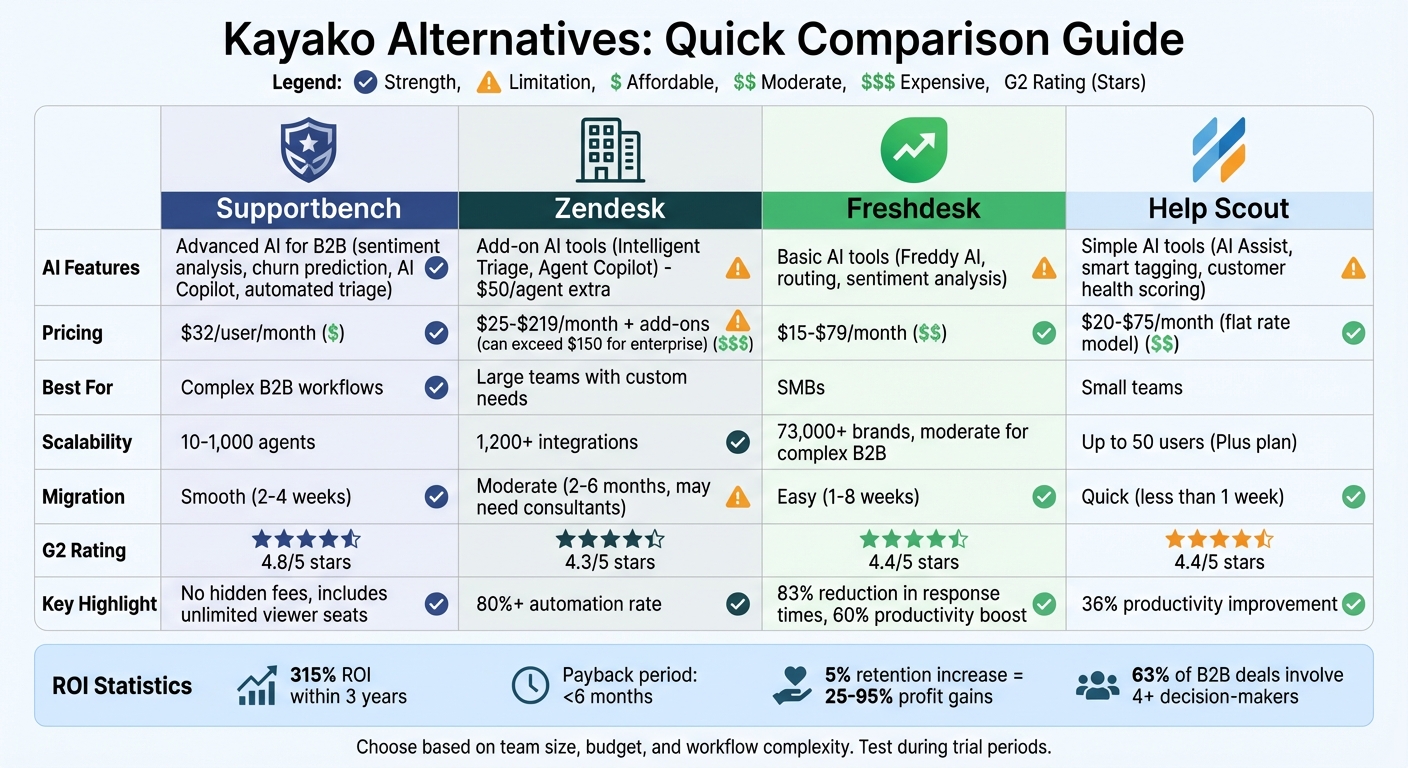
Kayako Alternatives Comparison: Features, Pricing, and Best Use Cases for B2B Support Teams
1. Supportbench
AI Capabilities
Supportbench uses built-in AI to simplify and enhance ticket management. It can automatically sort tickets by priority, topic, customer value, or even emotion through features like auto-tagging, priority detection, and predictive FCR scoring – eliminating the need for manual rules. Its AI Copilot offers real-time reply suggestions based on case history and knowledge base data, helping agents respond faster and more effectively. The platform also allows you to create knowledge base articles from resolved tickets with just one click.
Supportbench goes further by predicting CSAT and CES scores before surveys are completed, using sentiment and emotion analysis to identify potential churn risks and escalation trends. Automated QA reviews evaluate tickets for empathy, accuracy, tone, and overall effectiveness, cutting down on manual quality checks. These tools make the platform a strong choice for handling high-demand B2B environments.
Scalability for Growing Teams
Supportbench is designed to grow alongside your team, scaling from 10 to 1,000 agents without requiring a major overhaul of your existing systems. It provides a complete 360° view of each customer, including details like assets, entitlements, renewal history, and performance metrics. Communication is streamlined with unified channels that integrate email, chat, and social media into a single record. This allows teams across Support, Success, Product, and Operations to collaborate easily using shared visibility and threaded notes.
Eric Klimuk, Founder and CTO of Supportbench, highlights this balance:
"Supportbench offers a balanced approach, providing the power of automation and AI while maintaining ease of use for your team".
With straightforward scalability, transparent costs, and a smooth migration process, Supportbench is well-equipped to meet the needs of growing teams.
Cost Transparency
Supportbench offers clear pricing, starting at $32 per user per month (billed annually). This includes automation, analytics, and reporting, with no hidden fees. Unlike other platforms that charge extra for AI features or advanced reporting, Supportbench’s costs grow predictably with team size rather than feature usage. The platform has also earned high praise, with a 4.8/5 rating on G2.
Migration Process
The migration process is straightforward, with guided onboarding, smooth data imports, and API syncing. Most migrations are completed within 2–4 weeks, all without any downtime.
sbb-itb-e60d259
2. Zendesk
AI Capabilities
Zendesk uses AI to streamline operations and assist agents through tools like Intelligent Triage and Agent Copilot. Intelligent Triage classifies incoming requests by intent, language, and sentiment, cutting 45 seconds off each ticket. Meanwhile, Agent Copilot offers real-time suggestions, predicts next steps, and can even handle tasks for agents. For ongoing or complex cases, generative AI creates concise ticket summaries, making it easier for new agents or stakeholders to get up to speed quickly.
The platform’s AI automates more than 80% of customer interactions, and its AI-powered Quality Assurance reviews 100% of interactions to flag churn risks and uncover knowledge gaps. However, advanced features like intelligent triage and sentiment analysis require the Advanced AI add-on, priced at $50 per agent per month, in addition to the base subscription. While these tools improve efficiency, they come with added costs.
Scalability for Growing Teams
Zendesk supports scalability with over 1,200 native integrations and a unified Agent Workspace that brings email, chat, voice, and social media into a single view. It also offers enterprise-level tools like AI-powered Workforce Management for scheduling and forecasting, available as a $25 per agent per month add-on. Liberty London, for instance, reduced first response time by 73% and boosted CSAT by 9% using Zendesk AI for ticket labeling and routing.
However, as teams expand, costs can become unpredictable due to add-ons like quality assurance ($35 per agent per month) and workforce management, which are not included in the base plans. Additionally, the platform’s complexity can pose challenges. Advanced configurations may require significant effort, sometimes leading to fragmented workflows that can hinder efficiency.
Cost Transparency
Zendesk’s pricing starts at $25 per agent per month for the Support Team plan, going up to $219 per agent per month for the Suite Enterprise plan when billed monthly. Annual billing offers a 20% discount. Teams requiring AI-driven tools like triage, quality assurance, and workforce management should anticipate an additional $160 per agent per month in add-on costs.
For AI resolutions, Zendesk employs a usage-based model. For example, the Suite Professional plan includes 10 automated resolutions per agent per month, with extra resolutions costing $1.50 to $2.00 each. Zendesk holds a G2 rating of 4.3/5 from 6,214 reviews, though common complaints highlight "piecemeal pricing" and the difficulty of managing multiple add-ons to unlock full functionality.
Migration Process
Zendesk simplifies data unification during implementation with over 1,800 pre-built applications. It also offers up to two sandbox environments (available in Enterprise plans) for testing before going live. Kevin Barry, Vice President of Global Technical Services and Support at Degreed, shared:
"Zendesk was selected because we had champions on the team who knew that it would be easier to administer, and it would give our clients and internal teams a better service experience faster than another solution could".
However, the complexity and timeline of migration depend on the chosen tier and add-ons. Each additional module requires separate configuration and integration, underscoring the importance of planning for scalable, AI-driven workflows that reduce disruptions and keep teams productive.
3. Freshdesk
AI Capabilities
Freshdesk’s AI suite includes Freddy AI Agent, Copilot, and Insights. Freddy AI Copilot helps streamline workflows by suggesting ticket properties and using Intelligent Routing to assign tickets based on agent skills and workload. Real-time sentiment analysis is another standout feature, identifying customer frustration early and triggering escalations when necessary.
Freddy AI Insights empowers managers to create detailed reports using natural language prompts and automatically spot emerging ticket trends. For example, UPayments reported in August 2025 that Freddy AI Agent handled over 75% of its live chat conversations without human involvement, freeing up the support team to focus on more complicated tasks. Companies using Freshdesk AI have reported an average 83% reduction in response times and up to a 60% boost in agent productivity.
The Pro + AI Copilot plan is priced at $78 per agent per month, which includes 500 AI Agent sessions. Additional sessions cost about $100 per 1,000 sessions.
Scalability for Growing Teams
Freshdesk is built to scale, making it a solid choice for global B2B support teams managing high ticket volumes. It serves over 73,000 brands worldwide, handling thousands of tickets daily across distributed teams. Features like parent-child ticketing help break down complex, multi-stakeholder issues into smaller, manageable tasks. Meanwhile, linked tickets allow agents to keep track of related issues that are critical to business operations. For larger organizations, the Enterprise tier offers advanced tools such as a sandbox environment for testing workflows, audit logs for compliance, and skill-based routing to ensure specialized queries are handled by the right experts.
Bridgestone, for instance, adopted Freshdesk to leverage its flexible metrics and AI-powered tracking, resulting in more efficient follow-ups on customer and agent interactions. Implementation time varies depending on the complexity of the setup, ranging from 1 week for basic configurations to 4–8 weeks for multi-brand enterprise migrations. On average, businesses report saving 30–40% in costs compared to platforms with similar capabilities.
Cost Transparency
Freshdesk offers several pricing tiers to meet different needs. The Growth plan starts at $15 per agent per month, the Pro plan at $49 per agent per month, and the Enterprise plan at $79 per agent per month, all billed annually. The Pro + AI Copilot plan, which includes 500 AI Agent sessions, is priced at $78 per agent per month. For teams requiring omnichannel support – covering email, chat, phone, WhatsApp, and social media – plans range from $29 to $119 per agent per month.
With a G2 rating of 4.4/5 based on over 3,000 reviews, Freshdesk is often praised for its user-friendly interface and straightforward setup. However, advanced features like sandbox environments and audit logs are only available in the Enterprise tier. To make the most of its AI tools, teams are encouraged to test session usage during a 2-week trial before committing to an annual plan. These pricing structures are designed to support efficient operations while incorporating AI-driven tools for complex support needs.
Migration Process
Freshdesk prioritizes smooth migrations to minimize disruptions. It offers free onboarding support, including assistance from engineers to transfer tickets, contacts, and knowledge bases. Basic setups can be completed in 1 week, while more complex, multi-brand implementations may take 4–8 weeks.
Matt Phelps, Director of Global Customer Support, reflected on the transition to Freshdesk:
"After moving to Freshdesk, we had the capability to do live chat, voice, and ticketing all in one platform, which made things easier for us. Freshdesk really improved the efficiency that we saw across the board with our agents."
For enterprise migrations, the sandbox environment – available with the Enterprise plan at $79 per agent per month – is highly recommended for testing automations and integrations before going live. Teams handling sensitive data should confirm HIPAA compliance and BAA availability directly with Freshdesk, as these features are generally limited to Enterprise plans.
4. Help Scout
AI Capabilities
Help Scout takes a human-first approach to customer support, focusing on tools that boost agent efficiency rather than replacing teams. Its AI suite includes features like smart tagging and categorization to streamline incoming requests, along with auto-assignment tools that match conversations to agents based on their expertise and availability.
The platform also features AI Answers, a chatbot designed to handle straightforward queries while escalating more complex issues to human agents. AI Answers costs $0.75 per resolution, but charges only apply if the customer doesn’t escalate or consult the knowledge base. Additionally, its AI-driven customer health scoring helps teams identify and address potential issues early – especially useful for B2B teams aiming to stay ahead of problems. Help Scout estimates these AI tools can improve team productivity by 36%, resulting in faster response times.
For pricing, the Plus plan at $45 per user per month includes AI Drafts and AI Summarize, while AI Assist is available across all paid plans. Teams can also test AI Answers with a three-month free trial before committing to the usage-based fees. This approach makes it easier for businesses to scale their support operations without sacrificing efficiency.
Scalability for Growing Teams
Help Scout is built to grow with small to medium-sized businesses, offering tools that adapt to increasing B2B support needs. The platform currently serves around 12,000 customers and emphasizes simplicity in its design. In December 2025, Help Scout introduced Company Context, a feature that gives agents access to organization-wide details during conversations – ideal for managing key accounts or navigating multi-stakeholder environments.
The platform’s tiered plans make it easier to scale. The Standard plan supports up to 25 users, the Plus plan accommodates up to 50 users, and the Pro plan provides unlimited user capacity. For teams that need cross-departmental collaboration, Light Users offer limited access for roles like Product or Sales, allowing them to view conversations and add internal notes without requiring full agent licenses.
That said, Help Scout isn’t without its constraints. It lacks a built-in voice solution and dedicated SLA management features. Additionally, while it offers over 100 integrations, this falls short when compared to enterprise tools that support over 1,700 integrations. Another drawback is its knowledge base, which doesn’t allow dynamic content updates – meaning changes to a primary article won’t automatically sync across translated versions, a hurdle for global teams.
Cost Transparency
As of late 2025, Help Scout has moved to a flat monthly pricing model, ranging from $50 to $75 per month, which includes unlimited users and contacts. However, some legacy per-user pricing may still appear on certain channels. This flat-rate structure simplifies budgeting for teams.
Add-ons are straightforward as well: extra inboxes cost $10 per month, and additional Docs sites are priced at $20 per month. AI Answers resolutions are billed separately at $0.75 each after the three-month trial period. On G2, Help Scout maintains a rating of 4.4/5 and scores 9.2/10 for ease of use. For businesses needing advanced security, the Pro plan includes features like HIPAA compliance and IP restrictions, making it a strong option for industries like healthcare or finance.
Migration Process
Help Scout offers a quick and user-friendly setup, with basic configurations taking less than a day and more advanced setups requiring about a week. To make transitions even smoother, the platform provides the Import2 service, which automates the migration of support tickets, tags, and customer profiles.
For teams needing collaboration across departments, Light Users on the Plus and Pro plans offer visibility without adding to licensing costs. This streamlined migration process is especially helpful for B2B teams aiming for fast and cost-effective transitions. Additionally, Help Scout supports non-profits and B Corporations through its Free for Good program, which offers discounts to qualifying organizations.
Kayako Review – Top Features, Pros & Cons, and Alternatives
Platform Comparison: Pros and Cons
After analyzing each platform in detail, here’s a side-by-side comparison of their key features and limitations, tailored for B2B support teams. This table captures the most critical aspects discussed earlier:
| Platform | AI Capabilities | Scalability | Cost Transparency | Migration Ease |
|---|---|---|---|---|
| Supportbench | Built-in sentiment analysis, AI Co-Pilot, automated triage, and churn risk prediction designed for B2B retention | Easily scales from 10 to 1,000 agents without needing extra modules | $39 per seat per month, includes unlimited free viewer seats; no hidden fees | Excellent; guided onboarding and smooth data imports |
| Zendesk | Features like Answer Bot and predictive routing, but advanced tools often require costly add-ons or higher-tier plans | Handles large volumes but adds complexity as you scale | Starts at $55 per agent per month; enterprise features can push costs beyond $150 | Limited; steep learning curve, often needing external consultants |
| Freshdesk | Freddy AI for routing and basic sentiment analysis, ideal for simpler workflows | Moderate; its rigid structure can hinder scalability for complex B2B needs | Free tier available; paid plans range from $15 to $79 per agent per month | High; minimal implementation effort for setup |
| Help Scout | AI Assist for reply suggestions and customer health scoring | Best for small teams; lacks enterprise-level depth | Starts at $20 per user per month; flat pricing with no hidden costs | High; setup usually completed within days |
Supportbench stands out for B2B teams handling complex accounts involving multiple stakeholders. It offers tools like customer health visibility, sentiment tracking, and escalation management and risk prediction, all while maintaining a 4.8/5 rating on G2. This platform is tailored for retention-driven operations without requiring additional headcount.
Zendesk, on the other hand, offers unmatched integrations with over 1,200 apps. However, it comes with longer setup times (2 to 6 months) and higher costs due to reliance on multiple add-ons for advanced features.
Freshdesk focuses on affordability and simplicity, making it a good choice for growing SMBs. However, its rigid structure may struggle to support the complexity of scaling B2B workflows.
Help Scout provides a user-friendly experience, especially for smaller teams. But it lacks the customization and account-level insights that enterprise B2B support operations often require.
"Transitioning from legacy systems requires platforms that eliminate friction and unify teams." – Supportbench
For teams migrating from platforms like Kayako, having an account-centric data model is crucial. With 63% of B2B deals involving over four decision-makers, a unified view of stakeholders becomes essential. Modern platforms can achieve a 315% ROI within three years, with a payback period of less than six months. This underscores the value of investing in tools that simplify migration and scale effectively, aligning with both immediate and long-term operational needs.
Conclusion
Selecting the right Kayako alternative hinges on aligning your team’s needs with the strengths of each platform. For managing complex B2B accounts, Supportbench stands out with AI-driven sentiment tracking and churn risk alerts. Zendesk excels in enterprise-level customization, though it comes with a higher price tag. Freshdesk is an excellent choice for budget-conscious teams, while Help Scout offers a simple, email-focused experience.
Modern B2B support platforms can deliver impressive results, including a 315% ROI within three years and payback periods of less than six months. Even a modest 5% increase in customer retention can lead to profit gains of 25%–95%. This highlights the importance of choosing a platform that aligns with your growth strategy as you move away from Kayako.
Make the most of trial periods by testing platforms with real-world scenarios, such as handling complex escalations, facilitating collaboration across teams, and integrating business messaging tools. With 63% of B2B deals involving more than four decision-makers, it’s essential to select a solution that provides unified visibility for all stakeholders.
Your next platform should proactively identify problems before customers even submit tickets. Look for features like product usage data, customer health scores, and early churn alerts. Given that 91% of organizations now track service-driven revenue, your support platform must demonstrate tangible business value through CRM integration and retention analytics.
FAQs
What should I look for in a Kayako alternative for my B2B support team?
When picking a Kayako alternative for your B2B support team, it’s important to focus on solutions that cater to the complexities of managing multiple accounts and communicating with various stakeholders. Opt for platforms that provide omnichannel support, allowing your team to seamlessly interact across tools like Slack, Microsoft Teams, and email.
Look for options with AI-powered features such as automated ticket triage, escalation prediction, and reporting tools. These can help streamline workflows, improve response times, and boost overall efficiency. Make sure the platform is scalable, offering flexible pricing plans and smooth integration with your existing software to ensure it grows with your business.
Lastly, pay attention to the migration process. A solution that offers easy data transfers and comprehensive user training can significantly reduce downtime and ensure a smoother transition for your team.
By keeping these priorities in mind, you can select a platform that not only improves customer support but also aligns with your team’s long-term objectives.
How does Supportbench use AI to improve B2B customer support operations?
Supportbench integrates AI to simplify B2B support operations, cutting down on repetitive tasks, improving team efficiency, and offering actionable insights. One standout feature is its AI copilot, which assists agents by understanding the context of cases, suggesting responses based on past interactions, and instantly pulling relevant knowledge base content. This not only speeds up case resolutions but also lightens the workload for support teams.
AI also plays a critical role in ticket management. It automatically prioritizes cases by analyzing factors like urgency, customer value, or sentiment. This ensures teams can focus their energy on the most pressing or complex issues. Beyond that, AI enhances knowledge management by creating and organizing articles from resolved cases. This makes it easier to access information quickly and supports customer self-service options. These tools allow B2B support teams to deliver service that’s more tailored, proactive, and efficient.
What are the costs involved in switching from Kayako to another support platform?
Switching from Kayako to a new support platform comes with a variety of cost considerations, such as licensing fees, setup costs, and ongoing operational expenses. Platforms that offer transparent, all-in-one pricing and AI-powered tools can help cut long-term costs by removing the need for expensive add-ons.
You’ll also need to factor in one-time expenses like data migration, staff training, and the possibility of downtime during the transition. While these upfront costs can feel steep, selecting a platform with clear pricing and built-in features can lead to significant long-term savings, particularly for mid-sized B2B teams. In fact, many businesses report reducing their total cost of ownership by as much as 50% over three years with an AI-focused, budget-friendly solution.
Related Blog Posts
- What are the best non-US Zendesk alternatives for B2B support teams?
- Which non-US helpdesk platforms include advanced SLAs, portals, and knowledge base without add-ons?
- What’s the best alternative to Salesforce Service Cloud for B2B support teams?
- Pylon alternatives for B2B support: what should you use as you scale?
Evaluating help desks for a B2B team?
Supportbench is all-inclusive from $32 per agent per month, with migration and onboarding included. See pricing or book a 20-minute demo.






