


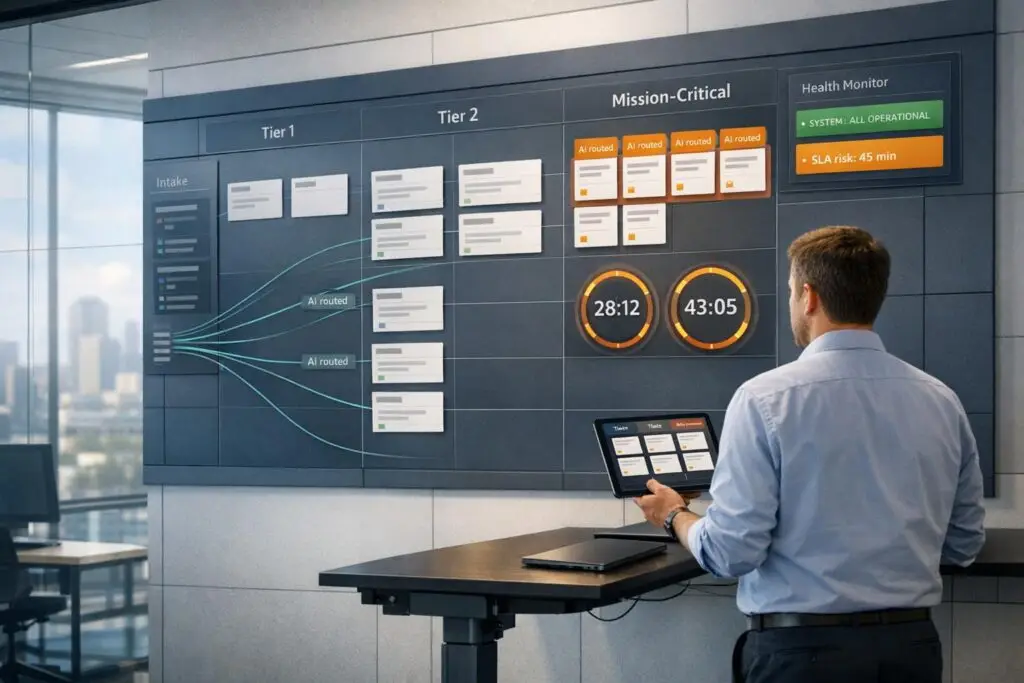
Supporting mission-critical customers – those generating $300,000+ annually – requires a system that ensures fast, expert-level problem resolution without creating chaos or inefficiency. Here’s how:
- Tiered Support Frameworks: Segment customers by revenue and engagement, ensuring high-value accounts get faster escalations while maintaining fairness and scalability.
- Dynamic SLAs: Use flexible response targets based on severity and urgency to align with business needs, especially during critical periods like contract renewals.
- AI-Driven Support: Automate ticket routing, prioritization, and sentiment monitoring to reduce manual work, cut response times, and prevent escalations.
- Preventive Workflows: Analyze customer behavior and sentiment to identify risks early, enabling teams to address issues before they escalate.
- Key Metrics: Track First Contact Resolution, escalation rates, and resolution times to measure effectiveness and adjust resources.
Building Tiered Support Frameworks That Scale
How to Define Support Tiers by Customer Value
Start by distinguishing operational tiers (which rank support expertise, such as Tier 0 to Tier 3) from customer tiers (which prioritize accounts based on revenue and behavior).
To segment high-value customers effectively, use metrics like revenue, engagement levels, and contract renewal data. This helps identify differences between accounts that generate high revenue but show low engagement versus those with growing usage patterns. A structured support tier system ensures that every issue is addressed by the appropriate level of expertise.
"Support tiers are not about offering ‘better’ support to some customers and less to others. They are about building a structured, scalable support system that ensures every issue is handled by the right level of expertise." – Jemima Naznin, Content Creator, BetterDocs
While all accounts should receive essential support, mission-critical accounts should benefit from faster escalation paths.
From there, implement dynamic SLAs to fine-tune response times, aligning them with customer needs and operational bandwidth in real time.
Using Dynamic SLAs for Flexible Response Times
Dynamic SLAs complement structured support tiers by tailoring response targets to evolving priorities and critical events. Unlike static SLAs, which can feel rigid and unresponsive, dynamic SLAs adapt to real-time customer needs and business demands. For example, during contract renewal periods, SLAs can automatically tighten to prioritize faster response times.
This system works by evaluating two key factors: severity (the technical impact of an issue) and urgency (the associated business risk). If a technical problem arises during a critical business milestone, the system can elevate its priority to ensure a quicker resolution.
Modern platforms enhance this process by monitoring real-time triggers, such as contract value, changes in ticket sentiment, or sudden spikes in volume. These triggers allow SLAs to adjust automatically and route tickets to the right Tier 2 or Tier 3 specialists, cutting down on manual triage and minimizing back-and-forth between teams.
| Priority Level | First Response Target | Update Cadence | Resolution Target |
|---|---|---|---|
| P1 (Critical) | 15 minutes | Hourly | 4–8 hours (mitigation) |
| P2 (High) | 1 hour | Every 4 hours | 1–2 business days |
| P3 (Medium) | 8 business hours | Daily | 5–10 business days |
| P4 (Low) | 2 business days | Weekly | Next release / Backlog |
This table illustrates how response targets balance customer expectations with team capacity. For instance, even P1 (critical) issues focus on immediate mitigation while a permanent fix is in progress. Sharing these targets through your support channels also helps set clear expectations, reducing unnecessary follow-ups and improving customer satisfaction.
How to Organize A Tier 1, 2, 3 Customer Service Team
Using AI to Prioritize Cases and Reduce Manual Work
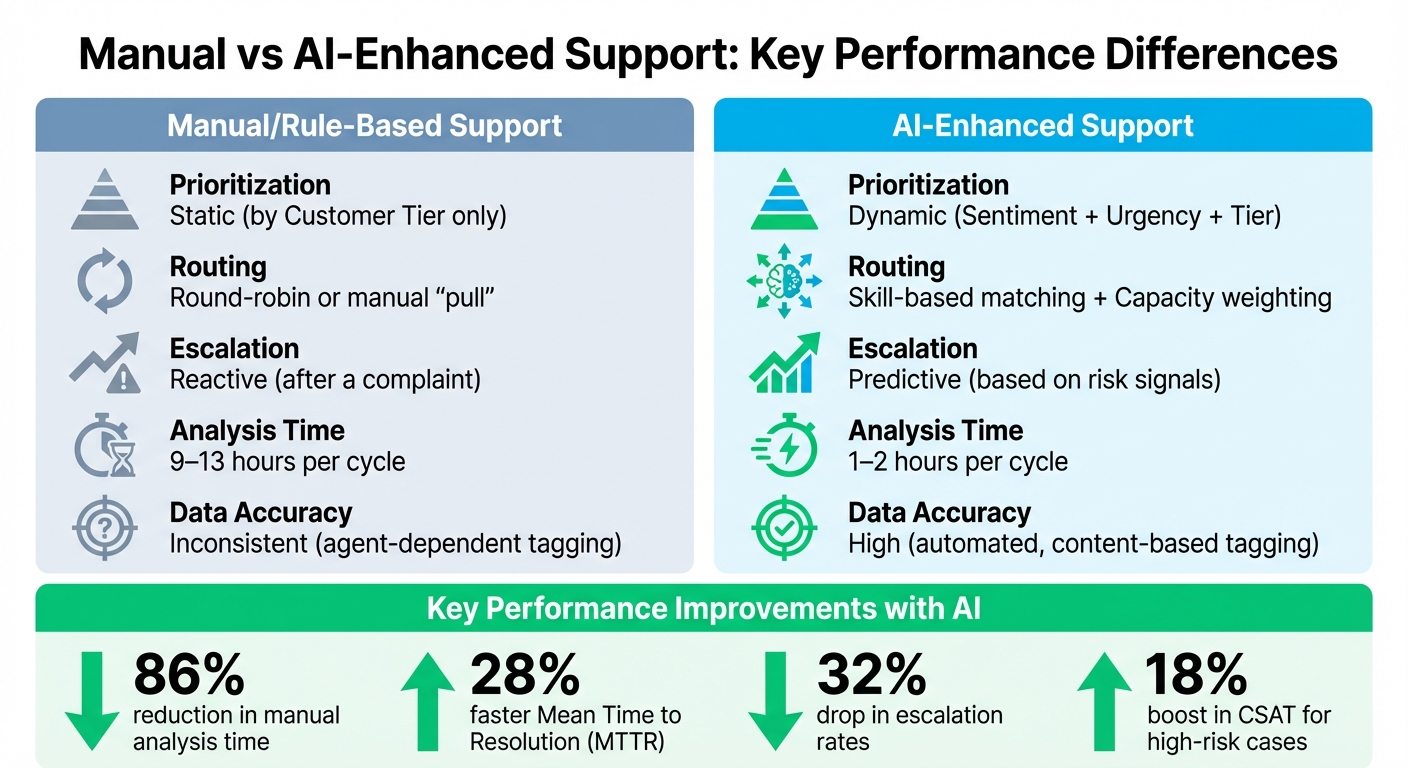
AI-Enhanced vs Manual Support Systems: Performance Metrics Comparison
Structured support tiers are just the beginning. By incorporating AI, case management becomes even more streamlined, reducing manual work while improving precision and scalability.
AI-Powered Case Routing and Prioritization
Traditional systems often rely on simple keyword matching, but AI takes it a step further. Using Natural Language Processing (NLP), it evaluates every word in a ticket – assessing sentiment, urgency, and intent. This means AI can identify critical issues, even when customers don’t explicitly label them as urgent.
Routing decisions are no longer tied to static criteria like job titles. Instead, AI considers agent skills and historical performance – matching complex cases to the most qualified team member based on past resolution times and topic expertise. It also factors in workload, accounting for case complexity and current ticket status, not just the number of open cases. This ensures high-priority issues are addressed promptly without overwhelming top-performing agents.
"AI is revolutionizing the operational backbone of support by bringing intelligence and context-awareness to ticket routing and prioritization." – Nooshin Alibhai, Founder and CEO, Supportbench
AI doesn’t stop at routing. It monitors tickets for sentiment changes and response delays. If a customer’s frustration grows during a conversation, the system raises the risk score and alerts management. This approach reduces manual analysis time by 86% and speeds up Mean Time to Resolution (MTTR) by 28%. Companies using AI-driven prioritization have also seen a 32% drop in escalation rates.
| Feature | Manual/Rule-Based Support | AI-Enhanced Support |
|---|---|---|
| Prioritization | Static (e.g., by Customer Tier only) | Dynamic (Sentiment + Urgency + Tier) |
| Routing | Round-robin or manual "pull" | Skill-based matching + Capacity weighting |
| Escalation | Reactive (after a complaint) | Predictive (based on risk signals) |
| Analysis Time | 9–13 hours per cycle | 1–2 hours per cycle |
| Data Accuracy | Inconsistent (agent-dependent tagging) | High (automated, content-based tagging) |
This dynamic system not only prioritizes cases but also simplifies repetitive tasks.
Automating Routine Tasks and Proactive Alerts
AI takes over mundane tasks like ticket categorization. By analyzing content, it automatically tags cases (e.g., "Product Bug" or "Billing"), ensuring clean and reliable data for trend analysis without manual input from agents. It can also detect missing information – like purchase orders or shipping details – and prompt customers to provide these before an agent steps in.
AI’s proactive capabilities extend to identifying risk signals, such as frequent follow-ups or upcoming renewal deadlines. When these indicators arise, the system triggers pre-escalation workflows, routing the ticket to the appropriate queue. This approach has led to an 18% boost in CSAT for high-risk cases. Looking ahead, analysts predict AI will resolve up to 80% of common support issues by 2029, often before customers even realize there’s a problem.
"The result is a routing system that behaves less like a static rules engine and more like a smart dispatcher that always knows who should handle what next." – Ryan Radcliff, Director of Product Marketing, SupportLogic
To get the most out of AI, define a skills ontology – a structured list of technical domains and product modules – to align case topics with agent expertise. Use warm handoffs, where AI summarizes case history during escalations, so customers don’t have to repeat themselves. And while AI can handle many tasks autonomously, set clear boundaries to prevent it from taking irreversible actions, like deleting accounts.
sbb-itb-e60d259
Preventing Escalations with Proactive Workflows
AI is transforming customer support by predicting potential issues through customer journey analysis. Instead of reacting to problems after they arise, this approach focuses on preventing them altogether. By identifying risks early, teams can reduce manual work and improve outcomes for critical accounts. This strategy works hand-in-hand with AI-driven case routing, tackling problems before they turn into escalations.
Identifying Pain Points Through Customer Journey Analysis
AI evaluates escalation risks by analyzing customer sentiment and interaction patterns. For instance, a noticeable shift from neutral to negative sentiment over several interactions often signals a higher chance of escalation. Other factors, like repeated follow-ups or multiple agent transfers, also contribute to this risk.
By combining data on error spikes, feature adoption gaps, and historical support issues, AI can predict risks even before a high-priority ticket is submitted. For example, if a customer’s product usage drops while support issues increase, the system triggers proactive outreach. Companies using this method have reported a 32% to 45% drop in escalation rates, with predictive models achieving around 88% accuracy in identifying at-risk tickets.
| Signal Category | Specific Data Points for Analysis |
|---|---|
| Ticket Language | Urgency markers, frustration markers, sentiment trends |
| Operational Context | SLA status, queue aging, reopen counts, agent handoffs |
| Product Usage | Feature adoption gaps, error spikes, new release proximity |
| Account Context | ARR, customer tier, renewal window, support entitlement |
To make this work, it’s essential to monitor sentiment changes across the entire ticket lifecycle – not just isolated moments. For example, set alerts for key milestones, like when a ticket reaches a fifth agent reply or includes a "Software Error" intent. This allows managers to step in before issues escalate. Additionally, integrating CRM data ensures that strategic accounts are prioritized and don’t get stuck in low-priority queues.
Using Customer Notes and Health Scores for Early Intervention
AI’s predictive capabilities don’t stop at individual tickets. By leveraging detailed customer notes and health scores, teams can take early action at the account level. Health scores consolidate data from multiple sources – like ticket sentiment, product usage, and SLA status – giving a full picture of account risk.
This broader view helps teams identify patterns across an entire organization. For example, if several users from the same company report similar issues, the system flags it for escalation or Customer Success Manager (CSM) involvement. These AI-driven processes cut down manual analysis time by 86% and improve Mean Time to Resolution by 28%. As a result, customer satisfaction scores (CSAT) for high-risk cases have increased by 18%.
"AI determines priority not just based on a selected field or a single keyword, but by analyzing a confluence of factors… [including] Customer Value/Tier: Integrating with CRM data to automatically elevate priority for high-value or premier-support clients." – Nooshin Alibhai, Founder and CEO, Supportbench
To streamline intervention, set triggers that automatically add internal notes for tickets with multiple follow-ups or negative sentiment trends. These notes should highlight reasons like "negative sentiment + SLA near breach", helping agents act quickly. Before escalating, it’s also important to check team availability to ensure a smooth handoff.
Measuring Results and Avoiding Common Mistakes
Metrics help you determine if your tiered support system is working as intended or just adding unnecessary complexity. One key metric is First Contact Resolution (FCR), which tracks how often Tier 1 agents resolve issues on the first try. A low FCR might mean these agents need better training or more tools. Another important metric is Average Resolution Time by Tier, which measures how long it takes to resolve issues at each level. If higher-tier resolution times are increasing, it could point to inefficient handoffs or knowledge gaps. Escalation Rate is another useful metric, showing how often tickets are bumped up to higher tiers. Frequent escalations might signal training gaps in Tier 1 or more complex technical challenges. Lastly, Cost Per Case, calculated by dividing total support costs by ticket volume, shows how financially efficient your framework is. For example, AI workflows have been shown to slash costs per case from $22 to $11 – a 50% reduction. Let’s dive deeper into the metrics and techniques that can fine-tune your support system.
Key Metrics for Evaluating Support Performance
To go beyond the basics, consider metrics like Backlog per Tier, which highlights overwhelmed levels and helps you adjust resources or hire for specific gaps. Time-to-Escalation is another critical measure, tracking how long tickets linger before being escalated. Long delays here may point to workflow confusion or hesitation. Ticket Volume by Tier is also crucial, ensuring your expert-level agents aren’t bogged down with simple requests. AI-driven workflows have demonstrated significant improvements: boosting customer satisfaction (CSAT) by 18%, reducing mean time to resolution (MTTR) by 28%, and cutting manual analysis time by 86%. These metrics are foundational for comparing tiered and VIP support models.
Comparison: Tiered Support vs. VIP Support Models
When comparing tiered and VIP support, the main differences lie in scalability and fairness. Tiered models focus on routing issues based on complexity, allowing specialists to handle advanced problems while generalists manage high-volume, simpler tasks. VIP models, however, prioritize customers based on their status, which can lead to bottlenecks and inconsistent service.
| Feature | Tiered Support Model | VIP Support Model |
|---|---|---|
| Scalability | High; add Tier 1 agents to handle volume. | Low; limited by the small pool of VIP agents. |
| Cost Efficiency | High; lower-cost generalists handle simple tasks. | Low; senior staff often deal with routine issues. |
| Fairness | Based on issue complexity. | Based on customer status; "loudest complaints" may win. |
| Career Path | Clear; junior agents can grow into higher tiers. | Limited; lacks structured skill-based progression. |
| Operational Flow | Structured; uses defined escalation paths. | Reactive; often bypasses standard processes. |
How to Avoid Over-Customization and Resource Drain
Excessive customization can weaken standardized knowledge bases, pushing more tickets into costly higher tiers. To avoid this, align customizations with tier-specific guidelines to maintain efficiency. Start simple – many teams thrive with just two tiers: Tier 1 for general inquiries and Tier 2 for complex problems. Add more tiers only when ticket volume justifies it. Clearly document boundaries for each tier to prevent unnecessary escalations. For smaller teams (three agents or fewer), rigid tier structures often backfire; these teams benefit more from shared visibility and collaboration than strict hierarchies.
Lastly, avoid impersonal handoffs by ensuring agents include detailed internal notes when escalating tickets. This prevents customers from having to repeat their issues. A real-world example: In June 2025, AssemblyAI implemented AI-powered support to handle developer inquiries. Under Lee Vaughn, Manager of Support Engineering, the company reduced first response time from 15 minutes to just 23 seconds – a 97% improvement – and doubled its AI automated resolution rate from 25% to 50%, all while achieving 24/7 coverage without increasing headcount.
Conclusion
To create a more effective support system, it’s essential to balance technical complexity with operational efficiency. Serving mission-critical customers requires moving away from chaotic VIP models and adopting tiered frameworks that organize issues by complexity. Combining this approach with AI-driven automation to eliminate manual bottlenecks and proactive workflows to address problems early allows specialists to focus on resolving real technical challenges.
Consider this: AI-powered ticketing systems can increase agent productivity by 92% – from handling 12 tickets per day to 23 – while cutting the cost per ticket in half, from $22 to $11. Teams that implement intelligent workflows also see a 28% reduction in resolution times and 32% fewer escalations. These numbers highlight a transformative shift in how support operations can be managed.
The key is to reimagine support as a system redesign. Start by building a strong Tier 0 self-service layer to handle routine questions. Then, let AI step in to route more complex issues based on their content and sentiment. Automated runbooks and sentiment tracking can ensure timely escalation to human agents when needed.
"The challenge is no longer treating customers differently; it is making sure every issue reaches the right level of expertise without overwhelming your support team." – BetterDocs
FAQs
How can AI help support teams better manage mission-critical customers without overwhelming resources?
AI empowers support teams to handle mission-critical customers more effectively by automating essential processes and enabling smarter prioritization. For example, it can assess factors like customer sentiment, issue urgency, and previous interactions to dynamically adjust service priorities. This ensures that high-value customers receive faster, more accurate responses without overwhelming the team.
It also enhances efficiency with intelligent ticket routing, automatically assigning requests to the most qualified agents based on their expertise and availability. This minimizes delays and ensures critical issues are resolved quickly. On top of that, AI can spot patterns in support data to predict potential escalations. By addressing these issues proactively, teams can improve customer satisfaction and reduce downtime.
By simplifying workflows and cutting down on manual tasks, AI helps support teams consistently deliver top-notch service to their most critical accounts, all while maintaining scalability and balancing resources effectively.
What makes dynamic SLAs better than static ones?
Dynamic SLAs adjust in real-time based on factors like customer needs, sentiment, and issue complexity. This adaptability enables your team to handle requests more efficiently, leading to faster resolutions and happier customers.
Unlike static SLAs that stick to fixed rules, dynamic SLAs focus on flexibility. They help minimize escalations by prioritizing the most pressing or high-impact cases. This approach keeps your support processes running smoothly while meeting the changing demands of your most important customers.
How can tiered support models prioritize critical customers while staying fair and scalable?
Tiered support models aim to balance the needs of critical customers with fairness for all by categorizing issues based on factors like complexity, urgency, and customer value. This system ensures resources are allocated efficiently, giving high-priority customers the specialized attention they require while still addressing the needs of others.
A common setup involves dividing support teams into tiers. Frontline agents typically handle straightforward inquiries, while more complex problems are escalated to specialists. This structure ensures customers receive the appropriate level of support without overwhelming the system. AI-powered tools can further streamline this process by automating the prioritization and escalation of issues, making sure resources are directed where they’re most needed.
By blending structured workflows with intelligent automation, tiered support models provide scalable and fair service – avoiding the pitfalls of focusing solely on VIP customers.
Related Blog Posts
- How to Manage Customer Support Across Multiple Products with Different Complexity Levels
- What’s the best way to set up tier 1 / tier 2 / tier 3 support workflows in a help desk?
- What’s the best way to set up tier 1 / tier 2 / tier 3 support workflows in a help desk?
- How do you handle VIP / strategic accounts without creating unfairness?






