



Knowledge-Centered Service (KCS) is a methodology that helps support teams solve issues faster by creating and reusing knowledge during customer interactions. Here’s a simple breakdown of how to implement it:
- Step 1: Assess Your Current State
Review your workflows, identify knowledge-sharing challenges, and set SMART goals (e.g., reducing resolution time or improving self-service success rates). - Step 2: Build a KCS Team
Form a KCS Council with managers and frontline agents to lead the implementation. Define roles like contributors, publishers, and experts. - Step 3: Design Workflows
Use the "Solve Loop" to create, reuse, and refine knowledge during issue resolution. Maintain quality with the "Content Health Loop." - Step 4: Set Up Tools
Integrate a centralized knowledge base with your ticketing system. Use templates for consistency and AI tools to streamline article creation and maintenance. - Step 5: Train Your Team
Train agents on KCS principles and workflows. Encourage real-time documentation using customer-friendly language. - Step 6: Launch and Track Results
Start with a small pilot, monitor metrics (e.g., first-contact resolution, article reuse), and refine the process based on feedback.
KCS helps teams resolve tickets faster, onboard new hires quicker, and reduce repetitive issues. AI tools can further enhance efficiency by automating article creation and identifying knowledge gaps.
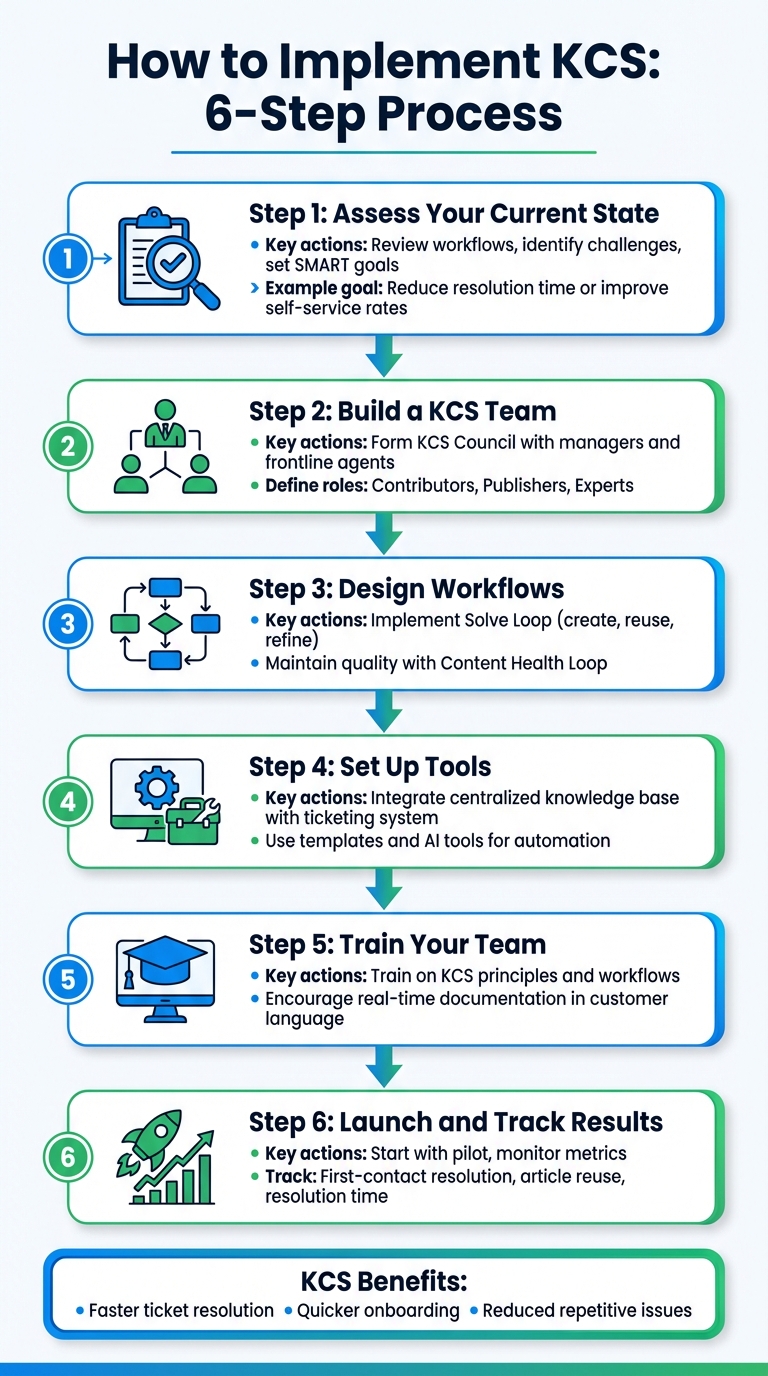
6-Step KCS Implementation Process for Support Teams
The Beginner’s Guide to Knowledge Centered Service (KCS)
Step 1: Review Your Current State and Set Clear Goals
Before jumping into KCS, it’s essential to figure out where you currently stand. Skipping this step can lead to a misaligned approach, making it harder to measure progress or identify areas ready for change. A proper assessment sets the stage for everything that follows in your KCS journey.
Review Your Current Knowledge Practices
Begin with an Opportunity Assessment Survey to get a detailed snapshot of how things currently work. Look closely at your workflows and check whether knowledge is documented in the language your customers use, not just internal jargon. Also, assess how easily agents can find the information they need. Are they spending more time searching for answers than solving problems?
Pay attention to challenges that might block knowledge sharing. For example, some organizations face "knowledge hoarding", where agents treat their expertise as job security instead of a shared asset. Others struggle with unclear documentation ownership or technical hurdles that make capturing and sharing knowledge more difficult.
Gather baseline data using your existing support metrics. Track key indicators like first-contact resolution rates, average handle times, ticket volumes, how long it takes new hires to become effective, and self-service success rates. This "before" picture will be crucial for showing the impact of KCS as you move forward.
Identify early champions for the change. Look for members to form a KCS Council, the team that will guide the implementation. Include frontline practitioners – they deal with support challenges daily and bring valuable insights to the table.
Set SMART Goals and Benchmarks
Once you have a clear understanding of your current state, it’s time to define specific goals to guide your efforts. KCS isn’t a one-and-done project; it’s an evolving system. Setting measurable milestones ensures you stay on track.
"Agree ahead of time on how success will be measured, and be sure you have access to the data you need to understand your progress." – Consortium for Service Innovation
Use the SMART framework to create goals that are Specific, Measurable, Achievable, Relevant, and Time-bound. Instead of vague aspirations, focus on clear targets that address your support team’s most critical needs.
Here are some examples of SMART goals:
| Goal Category | Example SMART Goal |
|---|---|
| Operational Efficiency | Reduce average resolution time from 45 minutes to 30 minutes by Q3 2026 |
| Self-Service Success | Achieve a 35% case deflection rate through the knowledge base by December 31, 2026 |
| Employee Productivity | Decrease new hire ramp-up time from 8 weeks to 4 weeks by June 30, 2026 |
| Customer Experience | Increase first-contact resolution from 50% to 70% within 6 months |
Keep in mind that repetitive issues make up 65% to 90% of support cases. This highlights the enormous opportunity for improvement. Start with smaller goals and refine them as you go. Experimentation will help you discover what works best for your organization.
Step 2: Build Your KCS Team and Design Workflows
Once your goals are clear and you’ve gathered baseline data, it’s time to focus on assembling the right team and creating workflows that seamlessly integrate knowledge capture into daily support activities.
Create a KCS Council
The KCS Council acts as the driving force behind your implementation. This group, made up of both managers and frontline team members, leads the charge in designing a program tailored to your organization. To build this council, use your assessment data to identify individuals who are ready to embrace change and advocate for the new approach.
The Council’s responsibilities include crafting a program that aligns with your SMART goals, monitoring progress, encouraging adoption, and maintaining quality standards. Members should undergo formal KCS training and certification to effectively guide the transformation. Leadership plays a crucial role here by establishing and communicating a clear vision that ties KCS efforts to broader organizational goals. This ensures everyone understands the purpose behind the initiative and feels aligned with its objectives.
"Article quality is the responsibility of everyone who interacts with the knowledge base." – Consortium for Service Innovation
This quote underscores a major shift in mindset. Instead of relying on a dedicated documentation team to manage all content, KCS promotes shared ownership. Everyone who interacts with the knowledge base contributes to its accuracy and usefulness. To make this work, introduce a licensing model that outlines specific roles and competencies. For instance, some team members may have the authority to publish or edit articles, while others may only flag content for review.
With your team in place, the next step is designing workflows to operationalize your KCS strategy.
Design Solve Loop and Content Health Loop Workflows
KCS relies on two interconnected workflows: the Solve Loop and the Content Health Loop. These processes work together to ensure knowledge is captured, maintained, and improved over time.
The Solve Loop is the reactive, day-to-day process where agents capture, structure, reuse, and refine knowledge as they resolve issues. To make this loop effective, focus on these practices:
- Capture knowledge in real time using the customer’s language, avoiding internal jargon.
- Structure articles with simple templates and concise, complete thoughts instead of lengthy sentences.
- Encourage agents to search early and search often before creating new solutions.
- Use a "flag or fix" approach, so every interaction with an article becomes an opportunity to update or improve it.
The Content Health Loop, part of the broader Evolve Loop, emphasizes continuous improvement through reflective analysis. This process is led by Knowledge Domain Experts (KDEs), who review patterns across Solve Loop articles. These experts identify trends, create high-value resources like diagnostic guides, and oversee the lifecycle of articles – archiving outdated ones when necessary.
| Role | Key Responsibilities |
|---|---|
| KCS Council | Develop the program, track progress, promote adoption, and uphold quality standards |
| Responders | Capture context, structure articles, reuse knowledge, and "flag or fix" content |
| Knowledge Domain Experts (KDEs) | Analyze trends, create reference materials, and manage article lifecycles |
| Leadership | Define the vision, build strategic frameworks, and ensure accountability |
With these roles and workflows in place, your team will be ready to move on to setting up the tools and infrastructure needed to support their efforts effectively.
Step 3: Set Up Tools and Infrastructure
Once your team and workflows are ready, it’s time to select the right tools to make knowledge capture as effortless as possible. A well-designed system should feel intuitive, not like an extra chore. Modern AI tools can also help reduce the manual workload, making it easier to maintain an effective knowledge base. Start by building a centralized repository that integrates smoothly with your ticketing system.
Set Up a Centralized Knowledge Base
Your knowledge base should act as the go-to source for all internal and external content. By consolidating systems and using visibility controls, agents can search through all available knowledge in one place. This eliminates the need to jump between platforms and reinforces the "Search Early, Search Often" approach, which helps avoid redundant work.
Integration with your ticketing system is critical. This allows agents to search, link, or even create new articles directly from their workspace. For example, adding a "Knowledge" section within the ticket panel can streamline workflows and make knowledge sharing more seamless.
To keep things consistent, use standardized templates like PERC (Problem, Environment, Resolution, Cause) for technical troubleshooting or a Question-Answer-Overview format for FAQs. These templates ensure that whether content is written by an agent or generated by AI, it follows a clear structure that’s easy to navigate.
Control access carefully to manage content edits and publishing. Some team members might have immediate publishing rights, while others can flag content for review. This ensures that internal notes stay separate from public-facing articles, keeping everything organized and professional.
"The quality of your knowledge-centered service (KCS) depends on how effectively you capture, organize, and share what your teams know." – Lauren Hakim, Director of Product Marketing, Zendesk
This kind of integration lays the groundwork for using AI to supercharge your support operations.
Use AI to Improve Knowledge Processes
AI can transform knowledge-centered service (KCS) into a much faster and more efficient process. For example, generative AI can turn a few bullet points or a brief summary into a fully drafted article in just minutes – what used to take 30 minutes can now take as little as 3. When an agent resolves a ticket with useful troubleshooting details, AI can automatically format those notes into a ready-to-publish article using your templates.
AI also helps identify gaps in your knowledge base by analyzing search trends, ticket surges, and customer feedback. This ensures your content evolves based on real-world needs. Tools like Supportbench use AI to process case histories and generate structured articles complete with subject lines, summaries, and keywords.
To keep your knowledge base fresh, AI can flag outdated content or highlight articles with high bounce rates that may need updates. For the "Find" and "Reuse" steps of the Solve Loop, Natural Language Processing (NLP) makes it easier for both agents and customers to search using conversational phrases instead of exact keywords. This dramatically improves the chances of finding and reusing existing knowledge, leading to faster resolutions. In fact, studies show that AI-powered support tools can handle at least 30% of customer queries without any human involvement.
When choosing tools, look for platforms that are "KCS v6-Verified" or "KCS Aligned", as certified by the Consortium for Service Innovation. These certifications confirm the platform’s ability to meet the specific demands of capturing, organizing, and reusing knowledge. The payoff is clear – implementing KCS can boost an analyst’s daily capacity by 57%.
sbb-itb-e60d259
Step 4: Train Your Team and Integrate KCS into Daily Work
Once your tools and infrastructure are ready, the next hurdle is getting your team fully on board. Adopting KCS isn’t just about learning new workflows – it’s about embracing a new mindset. Training should focus on more than the mechanics; it needs to emphasize the core principles: Trust, Create Value, Demand Driven, and Abundance.
Deliver Complete KCS Training
Start with your KCS Council – this group will lead the charge in implementing and promoting KCS. These members should earn KCS v6 Certification, equipping them to design workflows and guide others through the transition. Stress the idea of shared responsibility: every team member plays a role in ensuring the quality of the knowledge base.
Adopt a licensing model to manage proficiency levels and responsibilities. Here’s how it works:
- A KCS Candidate can flag articles for updates and draft content for review.
- A KCS Contributor can directly edit and publish content for internal use.
- A KCS Publisher has the authority to release content for external audiences.
This tiered approach keeps the process efficient while maintaining high-quality standards.
Training should also highlight practical techniques. For example, teach agents to capture details during customer interactions, using the customer’s own words to describe the issue. This ensures accuracy and saves time compared to documenting everything after the case is resolved. Encourage concise, clear language to streamline the process while maintaining clarity. Reinforce the mantra "Reuse is Review" – every time an article is used, it’s an opportunity to check its accuracy and make updates if necessary.
"If knowledge workers feel a sense of ownership for the knowledge base and the article quality, it encourages the techniques of ‘reuse is review’ and ‘flag it or fix it’." – Consortium for Service Innovation
After completing training, the focus should shift to embedding these practices into everyday workflows.
Integrate KCS into Case Handling Processes
For KCS to succeed, knowledge capture must feel like a natural part of the workflow, not an extra task. The Solve Loop – Capture, Structure, Reuse, and Improve – should guide every support interaction. Train agents to "Search Early, Search Often", encouraging them to consult the knowledge base first. This avoids duplicating effort and ensures they leverage the team’s collective knowledge.
To make this seamless, integrate the knowledge base with your ticketing system. Agents should be able to search, link, or create articles directly from the ticket panel. Use simple, consistent templates like PERC (Problem, Environment, Resolution, Cause) to speed up article creation and ensure consistency.
Implement a clear "Flag It or Fix It" policy: if agents spot errors in an article, they should fix them immediately if they have the appropriate license. If not, they can flag the article for a Knowledge Domain Expert to review. This ensures the knowledge base stays accurate without slowing down case resolution. You might also want to designate KCS Coaches – experienced agents who provide feedback and help their peers adapt to the new workflow.
| KCS Practice | Daily Action for Agents |
|---|---|
| Capture | Document issues in real time using the customer’s own words. |
| Structure | Use consistent templates to improve readability and searchability. |
| Reuse | Search the knowledge base before starting new research. |
| Improve | Update articles during interactions or flag them for review if needed. |
As agents see that their contributions reduce their own workload – because they can reuse what they’ve documented – adoption becomes a natural choice. The ultimate goal is to make KCS the easiest and most effective way for the team to work, rather than an added chore.
Step 5: Launch, Track Results, and Improve
After completing training and defining processes, kick things off with a small pilot. This allows you to fine-tune the approach to fit your specific environment. From the start, establish success metrics based on accessible data.
Track Key Metrics for Success
To measure the value of KCS, focus on two types of metrics: activity indicators (e.g., article reuse, participation rate) and outcome indicators (e.g., resolution time, customer satisfaction). Avoid setting hard numerical goals for activity metrics, like "write five articles per week", as this can lead to low-quality content or gaming the system.
Key metrics to prioritize include:
- First-Contact Resolution (FCR): KCS typically boosts FCR by 30% to 50%.
- Time-to-Proficiency: New hires onboard 70% faster with KCS.
- Known vs. New Ratio: In a mature KCS system, 85% of assisted support cases should involve new issues, as most known issues are resolved via self-service.
- Article Reuse Rate: Track how often existing articles are linked to new incidents, which directly shortens resolution time.
| Metric Category | Specific Metric | Impact |
|---|---|---|
| Activity (Leading) | Article Reuse/Citations | Frequency of linking existing articles to cases |
| Activity (Leading) | Participation Rate | Percentage of staff actively contributing content |
| Outcome (Lagging) | First-Contact Resolution | 30–50% improvement expected |
| Outcome (Lagging) | Time-to-Proficiency | 70% faster onboarding for new analysts |
| Outcome (Lagging) | Known vs. New Ratio | Ideal: 85% of cases are "new" issues |
Keep an eye on trends over time to spot patterns in the knowledge base. For efficiency, integrate metric tracking directly into your CRM system.
Use Feedback and Analytics to Improve
Once your pilot is live, use targeted metrics to evaluate how well KCS is working. Create continuous feedback loops to improve your knowledge base. Assign Knowledge Domain Experts to analyze recurring Solve Loop events, identify high-value articles, and flag gaps that need new content.
AI-powered tools can also help. For example, they can identify knowledge gaps by analyzing support tickets and search queries that yield no results. These tools can even pinpoint workflow bottlenecks and suggest articles based on real-time ticket data. To maintain quality, implement a Quality Index by having coaches manually review articles against established standards.
"KCS is a journey, not a destination. While the work of maintaining a KCS implementation is never done… the benefits realized in the short term can be assessed using traditional support metrics." – Consortium for Service Innovation
Regularly conduct KCS Process Adherence Reviews (KPAR) to ensure the team is following the "Capture, Structure, Reuse, Improve" workflow correctly. Remember, maintaining quality is a shared responsibility, not just the job of a dedicated writing team. Organizations using KCS often see a 20% to 35% boost in employee retention and a 20% to 40% improvement in employee satisfaction, making ongoing improvement efforts worthwhile.
How AI Improves KCS for Modern B2B Support
AI is reshaping Knowledge-Centered Service (KCS) by turning what was once a manual process into an intelligent system that actively manages the creation, maintenance, and delivery of knowledge. As Enjo.ai aptly put it, "Automation only excels when built on strong, accessible knowledge". Moving forward, AI will play an even greater role – not just assisting human agents but acting as an intelligence layer that seamlessly integrates into KCS processes, bridging the gap between manual efforts and automated efficiency.
AI-Powered Knowledge Base Management
Modern AI tools can now generate complete help articles in minutes using case histories, internal notes, or release documentation. They also proactively identify gaps and flag unresolved questions in real-time. This eliminates the need to wait for patterns to emerge, as AI suggests new content to address issues as they arise.
Beyond content creation, AI ensures consistent quality across distributed knowledge sources. It scans platforms like Confluence, SharePoint, and Notion for outdated or redundant content, aligning everything with corporate standards in real time. For instance, one case study highlighted an 80% resolution rate achieved by training an AI agent with a dynamic, constantly updated knowledge base.
Unlike traditional systems, AI-native knowledge bases act as "operational brains" rather than static repositories. By leveraging Retrieval-Augmented Generation (RAG), they fetch relevant semantic chunks and synthesize accurate answers directly within workflows like Slack or Microsoft Teams. To maximize retrieval accuracy, articles must be structured with concise paragraphs (2–4 lines), clear headings, and detailed metadata.
AI Tools for Operational Efficiency
AI tools are also transforming daily support operations by extending KCS benefits into every interaction. These tools act as copilots for agents, summarizing complex cases, suggesting next steps, and even predicting potential issues to improve workflow efficiency. They automatically forecast customer satisfaction (CSAT), detect first contact resolution (FCR), and prioritize cases, saving valuable time. Additionally, AI handles repetitive tasks like tagging cases, assigning issue types, and flagging frequently accessed but ineffective articles for immediate updates.
The most advanced AI agents go beyond answering questions – they resolve issues directly. By integrating with ERP and CRM systems, they can process refunds, update orders, or reschedule appointments without requiring customer intervention. This fully automated approach allows customers to get the help they need without visiting a help center or reading through articles. As a result, modern B2B support teams leveraging these AI-driven systems can resolve over 40% of repetitive IT issues directly within collaboration tools.
Conclusion: Key Steps for Successful KCS Implementation
Implementing KCS effectively brings together people, processes, and tools, embedding knowledge creation into everyday support tasks. Start by assessing your current situation and setting measurable goals aligned with business outcomes, like improving first-contact resolution or optimizing support cost ratios. Establish a KCS Council to guide the transition, design workflows for the Solve Loop and Evolve Loop, and remember – KCS is an ongoing process that requires regular adjustments. These foundational steps lay the groundwork for a more efficient system and a well-equipped team.
A centralized knowledge base is crucial for real-time collaboration, allowing agents to "flag it or fix it" as they work. This repository supports the Solve and Content Health loops, ensuring that knowledge stays accurate and accessible. Training should emphasize integrating KCS into case management so agents can capture relevant context on the spot, keeping content both useful and searchable. As the Consortium for Service Innovation explains:
"KCS is not something we do in addition to solving problems. It becomes the way we solve problems."
When built on strong processes, AI takes KCS to the next level. It speeds up article creation, identifies knowledge gaps proactively, and turns KCS into a more automated and responsive system. Organizations leveraging AI-powered KCS have seen service costs drop by 75% and first-contact resolution rates increase by 32%. Modern tools integrate AI directly into workflows, freeing agents to tackle new, complex challenges while routine issues are resolved automatically.
The double-loop model – combining the Solve Loop for daily operations with the Evolve Loop for long-term improvement – keeps your implementation adaptable and self-correcting. Monitor key metrics like self-service rates and knowledge reuse, and let AI assist in tracking content quality, spotting inefficiencies, and recommending updates. By starting with small pilots, gathering feedback, and gradually scaling up with AI support, your team can achieve noticeable gains in efficiency, customer satisfaction, and cost management in just a few months. These steps will help you build a streamlined, AI-enhanced support operation, as outlined throughout this guide.
FAQs
What are the main roles and responsibilities in a KCS team?
In a Knowledge-Centered Service (KCS) team, roles revolve around building, maintaining, and utilizing knowledge to boost support efficiency and improve customer experiences. While job titles may vary, the core responsibilities generally include:
- Knowledge contributors: These team members document solutions during customer interactions, making sure valuable insights are added to the knowledge base.
- Knowledge managers: They focus on maintaining the quality and structure of the knowledge base, ensuring content is accurate, up-to-date, and easy to navigate.
- Support agents: Along with resolving customer issues, they actively use and contribute to the knowledge base, promoting consistency and efficiency.
By working together, these roles integrate knowledge management into everyday processes. This ensures that articles are consistently created, updated, and used as part of problem-solving, leading to quicker resolutions, happier customers, and smoother operations.
How can AI tools help streamline KCS implementation in a support team?
AI tools can make Knowledge-Centered Service (KCS) implementation much smoother by automating repetitive tasks and lightening the manual workload. For instance, with the help of natural language processing (NLP), AI can quickly create, update, and organize knowledge articles, ensuring your knowledge base remains accurate and current. These tools can also recommend relevant articles to agents during customer interactions, speeding up response times and ensuring more consistent resolutions.
On top of that, AI can track usage patterns and analyze feedback to pinpoint outdated or missing content, helping you maintain a dependable and well-rounded knowledge base. By handling time-consuming tasks and improving the quality of articles, AI makes KCS more efficient and scalable, freeing your support team to focus on delivering outstanding customer service.
What are the key metrics to track for evaluating KCS success?
To measure the success of Knowledge-Centered Service (KCS), focus on key metrics that highlight operational efficiency and customer impact. Start with resolution time – this often improves by 20-50% in the initial months of implementation, reflecting quicker issue resolution. Another important metric is self-service success rates. Higher rates show that customers are solving problems on their own, which lightens the support team’s workload and boosts customer satisfaction.
Keep an eye on customer satisfaction (CSAT), as it typically improves with faster resolutions and effective knowledge sharing. Also, evaluate content quality and health by conducting regular reviews and gathering feedback to ensure the knowledge base remains accurate and helpful. Lastly, track agent productivity and knowledge reuse rates to see how well your team leverages existing resources to solve problems. These metrics together paint a clear picture of how KCS contributes to greater efficiency, cost reductions, and better customer experiences.
Related Blog Posts
- How Knowledge Base Integration Improves First-Contact Resolution
- How to Build a Knowledge Base for Ticket Deflection
- How to Build a Knowledge Base That Actually Reduces Tickets
- Knowledge Base Search Optimization: How Customers Find Answers Faster
Evaluating help desks for a B2B team?
Supportbench is all-inclusive from $32 per agent per month, with migration and onboarding included. See pricing or book a 20-minute demo.






