


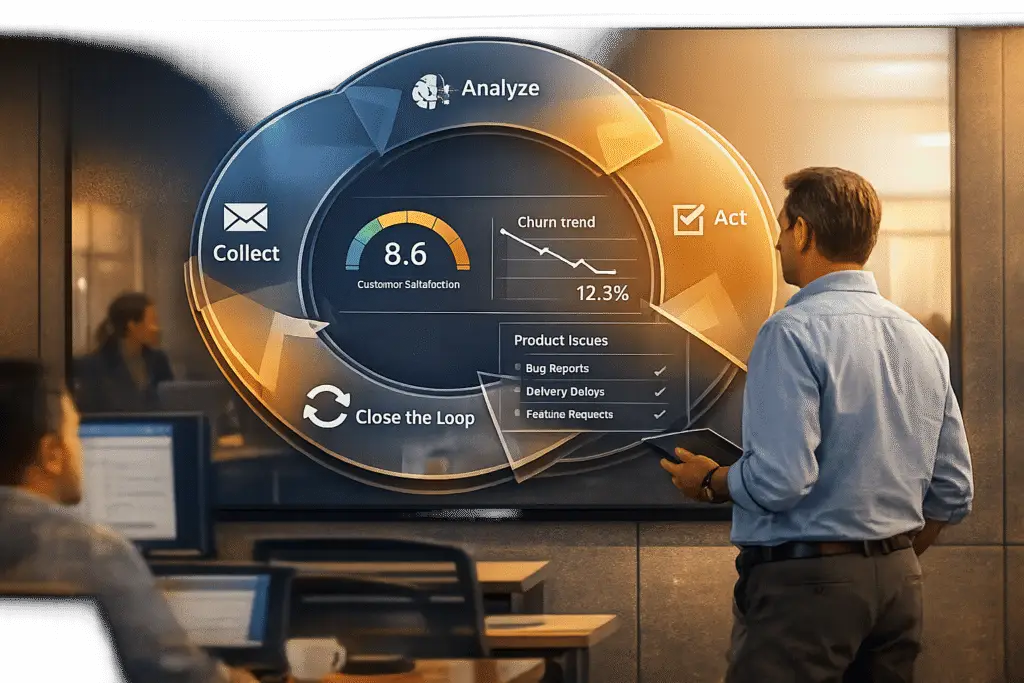
Want to improve your customer experience? Start with a feedback loop.
A customer feedback loop is a system to gather, analyze, and act on customer insights. It helps spot issues early, reduce churn, and improve satisfaction. Here’s how to build one:
- Collect Feedback: Use multiple channels like surveys, support tickets, and in-app prompts. Timing matters – ask for input right after key interactions.
- Analyze Efficiently: AI tools can process 100% of customer interactions, categorize feedback, and identify trends.
- Take Action: Assign clear responsibilities, prioritize fixes, and update resources based on feedback.
- Close the Loop: Follow up with customers to show their feedback led to changes, and measure the impact with metrics like CSAT and NPS.
AI simplifies and speeds up each step, ensuring no insight is missed. The result? Better products, happier customers, and a stronger business.
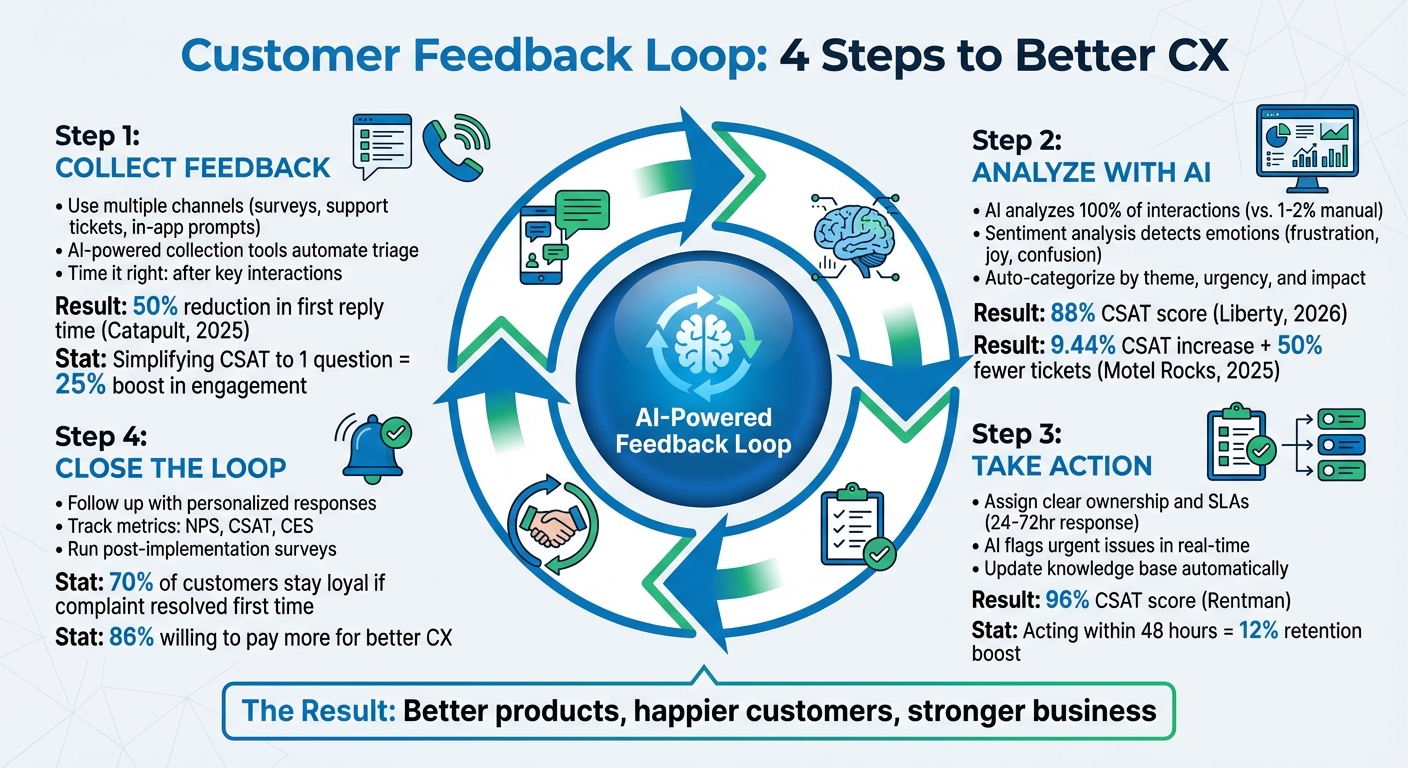
4-Step Customer Feedback Loop Process with AI Integration
Customer Feedback Loop: The Secret To Product Growth
Step 1: How to Collect Customer Feedback
The cornerstone of any effective feedback loop lies in pinpointing the best moments and channels for gathering input. In B2B settings, this goes beyond basic surveys. A solid strategy captures both direct feedback from customers and the insights their behavior reveals.
Use Multiple Feedback Channels
B2B customers interact with your team through a variety of touchpoints – support tickets, renewal calls, onboarding sessions, and even community forums. Each channel provides a unique perspective on their experience. Relying on just one? That’s a recipe for blind spots.
Post-interaction surveys like CSAT, NPS, and CES are crucial for measuring satisfaction. However, they’re most effective when paired with qualitative methods. For high-value accounts, a quick 15-minute feedback call with support leadership can uncover process gaps that a survey might miss.
Your front-line team – agents, sales directors, and account managers – often spot recurring issues before formal surveys catch them. If you’re hearing the same complaints repeatedly, it’s a red flag worth investigating, even if it hasn’t yet surfaced in your data.
Support interaction analysis digs deeper by examining ticket metadata, call transcripts, and chat logs. This helps pinpoint hidden friction points. For instance, a surge in tickets about a specific feature or trends within a particular customer segment can highlight areas needing attention.
For software platforms, in-app microsurveys are a game-changer. These quick, one-question prompts – like "Were we able to help you?" – can be triggered right after resolution. They’re minimally intrusive and provide fresh, actionable insights. Simplifying a CSAT survey to just one question has been shown to boost customer engagement by 25%.
"If your survey feels like a homework assignment, your response rate will tank."
– Tim Jordan, Sr. Manager of Customer Support, Cars.com
Community forums and social listening also play a vital role, offering both direct and indirect feedback. By combining insights from diverse sources, you can build a clearer picture of customer sentiment.
Use AI-Powered Collection Tools
In complex B2B environments, manual feedback collection just can’t keep up. That’s where AI steps in, automating the process across all customer interactions – like support tickets, call transcripts, and chat logs – to provide a more complete view.
Intelligent triage uses AI to label customer intent, sentiment, and language automatically. This ensures feedback gets routed to the right team for immediate action. For example, in 2025, Catapult, an athletic performance company, used AI to prioritize tickets and identify sentiment. The result? A 50% reduction in first reply time.
Natural Language Processing (NLP) and sentiment analysis take this further by analyzing emotions like frustration across thousands of interactions at once – something manual reviews simply can’t match. In 2025, Motel Rocks, an online fashion retailer, leveraged sentiment analysis to better understand customer needs, achieving a 9.44% increase in CSAT and cutting support tickets by half.
AI-powered surveys and microsurveys adapt dynamically, triggering questions after key moments like purchases or feature launches. This ensures you capture insights while the experience is still fresh.
AI-driven Quality Assurance (QA) tools also process vast amounts of unstructured data, identifying recurring themes, urgent issues, and churn risks. Rentman, a company specializing in audiovisual rental software, used QA tools to analyze customer conversations and agent performance. Sharing this data-driven feedback with their team helped them achieve CSAT scores as high as 96%.
Collect Feedback at the Right Time
Timing is everything. Feedback collected at the wrong moment risks being irrelevant or unhelpful. In B2B, it’s smart to use two distinct approaches: quarterly relationship surveys to monitor overall account health and transactional surveys immediately after key events like purchases or support resolutions.
For transactional feedback, immediacy is key. Request input right after a resolution, renewal, or feature launch. Surprisingly, 55% of companies skip post-delivery surveys altogether, and only 20% send them immediately – despite the fact that feedback loses value quickly.
Milestone-based collection is another effective approach. For example, gathering feedback after 30 days of product use can reveal what’s driving customer success – or where they’re struggling. Additionally, asking B2B stakeholders when they’d prefer to provide feedback (e.g., right away, the next day, or at week’s end) respects their communication preferences. Research shows people are more receptive to feedback earlier in the day, when they’re less stressed.
To avoid survey fatigue, space out requests and keep surveys short – no more than five key questions. Acting on feedback within 48 hours can boost customer retention by 12%. Timing and speed are just as critical as the quality of your questions.
"Account Experience programs that are generating revenue and blowing benchmarks out of the water are focusing on two major metrics: response rate and close the loop rate."
– Cary T. Self, Global VP of Education, CustomerGauge
Next, we’ll explore how AI-driven tools transform this data into actionable insights.
Step 2: How to Analyze Customer Feedback with AI
Once you’ve gathered customer feedback, the real work begins: making sense of all that data. Traditional methods often fall short, reviewing just 1–2% of customer interactions and leaving a wealth of valuable insights untouched in tickets and transcripts. AI changes the game by analyzing every interaction, spotting patterns, prioritizing issues, and identifying the root causes of customer dissatisfaction. Let’s dive into how AI enhances each step of the feedback analysis process to deliver actionable insights.
Sentiment Analysis and Emotional Scoring
AI-driven sentiment analysis goes far beyond just labeling feedback as positive or negative. Modern tools can pick up on emotions like frustration, confusion, joy, and disappointment by analyzing tone, word choice, and context. For example, in January 2026, luxury brand Liberty implemented automated sentiment analysis and intelligent triage to better understand customer intent and emotions, achieving an impressive 88% CSAT score. Other companies have seen similar success by using AI to prioritize tickets based on customer sentiment.
A major strength of AI is its ability to detect nuances in communication. It can distinguish sarcasm – like recognizing that "I love waiting on hold" actually signals frustration. For voice interactions, AI tools analyze not just the words spoken but also acoustic signals like tone, pitch, and pace. This dual-layered approach ensures a more accurate understanding of emotions, even when the words alone don’t tell the full story. Real-time sentiment scoring can even alert managers during live calls if a customer’s emotional state worsens, enabling immediate intervention.
"AI sentiment analysis tools detect patterns in your survey responses that aren’t as obvious to humans, like sarcasm, cultural differences, or translation errors."
– Sprig
Categorize and Prioritize Feedback
Using Natural Language Processing (NLP), AI can automatically organize qualitative feedback into meaningful categories such as product features, pricing, user experience, or billing issues – eliminating the need for time-consuming manual sorting. Many B2B operations utilize a three-layer taxonomy for categorization: Macro Theme (e.g., bug, UX friction), Product Area (e.g., billing, onboarding), and Urgency (P1, P2, P3).
But AI doesn’t stop at categorization. It evaluates multiple factors – like the scale of impact, frequency of incidents, and Customer Lifetime Value (CLV) – to decide which issues need immediate attention. For example, a critical bug affecting a high-value enterprise client would take precedence over a minor UI glitch reported by a single user. AI systems often use weighted scoring, applying multipliers (e.g., Impact = 3×, Prevalence = 2×, CLV = 1×) to systematically rank issues.
Setting measurable Service Level Objectives (SLOs) can help keep your team on track. For example, you might aim to triage 90% of feedback within 24 hours and escalate enterprise-critical issues within 4 hours. AI can also minimize redundancy by clustering similar feedback into a single record, reducing dashboard clutter and saving your team time.
"The integration of AI has significantly transformed the product research process… This approach enables us to quickly identify specific areas needing improvement, leading to faster iterations and more tailored product enhancements."
– Katarzyna Janas, Product Manager, Text
Once feedback is categorized, advanced analysis can uncover deeper trends and root causes.
Identify Trends and Root Causes
AI excels at uncovering the "why" behind customer dissatisfaction. By clustering recurring keywords and phrases, it can pinpoint systemic issues that might go unnoticed in manual reviews. For example, aspect-based sentiment analysis can break down feedback into specific elements – like pricing, wait times, or feature usability – offering a clearer picture of what’s driving complaints. This helps separate isolated complaints from widespread problems, such as consistently negative feedback about onboarding, which might signal a need for process improvements.
AI can also identify knowledge gaps. If agents repeatedly answer the same questions, AI can flag these topics and even assist in creating knowledge base articles to address them. For voice interactions, it transcribes and analyzes sales calls and user interviews, integrating these insights with survey data to create a comprehensive Voice-of-the-Customer (VoC) perspective.
"Advanced AI techniques like sentiment analysis, topic discovery, or more complex finetuned models for product identification, help us to quickly identify common themes and emotions in the feedback… This means we are able to close the feedback loop efficiently, almost in real-time."
– Angela Nowaszczuk, Product Owner, Lufthansa Group Digital Hangar
While AI automates much of the analysis, human oversight remains crucial. Spend 10–20 minutes daily reviewing AI-generated tags to keep false positives below 10%. Regular audits ensure accuracy and provide opportunities to fine-tune models if needed. This combination of AI efficiency and human validation ensures your feedback insights are both scalable and reliable.
sbb-itb-e60d259
Step 3: How to Act on Feedback Insights
Did you know that 86% of consumers are willing to spend more for a better customer experience? And 88% say that good service makes them more likely to buy again. The companies that thrive are often the ones that act quickly on feedback, turning insights into real improvements. Let’s dive into how you can make that happen using AI tools and effective teamwork.
Create Action Plans and Collaborate Across Teams
Once you’ve pinpointed the key issues, the next step is to assign clear responsibilities and ensure accountability. Every piece of feedback should have a primary owner, with secondary stakeholders looped in for visibility. Empower the teams closest to the customer to handle follow-ups directly. To keep things moving, set specific Service Level Agreements (SLAs) – for example, an initial response within 24–72 hours and a full resolution within 30 days.
To prioritize effectively, use an impact matrix that considers how often an issue occurs, its severity, and its potential impact on your business. This approach helps you separate quick fixes, like clarifying confusing pricing details on your website (which could be done in 48 hours), from larger, long-term initiatives. Route feedback directly into tools your teams already use – like Jira for product teams, Salesforce for sales, or Slack for general collaboration – so nothing gets overlooked.
"If you’re not closing the loop and making changes based on what customers are telling you, they’ll stop telling you anything at all."
– Tim Jordan, Sr. Manager of Customer Support, Cars.com
Hold "Insight-to-Action" meetings as soon as you notice significant trends. These sessions bring teams together to brainstorm actionable steps and align on priorities. Tailor dashboards to your audience: executives get high-level overviews, while product teams see detailed, actionable insights. This kind of collaboration lays the groundwork for proactive problem-solving, which we’ll discuss next.
Use AI for Proactive Problem-Solving
AI takes customer support to the next level by identifying problems before they escalate. Tools that use intelligent triage can automatically sort tickets by intent, sentiment, and language, ensuring urgent issues are routed to the right team immediately.
AI-powered Quality Assurance (QA) tools can evaluate every single customer interaction – whether it’s over email, chat, or phone – something manual reviews simply can’t match. These tools flag issues like negative sentiment, churn risks, and unusual service patterns in real time, giving managers the chance to step in before customers leave. For example, Rentman, a software company, used AI QA to analyze all customer conversations and agent performance. By sharing this feedback with agents for coaching, they reached CSAT scores as high as 96%.
Automating workflows can ensure that low CSAT scores or negative sentiment trigger immediate follow-ups from supervisors. AI copilots also help agents in real time by suggesting contextually relevant responses and guiding workflows, which helps teams stick to SLAs and resolve issues faster. Predictive analytics can even spot emerging problems by analyzing historical trends and shifting customer sentiment before they become widespread. Beyond addressing immediate concerns, AI can also help improve resources for the long term.
Update Your Knowledge Base and Resources
AI doesn’t just help solve problems – it ensures those solutions stick. By analyzing frequent customer queries, AI can identify patterns and suggest updates to your knowledge base, reducing ticket volume and improving self-service options. Some platforms, like Supportbench, even generate knowledge base articles directly from resolved cases, automatically filling in details like the subject, summary, and keywords.
Trends in support interactions can uncover "unspoken" feedback – issues customers face but don’t explicitly mention. For instance, if multiple customers ask about the same step in your onboarding process, it might be time to update your documentation or simplify that step. Motel Rocks, an online fashion retailer, used AI to analyze customer sentiment in real time. This led to a 9.44% boost in CSAT and a 50% drop in ticket volume by addressing issues more effectively and improving self-service resources.
Regularly review your knowledge base analytics to see which articles are most viewed and which searches yield no results. These insights help you prioritize updates and ensure your documentation stays relevant. With 80% of consumers expecting support reps to handle everything they need, keeping your knowledge base current and complete is critical.
Step 4: Close the Loop and Measure Impact
The final step in enhancing customer support is to close the loop and showcase the results. This means responding directly to customer feedback and turning it into meaningful action. Doing so builds trust and loyalty – after all, 70% of consumers say they’re more likely to stick with a company if their complaint is resolved effectively the first time.
Follow Up with Personalized Responses
Closing the loop starts with reaching out to customers who shared feedback and letting them know how their input made a difference. Whether it’s through email, an in-app message, or a phone call, inform customers of specific changes – like fixing a bug or introducing a new feature – implemented because of their suggestions. Personalize the message by addressing the customer by name and referencing their specific experience to make the interaction feel authentic.
"One of the most powerful things you can say to a customer is, ‘We heard you, and we made a change because of you.’"
– Tim Jordan, Sr. Manager of Customer Support, Cars.com
This approach works across all types of customers. For detractors, it can prevent churn, while for neutral customers, it might turn them into promoters. Even promoters appreciate the acknowledgment and may be encouraged to join advocacy programs. Personalized follow-ups strengthen trust and reinforce a positive customer experience.
Public acknowledgment also goes a long way. Highlight feedback-driven updates in newsletters, product release notes, or public announcements to show your entire audience that their voices matter. Additionally, if you’ve resolved a negative review, consider reaching out to the customer to see if they’re satisfied with the update and willing to revise their initial rating.
Monitor Metrics and Track Improvements
To measure the impact of your efforts, keep a close eye on key metrics. Use scorecards and dashboards to track performance before and after implementing changes. Focus on loyalty indicators like Net Promoter Score (NPS), Customer Satisfaction Score (CSAT), and Customer Effort Score (CES). Operational metrics, such as resolution times, first-response times, and ticket volumes, are equally important.
Drill down into metrics by customer tier, product line, or support channel to identify friction points. Also, track metrics specific to closing the loop, like the percentage of feedback tickets resolved, response times, and escalation rates.
Set up automated alerts for negative or neutral scores (like an NPS of 0–6) to ensure these cases receive prompt attention from supervisors. Create dashboards tailored to different roles – frontline agents can monitor individual tickets, while executives can focus on overall sentiment trends and ROI. Additionally, track recurring issues, such as the "Top 10 contact reasons", to confirm that your fixes are addressing the root causes of customer concerns.
When you see improvements, validate them through targeted surveys to ensure your solutions are hitting the mark.
Run Post-Implementation Surveys
After making changes, follow up with customers to confirm the resolution met their expectations. Send surveys immediately after resolving an issue to capture fresh impressions.
Keep surveys short and to the point. Microsurveys or single-question formats – like "Were we able to help you?" – are less intrusive and can boost engagement by 25%. Use the same communication channel the customer originally used, whether that’s email, SMS, or in-app messaging. Be explicit in stating that the change was made based on their feedback; this reinforces trust and encourages future participation.
For deeper insights, consider A/B testing different solutions and using follow-up surveys to see which approach resonates most with customers. To encourage survey participation, you could offer small incentives like discounts or giveaways. AI-powered dashboards can also help track real-time sentiment trends, showing whether your efforts are successfully converting detractors into promoters. This ongoing feedback loop ensures your support strategy continues to evolve in line with customer needs.
Conclusion
A well-executed customer feedback loop can turn customer input into measurable business growth. Using a four-step framework – gathering feedback from diverse channels, analyzing it with AI-driven tools, taking swift action on insights, and maintaining transparency throughout the process – you create a system where each step reinforces the next. This approach integrates naturally into daily operations, paving the way for meaningful, scalable improvements.
AI plays a key role here, making the process faster and more efficient. Instead of relying on manual sampling, AI tools analyze 100% of interactions, saving time and converting qualitative feedback into actionable data. This data can then guide product development and cross-functional strategies in a way that’s both precise and impactful.
The real game-changer is embedding the feedback loop into everyday workflows. By consolidating feedback from multiple sources into a unified platform, you eliminate silos and ensure no insight is lost. Automated triggers can prompt immediate actions, allowing teams to respond in real time. Empowering individual departments to act on feedback relevant to their areas ensures the process is dynamic and not bottlenecked by a centralized feedback team.
Quick wins can accelerate these improvements. For instance, resolving a confusing help article or fixing a small but frustrating workflow issue within 48 hours can make a big difference. Regular "insight-to-action" meetings, where teams like support, product, and engineering collaborate on emerging trends, can help address issues quickly and effectively. Role-specific dashboards also ensure that executives see high-level trends while frontline teams receive detailed, actionable insights.
The companies that excel are those that close the loop transparently. When customers see their feedback driving real change, they’re more likely to become loyal advocates rather than passive users. With the right tools and processes in place, your feedback loop transforms into a competitive edge – one that reduces churn, boosts retention, and drives growth. Leveraging AI tools not only makes your support operations more responsive but also aligns them more closely with long-term customer success.
FAQs
How does AI help streamline customer feedback analysis?
AI simplifies the way businesses handle customer feedback by automating the process of gathering, sorting, and analyzing data from various sources – think surveys, support tickets, chat logs, and even social media. This not only cuts down on manual work but also delivers insights faster and with greater precision.
With tools like sentiment analysis, AI can quickly gauge customer emotions, highlight recurring problems, and uncover common themes in feedback. This allows support teams to zero in on meaningful changes that genuinely improve the customer experience. On top of that, AI neatly organizes feedback into categories, making it easier to prioritize tasks and monitor progress over time.
The result? Businesses save time and money while improving decision-making, which translates into better service and happier customers.
What are the best ways to collect actionable customer feedback in a B2B setting?
Collecting feedback that drives real change in a B2B setting requires a thoughtful and well-organized approach. Start by asking specific, targeted questions at crucial moments – like after completing a major project or following a key interaction. This ensures the feedback you gather is both timely and relevant to the situation. To streamline the process, consider using AI-powered tools that can automate feedback collection across different channels, such as email, SMS, or even voice surveys. These tools can help centralize responses, making analysis much more manageable.
The key is to focus on uncovering valuable insights by filtering out noise and honing in on feedback that directly affects customer satisfaction and loyalty. Tools like sentiment analysis can be a game-changer here, helping you spot trends and pinpoint areas that need improvement. But gathering feedback is only half the battle – what truly matters is acting on it. Make sure to close the loop by implementing changes based on customer input. Not only does this improve your processes, but it also shows customers that their opinions matter, strengthening your relationship with them in the long run.
What steps can businesses take to effectively act on customer feedback?
To make the most of customer feedback, businesses need a clear plan that transforms insights into actionable steps. Start by asking thoughtful questions at the right moments, focusing on feedback that sheds light on important patterns or areas needing attention. Give priority to feedback that aligns with your business goals and customer expectations, ensuring your efforts lead to meaningful outcomes.
Leveraging AI-driven tools can make this process much smoother. These tools can automate tasks like gathering feedback, analyzing sentiment, and generating reports. This means businesses can uncover key insights faster, respond more efficiently, and implement targeted improvements. By integrating these practices into everyday workflows, companies can build a continuous feedback loop that boosts customer trust, improves service quality, and supports measurable growth.






